



1. 目標(biāo)說明
    本文檔旨在幫助Oracle管理及維護(hù)人員標(biāo)準(zhǔn)、高效安裝Oracle 11G/19C/21C 數(shù)據(jù)庫,
實現(xiàn)單機(jī)/RAC集群/standalone/PostgreSQL一鍵安裝。

軟件下載:


說明:
PostgreSQL建議使用OS: CentOS-7-x86_64-DVD-1810.iso(centos 7.6)
Oracle建議使用OS:Oraclelinux7.5.iso

培訓(xùn)視頻:
鏈接:https://pan.baidu.com/s/1lFCUBudw2gCZjq51XWZ0dg
提取碼:
|-- 1_一鍵安裝數(shù)據(jù)庫_OS配置及安裝.mp4
|-- 2_一鍵安裝數(shù)據(jù)庫_Oracle single環(huán)境安裝
|-- 3_一鍵安裝數(shù)據(jù)庫_standalone環(huán)境安裝
|-- 4_一鍵安裝數(shù)據(jù)庫_Oracle RAC環(huán)境安裝
2. 軟件規(guī)劃
| 序號 | 軟件名稱 | 軟件版本 | 備注 |
|---|---|---|---|
| 1 | Oracle Linux | 7.5 | 64bit |
| 2 | Oracle Database | 11.2.0.4 | – |
| 3 | Oracle Database | 19.3.0.0 | – |
| 4 | Oracle Database | 21.3.0.0 | – |
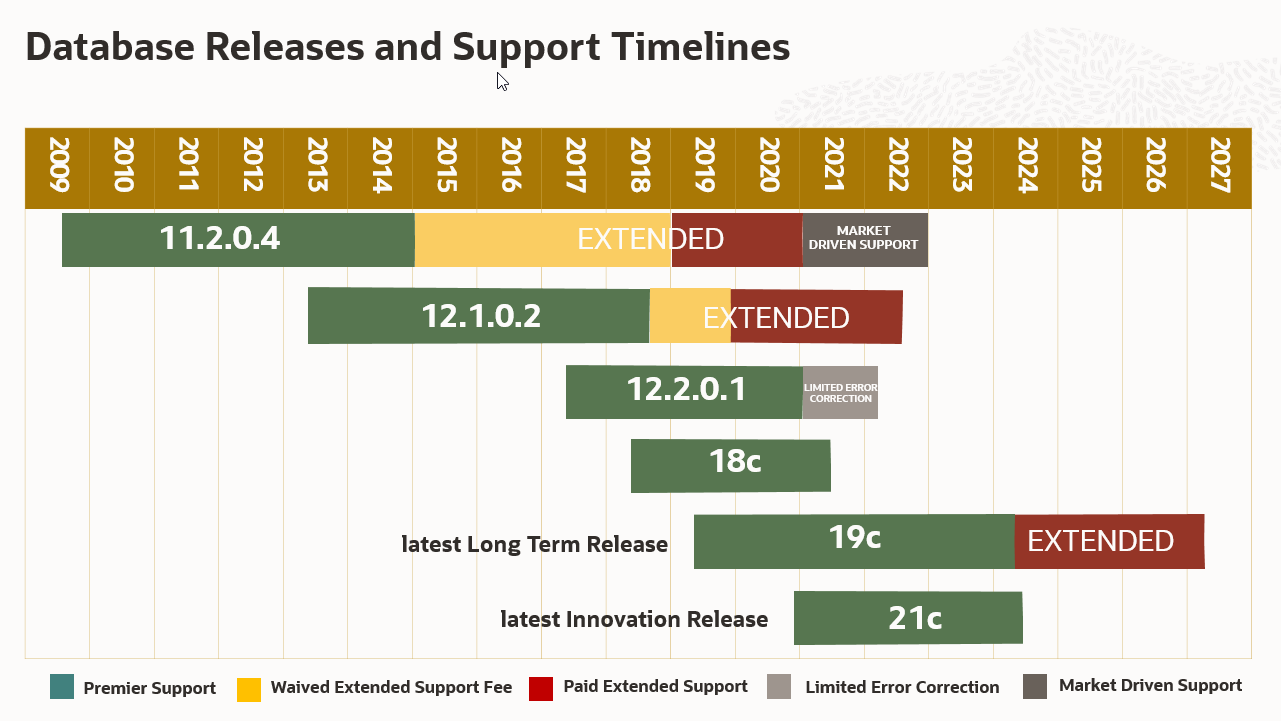
Oracle版本支持規(guī)劃如下所示,
3. 文件系統(tǒng)
3.1 單機(jī)環(huán)境目錄規(guī)劃
| 序號 | 目錄 | 用途 | 建議值 | 管理方式 | FS 類型 |
|---|---|---|---|---|---|
| 1 | /boot | 系統(tǒng)內(nèi)核 | 500M | 標(biāo)準(zhǔn)分區(qū) | – |
| 2 | /var | 日志存放目錄 | 10G | LVM | XFS |
| 3 | /u01 | 軟件安裝目錄 | 80G | LVM | XFS |
| 4 | swap | 交換分區(qū) | 32G | LVM | XFS |
| 5 | / | 根目錄 | 剩余可用空間 | LVM | XFS |
| 6 | /oradata | 數(shù)據(jù)文件 | 按業(yè)務(wù)需求 | LVM | XFS |
| 7 | /arch | 歸檔日志 | 按業(yè)務(wù)需求 | LVM | XFS |
| 8 | /backup | 備份目錄 | 按業(yè)務(wù)需求 | LVM | XFS |
注: 測試環(huán)境根據(jù)實際存儲量調(diào)整以上目錄大小,測試環(huán)境可以只安裝OS不用創(chuàng)建其它目錄,測試環(huán)境建議存儲40G以上。
4. OS時區(qū)
時區(qū)選擇東八區(qū):Shanghai,Asia;
5. 上傳安裝文件
創(chuàng)建軟件包目錄并上傳Oracle安裝文件

[root@ora11g ~]# mkdir -p /soft
[root@orcldb soft]# tree /soft
/soft
|-- LINUX.X64_193000_db_home.zip
|-- LINUX.X64_193000_grid_home.zip
|-- LINUX.X64_213000_db_home.zip
|-- LINUX.X64_213000_grid_home.zip
|-- p13390677_112040_Linux-x86-64_1of7.zip
|-- p13390677_112040_Linux-x86-64_2of7.zip
|-- p13390677_112040_Linux-x86-64_3of7.zip
|-- x_onekey.sh
`-- yum.iso

0 directories, 9 files
[root@orcldb soft]#
4. 安裝過程演示
4.1 single環(huán)境安裝
[root@ora11g ~]# chmod a+x /soft/x_onekey.sh
mv Oraclelinux7.5.iso yum.iso
[root@ora11g ~]# sh x_onekey.sh -dt=oracle \
-op=install \
-ht=single `#type: single/rac/ha` \
-v=21C `# version: 11G/19C/21C` \
-i=192.168.1.115 `#Public ip` \
-n=orcl `# hostname: will aotu add "db" for single/ha,add "db1/db2"for  rac` \
-dp=Enmo_1234 `# db password: os: oracle/grid db: SYS/SYSTEM/SYSMAN/DBSNMP ` \
-o=orcl `# oraclesid` \
-cdb=true `# createAsContainerDatabase: true/false` \
-pdbname=enmo \
-cs=ZHS16GBK `# characterset: ZHS16GBK/AL32UTF8 ` \
-ncs=AL16UTF16 `# NCHARACTERSET: AL16UTF16/UTF8 ` \
-yum=/soft/yum.iso `# yum location: /dev/cdrom or /soft/yum.iso`
4.2 standalone環(huán)境安裝
[root@ora11g ~]# chmod a+x /soft/x_onekey.sh
[root@ora11g ~]# sh x_onekey.sh -dt=oracle \
-op=install \
-ht=standalone `#type: single/rac/standalone` \
-v=21C `# version: 11G/19C/21C` \
-i=192.168.1.115 `#Public ip` \
-n=snyx `# hostname: will aotu add "db" for single/ha,add "db1/db2"for  rac` \
-dp=Enmo_1234 `# db password: os: oracle/grid db: SYS/SYSTEM/SYSMAN/DBSNMP ` \
-o=orcl `# oraclesid` \
-cdb=true `# createAsContainerDatabase: true/false` \
-pdbname=pdb `# pdbname` \
-cs=ZHS16GBK `# characterset: ZHS16GBK/AL32UTF8 ` \
-ncs=AL16UTF16 `# NCHARACTERSET: AL16UTF16/UTF8 ` \
-yum=/soft/yum.iso `# yum location: /dev/cdrom or /soft/yum.iso` \
-or=NORMAL `# asm ocr redundancy: high/normal/external` \
-od=/dev/sdb,/dev/sdc,/dev/sdd `# asm ocr disk` \
-dr=EXTERNAL `# asm data redundancy: high/normal/external` \
-dd=/dev/sde `# asm data disk`
4.3 RAC環(huán)境安裝
[root@ora11g ~]# chmod a+x /soft/x_onekey.sh
[root@ora11g ~]# sh x_onekey.sh -dt=oracle \
-op=install \
-ht=rac `#type: single/rac/ha` \
-v=19C `# version: 11G/19C/21C` \
-i=192.168.1.115 `#Public ip` \
-n=snyx `# hostname: will aotu add "db" for single/ha,add "db1/db2"for  rac` \
-rp=123456 `# root password` \
-dp=Enmo_1234 `# db password: os: oracle/grid db: SYS/SYSTEM/SYSMAN/DBSNMP ` \
-o=orcl `# oraclesid` \
-cdb=true `# createAsContainerDatabase: true/false` \
-pdbname=pdb `# pdbname` \
-cs=ZHS16GBK `# characterset: ZHS16GBK/AL32UTF8 ` \
-ncs=AL16UTF16 `# NCHARACTERSET: AL16UTF16/UTF8 ` \
-yum=/soft/yum.iso `# yum location: /dev/cdrom or /soft/yum.iso` \
-pu1=192.168.1.115 -pu2=192.168.1.117 `#public ip` \
-vi1=192.168.1.116 -vi2=192.168.1.118 `#virtual ip` \
-pr1=10.10.10.115 -pr2=10.10.10.117 `#private ip` \
-si=192.168.1.120 `# scan ip` \
-puf=eth0 -prf=eth1 `# network fcname` \
-or=NORMAL `# asm ocr redundancy: high/normal/external` \
-od=/dev/sdb,/dev/sdc,/dev/sdd `# asm ocr disk` \
-dr=EXTERNAL `# asm data redundancy: high/normal/external` \
-dd=/dev/sde `# asm data disk`
4.4 pg 編譯安裝
[root@pgsql soft]# mv CentOS-7-x86_64-DVD-1810.iso yum.iso
[root@pgsql soft]# chmod a+x x_onekey.sh
[root@pgsql soft]# sh x_onekey.sh -dt=pg \
-op=install \
-ht=single `#type: single/rac/ha` \
-v=16.1 `# version: 9.6.24/10.23/15.5` \
-i=192.168.137.19 `#Public ip` \
-n=pgdb1 `# hostname ` \
-pg_debug=yes `# Compiles all programs and libraries with debugging symbols ` \
-cassert=no `# Enables assertion checks in the server, which test for many "cannot happen" conditions. ` \
-tap_tests=no `# Enable tests using the Perl TAP tools ` \
-dtrace=no `# Compiles PostgreSQL with support for the dynamic tracing tool DTrace ` \
-yum=/soft/yum.iso `# yum location: /dev/cdrom or /soft/yum.iso`


[root@pgdb1 soft]# su - postgres
Last login: Mon Jan 29 23:21:54 CST 2024 on pts/0
[postgres@pgdb1 ~]$ source pg16.1_profile
[postgres@pgdb1 ~]$ pg_ctl start -l logfile
waiting for server to start.... done
server started
[postgres@pgdb1 ~]$ pg_ctl status
pg_ctl: server is running (PID: 76274)
/u01/app/pg/16.1/pgsql/bin/postgres
[postgres@pgdb1 ~]$ psql
psql (16.1)
Type "help" for help.

postgres=# \l
                                                     List of databases
   Name    |  Owner   | Encoding | Locale Provider | Collate |   Ctype    | ICU Locale | ICU Rules |   Access privileges
-----------+----------+----------+-----------------+---------+------------+------------+-----------+-----------------------
 postgres  | postgres | UTF8     | libc            | C       | en_US.utf8 |            |           |
 template0 | postgres | UTF8     | libc            | C       | en_US.utf8 |            |           | =c/postgres          +
           |          |          |                 |         |            |            |           | postgres=CTc/postgres
 template1 | postgres | UTF8     | libc            | C       | en_US.utf8 |            |           | =c/postgres          +
           |          |          |                 |         |            |            |           | postgres=CTc/postgres
(3 rows)

postgres=#
5. 常見問題
問題1 syntax error near unexpected token `$'{\r''
windows格式問題使用以下語句修復(fù)
sed -i 's/\r//g'  install_oracle11g_linux7_single.sh

問題2 7裝11.2.4不需要打補(bǔ)丁嗎
Installation of Oracle 11.2.0.4 Database Software on OL7 fails with 'Error in invoking target
'agent nmhs' of makefile ' & “undefined reference to symbol ‘B_DestroyKeyObject’” error (Doc ID 1965691.1),
solution:
01) Ignore the undefined symbol error during Oracle 11.2.0.4 installation and proceed further.
The software installation will succeed without any further errors.
02) Download and install patch 19692824
6. 版本功能說明
****************x_onekey_v0.1.sh*****************
1). 自動安裝Oracle 11G on Linux 7.x軟件
2). 自動完成大頁配置整改
3). 自動關(guān)閉防火墻/selinux等37項OS服務(wù)
4). 自動配置Oracle監(jiān)聽
5). 自動創(chuàng)建Oracle實例
****************x_onekey_v0.2.sh*****************
1). 自動安裝Oracle 19C/21C軟件
2). 自動配置Oracle 19C/21C監(jiān)聽
3). 自動創(chuàng)建Oracle 19C/21C實例
 ****************x_onekey_v0.3.sh*****************
1). 一鍵安裝Oracle RAC 11G  版本 11.2.0.4
2). 一鍵安裝Oracle RAC 19C  版本 19.3.0.0
3). 一鍵安裝Oracle RAC 21C  版本 21.3.0.0
 ****************x_onekey_v0.4.sh*****************
1). 添加內(nèi)存檢查,不符合安裝要求,直接退出并報錯
單機(jī) 11g/19c/21c: 內(nèi)存>=2G
11G RAC: 內(nèi)存>=2.5G
19C/21c rac: 內(nèi)存>=8G
2). RAC網(wǎng)卡檢查
#check nodename_db1: public1_interface == public_interface and priv1_interface == priv_interface
#check nodename_db1: public2_interface == public_interface and priv2_interface == priv_interface
3). 時區(qū)檢查
db1/db2 timezone check: Asia/Shanghai
 ****************x_onekey_v0.5.sh*****************
1). 安裝日志x_onekey_`date`.log
7. 功能測試說明

8. 環(huán)境初始化腳本
- 確認(rèn)該OS為全新環(huán)境,且只安裝一套Oracle
- 確認(rèn)該OS沒有已運行的ORACLE及其它應(yīng)用軟件
- 以下清理腳本運行兩次,執(zhí)行前請仔細(xì)評審
rm -f /etc/init.d/init.ohasd
rm -f /etc/init.d/ohasd
rm -rf /etc/oracle
rm -f /etc/init.d/init.cssd
rm -f /etc/init.d/init.crs
rm -f /etc/init.d/init.crsd
rm -f /etc/init.d/init.evmd
rm -rf /etc/oracle/scls_scr
rm -f /etc/inittab.crs
rm -f /etc/ohasd
rm -f /etc/oraInst.loc
rm -f /etc/oratab
rm -rf /var/tmp/.oracle

rm -f /etc/oraInst.loc
rm -f /etc/inittab.*
cat /dev/null > /etc/inittab
rm -rf /tmp/*
rm -rf /tmp/.*
rm -rf /var/tmp/*
rm -f /usr/local/bin/dbhome
rm -f /usr/local/bin/oraenv
rm -f /usr/local/bin/coraenv
rm -rf /opt/ORCLfmap

killall -u oracle
killall -u oracle
userdel -fr oracle
userdel -fr grid

groupdel oinstall
groupdel dba
groupdel oper
groupdel asmadmin
groupdel asmoper
groupdel asmdba

rm -rf /oradata/
rm -rf /u01/
rm -rf /soft/database
rm -rf /soft/grid
rm -f /soft/*.rsp
rm -f /soft/*.properties
rm -f /soft/*.log
echo "127.0.0.1   localhost localhost.localdomain localhost4 localhost4.localdomain4
::1         localhost localhost.localdomain localhost6 localhost6.localdomain6
" > /etc/hosts
rm -f /soft/setos.sh
reboot
9. vmware配置共享存儲
修改虛擬機(jī)vmx文件
在虛擬機(jī)的vmx文件中添加配置信息。

scsi1.sharedBus= "virtual"
disk.locking= "false"
diskLib.dataCacheMaxSize= "0"
diskLib.dataCacheMaxReadAheadSize= "0"
diskLib.DataCacheMinReadAheadSize= "0"
diskLib.dataCachePageSize= "4096"
diskLib.maxUnsyncedWrites= "0"
10. Linux7修改網(wǎng)卡名稱
1. vim /etc/sysconfig/grub 在quiet后面添加 net.ifnames=0 biosdevname=0 保存退出
2. 執(zhí)行命令 grub2-mkconfig -o /boot/grub2/grub.cfg,生成新的grub.cfg文件
3. 重命名網(wǎng)卡 vim /etc/sysconfig/network-scripts/ifcfg-ens33 更改dev等參數(shù)名字更改配置文件名字
NAME="eth0"
DEVICE="eth0"
mv /etc/sysconfig/network-scripts/ifcfg-ens33 /etc/sysconfig/network-scripts/ifcfg-eth0
4. 添加udev的規(guī)則,
vi /etc/udev/rules.d/70-persistent-net.rules
UBSYSTEM=="net",ACTION=="add",DRIVERS=="?*",ATTR{address}=="00:0c:29:f0:88:d5",ATTR{type}=="1" ,KERNEL=="eth*",NAME="eth0"
UBSYSTEM=="net",ACTION=="add",DRIVERS=="?*",ATTR{address}=="00:0c:29:f0:88:19",ATTR{type}=="1" ,KERNEL=="eth*",NAME="eth1"
5. 重啟服務(wù)器,驗證更改是否成功 ip addr
最后修改時間:2024-04-24 13:59:25
「喜歡這篇文章,您的關(guān)注和贊賞是給作者最好的鼓勵」
關(guān)注作者
【版權(quán)聲明】本文為墨天輪用戶原創(chuàng)內(nèi)容,轉(zhuǎn)載時必須標(biāo)注文章的來源(墨天輪),文章鏈接,文章作者等基本信息,否則作者和墨天輪有權(quán)追究責(zé)任。如果您發(fā)現(xiàn)墨天輪中有涉嫌抄襲或者侵權(quán)的內(nèi)容,歡迎發(fā)送郵件至:contact@modb.pro進(jìn)行舉報,并提供相關(guān)證據(jù),一經(jīng)查實,墨天輪將立刻刪除相關(guān)內(nèi)容。
