



一、問題現象
客戶環境Linux Oracle 11.2.0.4 兩節點RAC主庫,2節點備庫;需要對這個客戶的數據庫使用dg切換進行遷移;
第一輪搭建ADG完成后,fail over DG備庫 變成測試庫給開發應用人員進行測試;
第二輪正式切換之前,搭建重建ADG環境, restore database正常,recover database報錯
Thu Oct 28 21:35:11 2021
Warning: Recovery target destination is in a sibling branch of the controlfile checkpoint.
Recovery will only recover changes to datafiles.
Datafile 1 (ckpscn 20575410237) is orphaned on incarnation#=2
MRP0: Detected orphaned datafiles! Recovery will possibly be retried after flashback...
Errors in file /u01/app/oracle/diag/rdbms/oxxx/oxxxx/trace/oxxxx1\_pr00\_5100.trc:
ORA-19909: datafile 1 belongs to an orphan incarnation
ORA-01110: data file 1: '+DATA/oxxx/datafile/system.265.1087143661'
Managed Standby Recovery not using Real Time Apply
Recovery Slave PR00 previously exited with exception 19909
 Thu Oct 28 21:35:32 2021 MRP0: Background Media Recovery process shutdown (oxxx1)
二、問題排查
2.1 檢索相關文檔
檢索MOS有沒有相關的文章,找到了一篇幾乎類似的!
ORA-19906 and ORA-19909 at standby site (Doc ID 1509932.1)
Datafile 1 (ckpscn 7502822792898) is orphaned on incarnation#=1
MRP0: Background Media Recovery terminated with error 19909
Thu Nov 22 14:45:00 MET 2012
Errors in file < directory >/SGSDGB/admin/bdump/sgsdgb\_mrp0\_20506.trc:
ORA-19909: datafile 1 belongs to an orphan incarnation \[5\]
ORA-01110: data file 1: '< directory >/SGSDGB/data02/system01.dbf'
Thu Nov 22 14:45:00 MET 2012
Errors in file < directory >/SGSDGB/admin/bdump/sgsdgb\_mrp0\_20506.trc:
ORA-19909: datafile 1 belongs to an orphan incarnation
ORA-01110: data file 1: '< directory >/SGSDGB/data02/system01.dbf'
2.2 檢查問題是否匹配
遇到有mos差不多的文檔故障處理,啥也別說了,看看是不是匹配這個問題!
Redo apply at standby site suddenly failed as shown in the alert.log:
CAUSE
This occurs because the standby database, for various reasons, is opened with resetlogs and information on that resides in the FRA. RMAN will implicitly catalog the FRA thus causing information on this “test” incarnation to be inserted into the mounted standby controlfile. Therefore information on a new incarnation exists.
報錯的場景是說DG recover的時候報錯,控制文件"化生"(翻譯過來不一定準確incarnation )的問題;
場景往往發生在resetlogs后,產生新的版本的化生,但是RMAN的 FRA自動記錄了化生并且將這個化生寫入了新的控制文件當中,導致你的DG控制文件存在多個不同scn演進化生的版本;
那么這種情況和我們本次遇到的問題非常的匹配,因為這個新環境DG之前做過一次resetlogs,只要操作一次resetlogs,那么控制文件就會產生一次新的化生(incarnation);
由于我們沒有百分百的清理干凈,導致Oracle rman fra自動將上一次的resetlogs后的化生寫入到了控制文件當中,恢復的時候化生版本不對!
最終導致報錯!接下來就是進入DB查詢對比了!
2.3 查詢對比
This is the primary database's incarnation:
RMAN> list incarnation of database;
using target database control file instead of recovery catalog
DB Key Inc Key DB Name DB ID STATUS Reset SCN Reset Time
------- ------- -------- ---------------- --- ---------- ----------
1 1 SGSOPA 791150137 CURRENT 121289826 09-OCT-09

This is the standby database's incarnation:
RMAN> list incarnation of database;
using target database control file instead of recovery catalog
DB Key Inc Key DB Name DB ID STATUS Reset SCN Reset Time
------- ------- -------- ---------------- --- ---------- ----------
1 1 SGSOPA 791150137 PARENT 121289826 09-OCT-09
2 2 SGSOPA 791150137 CURRENT 7502821558550 22-NOV-12
In standby, execute:

RMAN> reset database to incarnation 1;
實際操作與MOS一致,只是實際環境inc2的時間是上一次resetlogs open第一次搭建dg fail over的時間點!
執行上述操作,recover database;不在報錯!
問題到這里就算是解決問題了,進入下一環節,問題學習。
三、問題學習
參考文章
https://www.cnblogs.com/askscuti/p/10939593.html
https://www.cnblogs.com/cqubityj/p/3492569.html
3.1 Oracle incarnation是什么?
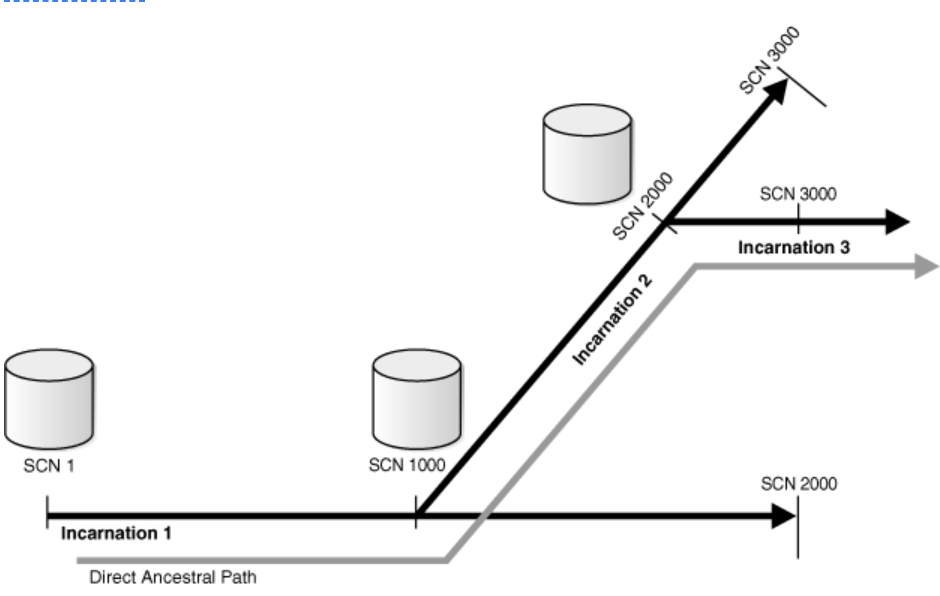
其實一張圖就能解釋問題,如果正常情況數據庫一直正常運行,那么就只有一個化生,SCN一直往一個方向走;
但是在某些場景下,DB使用了resetlogs 不完成的恢復時,那么就會產生一個新的化生,因為你的SCN方向以及和完全恢復的方向不同了。
如何查詢當前數據庫的化生
SQL> select INCARNATION#,RESETLOGS_CHANGE#,RESETLOGS_TIME,STATUS from v$database_incarnation;
3.2 如何避免出現這個問題呢?
那么如何避免可能出現的控制文件化生導致恢復的干擾的情況呢?MOS有方法二,還是上面的同一篇文章。
Option #2:
Clear the FRA information associated with the resetlogs executed against the standby.
1) remove archivelog files and/or controlfile autobackups which were generated by the
standby when it was activated (opened with resetlogs).
Leave only the archivelog files received from the primary.
2) consider refreshing standby controlfile from primary to remove unnecessary
 incarnation information from standby controlfile's v$database_incarnation.
3)  start manual recovery, applying the next archivelog from the primary
 site to confirm that recovery will now continue
4)  restart automatic recovery at the standby site
1.將上一次resetlogs庫open之后產生的archive log ,log進行刪除清理;
2.將上一次resetlogs庫open之后產生的控制文件自動備份的文件進行清理;
3.使用主庫最新的控制文件對DG庫的控制文件進行覆蓋;
4.再次進行recover之后,開啟MRP進程自動恢復。
前三步驟才是重點!
