



數據庫的并行度使用需要很謹慎,很容易造成數據庫運行緩慢以及嚴重的等待。
比較常見的由于 并行度 設置錯誤導致的等待事件:
- PX Deq Credit: send blkd
- PX Deq Credit: need buffer
錯誤的并行度設置往往可能是由于在創建索引或者重建索引時開啟并行度創建,后來忘記關閉導致!
create index <indexname> on <table>(<columns>) parallel 4;
alter index <indexname> rebuild parallel 4;
? 使用并行度設置后的正確操作:
alter index <indexname> noparallel;
當我們遇到這樣的等待事件很嚴重時,可以使用下方腳本快速查看是否存在不正確的并行度設置!
?? 注意: 以下腳本已經過內部測試,但是,不保證它對您有用。確保在使用前在測試環境中運行它。
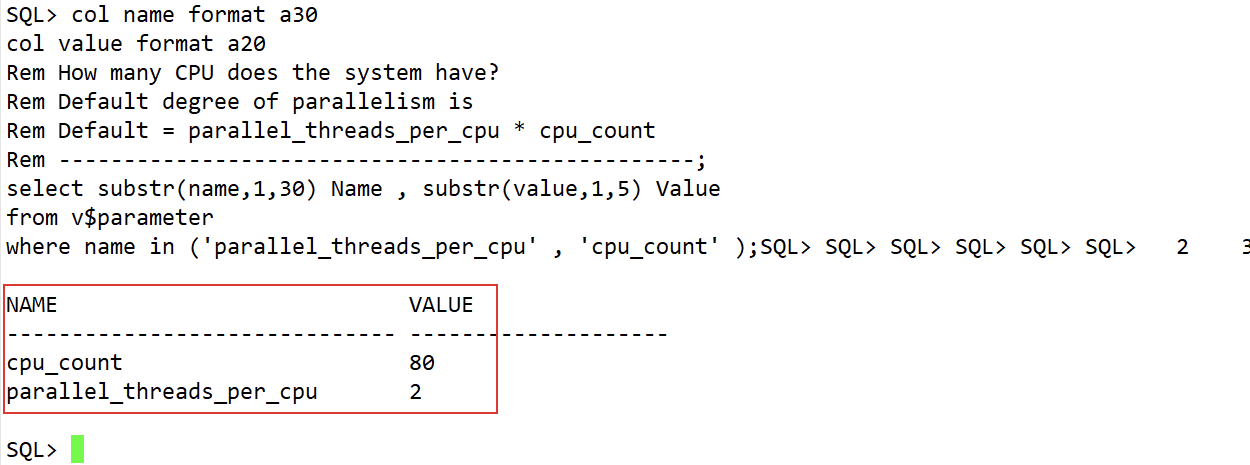
該 SQL 查詢當前數據庫主機 CPU 數以及每個 CPU 默認的并行度:
col name format a30
col value format a20
Rem How many CPU does the system have?
Rem Default degree of parallelism is
Rem Default = parallel_threads_per_cpu * cpu_count
Rem -------------------------------------------------;
select substr(name,1,30) Name , substr(value,1,5) Value
from v$parameter
where name in ('parallel_threads_per_cpu' , 'cpu_count' );

該 SQL 檢查當前數據庫中所有用戶中存在不同并行度的 表:
set pagesize1000
col owner format a30
col degree format a10
col instances format a10
Rem Normally DOP := degree * Instances
Rem See the following Note for the exact formula.
Rem Note:260845.1 Old and new Syntax for setting Degree of Parallelism
Rem How many tables a user have with different DOPs
Rem -------------------------------------------------------;
select * from (
select substr(owner,1,15) Owner , ltrim(degree) Degree,
ltrim(instances) Instances,
count(*) "Num Tables" , 'Parallel'
from all_tables
where ( trim(degree) != '1' and trim(degree) != '0' ) or
( trim(instances) != '1' and trim(instances) != '0' )
group by owner, degree , instances
union
select substr(owner,1,15) owner , '1' , '1' ,
count(*) , 'Serial'
from all_tables
where ( trim(degree) = '1' or trim(degree) = '0' ) and
( trim(instances) = '1' or trim(instances) = '0' )
group by owner
)
order by owner;
?? 注意: 如果查詢出 Parallel 列的值為 Serial 就證明并行度都是 1,為正常。
該 SQL 檢查當前數據庫中所有用戶中存在不同并行度的 索引:
set pagesize1000
Rem How many indexes a user have with different DOPs
Rem ---------------------------------------------------;
select * from (
select substr(owner,1,15) Owner ,
substr(trim(degree),1,7) Degree ,
substr(trim(instances),1,9) Instances ,
count(*) "Num Indexes",
'Parallel'
from all_indexes
where ( trim(degree) != '1' and trim(degree) != '0' ) or
( trim(instances) != '1' and trim(instances) != '0' )
group by owner, degree , instances
union
select substr(owner,1,15) owner , '1' , '1' ,
count(*) , 'Serial'
from all_indexes
where ( trim(degree) = '1' or trim(degree) = '0' ) and
( trim(instances) = '1' or trim(instances) = '0' )
group by owner
)
order by owner;
?? 注意: 如果查詢出 Parallel 列的值為 Serial 就證明并行度都是 1,為正常。
該 SQL 檢查具有不同 DOP 的索引的表:
col table_name format a35
col index_name format a35
Rem Tables that have Indexes with not the same DOP
Rem !!!!! This command can take some time to execute !!!
Rem ---------------------------------------------------;
set lines 150
select substr(t.owner,1,15) Owner ,
t.table_name ,
substr(trim(t.degree),1,7) Degree ,
substr(trim(t.instances),1,9) Instances,
i.index_name ,
substr(trim(i.degree),1,7) Degree ,
substr(trim(i.instances),1,9) Instances
from all_indexes i,
all_tables t
where ( trim(i.degree) != trim(t.degree) or
trim(i.instances) != trim(t.instances) ) and
i.owner = t.owner and
i.table_name = t.table_name;
?? 注意:查詢結果為空代表沒有不同 DOP 的索引的表,正常。
本文的腳本來自于 MOS:
Script to Report the Degree of Parallelism DOP on Tables and Indexes (Doc ID 270837.1)
「喜歡這篇文章,您的關注和贊賞是給作者最好的鼓勵」
關注作者
【版權聲明】本文為墨天輪用戶原創內容,轉載時必須標注文章的來源(墨天輪),文章鏈接,文章作者等基本信息,否則作者和墨天輪有權追究責任。如果您發現墨天輪中有涉嫌抄襲或者侵權的內容,歡迎發送郵件至:contact@modb.pro進行舉報,并提供相關證據,一經查實,墨天輪將立刻刪除相關內容。
