



為啥說驚險是因為在有限的停機時間里竟然不斷的出現報錯失敗,不免緊張,如果不能解決,失敗,就得考慮回退了,不說大家白熬夜是多么痛苦的事情,如果到點集群服務起不來則是重大事故責任。
這套集群曾經因為異常斷電重啟后,節點1不能自啟集群(節點2正常),最后節點1是通過手動啟動集群服務的,所以有些預感可能會出些風險,終究還是出了問題…
之前節點1的手動啟動處理參考GI Fails to Start as Process “init.ohasd run” is not Running (Doc ID 1680406.1)
cd /etc/init.d
nohup ./init.ohasd run &
升級前版本19.11:
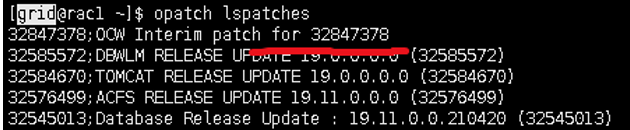
補丁過程主要參看readme
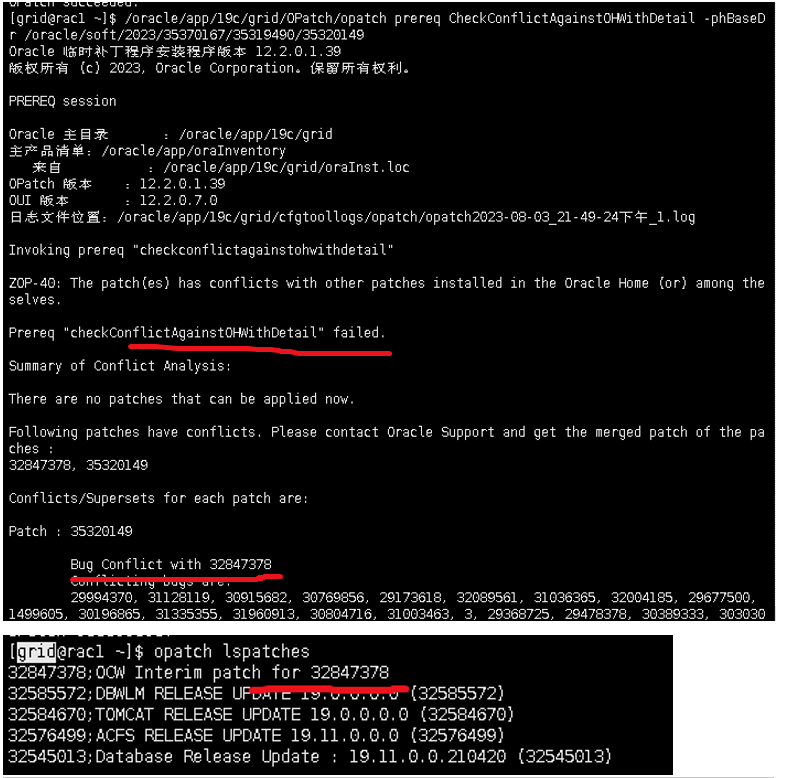
打補丁之前檢查發現有補丁沖突,所以需考慮先卸載沖突補丁。沒想到第一步就來個下馬威。
1.卸載沖突補丁,最后起crs報錯失敗:
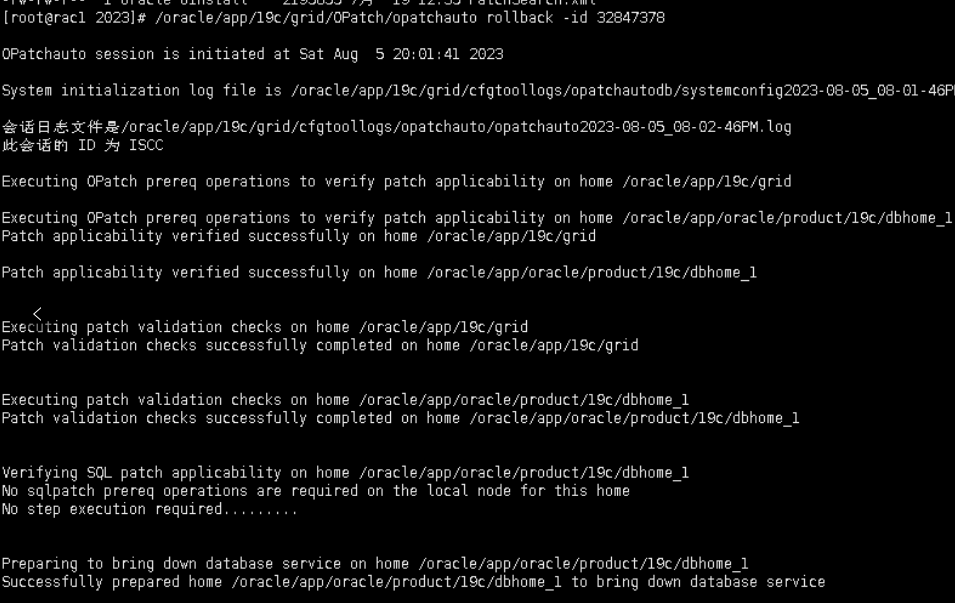
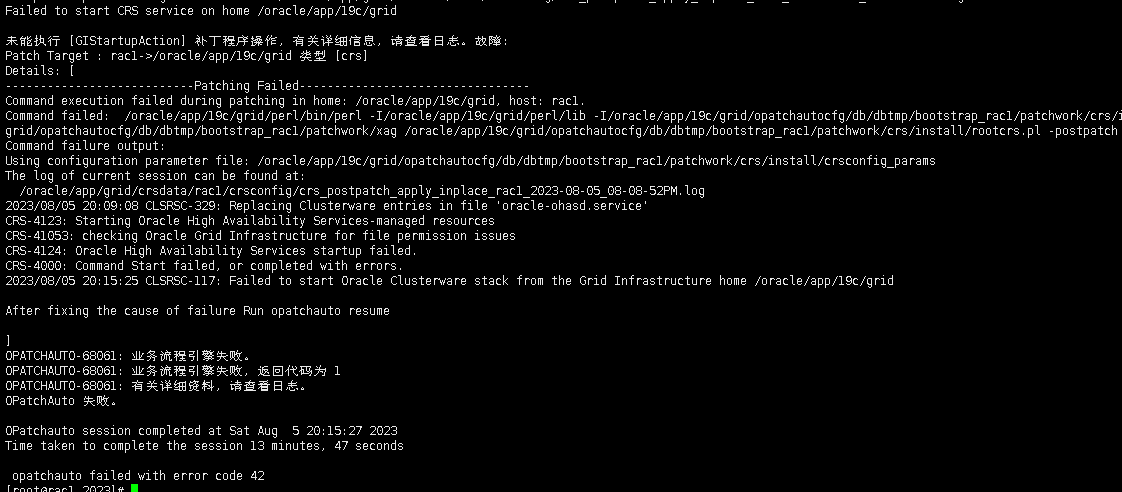
參考:CRS-41053: checking Oracle Grid Infrastructure for file permission issues. Not Able To Start HAS after patching failure. (Doc ID 2894422.1)
生產環境動作有點大,不敢輕舉妄動。
Oracle Database - Enterprise Edition - Version 19.16.0.0.0 and later
Information in this document applies to any platform.
SYMPTOMS
The HAS was failing to startup with the following message:

[ node1 bin ] # ./crsctl start has


CRS-41053: checking Oracle Grid Infrastructure for file permission issues
CRS-4124: Oracle High Availability Services startup failed.
CRS-4000: Command Start failed, or completed with errors.
Configurations we verified:

1) There were multiple ohasd processes running. There should only be 1 ohasd process running, therefore, we killed all of the processes but this action plan didn't help. After validating the HAS processes through "ps -ef | grep has" command and killing multiple processes followed by crsctl stop has and crsctl start has, this didn't help.

2) The clusterware alert log only reported the following message:

2022-09-02 17:46:51.671 [OHASD(31214)]CRS-0715: Oracle High Availability Service has timed out waiting for init.ohasd to be started.
3) No messages were reported in the ohasd.trc file

4) No errors were reported in the OS logs, located under var/log called messages. (For Linux)

5) Rebooting the node didn't start up the HAS even though the auto-start feature was enabled.

6) The directory permission on the inventory.xml file location and it's parent directory were incorrect but even after fixing the permissions, it didn't help with bringing the HAS online.

7) The CRS failed to come online even after executing roothas.sh -lock or roothas.sh -patch


CHANGES
After manual intervention during a failed patching process, the CRS was failing to startup

CAUSE
The customer mentioned executing "rootcrs.sh -lock" command in a standalone env. to bring the CRS online. In a standalone env, roothas.sh should be used instead.


SOLUTION
You will need to relink the binaries to resolve the issue.

we unlocked the grid home and relinked the binaries. After relinking, the CRS Started successfully:


How To Relink The Oracle Grid Infrastructure Standalone (Restart) Installation Or Oracle Grid Infrastructure RAC/Cluster Installation (11.2 to 21c). (Doc ID 1536057.1)
最終處理辦法:
/oracle/app/19c/grid/bin/crsctl stop crs
systemctl stop oracle-ohasd
ps -ef|grep d.bin
kill -9 xxx
cd /var/tmp/.oracle/
rm -rf /var/tmp/.oracle/*
systemctl start oracle-ohasd
/oracle/app/19c/grid/bin/crsctl start crs
ps -ef|grep d.bin|wc -l 一般看到20多個進程就OK了
節點1集群服務起來之后,再在節點2卸載補丁。
2.節點1打補丁,最后起crs報錯失敗
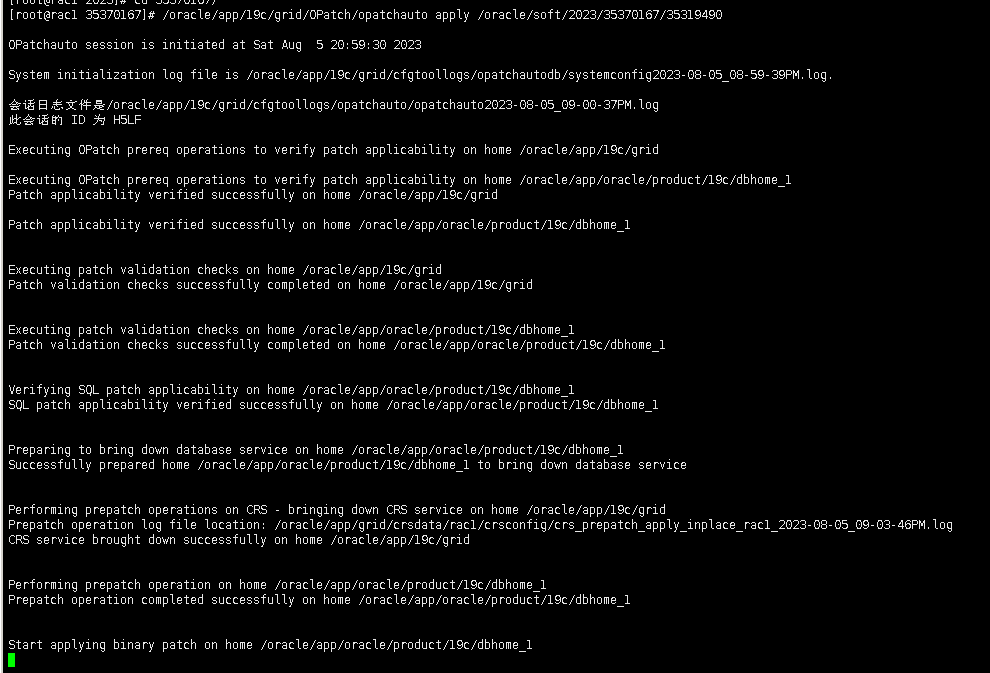
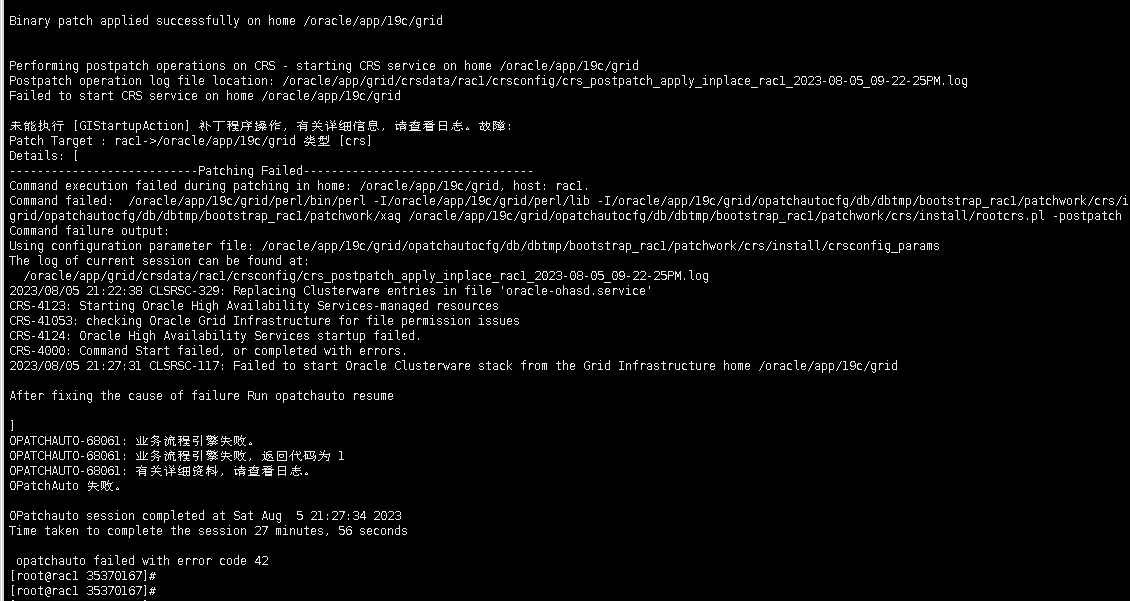
最終處理辦法:同問題1
/oracle/app/19c/grid/bin/crsctl stop crs
systemctl stop oracle-ohasd
ps -ef|grep d.bin
kill -9 xxx
cd /var/tmp/.oracle/
rm -rf /var/tmp/.oracle/*
systemctl start oracle-ohasd
systemctl status oracle-ohasd
/oracle/app/19c/grid/bin/crsctl start crs
ps -ef|grep d.bin|wc -l 一般看到20多個進程就OK了
節點1集群服務起來之后,再在節點2打補丁。
3.節點2打完補丁,但狀態不對
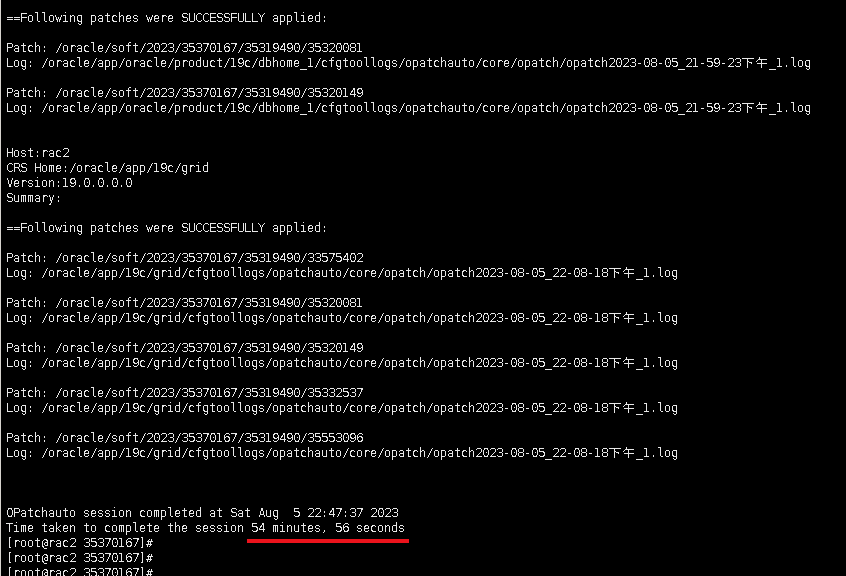
時間有點長,和存在備份任務有關(patch之前讓專人禁用任務竟然沒做,大意了)

處理辦法:
參考:http://www.sunline.cc/db/496096
節點1操作即可:
[root@rac1 .oracle]# /oracle/app/19c/grid/bin/clscfg -patch
clscfg: -patch mode specified
clscfg: EXISTING configuration version 19 detected.
Successfully accumulated necessary OCR keys.
Creating OCR keys for user 'root', privgrp 'root'..
Operation successful.
[root@rac1 .oracle]# /oracle/app/19c/grid/bin/crsctl query crs activeversion -f
Oracle Clusterware active version on the cluster is [19.0.0.0.0]. The cluster upgrade state is [ROLLING PATCH]. The cluster active patch level is [3331580692].
[root@rac1 .oracle]# /oracle/app/19c/grid/bin/crsctl stop rollingpatch
CRS-1161: The cluster was successfully patched to patch level [3976270074].
[root@rac1 .oracle]# /oracle/app/19c/grid/bin/crsctl query crs activeversion -f
Oracle Clusterware active version on the cluster is [19.0.0.0.0]. The cluster upgrade state is [NORMAL]. The cluster active patch level is [3976270074].
[root@rac1 .oracle]#
在節點2檢查也正常了。
[root@rac2 .oracle]# /oracle/app/19c/grid/bin/crsctl query crs activeversion -f
Oracle Clusterware active version on the cluster is [19.0.0.0.0]. The cluster upgrade state is [NORMAL]. The cluster active patch level is [3976270074].
4.打ojvm補丁報錯
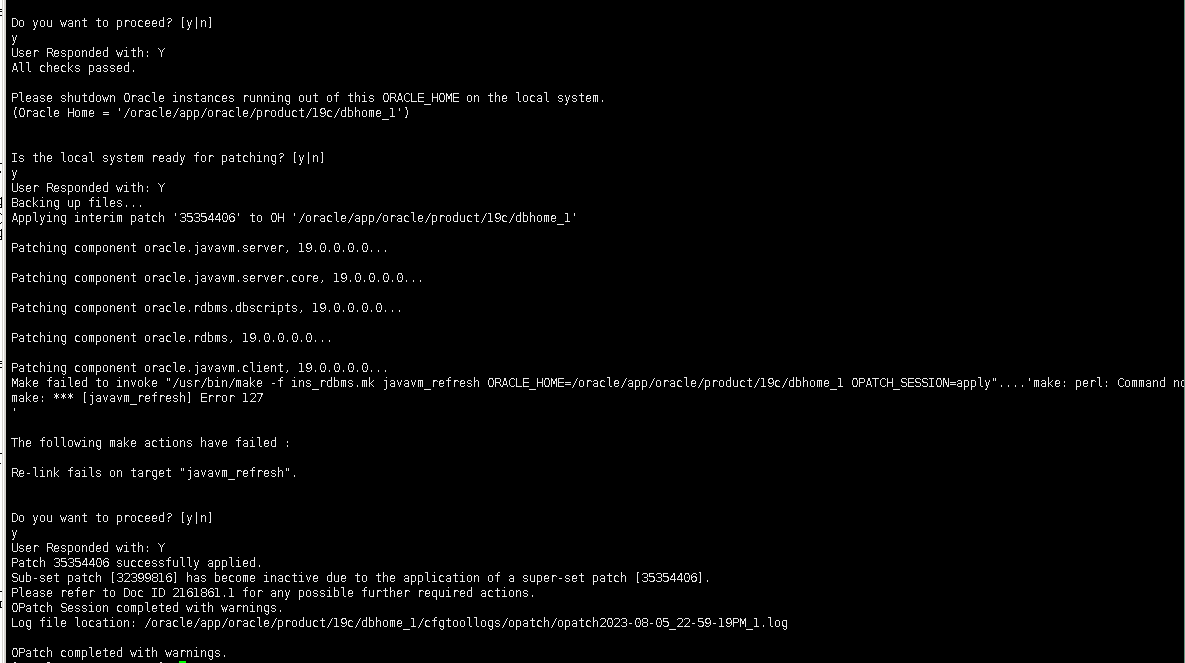
處理辦法:
參考:http://www.sunline.cc/db/1688153507759742976
設置PATH和PERL5LIB環境變量,然后重新opatch apply.

export PATH=$ORACLE_HOME/perl/bin:$PATH
export PERL5LIB=$ORACLE_HOME/perl/lib
小結:
1.對生產的補丁操作盡量申請預留足夠的時間應對風險(有備份就不用擔心回退)
備份grid/oracle軟件目錄
root操作:
節點1和2:
cd /oracle/app
tar -cvf /oracle/bak/oraInventory.tar ./oraInventory
tar -cvf /oracle/bak/grid.tar ./19c ./grid --exclude=./grid/admin --exclude=./grid/diag --exclude=./19c/grid/network/log --exclude=./19c/grid/log --exclude=./19c/grid/rdbms/audit
tar -cvf /oracle/bak/oracle.tar ./oracle --exclude=./oracle/admin --exclude=./oracle/diag
2.提前預判,盡量做足技術準備。
參考原經驗:https://blog.csdn.net/jycjyc/article/details/117396565
對比檢查節點1和2的目錄文件,這次的oui-patch.xml兩節點權限無問題,但/oracle/app/19c/grid/inventory/oneoffs目錄下的文件,節點2有缺失,所以需要從節點1提前傳輸過來,再在節點2打補丁。
[grid@rac1 ~]$ll /oracle/app/oraInventory/ContentsXML/oui-patch.xml
-rw-rw---- 1 grid oinstall 174 May 30 11:43 /oracle/app/oraInventory/ContentsXML/oui-patch.xml
[grid@rac1 ~]$ll /oracle/app/19c/grid/inventory/oneoffs
[grid@rac1 ~]$scp -rp /oracle/app/19c/grid/inventory/oneoffs/* rac2:/oracle/app/19c/grid/inventory/oneoffs/
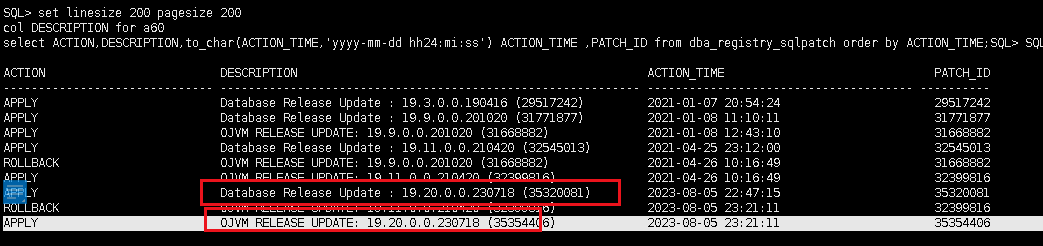
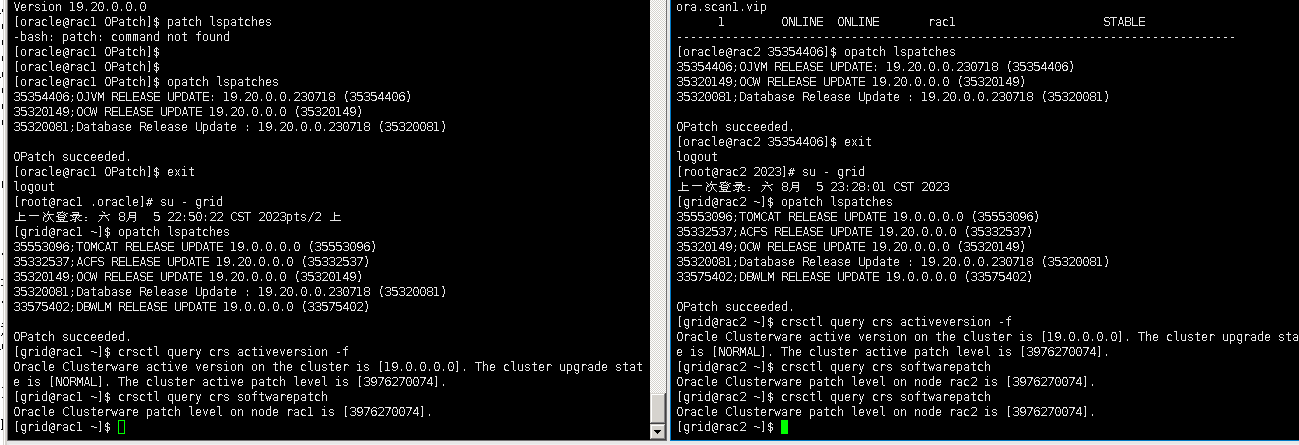
補丁升級成功截圖:
隨機附上crs,has,cluster的區別:
參考https://blog.csdn.net/czystc/article/details/103187780
crsctl start/stop crs
crsctl start/stop has
crsctl start/stop cluster
這三個是在oracle集群里常用的命令,他們的使用也有一些區別
Has是在11g里新出的概念,10g里只有Crs.
以下測試都是在12c的環境里進行的:
1.單機環境里只能使用crsctl start/stop has,不能使用crsctl start/stop crs.
2.在停集群的時候,crsctl stop has/crs能有效的完成工作(只能停單節點),而crsctl stop cluster卻不能停干凈(可以同時停所有節點),還剩下has進程.
3.在起集群的過程里, crsctl start has/crs 也可以完成使命。crsctl start cluster卻壓根不作用(原因是無法連接Has).
原因其實很容易理解,看下面的命令:
crsctl check crs
CRS-4638: Oracle High Availability Services is online
CRS-4537: Cluster Ready Services is online
CRS-4529: Cluster Synchronization Services is online
CRS-4533: Event Manager is online
crsctl check has
CRS-4638: Oracle High Availability Services is online
crsctl check cluster
CRS-4537: Cluster Ready Services is online
CRS-4529: Cluster Synchronization Services is online
CRS-4533: Event Manager is online
可以發現Crs=Has+Cluster,其中Has是主進程,Cluster都是集群交互的進程。
最后修改時間:2023-08-13 13:44:08
「喜歡這篇文章,您的關注和贊賞是給作者最好的鼓勵」
關注作者
【版權聲明】本文為墨天輪用戶原創內容,轉載時必須標注文章的來源(墨天輪),文章鏈接,文章作者等基本信息,否則作者和墨天輪有權追究責任。如果您發現墨天輪中有涉嫌抄襲或者侵權的內容,歡迎發送郵件至:contact@modb.pro進行舉報,并提供相關證據,一經查實,墨天輪將立刻刪除相關內容。
