



一、問題現象
OGG抽取進程全部Abend
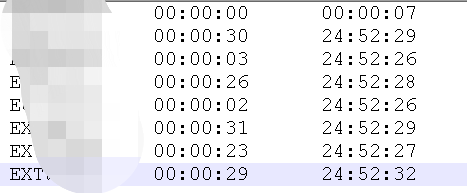
投遞進程無延遲,抽取進程均abend;
觀察ogg日志,提示無法寫入sysaux表空間!!!
排查發現sysaux表空間不足,擴容后,問題處理完成,反思?
為什么SYSAUX表空間不足,是什么對象占用過多導致的?后續如何規避?
其實思路有點類似診斷awr裸數據基表占用過大的空間導致系統表空間不足,其實思路一樣,定位大對象,然后Mos檢索相關對象如何安全有效的清理!
二、問題分析
2.1 估算SYSAUX表空間數據增長的情況
SQL> select ts# from v$tablespace where name='SYSAUX' and rownum=1;
       TS#
----------
         1

select a."USED_G",B."USED_G",A."USED_G"-B."USED_G" AS "7_DAY" FROM
 (SELECT ROUND(SUM(MAX(TABLESPACE_USEDSIZE)*8192/1024/1024/1024),4) AS "USED_G",
1 ID
       FROM DBA_HIST_TBSPC_SPACE_USAGE where
          trunc(to_date(rtime,'mm/dd/yyyy hh24:mi:ss'))=trunc(sysdate)
		   and TABLESPACE_ID=1
      group by tablespace_id) a,
  (SELECT ROUND(SUM(MAX(TABLESPACE_USEDSIZE)*8192/1024/1024/1024),4) AS "USED_G",
1 ID
       FROM DBA_HIST_TBSPC_SPACE_USAGE where
          trunc(to_date(rtime,'mm/dd/yyyy hh24:mi:ss'))=trunc(sysdate)-5
		   and TABLESPACE_ID=1
      group by tablespace_id) b where a.id=b.id;
    USED_G     USED_G      7_DAY
---------- ---------- ----------
   51.8245    11.9203    39.9042

本來腳本是計算7天的數據增長,但是檢查發現DBA視圖最近也是只有記錄5天的!!!
這個DB是新建的庫,腳本修改為有數據的5天數據增長,可以發現SYSAUX5天增長了進40G空間!!!
2.2 找到Top Segments
SELECT * FROM (
select owner,segment_name,segment_type,round(bytes/1024/1024/1024) AS "BYTES_G"
 from dba_segments where tablespace_name='SYSAUX'
 AND bytes>1*1024*1024*100
 ) A  ORDER BY A.BYTES_G;
OWNER                SEGMENT_NAME                   SEGMENT_TYPE          BYTES_G
-------------------- ------------------------------ ------------------ ----------
SYSTEM               LOGMNR_COL$                    TABLE PARTITION             0
SYS                  SYS_LOB0000011147C00038$$      LOBSEGMENT                  0
SYSTEM               LOGMNR_I2COL$                  INDEX PARTITION             0
MDSYS                SYS_LOB0000064076C00006$$      LOBSEGMENT                  0
SYSTEM               LOGMNR_COL$                    TABLE PARTITION             0
SYSTEM               LOGMNR_COL$                    TABLE PARTITION             0
SYSTEM               LOGMNR_COL$                    TABLE PARTITION             0
SYSTEM               LOGMNR_COL$                    TABLE PARTITION             0
SYSTEM               LOGMNR_COL$                    TABLE PARTITION             0
SYSTEM               LOGMNR_COL$                    TABLE PARTITION             0
SYSTEM               LOGMNR_I2COL$                  INDEX PARTITION             0
SYSTEM               LOGMNR_I2COL$                  INDEX PARTITION             0
SYSTEM               LOGMNR_I2COL$                  INDEX PARTITION             0
SYSTEM               LOGMNR_I2COL$                  INDEX PARTITION             0
SYSTEM               LOGMNR_I2COL$                  INDEX PARTITION             0
SYSTEM               LOGMNR_I2COL$                  INDEX PARTITION             0
SYSTEM               SYS_LOB0000001462C00009$$      LOBSEGMENT                  1
SYSTEM               LOGMNR_RESTART_CKPT$_PK        INDEX                       3
SYSTEM               LOGMNR_RESTART_CKPT$           TABLE                      45
19 rows selected.
2.3 查詢一下Top表信息
SQL> select TABLE_NAME,PARTITIONED from dba_tables
 where table_name='LOGMNR_RESTART_CKPT$';
TABLE_NAME                     PAR
------------------------------ ---
LOGMNR_RESTART_CKPT$           NO

select * from system.LOGMNR_RESTART_CKPT$ where rownum<=20;
---- ---------- ---------- ----------
         1          1 8.9662E+11        131
       33       9421        6648      47838
02000003F8F2C5977000000090AA6F9D70000000CE01
00004F8B4C0010000000B43724BFD0000000B43724BF
D000000083002100CD2400000F000000F8190000DEBA
0000022000000000000001000000      2          1

其實基本上了解到這個是非分區表! 并且這個表有45G的大小占用!
2.4 檢索相關資料
Sysaux Tablespace Getting Heavily Utilized When Extracts Are Running (Doc ID 2802325.1)
這篇MOS的文章描述,CKPT檢查點寫入太過頻繁,導致這個基表很大,那么如何降低基表的寫入頻率,可以對參數進行控制,設置max_sga_size,檢查點的寫入間隔將是max_sga_size*5,從而大大降低檢查點的寫入頻率
Oracle GoldenGate - Version 18.1.0.0.1 and later
SYSAUX gets filled up when extract is started and continuously grows.
Stopping the extracts stops the growth and the tablespace releases
 the space after sometime but as soon as the extracts are started again
 the tablespace again gets filled up.
CAUSE
Excessive checkpointing by the extracts
SOLUTION
Please check the Logminer checkpoint interval using Alert log.
For example here, the alert log indicates the logminer checkpoint is 10M.
This is far too small and will cause excessive checkpointing.
LOGMINER: Memory Size = 999M, Checkpoint interval = 10M
This value can be influenced by setting
TRANLOGOPTIONS INTEGRATEDPARAMS (max_sga_size 1000)
in which case it will be set to 5 times this value
e.g. LOGMINER: Memory Size = 999M, Checkpoint interval = 5000M
Increasing this value will decrease the checkpointing.
SYSAUX 空間使用問題故障排除(文檔 ID 1399365.1)
System.Logmnr_restart_ckpt$ Grows quite fast (Doc ID 735071.1)
這篇文章描述,Oracle DB版本是10.2~11.1的情況下,ckpt基表數據增長很快,默認檢查點也是10m寫入,可以修改_CHECKPOINT_FREQUENCY 到1000,從而降低檢查點的寫入頻率,其實和上述ogg 18.1原理是一樣的,只是具體操作不一樣。
Oracle Database - Enterprise Edition
- Version 10.2.0.1 to 11.1.0.6 [Release 10.2 to 11.1]
Streams Capture setup is defined and two symptoms have been observed:
1) system.logmnr_restart_ckpt$ table grows daily and the number
 of rows in the table just grow
2) Excessive archive log generated in this database,
 when starting Capture
CAUSE
Observe if the value of capture parameter _checkpoint_frequency is below 10,
 which is the default value for this parameter.
This parameter control how often the logminer session associated
 to the capture is going to do a logminer checkpoint,
 so having a value of 10 means that after 10Mb of redo activity
 we do a logminer checkpoint.
This causes lots of entries on table system.logmnr_restart_ckpt$
 and causes that the streams tables grows, also this causes delays
 on the streams performance.
SOLUTION
In order to conduct this database to a normal situation, please do:

1) Increase Capture parameter _CHECKPOINT_FREQUENCY to 1000 , by doing:
exec dbms_capture_adm.stop_capture ('CAPTURE');
begin

    dbms_capture_adm.set_parameter

         ('CAPTURE','_CHECKPOINT_FREQUENCY','1000');

end;
/
exec dbms_capture_adm.start_capture ('CAPTURE');
Note that the capture may take some time to start as there are lot of
 checkpoints to manage.
The aim of this is to reduce the number of Logminer checkpoint and
 therefore reduce the number of entries on logmnr_checkpoint_entries
 table and also reduce the consume and increase performance.
Value 1000 for _checkpoint_frequency is a recommended value for
 releases 10GR2 and 11G, according to Metalink Note 418755.1
2) During next 10 days shrink table SYSTEM.LOGMNR_RESTART_CKPT$
 and associated indexes, to reduce
the amount of space consumed by this table.
Execute at least once in a day, although recommended is three times in a day,
the steps documented on Metalink Note 429599.1 to do the shrink:
How to reduce the Highwater of LOGMNR_RESTART_CKPT$ (Doc ID 429599.1)
那這一篇文章,就是講述如何清理這個基表,從10.2的版本開始,oracle 有參數checkpoint_retention_time 定期進行清理,默認是60天,當然每個版本都存在差異,不要被這個60天嚇到了。
那么清理策略:
1.修改參數,指定清理的周期,例如原本保留7天修改為3天,近乎只保留一半,而且這個刪除操作是時時刻刻執行的,你寫入新的檢查點,計算保留時間大于的就被刪除,delete操作,非分區表,感覺oracle后續可以在優化一下,類似審計基表12c之后自動改為分區表可以刪除分區從而加快刪除的速度;
2.Oracle也提到了一句設置_checkpoint_frequency,這個就是上述2篇文章提到的檢查點寫入的頻率,頻率低寫的數據少,保留天數多一點總量還是少的。
Oracle Database - Enterprise Edition
- Version 10.2.0.2 to 11.2.0.2.0 [Release 10.2 to 11.2]
Oracle Streams enables the sharing of data and events in a data stream,
 either within a database or from one database to another.
 This article is intended to provide information regarding
 the management of LOGMNR_RESTART_CKPT$ table.
SOLUTION
Periodically, the mining process checkpoints itself for quicker restart.
These checkpoint information is maintained in the SYSAUX tablespace by default.
From Oracle 10.2 onwards, the purging of logmnr_restart_ckpt$ is done
 automatically by Oracle. There is a capture parameter
 checkpoint_retention_time that determines how
frequently the purge occurs.

CHECKPOINT_RETENTION_TIME, controls the amount of checkpoint data that is
 retained by moving the FIRST_SCN of the capture process forward.
 When the checkpoint_retention_time
is exceeded (default = 60 days), the FIRST_SCN is moved and the Streams metadata
 tables previous to this scn(FIRST_SCN) can be purged.
 Space in the SYSAUX tablespace should be reclaimed at this time.

You can alter checkpoint_retention_time to lesser value to purge
the metatdata tables more frequently using the following syntax :
exec dbms_capture_adm.alter_capture
(capture_name =>'STRMADMIN_CAPTURE ',CHECKPOINT_RETENTION_TIME=>7);
--
It is also useful to tune _checkpoint_frequency appropriately in order
 to minimise the checkpoint information stored and this should be mentioned.
alter table system.LOGMNR_RESTART_CKPT$ enable row movement;
alter table system.LOGMNR_RESTART_CKPT$ shrink space ;
alter table system.LOGMNR_RESTART_CKPT$ modify lob (CKPT_INFO) (shrink space);
alter table system.LOGMNR_RESTART_CKPT$ disable row movement;
alter index <index name> shrink space;
2.5 問題處理
1)降低OGG CKPT寫入頻率
修改前,查詢DB Alert,發現很不規律,有寫入頻率低的,也有默認的10M
[oracle@xx trace]$ cat alert_CDBPROD1.log |grep Memory
LOGMINER: Memory Size = 8195M, Checkpoint interval = 40980M
LOGMINER: Memory Size = 999M, Checkpoint interval = 10M
備注:寫入間隔高的設置了參數max_sga_size 4098
調整抽取進程對應參數,添加參數
TRANLOGOPTIONS INTEGRATEDPARAMS(max_sga_size 1000, parallelism 2)
觀察DB Alert
LOGMINER: Memory Size = 999M, Checkpoint interval = 5000M
但是第一次調整參數后,檢查發現抽取進程延遲很高,因此為了加快避免抽取進程延遲;
第二次設置如下參數,加大內存限制,并行加大
TRANLOGOPTIONS INTEGRATEDPARAMS(max_sga_size 2000, parallelism 12)
2)減少OGG CKPT保留時間
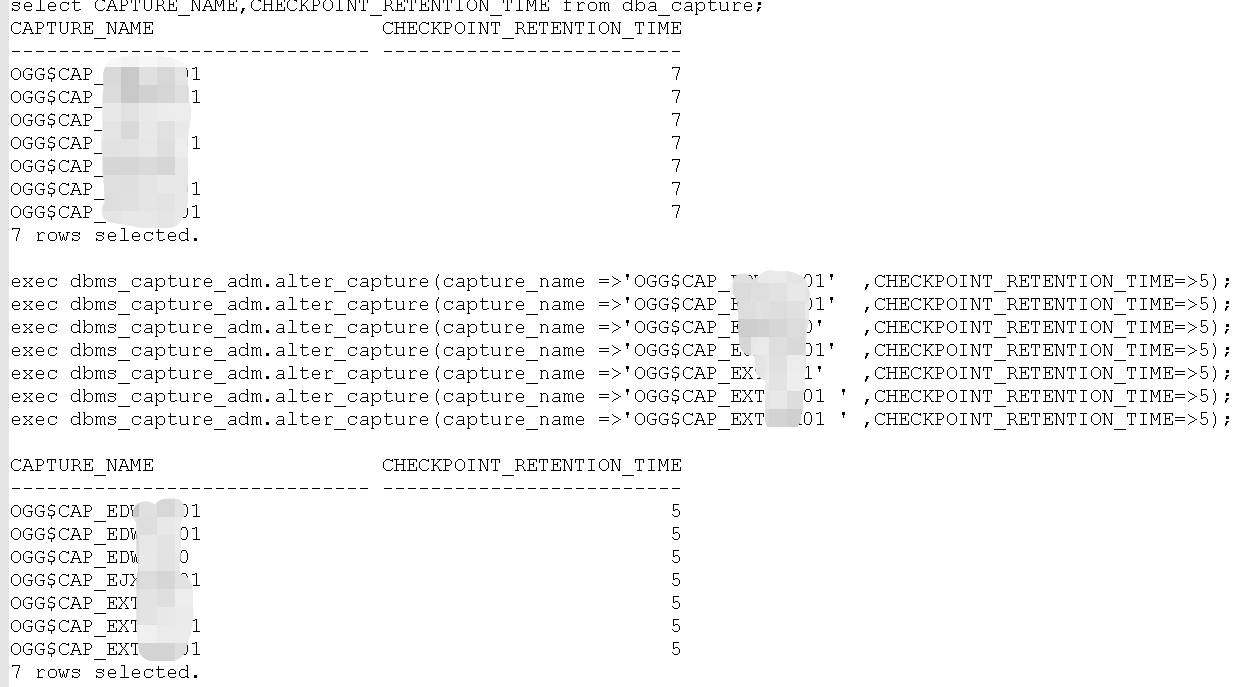
本次OGG19.1 For DB 19.3 OGG有7個抽取進程,默認保留時間是7天,調整為5天!
觀察調整后,數據是否降低!
select /*+ parallel(12,a) */ count(*) from system.LOGMNR_RESTART_CKPT$ a;
---數據在降低
  COUNT(*)
----------
  33227356
--在降低
  COUNT(*)
----------
  31242474
三、問題總結
1.對于后續OGG抽取進程,都可以配置加上內存參數的限制參數,從而降低基表的寫入頻率;
2.加強數據庫的監控,SYSAUX這么重要的系統表空間使用率比較高就快速告警,并且提前進行人為干預去分析什么對象占用的,占用是否合理;
3.上述問題已經調整了寫入頻率,保留時間調整為5天,持續觀察如果數據還是增長,可以考慮再次降低保留時間或者對SYSAUX表空間擴容。
