



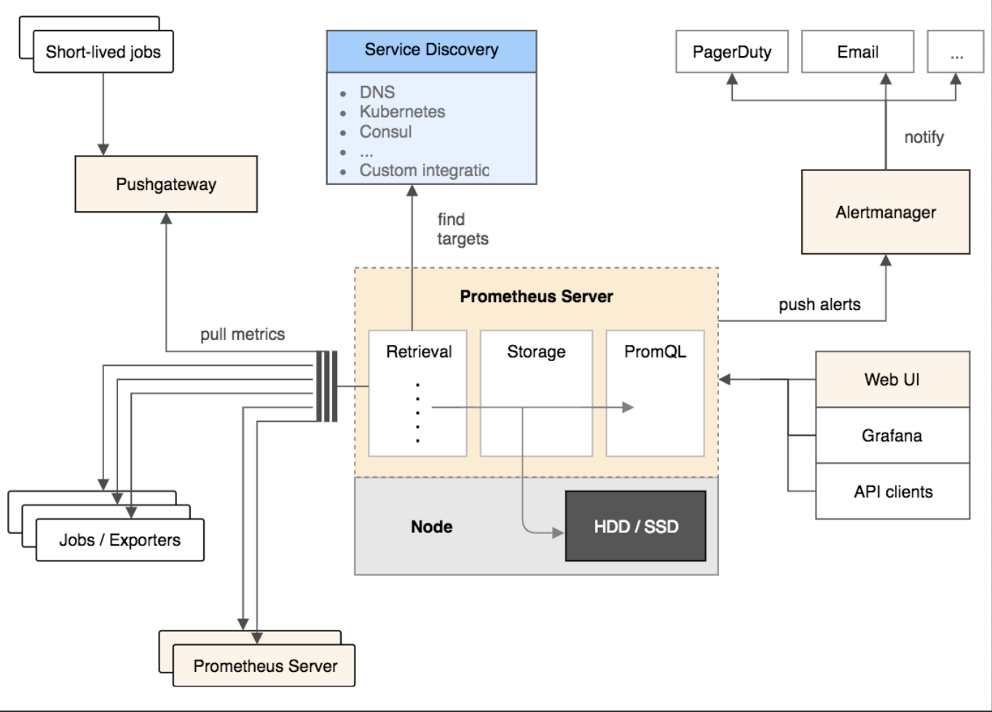
node_exporter
下載
https://github.com/prometheus/node_exporter/releases
啟動
nohup /opt/node_exporter/node_exporter --no-collector.softnet > /opt/node_exporter/node_exporter.log 2>&1 &
opengass_exporter
opengauss_exporter使用詳情請參考 http://www.sunline.cc/db/47407
下載
https://gitee.com/enmotech/opengauss_exporter
配置數(shù)據(jù)庫參數(shù)
echo "password_encryption_type=1" >> postgresql.conf
echo "host all opengauss_exporter x.x.x.x/32 md5" >> pg_hba.conf
配置數(shù)據(jù)庫用戶
CREATE USER opengauss_exporter WITH PASSWORD 'opengauss_exporter123' MONADMIN;
grant usage on schema dbe_perf to opengauss_exporter;
grant select on pg_stat_replication to opengauss_exporter;
配置環(huán)境變量
export DATA_SOURCE_NAME="host=x.x.x.x user=xxx password=xxx port=xxx dbname=xxx sslmode=disable"

or

export DATA_SOURCE_NAME="postgresql://username:password@hostname:port/dbname?sslmode=disable"

or
監(jiān)控多實(shí)例
export DATA_SOURCE_NAME="postgresql://username:password@hostname:port/dbname?sslmode=disable,postgresql://username2:password2@hostname2:port2/dbname2?sslmode=disable"
啟動
nohup /opt/opengauss_exporter/opengauss_exporter --config="/opt/opengauss_exporter/default_queries.yaml" --log.level=debug --auto-discover-databases --exclude-databases="template0,template1" --web.listen-address=":9187" --parallel=5 >> /opt/opengauss_exporter/opengauss_exporter.log 2>&1 &
Prometheus
下載地址
https://prometheus.io/download/
解壓
--以2.31.1版本為例
tar -zxvf prometheus-2.31.1.linux-amd64.tar.gz
編輯配置文件
vim prometheus.yml
# my global config
global:
  scrape_interval:     15s # Set the scrape interval to every 15 seconds. Default is every 1 minute.
  evaluation_interval: 15s # Evaluate rules every 15 seconds. The default is every 1 minute.
  # scrape_timeout is set to the global default (10s).


# Alertmanager configuration
alerting:
  alertmanagers:
  - static_configs:
    - targets:
      # - alertmanager:9093


# Load rules once and periodically evaluate them according to the global 'evaluation_interval'.
rule_files:
  # - "first_rules.yml"
  # - "second_rules.yml"


# A scrape configuration containing exactly one endpoint to scrape:
# Here it's Prometheus itself.
scrape_configs:
  # The job name is added as a label `job=<job_name>` to any timeseries scraped from this config.
  - job_name: 'prometheus'


    # metrics_path defaults to '/metrics'
    # scheme defaults to 'http’.

    static_configs:
    - targets: ['xxx.xxx.xxx.131:9090']


  - job_name: 'Node'
    static_configs:
    - targets: ['xxx.xxx.xxx.131:9100']
      labels:
                instance: 'xxx.xxx.xxx.131'
    - targets: ['xxx.xxx.xxx.130:9100']
      labels:
                instance: 'xxx.xxx.xxx.130'
    - targets: ['xxx.xxx.xxx.62:9100']
      labels:
                instance: 'xxx.xxx.xxx.62'


  - job_name: 'MogDB'
    static_configs:
    - targets: ['xxx.xxx.xxx.131:9187']
      labels:
                instance: 'MogDB_131'
    - targets: ['xxx.xxx.xxx.130:9187']
      labels:
                instance: 'MogDB_130'
    - targets: ['xxx.xxx.xxx.62:9187']
      labels:
                instance: 'MogDB_62'
啟動prometheus
nohup /opt/prometheus/prometheus --config.file=/opt/prometheus/prometheus.yml --web.enable-lifecycle > /opt/prometheus/prometheus.log 2>&1 &
grafana
下載地址
https://grafana.com/grafana/download

直接rpm下載
wget https://dl.grafana.com/oss/release/grafana-enterprise-8.2.4-1.x86_64.rpm
修改數(shù)據(jù)存儲
---此步驟可以跳過,這里已PostgreSQL為例

---創(chuàng)建數(shù)據(jù)庫及數(shù)據(jù)庫用戶
create user grafanaer login encrypted password 'grafanaer';
create database grafana owner grafanaer;

—修改postgresql的pg_hba.cnf文件
vim /data/pg_data/pg_hba.conf

host    all             all             xxx.xxx.xxx.131/32         trust

---修改配置文件
vim /etc/grafana/grafana.ini

type = postgres
host = xxx.xxx.xxx.131:5432
name = grafana
user = grafanaer
password = grafanaer
啟動grafana
systemctl daemon-reload
systemctl enable grafana-server.service
systemctl start grafana-server
systemctl status grafana-server
驗(yàn)證
--以網(wǎng)站的方式打開
http://xxx.xxx.xxx:3000

賬號:admin
默認(rèn)密碼:admin

注:需要在阿里云ecs的安全組中流入方向打開自定義3000端口
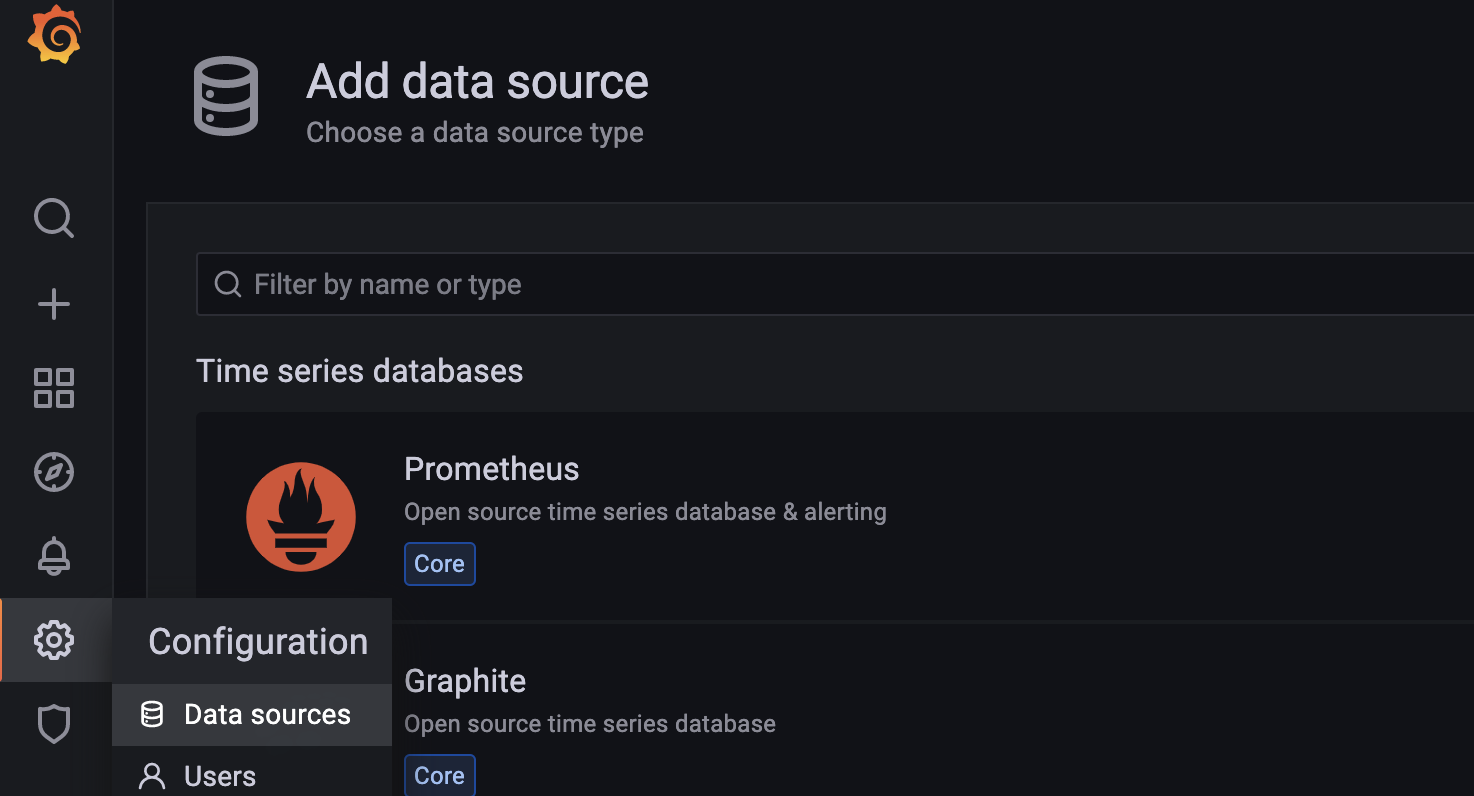
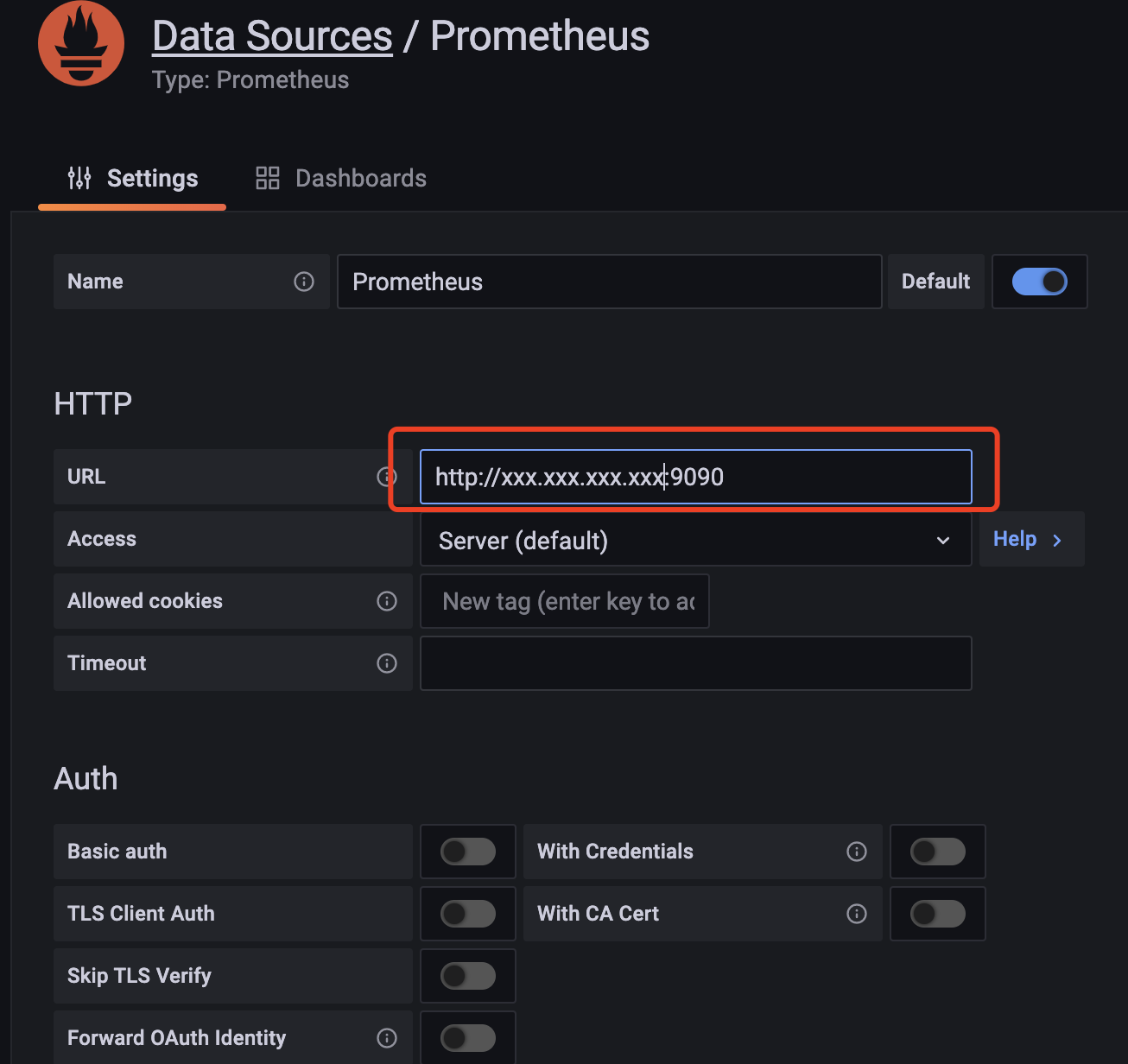
配置數(shù)據(jù)源
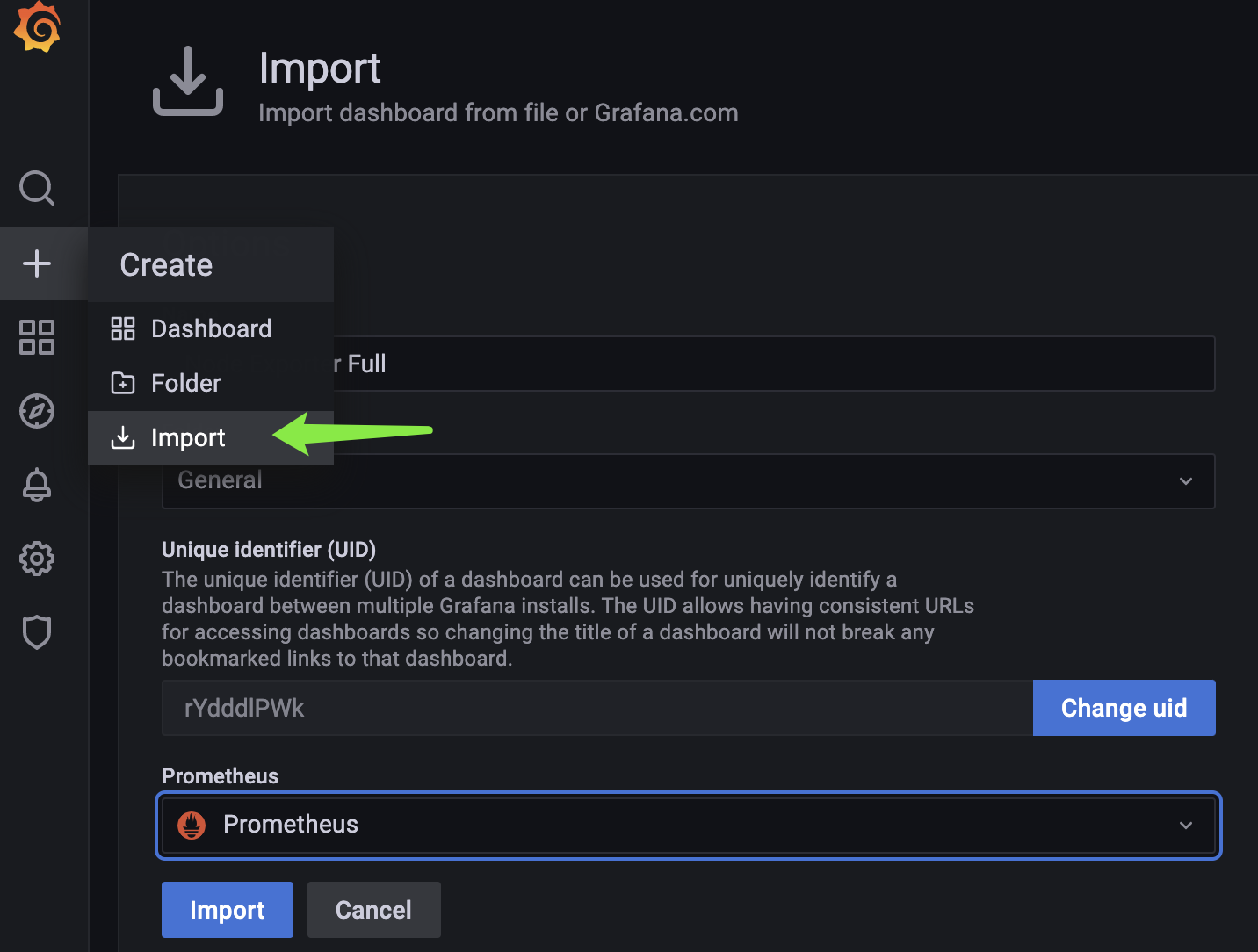
導(dǎo)入dashboard
最后修改時(shí)間:2021-12-14 16:24:22
「喜歡這篇文章,您的關(guān)注和贊賞是給作者最好的鼓勵」
關(guān)注作者
【版權(quán)聲明】本文為墨天輪用戶原創(chuàng)內(nèi)容,轉(zhuǎn)載時(shí)必須標(biāo)注文章的來源(墨天輪),文章鏈接,文章作者等基本信息,否則作者和墨天輪有權(quán)追究責(zé)任。如果您發(fā)現(xiàn)墨天輪中有涉嫌抄襲或者侵權(quán)的內(nèi)容,歡迎發(fā)送郵件至:contact@modb.pro進(jìn)行舉報(bào),并提供相關(guān)證據(jù),一經(jīng)查實(shí),墨天輪將立刻刪除相關(guān)內(nèi)容。
