



Oracle 一鍵安裝腳本,演示 統(tǒng)信 UOS V20 一鍵安裝 Oracle 12CR2(220118)單機(jī)版過程(全程無(wú)需人工干預(yù)):(腳本包括 ORALCE PSU/OJVM 等補(bǔ)丁自動(dòng)安裝)
?? 腳本下載地址:Shell腳本安裝Oracle數(shù)據(jù)庫(kù)
腳本第三代支持 N 節(jié)點(diǎn)一鍵安裝,不限制節(jié)點(diǎn)數(shù)!
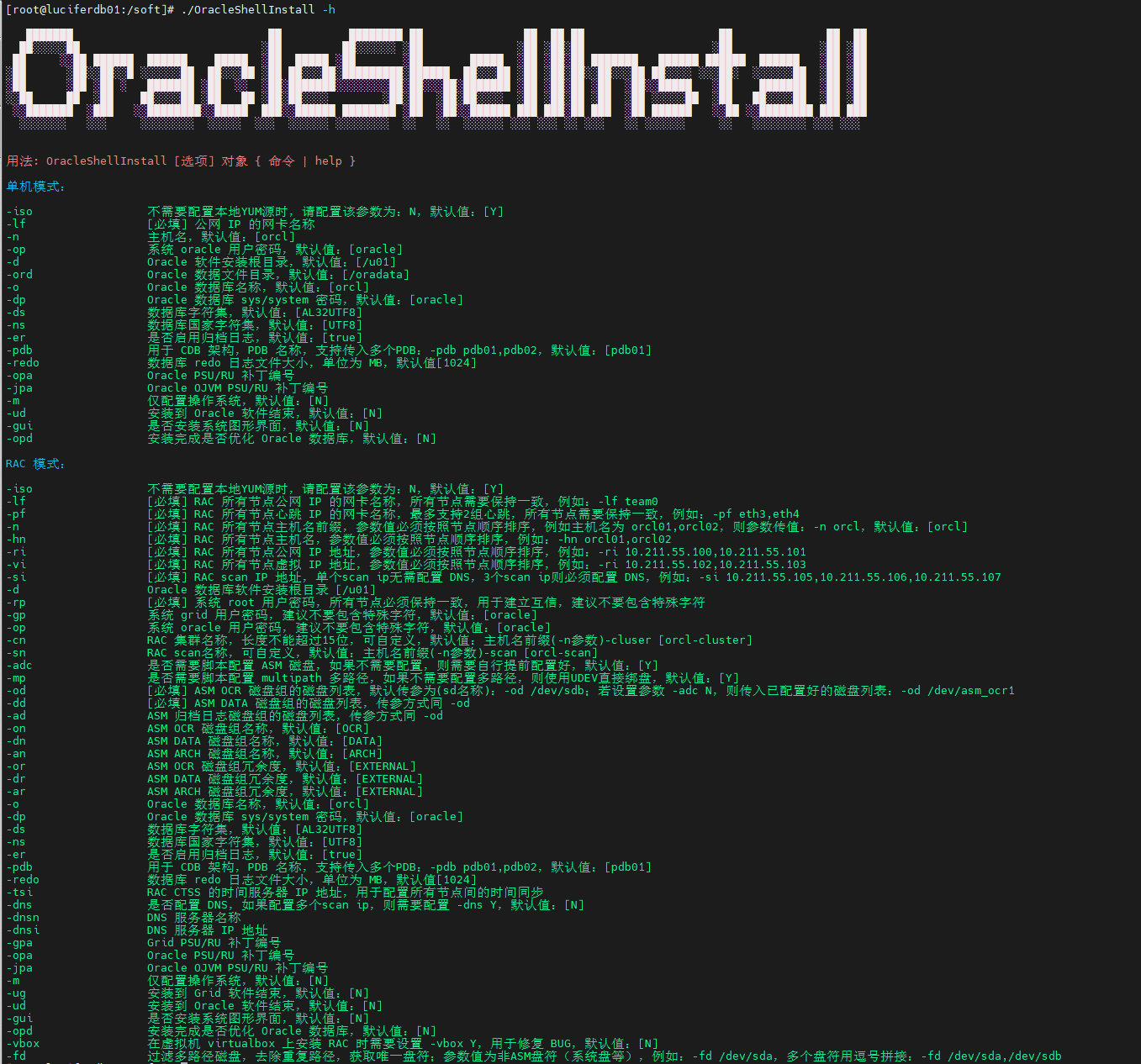
安裝準(zhǔn)備
- 1、安裝好操作系統(tǒng),建議安裝圖形化
- 2、配置好網(wǎng)絡(luò)
- 3、掛載本地 ISO 鏡像源
- 4、上傳必須軟件安裝包(安裝基礎(chǔ)包,補(bǔ)丁包:35926646、35943157、6880880)
- 5、上傳一鍵安裝腳本:OracleShellInstall
? 偷懶可以直接下載本文安裝包合集:統(tǒng)信 UOS V20 安裝 Oracle Oracle 12CR2(220118)單機(jī)版安裝包合集(包含補(bǔ)丁!!!)
演示環(huán)境信息
# 主機(jī)版本
[root@uosv20 soft]# cat /etc/os-release
PRETTY_NAME="UOS Server 20"
NAME="UOS Server 20"
VERSION_ID="20"
VERSION="20"
ID=uos
HOME_URL="https://www.chinauos.com/"
BUG_REPORT_URL="https://bbs.chinauos.com/"
VERSION_CODENAME=kongzi
PLATFORM_ID="platform:uelc20"

# 網(wǎng)絡(luò)信息
[root@uosv20 soft]# ip a
2: ens33: <BROADCAST,MULTICAST,UP,LOWER_UP> mtu 1500 qdisc fq_codel state UP group default qlen 1000
    link/ether 00:0c:29:db:c5:f9 brd ff:ff:ff:ff:ff:ff
    inet 192.168.6.141/24 brd 192.168.6.255 scope global noprefixroute ens33
       valid_lft forever preferred_lft forever
    inet6 fe80::88f9:eb9b:43bc:6d1c/64 scope link noprefixroute
       valid_lft forever preferred_lft forever

# 掛載本地 ISO 鏡像
[root@uosv20 soft]# mount | grep iso9660 | grep -v "/run/media"
/dev/sr0 on /mnt type iso9660 (ro,relatime,nojoliet,check=s,map=n,blocksize=2048,iocharset=utf8)
[root@uosv20 soft]# df -h|grep /mnt
/dev/sr0              7.8G  7.8G     0  100% /mnt

# 安裝包存放在 /soft 目錄下
[root@uosv20 ~]# cd /soft/
[root@uosv20 soft]# ll
-rwx------ 1 root root 3453696911  3月 28 16:44 LINUX.X64_122010_db_home.zip
-rwxr-xr-x 1 root root     169044  3月 28 16:43 OracleShellInstall
-rwxr-xr-x 1 root root  138022236  3月 28 16:43 p33561275_122010_Linux-x86-64.zip
-rwx------ 1 root root 1020001457  3月 28 16:43 p33587128_122010_Linux-x86-64.zip
-rwx------ 1 root root  124109254  3月 28 16:43 p6880880_122010_Linux-x86-64.zip
-rwx------ 1 root root     321590  3月 28 16:43 rlwrap-0.44.tar.gz
確保安裝環(huán)境準(zhǔn)備完成后,即可執(zhí)行一鍵安裝。
安裝命令
使用標(biāo)準(zhǔn)生產(chǎn)環(huán)境安裝參數(shù):
# 根據(jù)腳本 README 或者 -h 命令提示,編輯好一鍵安裝命令,進(jìn)入 /soft 目錄執(zhí)行安裝:
./OracleShellInstall -lf ens33 `# local ip ifname`\
-n uosv20 `# hostname`\
-op oracle `# oracle password`\
-d /u01 `# software base dir`\
-ord /oradata `# data dir`\
-o lucifer `# dbname`\
-dp oracle `# sys/system password`\
-ds AL32UTF8 `# database character`\
-ns AL16UTF16 `# national character`\
-redo 100 `# redo size`\
-opa 33587128 `# oracle PSU/RU`\
-jpa 33561275 `# OJVM PSU/RU`\
-opd Y `# optimize db`
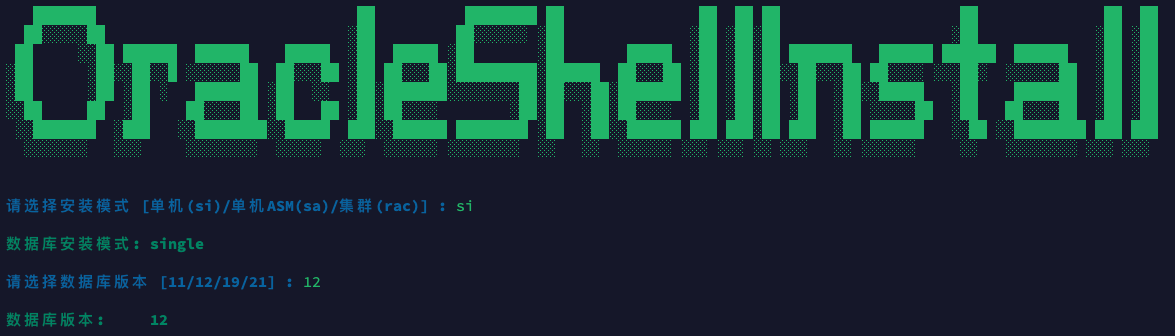
選擇需要安裝的模式以及版本,即可開始安裝:
安裝過程
███████ ██ ████████ ██ ██ ██ ██ ██ ██ ██
██?????██ ?██ ██?????? ?██ ?██ ?██?██ ?██ ?██ ?██
██ ??██ ██████ ██████ █████ ?██ █████ ?██ ?██ █████ ?██ ?██?██ ███████ ██████ ██████ ██████ ?██ ?██
?██ ?██??██??█ ??????██ ██???██ ?██ ██???██?█████████?██████ ██???██ ?██ ?██?██??██???██ ██???? ???██? ??????██ ?██ ?██
?██ ?██ ?██ ? ███████ ?██ ?? ?██?███████????????██?██???██?███████ ?██ ?██?██ ?██ ?██??█████ ?██ ███████ ?██ ?██
??██ ██ ?██ ██????██ ?██ ██ ?██?██???? ?██?██ ?██?██???? ?██ ?██?██ ?██ ?██ ?????██ ?██ ██????██ ?██ ?██
??███████ ?███ ??████████??█████ ███??██████ ████████ ?██ ?██??██████ ███ ███?██ ███ ?██ ██████ ??██ ??████████ ███ ███
??????? ??? ???????? ????? ??? ?????? ???????? ?? ?? ?????? ??? ??? ?? ??? ?? ?????? ?? ???????? ??? ???
請(qǐng)選擇安裝模式 [單機(jī)(si)/單機(jī)ASM(sa)/集群(rac)] : si
數(shù)據(jù)庫(kù)安裝模式: single
請(qǐng)選擇數(shù)據(jù)庫(kù)版本 [11/12/19/21] : 12
數(shù)據(jù)庫(kù)版本: 12
#==============================================================#
配置本地 YUM 源
#==============================================================#
[BaseOS]
name=BaseOS
baseurl=file:///mnt/BaseOS
enabled=1
gpgcheck=0
[AppStream]
name=AppStream
baseurl=file:///mnt/AppStream
enabled=1
gpgcheck=0
#==============================================================#
禁用防火墻
#==============================================================#
防火墻服務(wù)未啟動(dòng),無(wú)需禁用。
#==============================================================#
禁用 SELinux
#==============================================================#
SELinux status: disabled
#==============================================================#
YUM 靜默安裝依賴包
#==============================================================#
bc-1.07.1-7.uelc20.1.x86_64
binutils-2.30-117.0.1.uelc20.04.x86_64
未安裝軟件包 compat-libcap1
gcc-8.5.0-10.1.0.3.uelc20.03.x86_64
gcc-c++-8.5.0-10.1.0.3.uelc20.03.x86_64
elfutils-libelf-0.187-4.uelc20.02.x86_64
elfutils-libelf-devel-0.187-4.uelc20.02.x86_64
glibc-2.28-189.5.0.2.uelc20.05.x86_64
glibc-devel-2.28-189.5.0.2.uelc20.05.x86_64
libaio-0.3.112-5.up1.uelc20.01.x86_64
libaio-devel-0.3.112-5.up1.uelc20.01.x86_64
libgcc-8.5.0-10.1.0.3.uelc20.03.x86_64
libstdc++-8.5.0-10.1.0.3.uelc20.03.x86_64
libstdc++-devel-8.5.0-10.1.0.3.uelc20.03.x86_64
libxcb-1.13.1-4.uelc20.1.x86_64
libX11-1.6.8-5.uelc20.4.x86_64
libXau-1.0.9-3.uelc20.x86_64
libXi-1.7.10-1.uelc20.x86_64
libXrender-0.9.10-9.uelc20.1.x86_64
make-4.2.1-12.uelc20.2.x86_64
net-tools-2.0-0.53.20160912git.uelc20.3.x86_64
smartmontools-7.1-1.0.2.uelc20.x86_64
sysstat-11.7.3-7.uelc20.01.x86_64
e2fsprogs-1.45.6-18.uelc20.01.x86_64
e2fsprogs-libs-1.45.6-18.uelc20.01.x86_64
unzip-6.0-46.uelc20.4.x86_64
openssh-clients-8.2p1-19.up1.0.2.uelc20.04.x86_64
readline-7.0-12.uelc20.1.x86_64
readline-devel-7.0-12.uelc20.1.x86_64
psmisc-23.3-1.uelc20.01.x86_64
ksh-20120801-255.uelc20.1.x86_64
nfs-utils-2.5.1-8.up3.uelc20.04.x86_64
tar-1.32-3.uelc20.03.x86_64
device-mapper-multipath-0.8.4-30.uelc20.1.x86_64
avahi-0.7-21.uelc20.6.x86_64
ntp-4.2.8p15-3.uelc20.02.x86_64
chrony-4.2-1.0.1.uelc20.02.x86_64
libXtst-1.2.3-9.uelc20.1.x86_64
libXrender-devel-0.9.10-9.uelc20.1.x86_64
fontconfig-devel-2.13.1-5.uelc20.01.x86_64
policycoreutils-2.9-19.uelc20.x86_64
未安裝軟件包 policycoreutils-python
librdmacm-37.2-1.0.3.uelc20.x86_64
未安裝軟件包 libnsl*
libibverbs-37.2-1.0.3.uelc20.x86_64
未安裝軟件包 compat-openssl10
policycoreutils-python-utils-2.9-19.uelc20.noarch
未安裝軟件包 elfutils*
glibc-2.28-189.5.0.2.uelc20.05.x86_64
#==============================================================#
配置主機(jī)名
#==============================================================#
uosv20
#==============================================================#
配置 /etc/hosts 文件
#==============================================================#
127.0.0.1 localhost localhost.localdomain localhost4 localhost4.localdomain4
::1 localhost localhost.localdomain localhost6 localhost6.localdomain6
192.168.6.141 uosv20
#==============================================================#
創(chuàng)建用戶和組
#==============================================================#
oracle 用戶:
用戶id=54321(oracle) 組id=54321(oinstall) 組=54321(oinstall),54322(dba),54323(oper),54324(backupdba),54325(dgdba),54326(kmdba),54330(racdba)
#==============================================================#
配置 Avahi-daemon 服務(wù)
#==============================================================#
● avahi-daemon.service - Avahi mDNS/DNS-SD Stack
Loaded: loaded (/usr/lib/systemd/system/avahi-daemon.service; disabled; vendor preset: enabled)
Active: inactive (dead)
3月 29 09:22:41 uosv20 avahi-daemon[1073]: No service file found in /etc/avahi/services.
3月 29 09:22:41 uosv20 avahi-daemon[1073]: Files changed, reloading.
3月 29 09:22:41 uosv20 avahi-daemon[1073]: No service file found in /etc/avahi/services.
3月 29 09:22:43 uosv20 avahi-daemon[1073]: Got SIGTERM, quitting.
3月 29 09:22:43 uosv20 avahi-daemon[1073]: Leaving mDNS multicast group on interface ens33.IPv6 with address fe80::88f9:eb9b:43bc:6d1c.
3月 29 09:22:43 uosv20 systemd[1]: Stopping Avahi mDNS/DNS-SD Stack...
3月 29 09:22:43 uosv20 avahi-daemon[1073]: Leaving mDNS multicast group on interface ens33.IPv4 with address 192.168.6.141.
3月 29 09:22:43 uosv20 avahi-daemon[1073]: avahi-daemon 0.7 exiting.
3月 29 09:22:43 uosv20 systemd[1]: avahi-daemon.service: Succeeded.
3月 29 09:22:43 uosv20 systemd[1]: Stopped Avahi mDNS/DNS-SD Stack.
#==============================================================#
配置透明大頁(yè) && NUMA && 磁盤 IO 調(diào)度器
#==============================================================#
args="ro resume=/dev/mapper/uos-swap rd.lvm.lv=uos/root rd.lvm.lv=uos/swap rhgb quiet numa=off transparent_hugepage=never elevator=deadline"
-resume=/dev/mapper/uos-swap
-args="ro
args="ro resume=/dev/mapper/uos-swap rd.lvm.lv=uos/root rd.lvm.lv=uos/swap rhgb quiet numa=off transparent_hugepage=never elevator=deadline"
-elevator=deadline"
-transparent_hugepage=never
#==============================================================#
配置 sysctl.conf
#==============================================================#
net.core.busy_read = 100
vm.dirty_ratio = 50
kernel.sysrq = 0
kernel.panic = 3
fs.aio-max-nr = 1048576
fs.file-max = 6815744
kernel.shmall = 2097152
kernel.shmmax = 8352497663
kernel.shmmni = 4096
kernel.sem = 250 32000 100 128
net.ipv4.ip_local_port_range = 9000 65500
net.core.rmem_default = 262144
net.core.rmem_max = 4194304
net.core.wmem_default = 262144
net.core.wmem_max = 1048576
vm.min_free_kbytes = 32626
net.ipv4.conf.ens33.rp_filter = 1
vm.swappiness = 10
kernel.panic_on_oops = 1
kernel.randomize_va_space = 2
kernel.numa_balancing = 0
#==============================================================#
配置 RemoveIPC
#==============================================================#
[Login]
RemoveIPC=no
#==============================================================#
配置 /etc/security/limits.conf 和 /etc/pam.d/login
#==============================================================#
查看 /etc/security/limits.conf:
* soft core 0
* hard core 0
oracle soft nofile 1024
oracle hard nofile 65536
oracle soft stack 10240
oracle hard stack 32768
oracle soft nproc 2047
oracle hard nproc 16384
oracle hard memlock unlimited
oracle soft memlock unlimited
查看 /etc/pam.d/login 文件:
auth substack system-auth
auth include postlogin
account required pam_nologin.so
account include system-auth
password include system-auth
session required pam_selinux.so close
session required pam_loginuid.so
session required pam_selinux.so open
session required pam_namespace.so
session optional pam_keyinit.so force revoke
session include system-auth
session include postlogin
-session optional pam_ck_connector.so
session required pam_limits.so
session required /lib64/security/pam_limits.so
#==============================================================#
配置 /dev/shm
#==============================================================#
/dev/mapper/uos-root / xfs defaults 0 0
UUID=c1af6e7c-5714-4a4e-b05a-2f06a1942dd7 /boot xfs defaults 0 0
/dev/mapper/uos-swap none swap defaults 0 0
tmpfs /dev/shm tmpfs size=8156736k 0 0
#==============================================================#
安裝 rlwrap 插件
#==============================================================#
成功安裝 rlwrap: rlwrap 0.44
#==============================================================#
Root 用戶環(huán)境變量
#==============================================================#
if [ -f ~/.bashrc ]; then
. ~/.bashrc
fi
PATH=$PATH:$HOME/bin
export PATH
alias so='su - oracle'
export PS1="[`whoami`@`hostname`:"'$PWD]$ '
#==============================================================#
Oracle 用戶環(huán)境變量
#==============================================================#
if [ -f ~/.bashrc ]; then
. ~/.bashrc
fi
umask 022
export TMP=/tmp
export TMPDIR=$TMP
export NLS_LANG=AMERICAN_AMERICA.AL32UTF8
export ORACLE_BASE=/u01/app/oracle
export ORACLE_HOME=/u01/app/oracle/product/12.2.0/db
export ORACLE_TERM=xterm
export TNS_ADMIN=$ORACLE_HOME/network/admin
export LD_LIBRARY_PATH=$ORACLE_HOME/lib:/lib:/usr/lib
export ORACLE_SID=lucifer
export PATH=/usr/sbin:$PATH
export PATH=$ORACLE_HOME/bin:$ORACLE_HOME/OPatch:$ORACLE_HOME/perl/bin:$PATH
export PERL5LIB=$ORACLE_HOME/perl/lib
alias sas='sqlplus / as sysdba'
alias awr='sqlplus / as sysdba @?/rdbms/admin/awrrpt'
alias ash='sqlplus / as sysdba @?/rdbms/admin/ashrpt'
alias alert='vi $ORACLE_BASE/diag/rdbms/*/$ORACLE_SID/trace/alert_$ORACLE_SID.log'
export PS1="[`whoami`@`hostname`:"'$PWD]$ '
export CV_ASSUME_DISTID=OL7
alias sqlplus='rlwrap sqlplus'
alias rman='rlwrap rman'
alias adrci='rlwrap adrci'
#==============================================================#
靜默解壓 Oracle 軟件包
#==============================================================#
正在靜默解壓縮 Oracle 軟件包,請(qǐng)稍等:
.---- -. -. . . . .
( .',----- - - ' ' ' __
\_/ ;--:- __--------------------___ ____=========_||___
__U__n_^_''__[. ooo___ | |_!_||_!_||_!_||_!_| | |..|_i_|..|_i_|..|
c(_ ..(_ ..(_ ..( /,,,,,,] | |___||___||___||___| | | |
,_\___________'_|,L______],|______________________|_i,!________________!_i
/;_(@)(@)==(@)(@) (o)(o) (o)^(o)--(o)^(o) (o)(o)-(o)(o)
""~"""~"""~"""~"""~"""~"""~"""~"""~"""~"""~"""~"""~"""~"""~"""~"""~"""~"""~"""~"'""
靜默解壓 Oracle 軟件安裝包: /soft/LINUX.X64_122010_db_home.zip
靜默解壓 Oracle 軟件補(bǔ)丁包: /soft/p33587128*.zip
靜默解壓 OJVM 軟件補(bǔ)丁包: /soft/p33561275*.zip
#==============================================================#
Oracle 安裝靜默文件
#==============================================================#
oracle.install.option=INSTALL_DB_SWONLY
UNIX_GROUP_NAME=oinstall
INVENTORY_LOCATION=/u01/app/oraInventory
ORACLE_BASE=/u01/app/oracle
oracle.install.db.InstallEdition=EE
oracle.install.db.DBA_GROUP=dba
oracle.install.db.OPER_GROUP=oper
oracle.install.responseFileVersion=/oracle/install/rspfmt_dbinstall_response_schema_v12.2.0
SELECTED_LANGUAGES=en,zh_CN
ORACLE_HOME=/u01/app/oracle/product/12.2.0/db
oracle.install.db.OSBACKUPDBA_GROUP=backupdba
oracle.install.db.OSDGDBA_GROUP=dgdba
oracle.install.db.OSKMDBA_GROUP=kmdba
oracle.install.db.OSRACDBA_GROUP=racdba
#==============================================================#
靜默安裝數(shù)據(jù)庫(kù)軟件
#==============================================================#
Starting Oracle Universal Installer...
Checking Temp space: must be greater than 500 MB. Actual 3982 MB Passed
Checking swap space: must be greater than 150 MB. Actual 8185 MB Passed
Preparing to launch Oracle Universal Installer from /tmp/OraInstall2024-03-29_09-23-57AM. Please wait ...You can find the log of this install session at:
/u01/app/oraInventory/logs/installActions2024-03-29_09-23-57AM.log
Prepare in progress.
.................................................. 8% Done.
Prepare successful.
Copy files in progress.
.................................................. 17% Done.
.................................................. 22% Done.
.................................................. 27% Done.
.................................................. 32% Done.
.................................................. 40% Done.
.................................................. 45% Done.
.................................................. 50% Done.
.................................................. 55% Done.
.................................................. 60% Done.
.................................................. 65% Done.
.................................................. 70% Done.
.................................................. 75% Done.
.................................................. 80% Done.
....................
Copy files successful.
Link binaries in progress.
..........
Link binaries successful.
Setup files in progress.
..............................
Setup files successful.
Setup Inventory in progress.
Setup Inventory successful.
Finish Setup successful.
The installation of Oracle Database 12c was successful.
Please check '/u01/app/oraInventory/logs/silentInstall2024-03-29_09-23-57AM.log' for more details.
Setup Oracle Base in progress.
Setup Oracle Base successful.
.................................................. 95% Done.
As a root user, execute the following script(s):
1. /u01/app/oraInventory/orainstRoot.sh
2. /u01/app/oracle/product/12.2.0/db/root.sh
.................................................. 100% Done.
Successfully Setup Software.
#==============================================================#
執(zhí)行 root 腳本
#==============================================================#
Changing permissions of /u01/app/oraInventory.
Adding read,write permissions for group.
Removing read,write,execute permissions for world.
Changing groupname of /u01/app/oraInventory to oinstall.
The execution of the script is complete.
Check /u01/app/oracle/product/12.2.0/db/install/root_uosv20_2024-03-29_09-28-36-858905821.log for the output of root script
#==============================================================#
Oracle 軟件安裝補(bǔ)丁
#==============================================================#
Oracle Interim Patch Installer version 12.2.0.1.30
Copyright (c) 2024, Oracle Corporation. All rights reserved.
PREREQ session
Oracle Home : /u01/app/oracle/product/12.2.0/db
Central Inventory : /u01/app/oraInventory
from : /u01/app/oracle/product/12.2.0/db/oraInst.loc
OPatch version : 12.2.0.1.30
OUI version : 12.2.0.1.4
Log file location : /u01/app/oracle/product/12.2.0/db/cfgtoollogs/opatch/opatch2024-03-29_09-28-42AM_1.log
Invoking prereq "checkconflictagainstohwithdetail"
Prereq "checkConflictAgainstOHWithDetail" passed.
OPatch succeeded.
Oracle Interim Patch Installer version 12.2.0.1.30
Copyright (c) 2024, Oracle Corporation. All rights reserved.
Oracle Home : /u01/app/oracle/product/12.2.0/db
Central Inventory : /u01/app/oraInventory
from : /u01/app/oracle/product/12.2.0/db/oraInst.loc
OPatch version : 12.2.0.1.30
OUI version : 12.2.0.1.4
Log file location : /u01/app/oracle/product/12.2.0/db/cfgtoollogs/opatch/opatch2024-03-29_09-28-44AM_1.log
Verifying environment and performing prerequisite checks...
OPatch continues with these patches: 33587128
Do you want to proceed? [y|n]
Y (auto-answered by -silent)
User Responded with: Y
All checks passed.
Please shutdown Oracle instances running out of this ORACLE_HOME on the local system.
(Oracle Home = '/u01/app/oracle/product/12.2.0/db')
Is the local system ready for patching? [y|n]
Y (auto-answered by -silent)
User Responded with: Y
Backing up files...
Applying interim patch '33587128' to OH '/u01/app/oracle/product/12.2.0/db'
ApplySession: Optional component(s) [ oracle.swd, 12.2.0.1.0 ] , [ oracle.swd.oui, 12.2.0.1.0 ] , [ oracle.network.cman, 12.2.0.1.0 ] , [ oracle.network.gsm, 12.2.0.1.0 ] , [ oracle.rdbms.drdaas, 12.2.0.1.0 ] , [ oracle.ons.cclient, 12.2.0.1.0 ] , [ oracle.ons.daemon, 12.2.0.1.0 ] , [ oracle.ons.eons.bwcompat, 12.2.0.1.0 ] , [ oracle.oid.client, 12.2.0.1.0 ] not present in the Oracle Home or a higher version is found.
Patching component oracle.rdbms.util, 12.2.0.1.0...
Patching component oracle.rdbms, 12.2.0.1.0...
Patching component oracle.network.rsf, 12.2.0.1.0...
Patching component oracle.rdbms.rsf, 12.2.0.1.0...
Patching component oracle.ctx, 12.2.0.1.0...
Patching component oracle.has.common.cvu, 12.2.0.1.0...
Patching component oracle.ldap.owm, 12.2.0.1.0...
Patching component oracle.ldap.rsf, 12.2.0.1.0...
Patching component oracle.nlsrtl.rsf, 12.2.0.1.0...
Patching component oracle.oracore.rsf, 12.2.0.1.0...
Patching component oracle.oraolap, 12.2.0.1.0...
Patching component oracle.rdbms.dbscripts, 12.2.0.1.0...
Patching component oracle.rdbms.deconfig, 12.2.0.1.0...
Patching component oracle.rdbms.rsf.ic, 12.2.0.1.0...
Patching component oracle.sdo, 12.2.0.1.0...
Patching component oracle.sdo.locator, 12.2.0.1.0...
Patching component oracle.sdo.locator.jrf, 12.2.0.1.0...
Patching component oracle.tfa, 12.2.0.1.0...
Patching component oracle.ctx.rsf, 12.2.0.1.0...
Patching component oracle.rdbms.install.plugins, 12.2.0.1.0...
Patching component oracle.rdbms.install.common, 12.2.0.1.0...
Patching component oracle.assistants.deconfig, 12.2.0.1.0...
Patching component oracle.ons.ic, 12.2.0.1.0...
Patching component oracle.rdbms.rman, 12.2.0.1.0...
Patching component oracle.precomp.rsf, 12.2.0.1.0...
Patching component oracle.install.deinstalltool, 12.2.0.1.0...
Patching component oracle.assistants.acf, 12.2.0.1.0...
Patching component oracle.rdbms.oci, 12.2.0.1.0...
Patching component oracle.sqlplus.ic, 12.2.0.1.0...
Patching component oracle.xdk.parser.java, 12.2.0.1.0...
Patching component oracle.dbtoolslistener, 12.2.0.1.0...
Patching component oracle.ldap.rsf.ic, 12.2.0.1.0...
Patching component oracle.rdbms.dv, 12.2.0.1.0...
Patching component oracle.rdbms.lbac, 12.2.0.1.0...
Patching component oracle.ons, 12.2.0.1.0...
Patching component oracle.ldap.client, 12.2.0.1.0...
Patching component oracle.xdk, 12.2.0.1.0...
Patching component oracle.xdk.rsf, 12.2.0.1.0...
Patching component oracle.sqlplus, 12.2.0.1.0...
Patching component oracle.assistants.server, 12.2.0.1.0...
Patching component oracle.rdbms.crs, 12.2.0.1.0...
Patching component oracle.precomp.common, 12.2.0.1.0...
Patching component oracle.precomp.lang, 12.2.0.1.0...
Patching component oracle.jdk, 1.8.0.91.0...
OPatch found the word "error" in the stderr of the make command.
Please look at this stderr. You can re-run this make command.
Stderr output:
chmod: changing permissions of '/u01/app/oracle/product/12.2.0/db/bin/extjobO': Operation not permitted
make: [ins_rdbms.mk:533: iextjob] Error 1 (ignored)
Patch 33587128 successfully applied.
OPatch Session completed with warnings.
Log file location: /u01/app/oracle/product/12.2.0/db/cfgtoollogs/opatch/opatch2024-03-29_09-28-44AM_1.log
OPatch completed with warnings.
#==============================================================#
OJVM 補(bǔ)丁安裝
#==============================================================#
Oracle Interim Patch Installer version 12.2.0.1.30
Copyright (c) 2024, Oracle Corporation. All rights reserved.
PREREQ session
Oracle Home : /u01/app/oracle/product/12.2.0/db
Central Inventory : /u01/app/oraInventory
from : /u01/app/oracle/product/12.2.0/db/oraInst.loc
OPatch version : 12.2.0.1.30
OUI version : 12.2.0.1.4
Log file location : /u01/app/oracle/product/12.2.0/db/cfgtoollogs/opatch/opatch2024-03-29_09-33-45AM_1.log
Invoking prereq "checkconflictagainstohwithdetail"
Prereq "checkConflictAgainstOHWithDetail" passed.
OPatch succeeded.
Oracle Interim Patch Installer version 12.2.0.1.30
Copyright (c) 2024, Oracle Corporation. All rights reserved.
Oracle Home : /u01/app/oracle/product/12.2.0/db
Central Inventory : /u01/app/oraInventory
from : /u01/app/oracle/product/12.2.0/db/oraInst.loc
OPatch version : 12.2.0.1.30
OUI version : 12.2.0.1.4
Log file location : /u01/app/oracle/product/12.2.0/db/cfgtoollogs/opatch/opatch2024-03-29_09-33-47AM_1.log
Verifying environment and performing prerequisite checks...
OPatch continues with these patches: 33561275
Do you want to proceed? [y|n]
Y (auto-answered by -silent)
User Responded with: Y
All checks passed.
Please shutdown Oracle instances running out of this ORACLE_HOME on the local system.
(Oracle Home = '/u01/app/oracle/product/12.2.0/db')
Is the local system ready for patching? [y|n]
Y (auto-answered by -silent)
User Responded with: Y
Backing up files...
Applying interim patch '33561275' to OH '/u01/app/oracle/product/12.2.0/db'
Patching component oracle.javavm.server, 12.2.0.1.0...
Patching component oracle.javavm.server.core, 12.2.0.1.0...
Patching component oracle.rdbms.dbscripts, 12.2.0.1.0...
Patching component oracle.javavm.client, 12.2.0.1.0...
Patching component oracle.rdbms, 12.2.0.1.0...
Patching component oracle.dbjava.jdbc, 12.2.0.1.0...
Patching component oracle.dbjava.ic, 12.2.0.1.0...
Patch 33561275 successfully applied.
Log file location: /u01/app/oracle/product/12.2.0/db/cfgtoollogs/opatch/opatch2024-03-29_09-33-47AM_1.log
OPatch succeeded.
#==============================================================#
Oracle 軟件版本
#==============================================================#
SQL*Plus: Release 12.2.0.1.0 Production
#==============================================================#
Oracle 補(bǔ)丁信息
#==============================================================#
33561275;OJVM RELEASE UPDATE 12.2.0.1.220118 (33561275)
33587128;Database Jan 2022 Release Update : 12.2.0.1.220118 (33587128)
OPatch succeeded.
#==============================================================#
配置監(jiān)聽
#==============================================================#
Parsing command line arguments:
Parameter "silent" = true
Parameter "responsefile" = /u01/app/oracle/product/12.2.0/db/assistants/netca/netca.rsp
Done parsing command line arguments.
Oracle Net Services Configuration:
Profile configuration complete.
Oracle Net Listener Startup:
Running Listener Control:
/u01/app/oracle/product/12.2.0/db/bin/lsnrctl start LISTENER
Listener Control complete.
Listener started successfully.
Listener configuration complete.
Oracle Net Services configuration successful. The exit code is 0
檢查監(jiān)聽狀態(tài):
LSNRCTL for Linux: Version 12.2.0.1.0 - Production on 29-MAR-2024 09:34:57
Copyright (c) 1991, 2016, Oracle. All rights reserved.
Connecting to (DESCRIPTION=(ADDRESS=(PROTOCOL=TCP)(HOST=uosv20)(PORT=1521)))
STATUS of the LISTENER
------------------------
Alias LISTENER
Version TNSLSNR for Linux: Version 12.2.0.1.0 - Production
Start Date 29-MAR-2024 09:34:46
Uptime 0 days 0 hr. 0 min. 11 sec
Trace Level off
Security ON: Local OS Authentication
SNMP OFF
Listener Parameter File /u01/app/oracle/product/12.2.0/db/network/admin/listener.ora
Listener Log File /u01/app/oracle/diag/tnslsnr/uosv20/listener/alert/log.xml
Listening Endpoints Summary...
(DESCRIPTION=(ADDRESS=(PROTOCOL=tcp)(HOST=uosv20)(PORT=1521)))
(DESCRIPTION=(ADDRESS=(PROTOCOL=ipc)(KEY=EXTPROC1521)))
The listener supports no services
The command completed successfully
#==============================================================#
靜默建庫(kù)命令
#==============================================================#
dbca -silent -createDatabase \
-ignorePrereqFailure \
-templateName General_Purpose.dbc \
-responseFile NO_VALUE \
-gdbName lucifer \
-sid lucifer \
-sysPassword oracle \
-systemPassword oracle \
-redoLogFileSize 100 \
-datafileDestination /oradata \
-storageType FS \
-enableArchive true \
-archiveLogDest /oradata \
-databaseConfigType SINGLE \
-characterset AL32UTF8 \
-nationalCharacterSet AL16UTF16 \
-emConfiguration NONE \
-automaticMemoryManagement false \
-totalMemory 3982 \
-databaseType OLTP \
-createAsContainerDatabase false
#==============================================================#
創(chuàng)建數(shù)據(jù)庫(kù)
#==============================================================#
[WARNING] [DBT-06208] The 'SYS' password entered does not conform to the Oracle recommended standards.
CAUSE:
a. Oracle recommends that the password entered should be at least 8 characters in length, contain at least 1 uppercase character, 1 lower case character and 1 digit [0-9].
b.The password entered is a keyword that Oracle does not recommend to be used as password
ACTION: Specify a strong password. If required refer Oracle documentation for guidelines.
[WARNING] [DBT-06208] The 'SYSTEM' password entered does not conform to the Oracle recommended standards.
CAUSE:
a. Oracle recommends that the password entered should be at least 8 characters in length, contain at least 1 uppercase character, 1 lower case character and 1 digit [0-9].
b.The password entered is a keyword that Oracle does not recommend to be used as password
ACTION: Specify a strong password. If required refer Oracle documentation for guidelines.
Copying database files
1% complete
2% complete
18% complete
33% complete
Creating and starting Oracle instance
35% complete
40% complete
44% complete
49% complete
50% complete
53% complete
55% complete
Completing Database Creation
56% complete
57% complete
58% complete
62% complete
65% complete
66% complete
Executing Post Configuration Actions
100% complete
Look at the log file "/u01/app/oracle/cfgtoollogs/dbca/lucifer/lucifer.log" for further details.
#==============================================================#
配置在線重做日志
#==============================================================#
數(shù)據(jù)庫(kù)在線重做日志文件:
THREAD# GROUP# MEMBER size(M)
---------- ---------- ------------------------------------------------------------------------------------------------------------------------ ----------
1 1 /oradata/lucifer/redo01.log 100
1 2 /oradata/lucifer/redo02.log 100
1 3 /oradata/lucifer/redo03.log 100
1 11 /oradata/LUCIFER/onlinelog/o1_mf_11_m0d78yg8_.log 100
1 12 /oradata/LUCIFER/onlinelog/o1_mf_12_m0d78yky_.log 100
1 13 /oradata/LUCIFER/onlinelog/o1_mf_13_m0d78yot_.log 100
1 14 /oradata/LUCIFER/onlinelog/o1_mf_14_m0d78ysh_.log 100
1 15 /oradata/LUCIFER/onlinelog/o1_mf_15_m0d78yyl_.log 100
#==============================================================#
配置 RMAN 備份任務(wù)
#==============================================================#
## OracleBegin
00 02 * * * /home/oracle/scripts/del_arch.sh
#00 00 * * 0 /home/oracle/scripts/dbbackup_lv0.sh
#00 00 * * 1,2,3,4,5,6 /home/oracle/scripts/dbbackup_lv1.sh
#==============================================================#
配置 glogin.sql
#==============================================================#
define _editor=vi
set serveroutput on size 1000000
set pagesize 9999
set long 99999
set trimspool on
col name format a80
set termout off
define gname=idle
column global_name new_value gname
select lower(user) || '@' || substr( global_name, 1, decode( dot, 0, length(global_name), dot-1) ) global_name from (select global_name, instr(global_name,'.') dot from global_name );
ALTER SESSION SET nls_date_format = 'YYYY-MM-DD HH24:MI:SS';
set sqlprompt '&gname _DATE> '
set termout on
#==============================================================#
優(yōu)化數(shù)據(jù)庫(kù)參數(shù)
#==============================================================#
數(shù)據(jù)庫(kù)參數(shù):
NAME SID SPVALUE VALUE
-------------------------------------------------- ---------- -------------------------------------------------------------------------------- --------------------------------------------------------------------------------
_b_tree_bitmap_plans * FALSE FALSE
_datafile_write_errors_crash_instance * FALSE FALSE
audit_file_dest * /u01/app/oracle/admin/lucifer/adump /u01/app/oracle/admin/lucifer/adump
audit_trail * NONE DB
compatible * 12.2.0 12.2.0
control_file_record_keep_time * 31 31
db_block_size * 8192 8192
db_create_file_dest * /oradata /oradata
db_file_multiblock_read_count * 128
db_files * 5000 200
db_name * lucifer lucifer
db_writer_processes * 1
deferred_segment_creation * FALSE FALSE
diagnostic_dest * /u01/app/oracle /u01/app/oracle
dispatchers * (PROTOCOL=TCP) (SERVICE=luciferXDB) (PROTOCOL=TCP) (SERVICE=luciferXDB)
event * 10949 trace name context forever,level 1
event * 28401 trace name context forever,level 1
fast_start_parallel_rollback * LOW
log_archive_dest_1 * location=/oradata/archivelog location=/oradata/archivelog
log_archive_format * %t_%s_%r.dbf %t_%s_%r.dbf
max_dump_file_size * unlimited
max_string_size * STANDARD
nls_language * AMERICAN AMERICAN
nls_territory * AMERICA AMERICA
open_cursors * 1000 300
optimizer_adaptive_plans * TRUE
optimizer_adaptive_statistics * FALSE
optimizer_index_caching * 0
optimizer_mode * ALL_ROWS
parallel_force_local * FALSE
parallel_max_servers * 64 64
pga_aggregate_target * 1335885824 835715072
processes * 2000 640
remote_login_passwordfile * EXCLUSIVE EXCLUSIVE
session_cached_cursors * 300 50
sessions * 984
sga_max_size * 5344591872 3355443200
sga_target * 5344591872 3355443200
spfile * /u01/app/oracle/product/12.2.0/db/dbs/spfilelucifer.ora
statistics_level * TYPICAL
undo_retention * 10800 900
恭喜!Oracle 單機(jī)安裝成功,現(xiàn)在是否重啟主機(jī):[Y/N] Y
最后修改時(shí)間:2026-03-23 16:29:11
「喜歡這篇文章,您的關(guān)注和贊賞是給作者最好的鼓勵(lì)」
關(guān)注作者
【版權(quán)聲明】本文為墨天輪用戶原創(chuàng)內(nèi)容,轉(zhuǎn)載時(shí)必須標(biāo)注文章的來(lái)源(墨天輪),文章鏈接,文章作者等基本信息,否則作者和墨天輪有權(quán)追究責(zé)任。如果您發(fā)現(xiàn)墨天輪中有涉嫌抄襲或者侵權(quán)的內(nèi)容,歡迎發(fā)送郵件至:contact@modb.pro進(jìn)行舉報(bào),并提供相關(guān)證據(jù),一經(jīng)查實(shí),墨天輪將立刻刪除相關(guān)內(nèi)容。
