



大家好,這里是公眾號 DBA學習之路,致力于分享數據庫領域相關知識。
社群交流
為了給大家提供一些技術交流的平臺,目前已成立的技術交流群:
- Oracle 數據庫交流群
- 國產數據庫交流群
- Linux 技術交流群
- ChatGPT 4o 免費體驗群
需要進群可以添加號主微信:Lucifer-0622,備注對應的群名即可。
目錄
EMCC 24ai
EMCC 24ai 發布了,到底更新了些什么呢? 通過官方文檔可以看到一些介紹:
- Enhanced Enterprise Manager Federation
- New Navigation Menu
- Enterprise Manager Dashboard Enhancements
- Monitoring Using Remote Agents
- Zero Downtime Monitoring
- New Job System Console
- Support for Oracle Key Vault
- Guided Discovery Process for Autonomous Databases
- Automatic Database Diagnostic Monitor (ADDM) Tab in Performance Hub
- New Swim Lanes Visualization in ADDM Spotlight
- Data Masking and Subsetting Enhancements in Enterprise Manager
- New Metrics to Monitor Raft-based Sharding
- New SCAP Standards for Oracle Linux 7, 8, and 9
- New DBSAT 3.1 Standards
- Upload Gold Images from External Sources
- Remote Agent Support for Database Lifecycle Management Activities
- New EMCLI Verb
set_cs_rule_lifecycle_status - Configure Backups for Data Guard Databases with More Than One Standby Database
- REST APIs for Blackouts Management
- Redesigned Plug-ins
其中遠程代理進行監控、零停機監控、監控基于 Raft 的分片的新指標、新增適配 Oracle Linux 7/8/9 等功能還是十分不錯的,值得點贊!
廢話不多說,接下來實戰演示下如何在 OracleLinux 8.10 上快速安裝一套 EMCC 24ai 監控軟件!
環境準備
主機信息
| 角色 | 主機名 | IP | 操作系統 | 數據庫版本 | 物理內存 | 磁盤空間 |
|---|---|---|---|---|---|---|
| EMCC 服務端 | emcc24ai | 192.168.6.72 | oel8.10 | 19.25 | 32G | 500G |
硬件要求
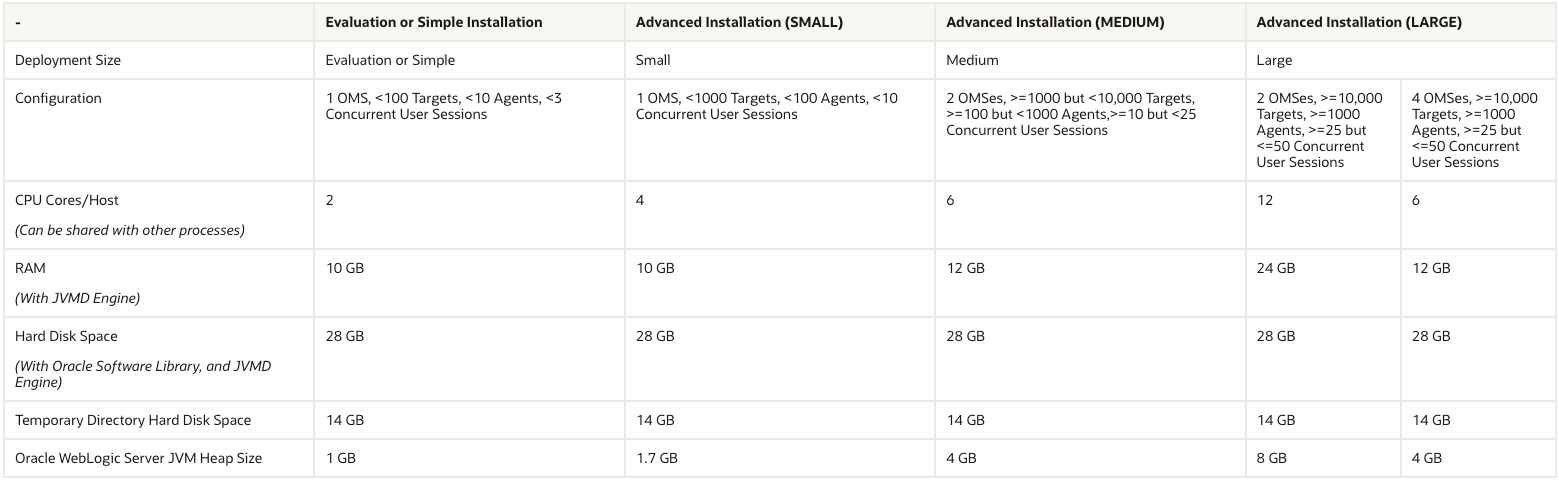
每個 OMS 的最低 CPU、RAM、堆大小和硬盤空間要求(一般選擇小型安裝):
管理存儲庫的最低 CPU、RAM 和硬盤空間要求:
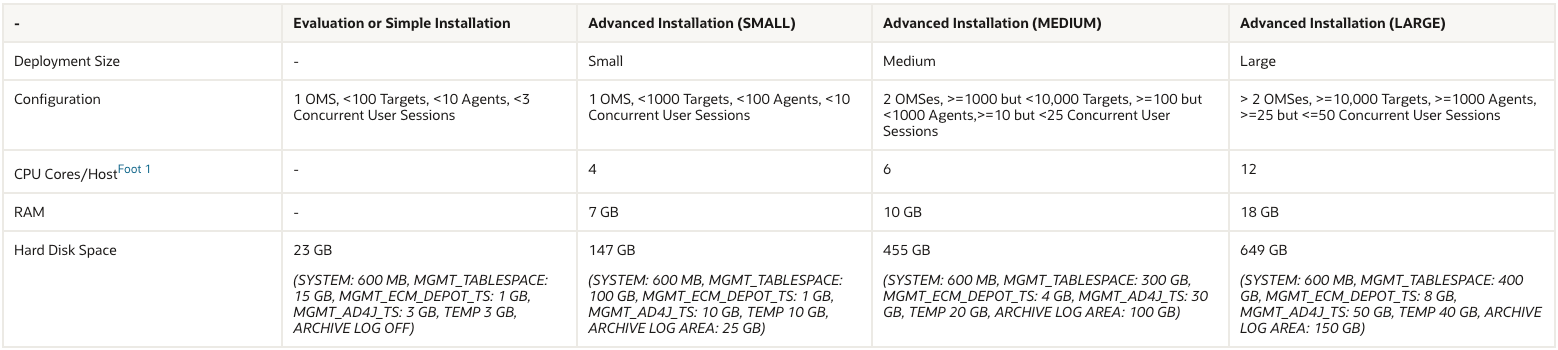
??注意:EMCC 服務端物理內存至少 10G(建議 16G 以上),磁盤空間 500G 往上。
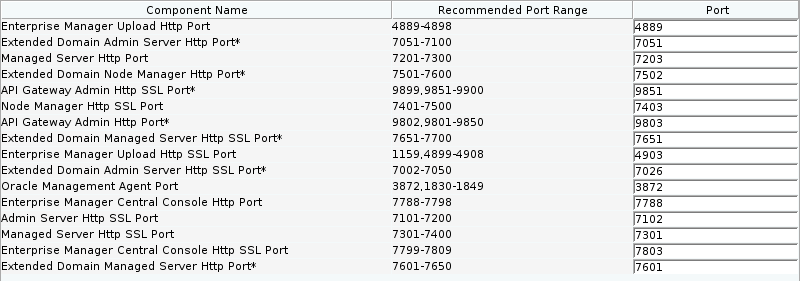
EMCC 需要開放端口
EMCC 24ai 軟件下載
Oracle Enterprise Manager 24ai 下載鏈接如下:
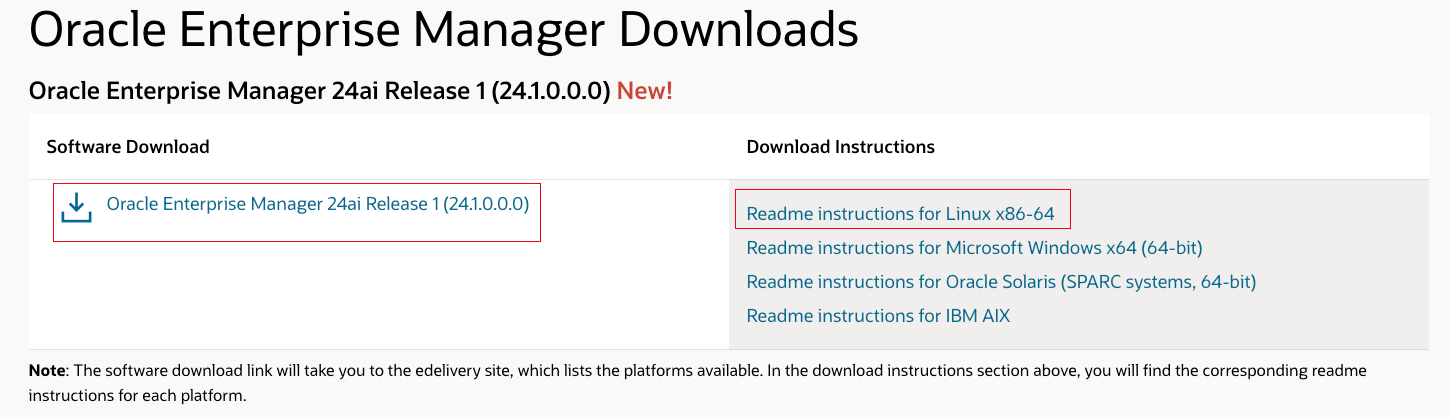
點擊上方軟件下載鏈接會跳轉到 edelivery 進行下載:
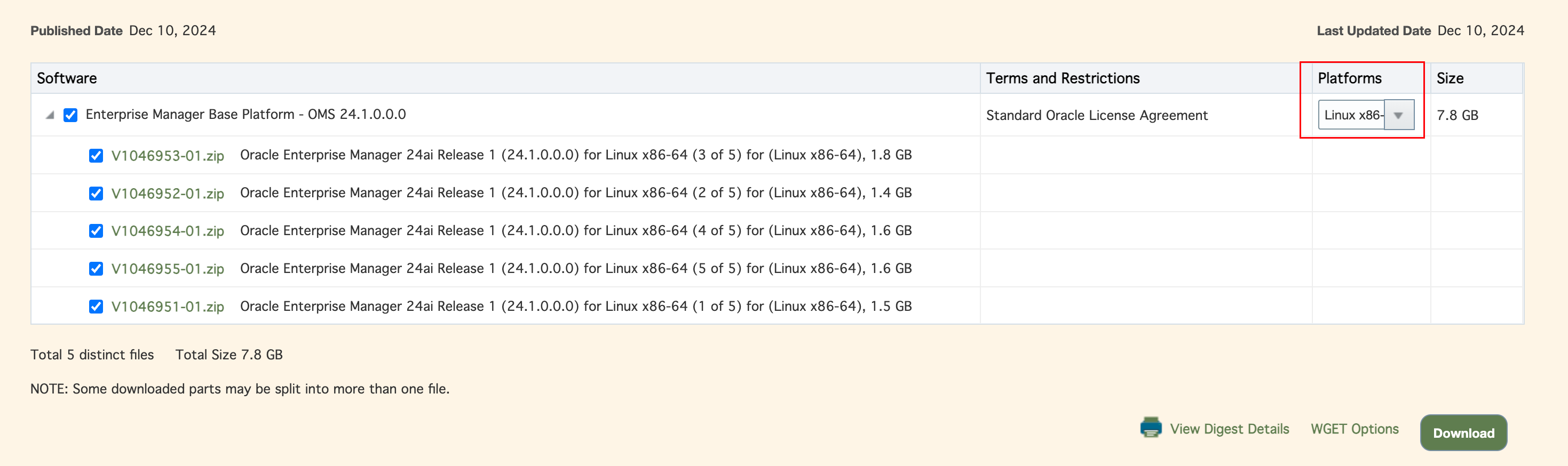
選擇對應的平臺進行下載即可。
安裝包上傳
安裝包下載后上傳到主機即可:
[root@emcc24ai ~]# mkdir /soft
[root@emcc24ai ~]# cd /soft

## Oracle 安裝軟件包
LINUX.X64_193000_db_home.zip

## Oracle 軟件補丁包
p36912597_190000_Linux-x86-64.zip
p36878697_190000_Linux-x86-64.zip
p6880880_190000_Linux-x86-64.zip

## EMCC 安裝包
V1046951-01.zip
V1046952-01.zip
V1046953-01.zip
V1046954-01.zip
V1046955-01.zip
數據庫安裝
Oracle 19C 一鍵安裝
Oracle 數據庫還是使用我寫的 Oracle 一鍵安裝腳本來一鍵部署,方便快捷。
?? Oracle 使用一鍵安裝腳本部署:https://www.oracleshellinstall.com/
不過多介紹,直接一鍵安裝完事:
[root@emcc24ai soft]# ./OracleShellInstall -lf ens192 `# 主機網卡名稱`\
-n emcc24ai `# 主機名`\
-op oracle `# 主機 oracle 用戶密碼`\
-d /u01 `# Oracle 軟件安裝基礎目錄`\
-ord /oradata `# 數據庫文件存放目錄`\
-o emcc `# 數據庫名稱`\
-dp oracle `# sys/system 用戶密碼`\
-ds AL32UTF8 `# 數據庫字符集`\
-ns AL16UTF16 `# 國家字符集`\
-opa 36912597 `# oracle PSU/RU 補丁編號`\
-jpa 36878697 `# OJVM PSU/RU 補丁編號`\
-redo 1000 `# 在線重做日志大小(M)`\
-opd Y `# 是否優化數據庫`

   ███████                             ██          ████████ ██               ██  ██ ██                    ██              ██  ██
  ██?????██                           ?██         ██?????? ?██              ?██ ?██?██                   ?██             ?██ ?██
 ██     ??██ ██████  ██████    █████  ?██  █████ ?██       ?██       █████  ?██ ?██?██ ███████   ██████ ██████  ██████   ?██ ?██
?██      ?██??██??█ ??????██  ██???██ ?██ ██???██?█████████?██████  ██???██ ?██ ?██?██??██???██ ██???? ???██?  ??????██  ?██ ?██
?██      ?██ ?██ ?   ███████ ?██  ??  ?██?███████????????██?██???██?███████ ?██ ?██?██ ?██  ?██??█████   ?██    ███████  ?██ ?██
??██     ██  ?██    ██????██ ?██   ██ ?██?██????        ?██?██  ?██?██????  ?██ ?██?██ ?██  ?██ ?????██  ?██   ██????██  ?██ ?██
 ??███████  ?███   ??████████??█████  ███??██████ ████████ ?██  ?██??██████ ███ ███?██ ███  ?██ ██████   ??██ ??████████ ███ ███
  ???????   ???     ????????  ?????  ???  ?????? ????????  ??   ??  ?????? ??? ??? ?? ???   ?? ??????     ??   ???????? ??? ???


注意:本腳本僅用于新服務器上實施部署數據庫使用,嚴禁在已運行數據庫的主機上執行,以免發生數據丟失或者損壞,造成不可挽回的損失!!!

請選擇安裝模式 [單機(si)/單機ASM(sa)/集群(rac)] : si

數據庫安裝模式: single

請選擇數據庫版本 [11|12|19|21|23] : 19

數據庫版本:     19

OracleShellInstall 開始安裝,詳細安裝過程可查看日志: tail -2000f /soft/print_shell_install_20241220134845.log

正在進行安裝前檢查,請稍等......

正在檢測安裝包 /soft/LINUX.X64_193000_db_home.zip 的 MD5 值是否正確,請稍等......

正在配置本地軟件源......已完成 (耗時: 0 秒)
正在獲取操作系統信息......已完成 (耗時: 1 秒)
正在安裝依賴包......已完成 (耗時: 128 秒)
正在配置 Swap......已完成 (耗時: 2 秒)
正在禁用防火墻......已完成 (耗時: 1 秒)
正在禁用 selinux......已完成 (耗時: 1 秒)
正在配置 nsyctl......已完成 (耗時: 0 秒)
正在配置主機名和 hosts 文件......已完成 (耗時: 0 秒)
正在創建用戶和組......已完成 (耗時: 1 秒)
正在創建安裝目錄......已完成 (耗時: 0 秒)
正在配置 Avahi-daemon 服務......已完成 (耗時: 1 秒)
正在配置透明大頁 && NUMA && 磁盤 IO 調度器......已完成 (耗時: 3 秒)
正在配置操作系統參數 sysctl......已完成 (耗時: 1 秒)
正在配置 RemoveIPC......已完成 (耗時: 1 秒)
正在配置用戶限制 limit......已完成 (耗時: 0 秒)
正在配置 shm 目錄......已完成 (耗時: 1 秒)
正在安裝 rlwrap 插件......已完成 (耗時: 1 秒)
正在配置用戶環境變量......已完成 (耗時: 1 秒)
正在解壓 Oracle 安裝包以及補丁......已完成 (耗時: 136 秒)
正在安裝 Oracle 軟件以及補丁......已完成 (耗時: 1018 秒)
正在創建監聽......已完成 (耗時: 3 秒)
正在創建數據庫......已完成 (耗時: 1557 秒)
正在優化數據庫......已完成 (耗時: 85 秒)

恭喜!Oracle 一鍵安裝執行完成 (耗時: 2948 秒),現在是否重啟主機:[Y/N] Y

正在重啟當前節點主機......
執行完成后,查看數據庫:
## 查看補丁
[oracle@emcc24ai:/home/oracle]$ opatch lspatches
36878697;OJVM RELEASE UPDATE: 19.25.0.0.241015 (36878697)
36912597;Database Release Update : 19.25.0.0.241015 (36912597)
29585399;OCW RELEASE UPDATE 19.3.0.0.0 (29585399)

OPatch succeeded.

## 連接數據庫
[oracle@emcc24ai:/home/oracle]$ sas

SQL*Plus: Release 19.0.0.0.0 - Production on Fri Dec 20 14:40:38 2024
Version 19.25.0.0.0

Copyright (c) 1982, 2024, Oracle.  All rights reserved.


Connected to:
Oracle Database 19c Enterprise Edition Release 19.0.0.0.0 - Production
Version 19.25.0.0.0

SYS@emcc SQL> show parameter name

NAME                                 TYPE        VALUE
------------------------------------ ----------- ------------------------------
cdb_cluster_name                     string
cell_offloadgroup_name               string
db_file_name_convert                 string
db_name                              string      emcc
db_unique_name                       string      emcc
global_names                         boolean     FALSE
instance_name                        string      emcc
lock_name_space                      string
log_file_name_convert                string
pdb_file_name_convert                string
processor_group_name                 string
service_names                        string      emcc
至此,Oracle 數據庫實例部署完成。
數據庫優化
一鍵安裝腳本會對數據庫進行最佳實踐優化,所以只需要修改必要的參數即可:
-- 調整內存參數,數據庫使用 12G 內存即可
SYS@emcc SQL> alter system set sga_max_size=10G scope=spfile;

System altered.

SYS@emcc SQL> alter system set sga_target=10G scope=spfile;

System altered.

SYS@emcc SQL> alter system set pga_aggregate_target=2G;

System altered.

-- 必須配置這個隱含參數 _allow_insert_with_update_check,否則會安裝失敗
SYS@emcc SQL> alter system set "_allow_insert_with_update_check"=true;

System altered.

-- 建議配置參數 shared_pool_size,否則安裝時會告警
SYS@emcc SQL> alter system set shared_pool_size=600M;

System altered.

-- 以下這些參數如果在 19c 版本數據庫中設置,需要取消設置,否則安裝失敗
SYS@emcc SQL> alter system reset "_optimizer_nlj_hj_adaptive_join" scope=both sid='*';
alter system reset "_optimizer_strans_adaptive_pruning" scope=both sid='*';
alter system reset "_px_adaptive_dist_method" scope=both sid='*';
alter system reset "_sql_plan_directive_mgmt_control" scope=both sid='*';
alter system reset "_optimizer_dsdir_usage_control" scope=both sid='*';
alter system reset "_optimizer_use_feedback" scope=both sid='*';
alter system reset "_optimizer_gather_feedback" scope=both sid='*';
alter system reset "_optimizer_performance_feedback" scope=both sid='*';

-- 重啟數據庫
shu immediate
startup
重啟數據庫生效。
EMCC 安裝
EMCC 依賴安裝
參考官方文檔:Package, Kernel Parameter and Library Requirements for Enterprise Manager
## root 用戶下執行
[root@emcc24ai:/root]# dnf install -y make binutils gcc libaio libstdc++ glibc-devel libXtst glibc-common libnsl sysstat

## 檢查是否安裝
[root@emcc24ai:/root]# rpm -qa make binutils gcc libaio libstdc++ glibc-devel libXtst glibc-common libnsl sysstat
make-4.2.1-11.el8.x86_64
libaio-0.3.112-1.el8.x86_64
glibc-common-2.28-251.0.2.el8.x86_64
libstdc++-8.5.0-21.0.1.el8.x86_64
glibc-devel-2.28-251.0.2.el8.x86_64
libXtst-1.2.3-7.el8.x86_64
gcc-8.5.0-21.0.1.el8.x86_64
sysstat-11.7.3-12.0.1.el8.x86_64
binutils-2.30-123.0.2.el8.x86_64
libnsl-2.28-251.0.2.el8.x86_64
正常情況下,安裝腳本在安裝 Oracle 數據庫時會將這些包都安裝好。
配置 net.ipv4.ip_local_port_range
[root@emcc24ai:/root]# cat /proc/sys/net/ipv4/ip_local_port_range
9000    65500

[root@emcc24ai:/root]# echo 11000 65000 > /proc/sys/net/ipv4/ip_local_port_range

[root@emcc24ai:/root]# cat /proc/sys/net/ipv4/ip_local_port_range
11000   65000

[root@emcc24ai:/root]# vi /etc/sysctl.conf
net.ipv4.ip_local_port_range = 11000 65000

[root@emcc24ai:/root]# sysctl -p
fs.aio-max-nr = 1048576
fs.file-max = 6815744
kernel.shmall = 8214575
kernel.shmmax = 33646903286
kernel.shmmni = 4096
kernel.sem = 250 32000 100 128
net.ipv4.ip_local_port_range = 11000 65000
net.core.rmem_default = 262144
net.core.rmem_max = 4194304
net.core.wmem_default = 262144
net.core.wmem_max = 1048576
vm.min_free_kbytes = 131433
net.ipv4.conf.ens192.rp_filter = 1
vm.swappiness = 10
kernel.panic_on_oops = 1
kernel.randomize_va_space = 2
vm.hugetlb_shm_group = 54321
kernel.numa_balancing = 0

## 重啟網絡生效
[root@emcc24ai:/root]# systemctl restart NetworkManager
配置 nproc
[root@emcc24ai:/root]# echo "nproc 4098" >> /etc/security/limits.conf
創建安裝目錄
[root@emcc24ai:/root]# mkdir -p /u01/app/oracle/middleware/{oms,agent}
[root@emcc24ai:/root]# chown -R oracle.oinstall /u01/app/oracle/middleware
配置環境變量
使用 oracle 用戶配置 oms 環境變量:
## oracle 用戶下執行
[oracle@emcc24ai:/home/oracle]$ cp /home/oracle/.bash_profile /home/oracle/.oms
[oracle@emcc24ai:/home/oracle]$ cat<<-\EOF>>/home/oracle/.oms
export OMS_HOME=/u01/app/oracle/middleware/oms/oms_home
export PATH=$OMS_HOME/bin:$OMS_HOME/OMSPatcher:$PATH
EOF
使用 oracle 用戶配置 agent 環境變量:
## oracle 用戶下執行
[oracle@emcc24ai:/home/oracle]$ cp /home/oracle/.bash_profile /home/oracle/.agent
[oracle@emcc24ai:/home/oracle]$ cat<<-\EOF>>/home/oracle/.agent
export AGENT_HOME=/u01/app/oracle/middleware/agent/agent_inst
export PATH=$AGENT_HOME/bin:$AGENT_HOME/AgentPatcher:$PATH
EOF
EMCC 圖形化安裝
圖形化安裝 EMCC,建議使用 vnc 遠程安裝,防止斷網失敗:
## oracle 用戶下
## 進入軟件目錄
[oracle@emcc24ai:/home/oracle]$ cd /soft/

## 解壓 emcc 安裝包
[oracle@emcc24ai:/soft]$ unzip -q V1046951-01.zip
[oracle@emcc24ai:/soft]$ unzip -q V1046952-01.zip
[oracle@emcc24ai:/soft]$ unzip -q V1046953-01.zip
[oracle@emcc24ai:/soft]$ unzip -q V1046954-01.zip
[oracle@emcc24ai:/soft]$ unzip -q V1046955-01.zip

## 解壓后文件如下
em24100_linux64.bin
em24100_linux64-2.zip
em24100_linux64-3.zip
em24100_linux64-4.zip
em24100_linux64-5.zip

## 授予執行權限
[oracle@emcc24ai:/soft]$ chmod +x em24100_linux64.bin
[oracle@emcc24ai:/soft]$ ./em24100_linux64.bin
## 安裝過程的日志輸出太長,這里省略不顯示
主要提供下圖形化安裝步驟:
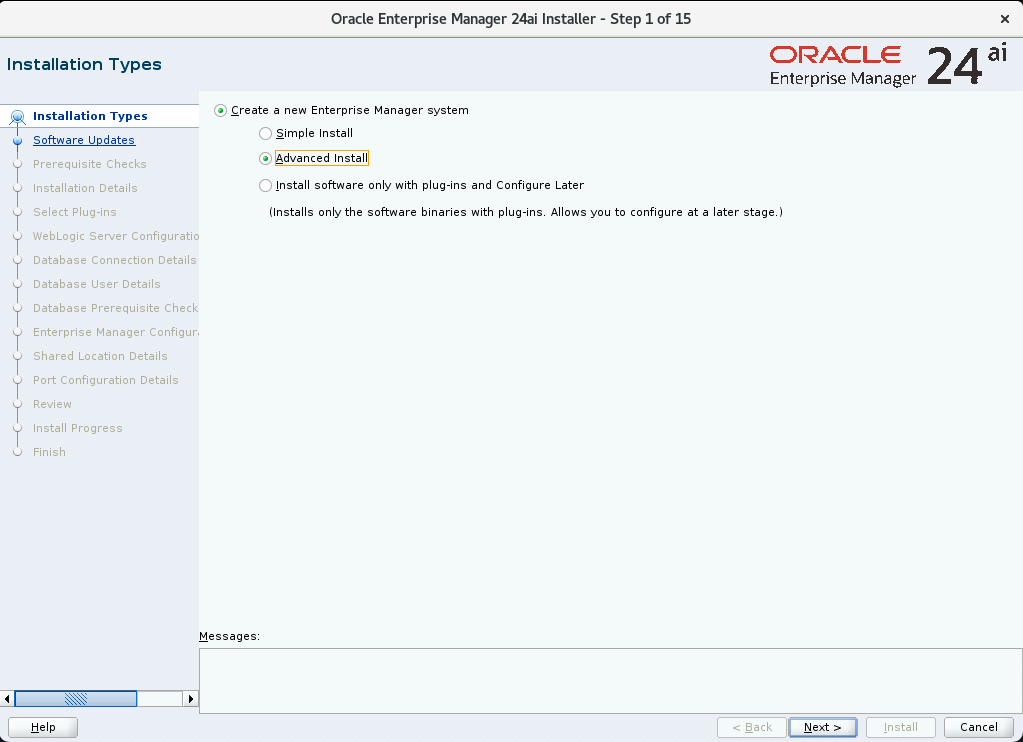
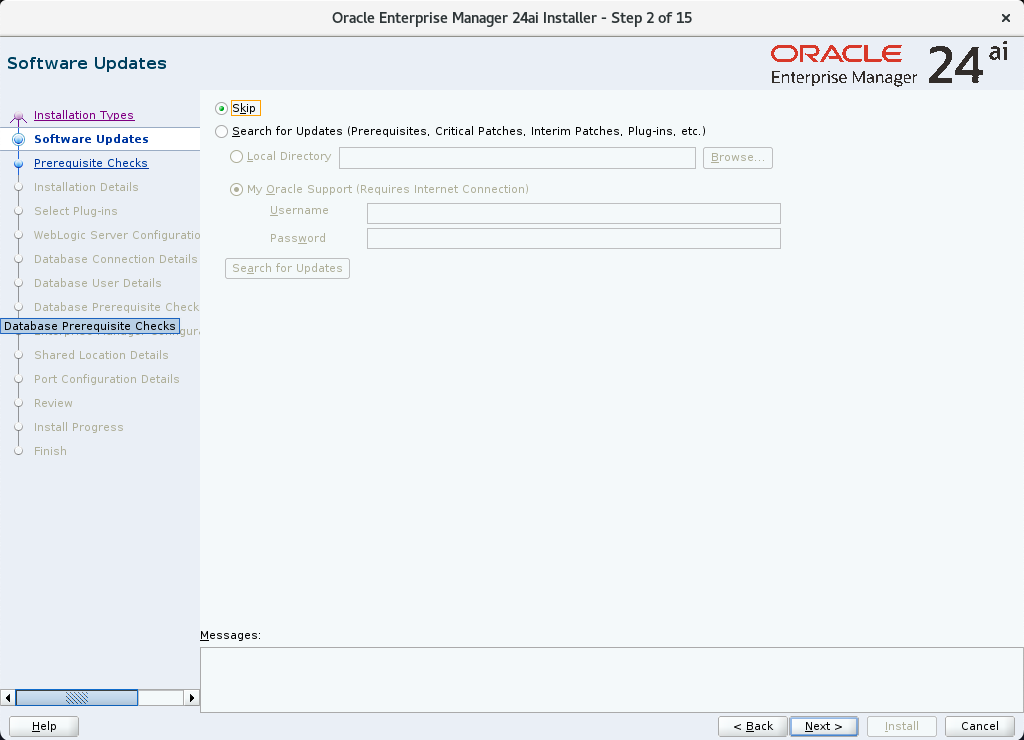
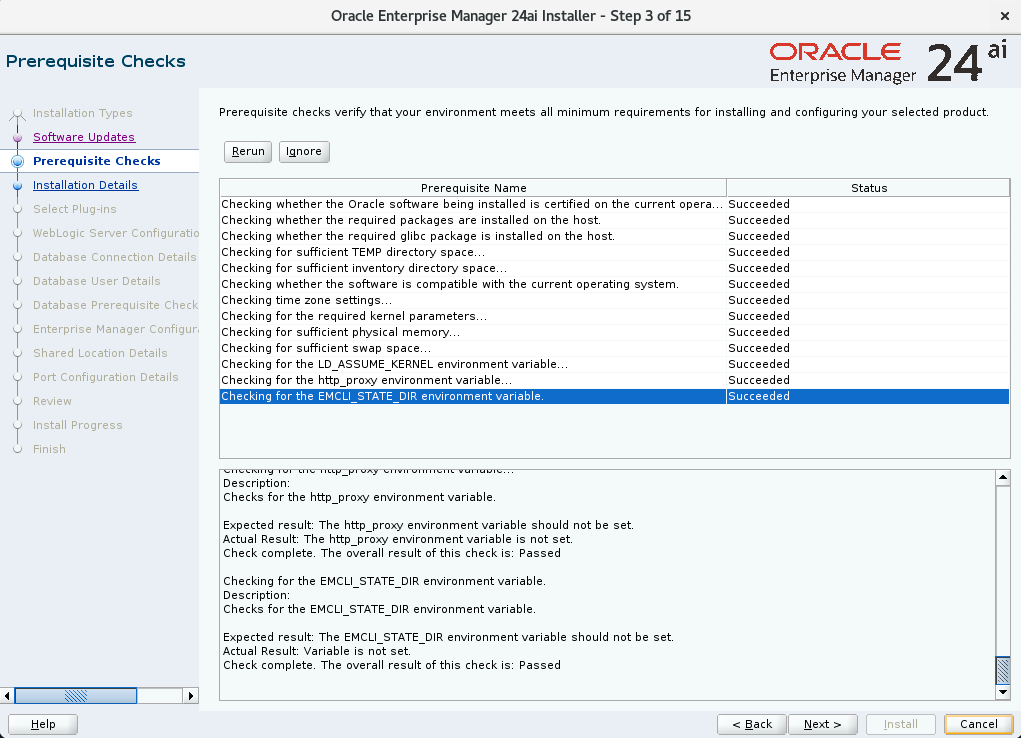
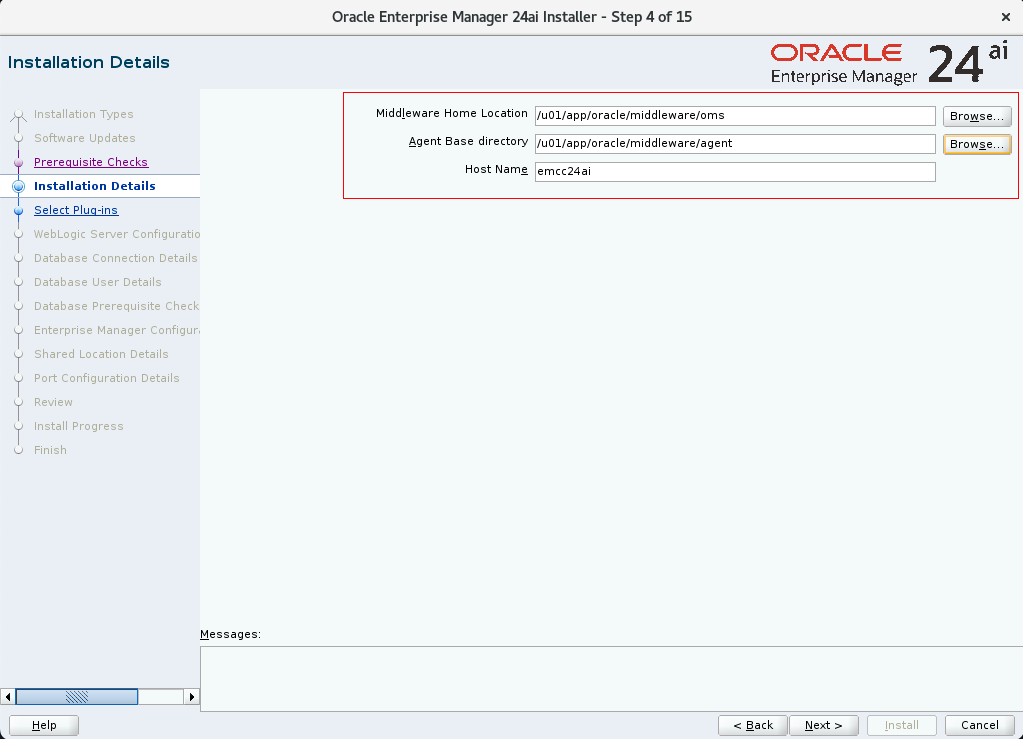
選擇上面我們提前創建好的安裝目錄:
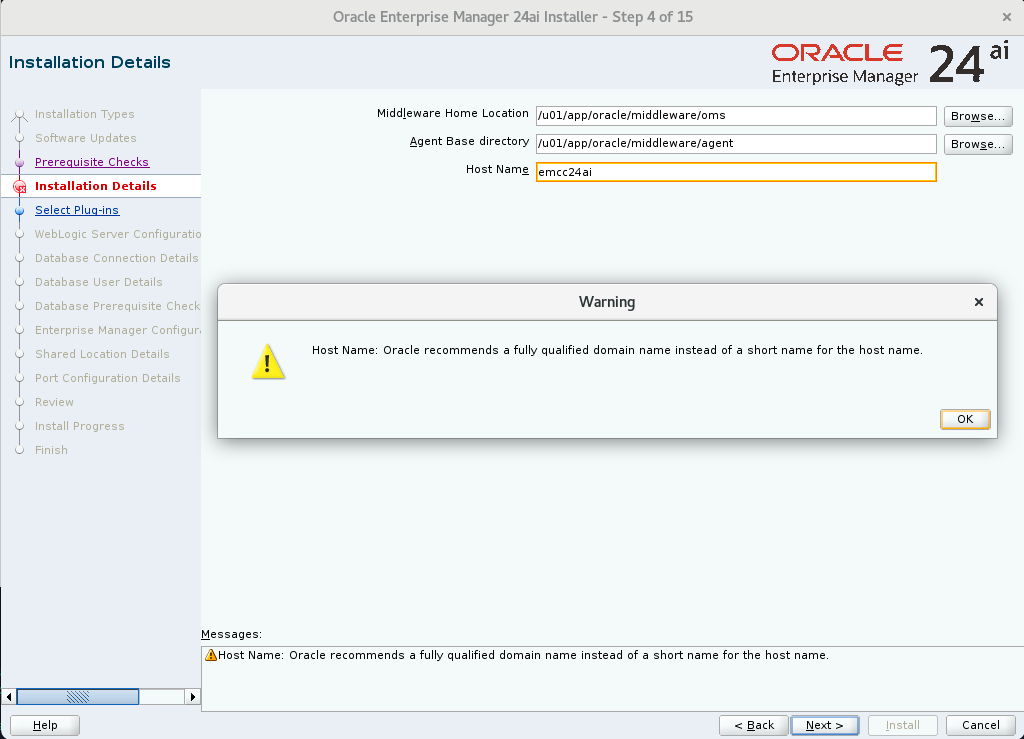
這里忽略提示即可:
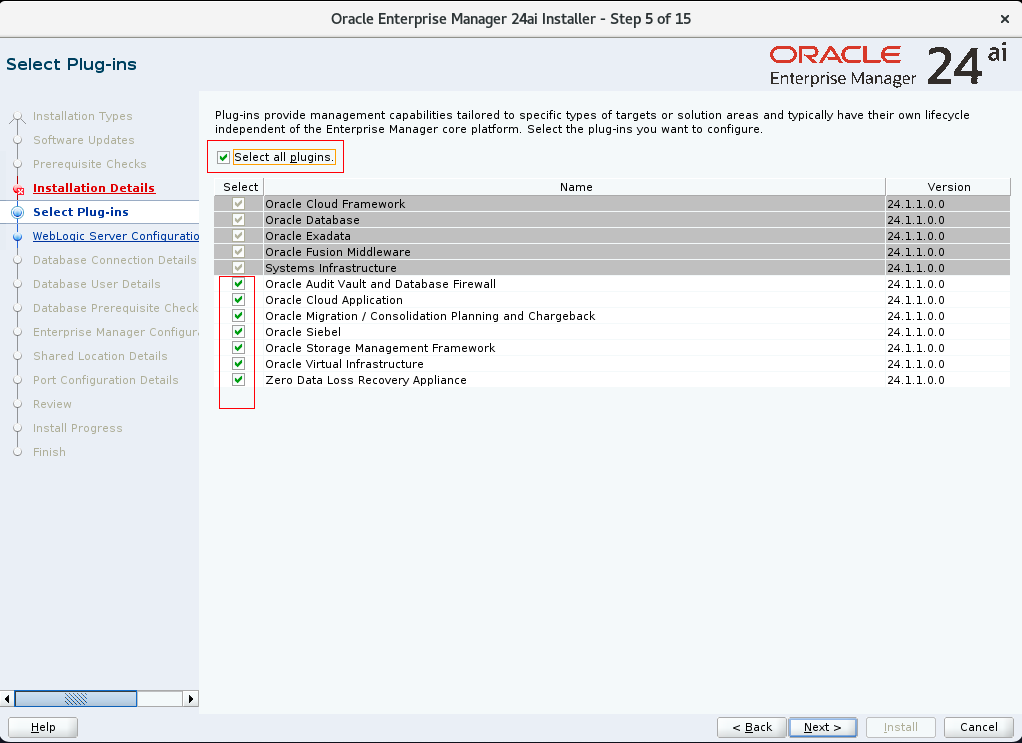
全部勾選:
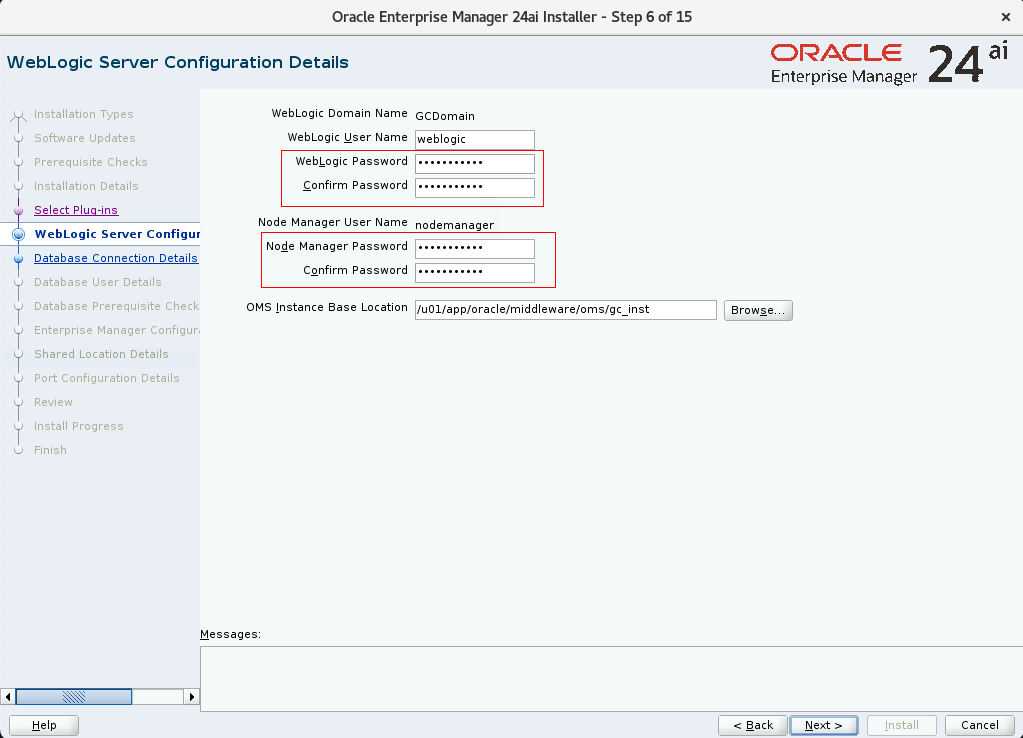
密碼有復雜度要求,設置后不能忘記(Passw0rd):
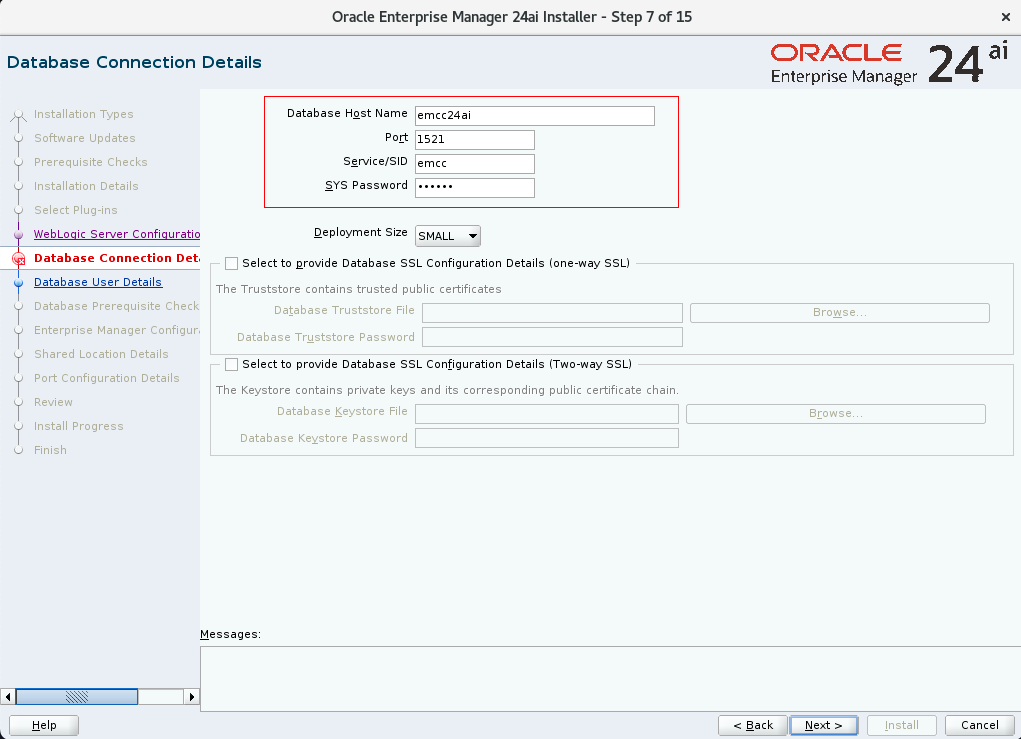
數據庫信息填寫上方創建的數據庫(驗證通過會進入下一步):
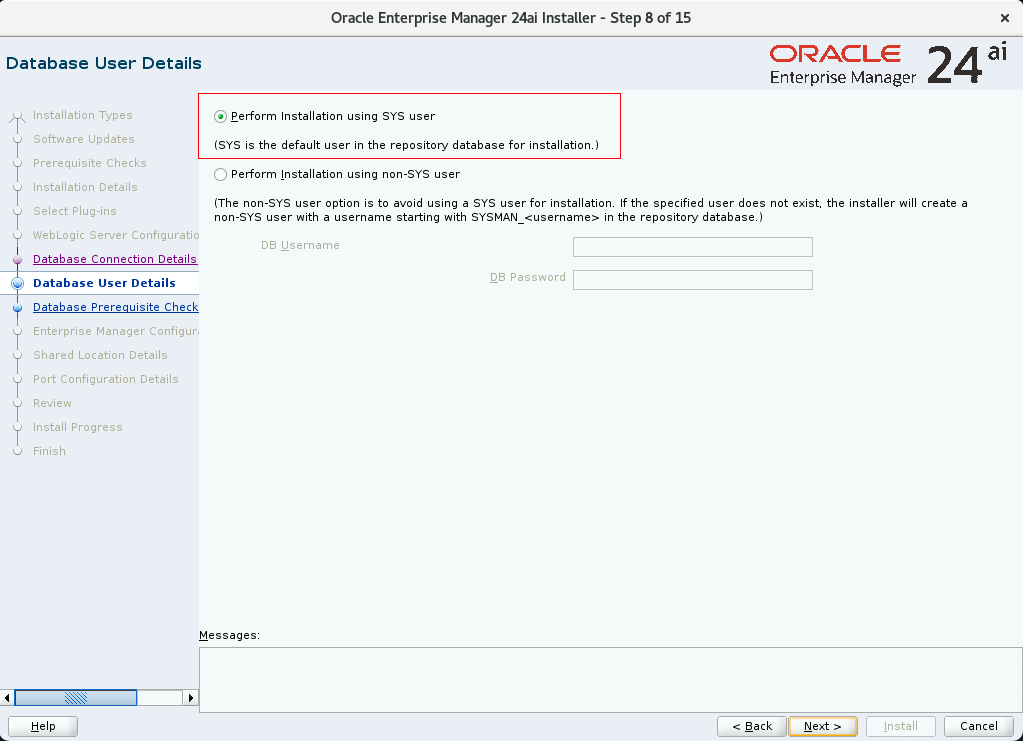
選擇使用 SYS 用戶安裝:
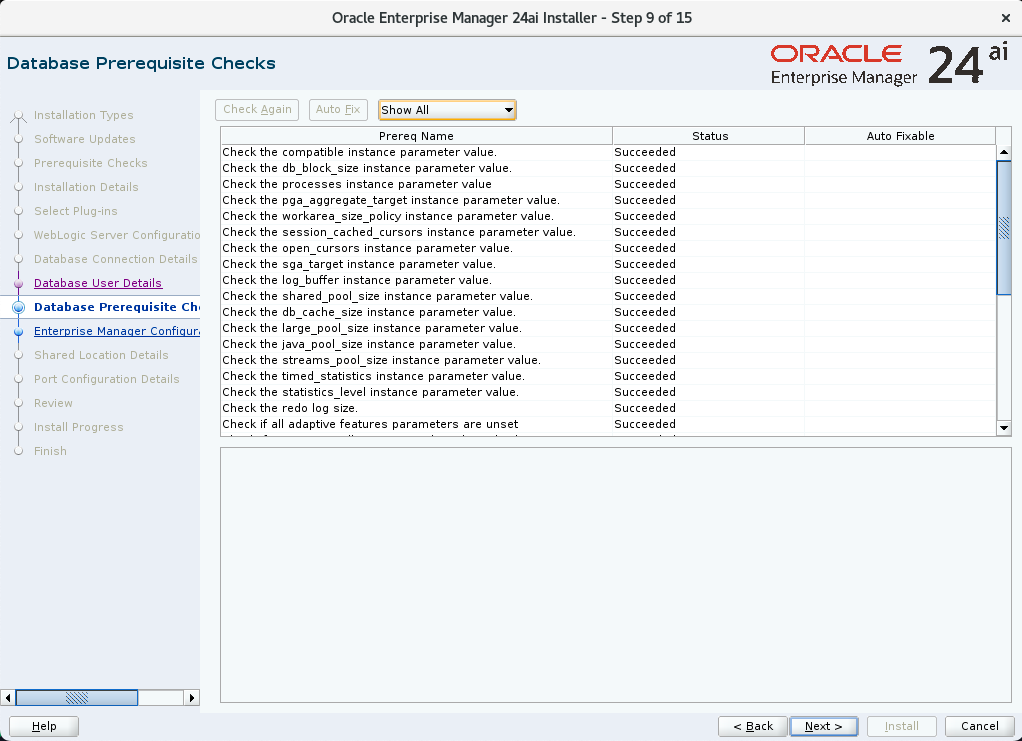
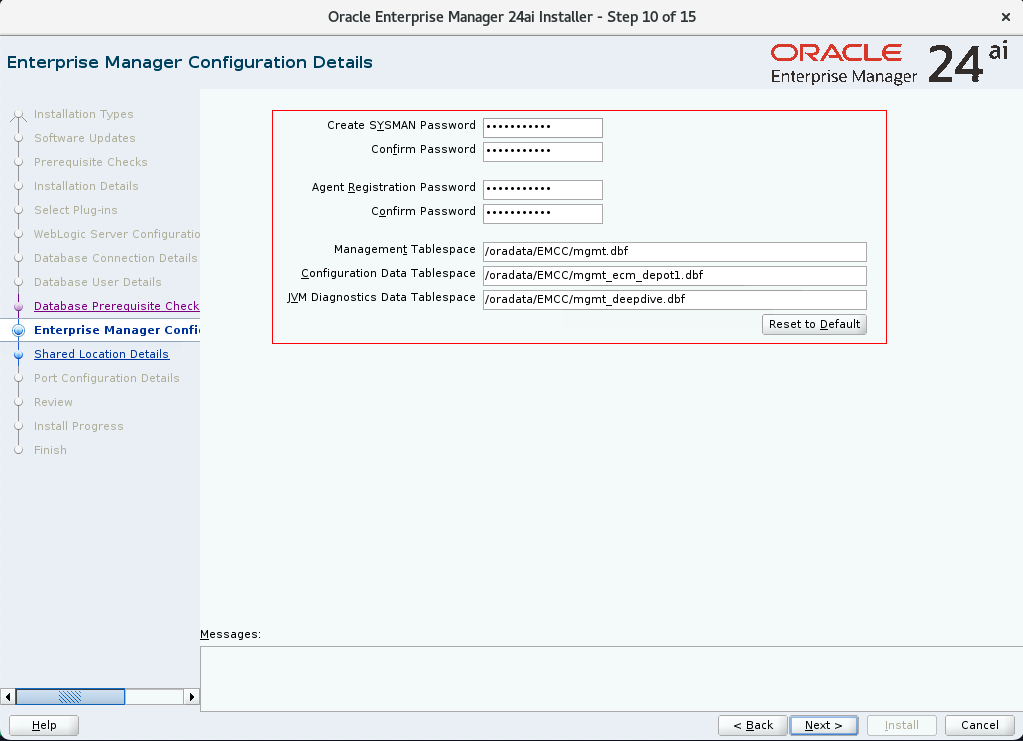
SYSMAN 是 EMCC 登錄用戶,密碼需要記住(Passw0rd):
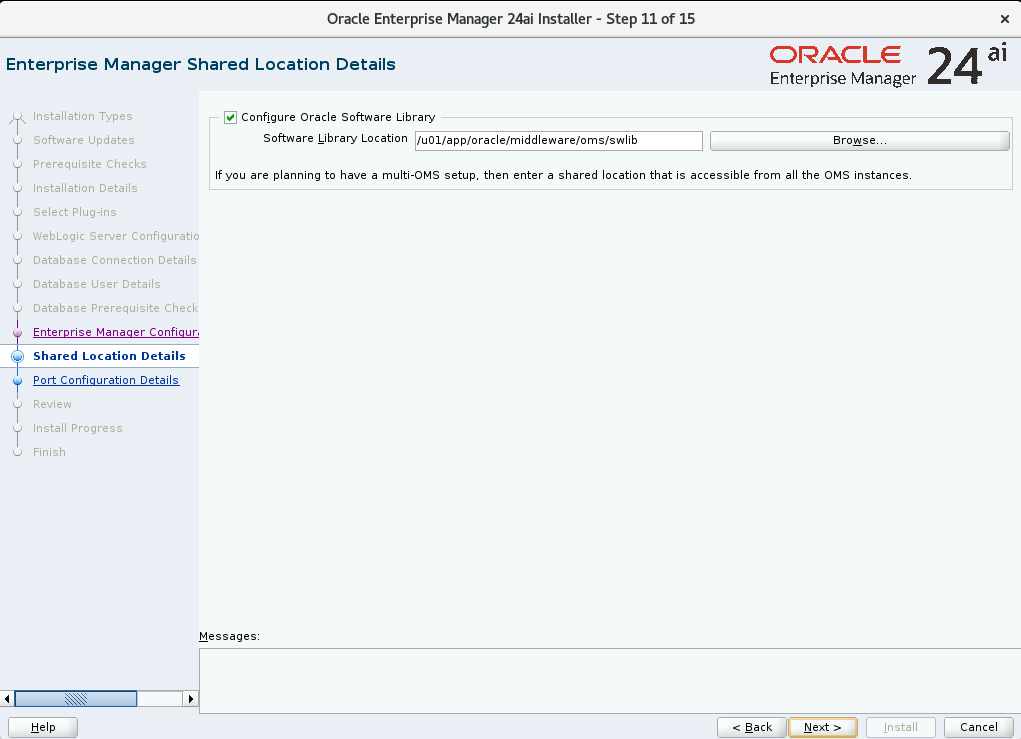
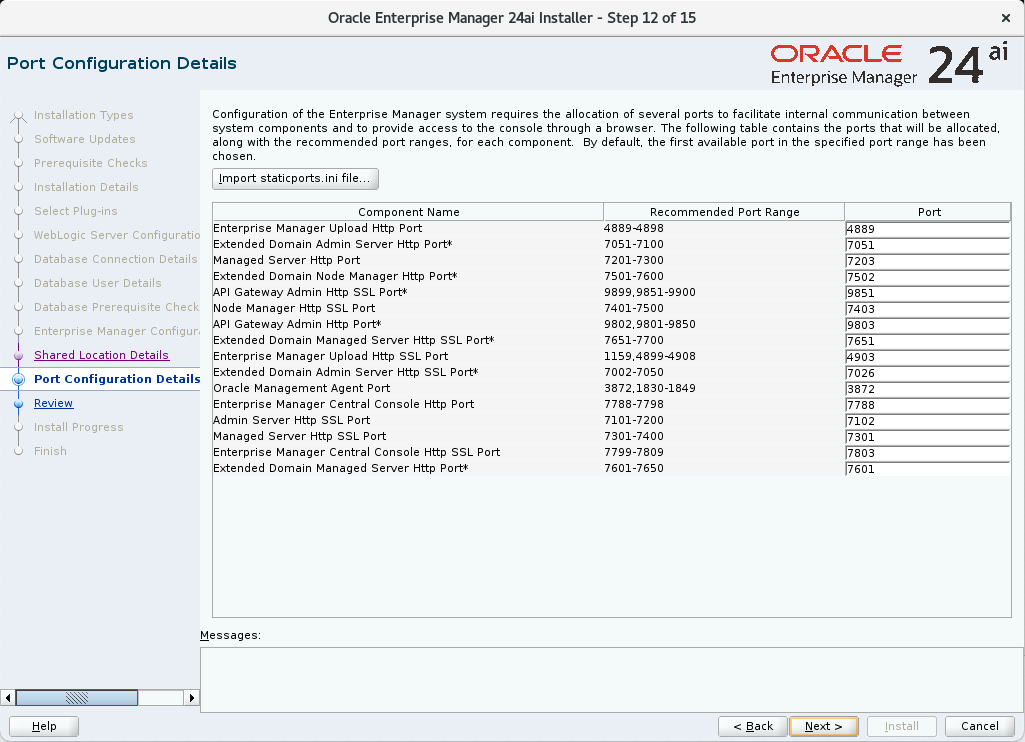
以下端口均需開啟:
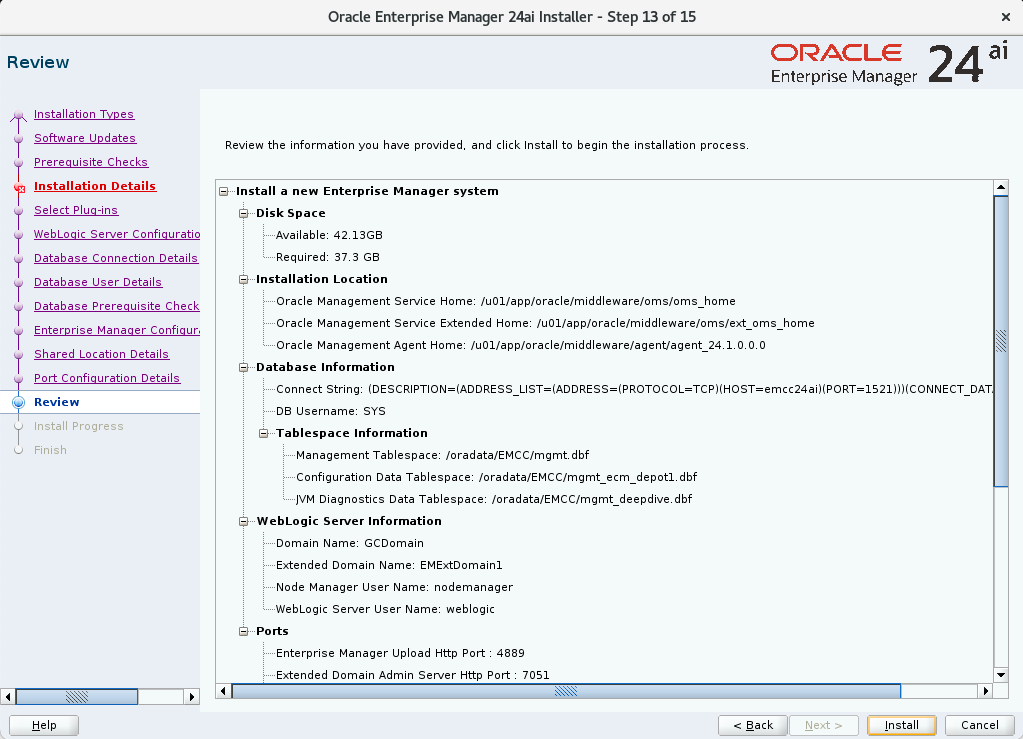
開始安裝:
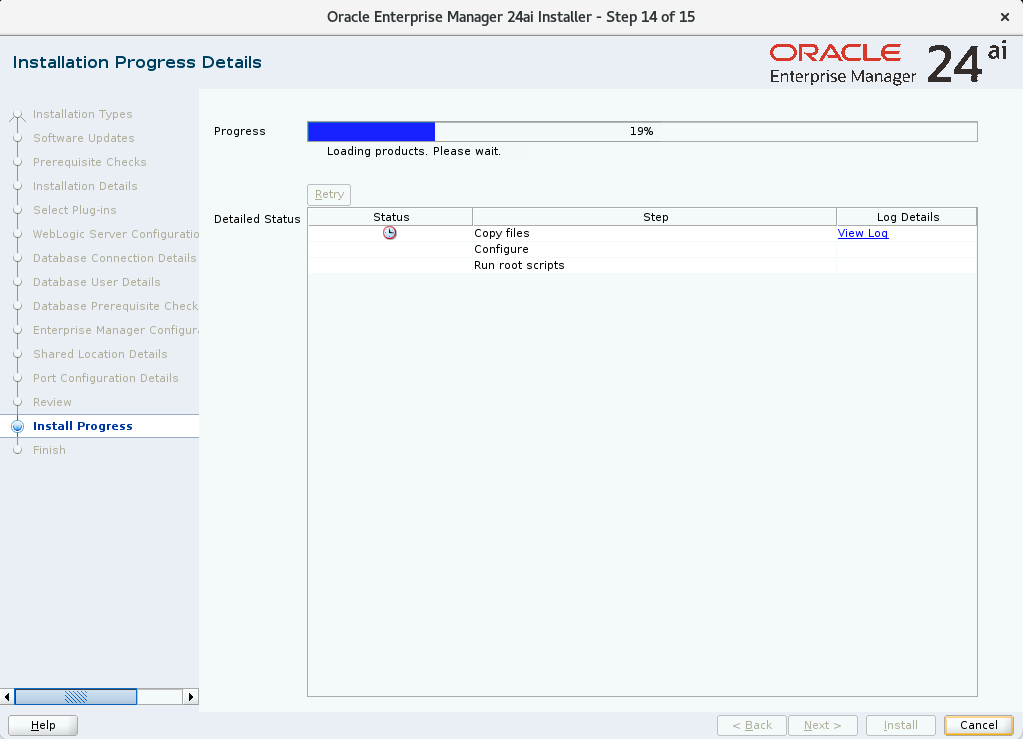
等待安裝完成即可:
執行 root.sh 腳本:
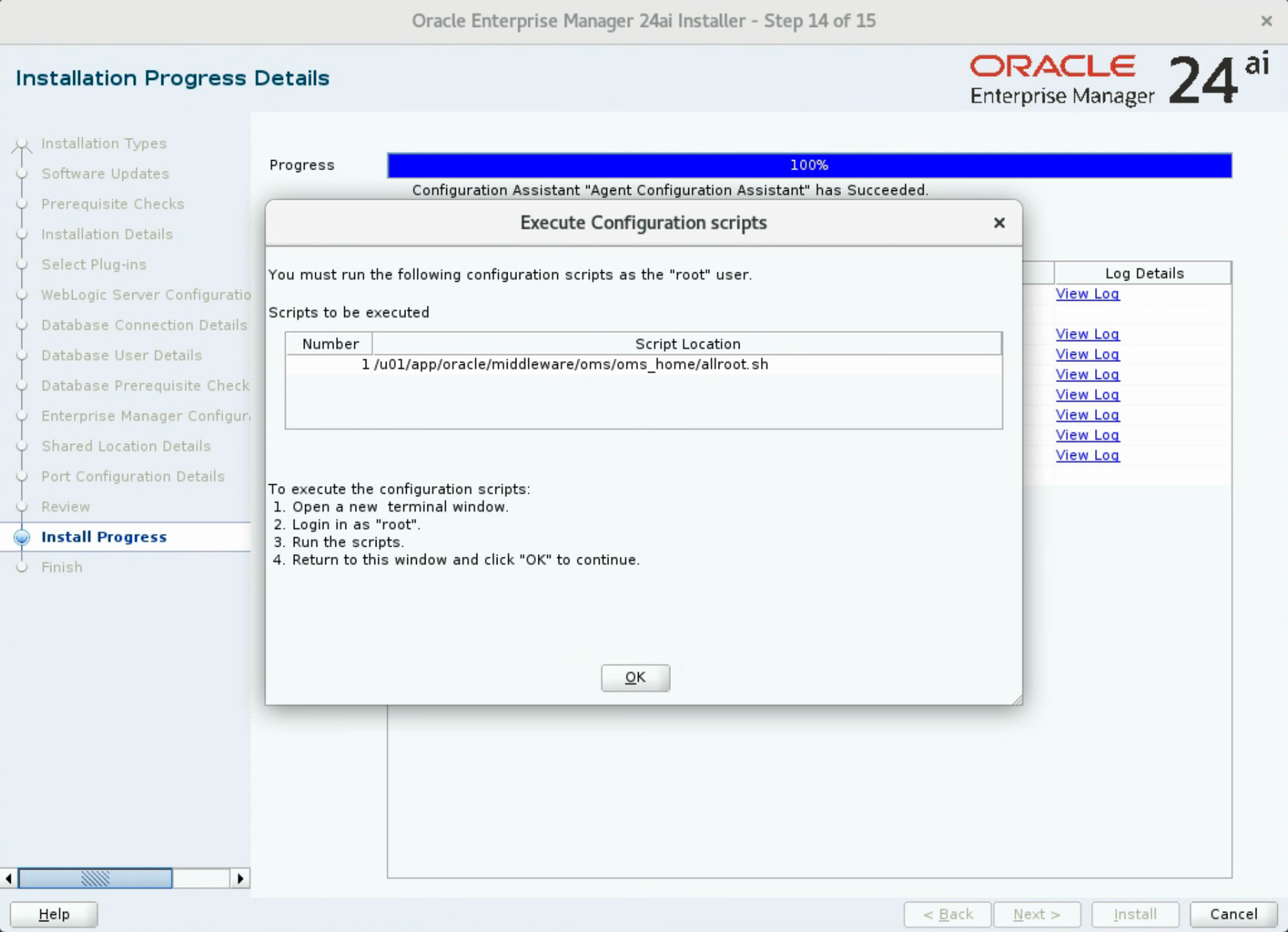
使用 root 用戶執行腳本:
[root@emcc24ai:/root]# /u01/app/oracle/middleware/oms/oms_home/allroot.sh

Starting to execute allroot.sh .........

Starting to execute /u01/app/oracle/middleware/oms/oms_home/root.sh ......
Check /u01/app/oracle/middleware/oms/oms_home/install/root_emcc24ai_2024-12-22_21-16-47-177128410.log for the output of root script

Finished product-specific root actions.
/etc exist
Finished execution of  /u01/app/oracle/middleware/oms/oms_home/root.sh ......


Starting to execute /u01/app/oracle/middleware/agent/agent_24.1.0.0.0/root.sh ......

Finished product-specific root actions.
/etc exist
Finished execution of  /u01/app/oracle/middleware/agent/agent_24.1.0.0.0/root.sh ......
安裝完成:
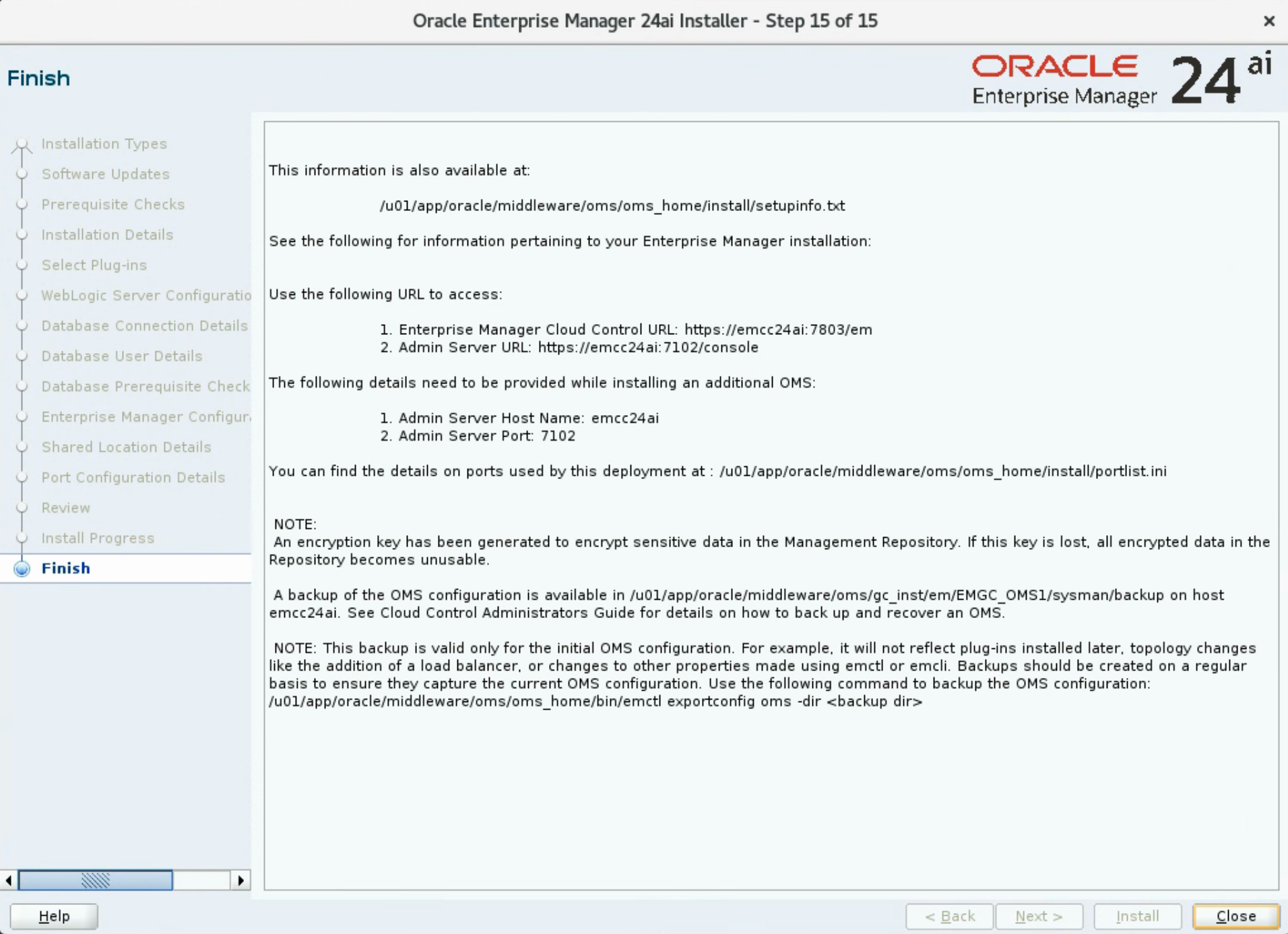
至此,EMCC 24ai 安裝完成。
安裝后配置
檢查 OMS 服務
## 生效 oms 環境變量
[oracle@emcc24ai:/home/oracle]$ . .oms

## 查看 oms 狀態
[oracle@emcc24ai:/home/oracle]$ emctl status oms
Oracle Enterprise Manager 24ai Release 1
Copyright (c) 1996, 2024 Oracle Corporation.  All rights reserved.
WebTier is Up
Oracle Management Server is Up
JVMD Engine is Up

## 查看 oms 詳細狀態信息
[oracle@emcc24ai:/home/oracle]$ emctl status oms -details
Oracle Enterprise Manager 24ai Release 1
Copyright (c) 1996, 2024 Oracle Corporation.  All rights reserved.
Console Server Host        : emcc24ai
HTTP Console Port          : 7788
HTTPS Console Port         : 7803
HTTP Upload Port           : 4889
HTTPS Upload Port          : 4903
EM Instance Home           : /u01/app/oracle/middleware/oms/gc_inst/em/EMGC_OMS1
OMS Log Directory Location : /u01/app/oracle/middleware/oms/gc_inst/em/EMGC_OMS1/sysman/log
OMS is not configured with SLB or virtual hostname
Agent Upload is locked.
OMS Console is locked.
Active CA ID: 1
Console URL: https://emcc24ai:7803/em
Upload URL: https://emcc24ai:4903/empbs/upload

WLS Domain Information
Domain Name            : GCDomain
Admin Server Host      : emcc24ai
Admin Server HTTPS Port: 7102
Admin Server is RUNNING

Extended Domain Name            : EMExtDomain1
Extended Admin Server Host      : emcc24ai
Extended Admin Server HTTPS Port: 7016
Extended Admin Server is RUNNING

Oracle Management Server Information
Managed Server Instance Name: EMGC_OMS1
Oracle Management Server Instance Host: emcc24ai
WebTier is Up
Oracle Management Server is Up
JVMD Engine is Up
檢查 AGENT 服務
## 生效 agent 環境變量
[oracle@emcc24ai:/home/oracle]$ . .agent

## 查看 agent 狀態
[oracle@emcc24ai:/home/oracle]$ emctl status agent
Oracle Enterprise Manager 24ai Release 1
Copyright (c) 1996, 2024 Oracle Corporation.  All rights reserved.
---------------------------------------------------------------
Agent Version          : 24.1.0.0.0
OMS Version            : 24.1.0.0.0
Protocol Version       : 12.1.0.1.0
Agent Home             : /u01/app/oracle/middleware/agent/agent_inst
Agent Log Directory    : /u01/app/oracle/middleware/agent/agent_inst/sysman/log
Agent Binaries         : /u01/app/oracle/middleware/agent/agent_24.1.0.0.0
Core JAR Location      : /u01/app/oracle/middleware/agent/agent_24.1.0.0.0/jlib
Agent Process ID       : 575071
Parent Process ID      : 575019
Agent URL              : https://emcc24ai:3872/emd/main/
Local Agent URL in NAT : https://emcc24ai:3872/emd/main/
Repository URL         : https://emcc24ai:4903/empbs/upload
Started at             : 2024-12-22 02:59:53
Started by user        : oracle
Operating System       : Linux version 5.15.0-206.153.7.1.el8uek.x86_64 (amd64)
Number of Targets      : 39
Last Reload            : (none)
Last successful upload                       : 2024-12-22 21:44:58
Last attempted upload                        : 2024-12-22 21:44:58
Total Megabytes of XML files uploaded so far : 2.79
Number of XML files pending upload           : 0
Size of XML files pending upload(MB)         : 0
Available disk space on upload filesystem    : 76.66%
Collection Status                            : Collections enabled
Heartbeat Status                             : Ok
Last attempted heartbeat to OMS              : 2024-12-22 21:44:52
Last successful heartbeat to OMS             : 2024-12-22 21:44:52
Next scheduled heartbeat to OMS              : 2024-12-22 21:45:52

---------------------------------------------------------------
Agent is Running and Ready
配置開機自啟
其實 EMCC 安裝完成后會創建一個開啟自啟腳本 /etc/rc.d/init.d/gcstartup,通過判斷 /etc/oragchomelist 文件中是否存在 oms 和 agent 的 HOME 來進行開機自啟:
[root@emcc24ai:/root]# ll /etc/rc.d/init.d/gcstartup
-rwxr-x--- 1 root root 7210 Dec 22 21:16 /etc/rc.d/init.d/gcstartup

[root@emcc24ai:/root]# cat /etc/oragchomelist
/u01/app/oracle/middleware/oms/oms_home
/u01/app/oracle/middleware/agent/agent_24.1.0.0.0:/u01/app/oracle/middleware/agent/agent_inst
但是有個問題,這個腳本不會等待數據庫先啟動再執行,所以還是需要人為增加自啟:
## oracle 用戶執行
sed -i 's/db:N/db:Y/' /etc/oratab
sed -i 's/ORACLE_HOME_LISTNER=$1/ORACLE_HOME_LISTNER=$ORACLE_HOME/' $ORACLE_HOME/bin/dbstart
## root 用戶執行
cat <<-\EOF >>/etc/rc.d/rc.local
su oracle -lc "/u01/app/oracle/product/19.3.0/db/bin/lsnrctl start"
su oracle -lc "/u01/app/oracle/product/19.3.0/db/bin/dbstart"
su oracle -lc "/u01/app/oracle/middleware/oms/omrs_home/bin/emctl start oms"
su oracle -lc "/u01/app/oracle/middleware/agent/agent_inst/bin/emctl start agent"
EOF
chmod +x /etc/rc.d/rc.local
配置完成后,我們重啟服務器,然后查看服務是否啟動:
## root 用戶執行
reboot
## 注意:重啟后需要等待一段時間,啟動比較慢
[oracle@emcc24ai:/home/oracle]$ ps -ef|grep smon
oracle      2246       1  0 22:06 ?        00:00:00 ora_smon_emcc
oracle      6359    6315  0 22:11 pts/1    00:00:00 grep --color=auto smon
[oracle@emcc24ai:/home/oracle]$ . .agent
[oracle@emcc24ai:/home/oracle]$ emctl status agent
Oracle Enterprise Manager 24ai Release 1
Copyright (c) 1996, 2024 Oracle Corporation.  All rights reserved.
---------------------------------------------------------------
Agent Version          : 24.1.0.0.0
OMS Version            : 24.1.0.0.0
Protocol Version       : 12.1.0.1.0
Agent Home             : /u01/app/oracle/middleware/agent/agent_inst
Agent Log Directory    : /u01/app/oracle/middleware/agent/agent_inst/sysman/log
Agent Binaries         : /u01/app/oracle/middleware/agent/agent_24.1.0.0.0
Core JAR Location      : /u01/app/oracle/middleware/agent/agent_24.1.0.0.0/jlib
Agent Process ID       : 2309
Parent Process ID      : 2130
Agent URL              : https://emcc24ai:3872/emd/main/
Local Agent URL in NAT : https://emcc24ai:3872/emd/main/
Repository URL         : https://emcc24ai:4903/empbs/upload
Started at             : 2024-12-22 22:07:02
Started by user        : oracle
Operating System       : Linux version 5.15.0-206.153.7.1.el8uek.x86_64 (amd64)
Number of Targets      : 39
Last Reload            : (none)
Last successful upload                       : 2024-12-22 22:13:14
Last attempted upload                        : 2024-12-22 22:14:11
Total Megabytes of XML files uploaded so far : 0.01
Number of XML files pending upload           : 118
Size of XML files pending upload(MB)         : 0.1
Available disk space on upload filesystem    : 76.57%
Collection Status                            : Collections enabled
Heartbeat Status                             : Ok
Last attempted heartbeat to OMS              : 2024-12-22 22:14:11
Last successful heartbeat to OMS             : 2024-12-22 22:14:11
Next scheduled heartbeat to OMS              : 2024-12-22 22:15:11

---------------------------------------------------------------
Agent is Running and Ready
[oracle@emcc24ai:/home/oracle]$
[oracle@emcc24ai:/home/oracle]$ . .oms
[oracle@emcc24ai:/home/oracle]$ emctl status oms
Oracle Enterprise Manager 24ai Release 1
Copyright (c) 1996, 2024 Oracle Corporation.  All rights reserved.
WebTier is Up
Oracle Management Server is Up
JVMD Engine is Up
可以看到所有服務都已經正常開啟了。
網頁訪問
訪問網頁訪問鏈接:https://192.168.6.72:7803/em
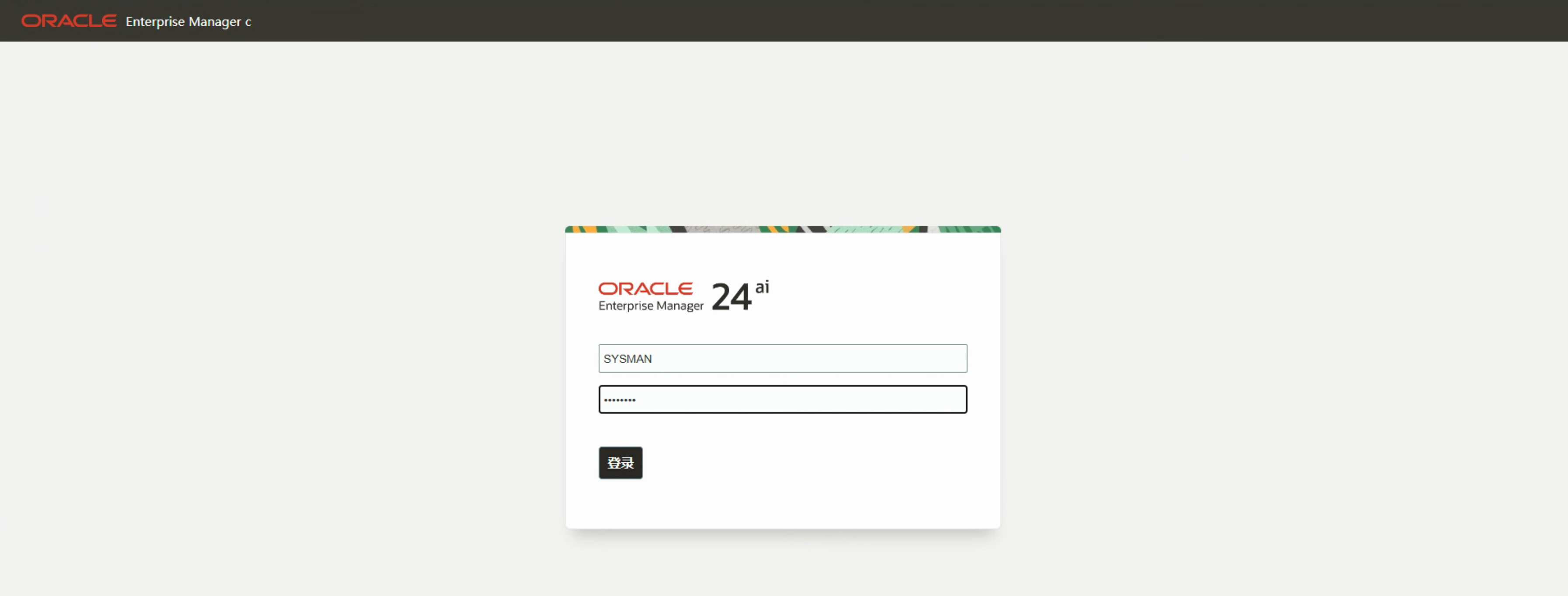
登錄之后的界面如下:
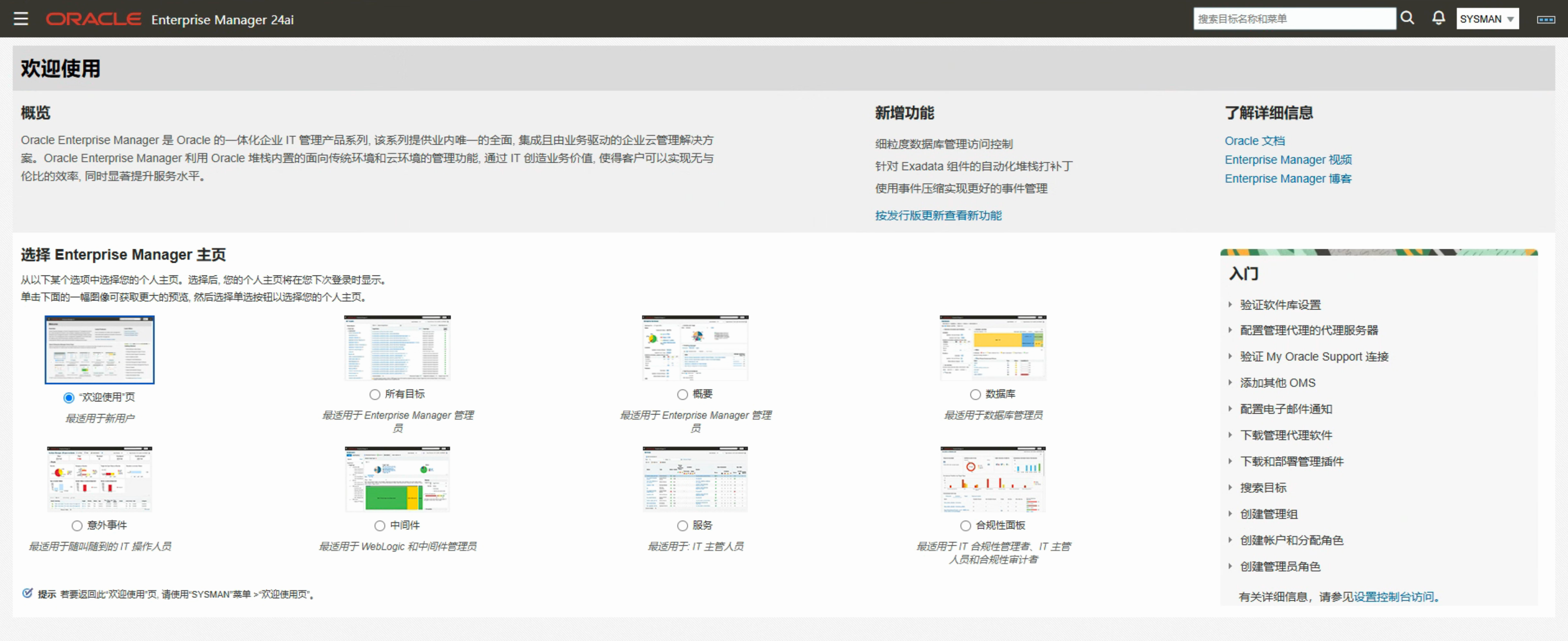
我們可以根據個人喜好或者監控需求選擇需要的主頁。
寫在最后
EMCC 24ai 的安裝還是比較簡單,目前還沒有補丁發布,所以沒有演示補丁安裝,應該與 13.5 版本的安裝大同小異。后續如果時間多的話,可能還會寫一篇如何從 13.5 升級到 24ai 的文章!
如果有遺漏或者不足的地方,歡迎評論區補充或者投稿,感謝閱讀!
往期精彩文章
眼見不一定為實:一條 SQL 背后隱藏的 BUG
第 1 天:VirtualBox 虛擬機安裝 Linux 系統
第 2 天:RHEL 6 安裝 Oracle 11GR2 數據庫
第 3 天:RHEL 7 安裝 Oracle 11GR2 數據庫
