



軟件版本:
PostgreSQL-11.2
gdal-2.2.3
proj-4.8.0
geos-3.5.0
json-c-0.13.1
protobuf-2.6.1
protobuf-c-1.2.1
postgis-2.5.0
一、源碼安裝pg11.2
用戶配置
創(chuàng)建安裝用戶
groupadd dba -g 1000
useradd postgres -g 1000 -u 1000
上傳對應iso鏡像,構建本地yum源
[root@ysl ~]# ls
CentOS-7-x86_64-Everything-2009.iso  rpmbuild  temp

[root@ysl ~]# mkdir /mnt/cdrom
[root@ysl ~]# mount -o loop /root/CentOS-7-x86_64-Everything-2009.iso /mnt/cdrom

[root@ysl ~]# cd /mnt/cdrom/
[root@ysl cdrom]# ls
CentOS_BuildTag  GPL       LiveOS    RPM-GPG-KEY-CentOS-7
EFI              images    Packages  RPM-GPG-KEY-CentOS-Testing-7
EULA             isolinux  repodata  TRANS.TBL

#備份原來repo,并創(chuàng)建新的repo

[root@ysl ~]# cd /etc/yum.repos.d/
[root@ysl yum.repos.d]# mv CentOS-Base.repo CentOS-Base.repo_bak
[root@ysl yum.repos.d]# mv epel.repo epel.repo_bak

[root@ysl yum.repos.d]#vim myiso.repo
[root@ysl yum.repos.d]# cat myiso.repo
[base]
name=CentOS7IOS
baseurl=file:///mnt/cdrom
enabled=1
gpgcheck=0
gpgkey=file:///mnt/cdrom/RPM-GPG-KEY-CentOS-7

[root@ysl ~]# yum clean all
[root@ysl ~]# yum list
安裝依賴
yum install -y openssl openssl-devel readline readline-devel zlib-devel gcc gcc-c++ libxml2 libxml2-devel flex automake libtool
切換到postgres用戶
su - postgres
獲取并解壓包
wget https://ftp.postgresql.org/pub/source/v11.2/postgresql-11.2.tar.gz
tar -xf postgresql-11.2.tar.gz
進入目錄
cd postgresql-11.2
編譯環(huán)境檢查
./configure --prefix=/home/postgres/soft --with-openssl --with-pgport=6000
(最后出現makefile)
編譯安裝
make world -j24
make install-world -j24
初始化數據庫數據目錄到/home/postgres/data
/home/postgres/soft/bin/initdb -D /home/postgres/data -E UTF8
啟動數據庫
/home/postgres/soft/bin/pg_ctl start -D /home/postgres/data -l /tmp/logfile
配置環(huán)境變量.bashrc
vi .bashrc
export PGPORT=6000
export PGUSER=postgres
export PGHOME=/home/postgres/soft
export PGDATA=/home/postgres/data
export PATH=${PGHOME}/bin:${PATH}
LD_LIBRARY_PATH=$PGHOME/lib:/usr/local/lib:/usr/local/lib64:/usr/lib64:$LD_LIBRARY_PATH
–讀取環(huán)境變量
source .bashrc
數據庫配置
su - postgres
mkdir -p /home/postgres/archive/wal
cluster_name='enmo_6001'
listen_addresses='0.0.0.0'
port=6000
wal_log_hints=on
logging_collector=on
logging_collector=on
log_filename='pg_log_%u.log'
log_file_mode=0600
log_truncate_on_rotation=on
log_rotation_age=1d
wal_keep_segments=100
archive_mode = on
archive_command = 'cp %p /home/postgres/archive/wal/%f'
wal_level = 'logical'
max_wal_senders = 10
max_replication_slots = 10
hot_standby = on
client_encoding='UTF8'
lc_messages = 'en_US.UTF-8'
lc_monetary = 'en_US.UTF-8'
lc_numeric = 'en_US.UTF-8'
lc_time = 'en_US.UTF-8
修改參數,其余參數根據環(huán)境進行調整。
重啟數據庫生效
pg_ctl restart -D $PGDATA -l /tmp/logfile
二、postgis安裝
mkdir  /home/postgres/postgis
cd /home/postgres/postgis
1.安裝gdal
 wget http://download.osgeo.org/gdal/2.2.3/gdal-2.2.3.tar.gz
 tar xf gdal-2.2.3.tar.gz
 cd gdal-2.2.3
 ./configure
 make -j 24
 make install -j 24
2.安裝proj
 wget http://download.osgeo.org/proj/proj-4.8.0.tar.gz
 tar xf proj-4.8.0.tar.gz
 cd  proj-4.8.0
  ./configure
 export PKG_CONFIG_PATH=/usr/local/lib/pkgconfig
 export LD_LIBRARY_PATH=/usr/local/lib
 make -j 24
 make install -j 24
3.安裝geos
 wget http://download.osgeo.org/geos/geos-3.5.0.tar.bz2
 tar jxvf geos-3.5.0.tar.bz2
  cd geos-3.5.0
 ./autogen.sh
 ./configure
 make -j 24
 make install -j 24
4.安裝json-c
 wget https://s3.amazonaws.com/json-c_releases/releases/json-c-0.13.1.tar.gz
 tar -xf json-c-0.13.1.tar.gz
 ./autogen.sh
 ./configure
 make -j 24
 make install -j 24
5.安裝protobuf-c
wget https://github.com/google/protobuf/releases/download/v2.6.1/protobuf-2.6.1.tar.gz
tar xvf protobuf-2.6.1.tar.gz
cd protobuf-2.6.1
./configure
make -j 24
make check
make install -j 24

wget https://github.com/protobuf-c/protobuf-c/releases/download/v1.2.1/protobuf-c-1.2.1.tar.gz
tar xvf protobuf-c-1.2.1.tar.gz
cd protobuf-c-1.2.1
export PKG_CONFIG_PATH=/usr/local/lib/pkgconfig  // 指定protobuf.pc文件所在
./configure
make -j 24
make install -j 24
6.配置ldconfig
將數據庫軟件、gdal、proj、geos的lib目錄添加到ldconfig。
cat /etc/ld.so.conf

include ld.so.conf.d/*.conf
/usr/local/gdal/lib/
/usr/local/proj/lib/
/usr/local/geos/lib/
/home/postgres/soft/lib/
/usr/local/lib

#保存退出
ldconfig
7.安裝postgis(./configure對應目錄需校對)
 wget http://download.osgeo.org/postgis/source/postgis-2.5.0.tar.gz
 tar -xf postgis-2.5.0.tar.gz
 cd postgis-2.5.0/
 ./configure -prefix=/usr/local/postgis --with-geosconfig=/usr/local/bin/geos-config --with-projdir=/usr/local/proj --with-gdalconfig=/usr/local/bin/gdal-config  --with-pgconfig=/home/postgres/soft/bin/pg_config
make -j 24
make install -j 24
8.檢查postgis組件是否安裝
ls /home/postgres/soft/share/extension/postgis*
9.使用超級用戶創(chuàng)建擴展
[postgres@ysl ~]$psql -Upostgres postgres

create extension postgis;
create extension postgis_topology;
create extension fuzzystrmatch;
create extension postgis_tiger_geocoder;
三、測試
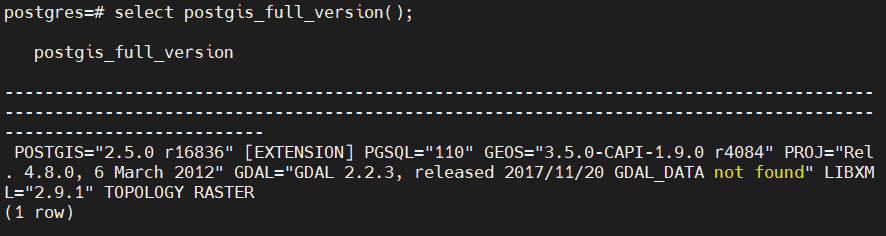
postgres=# select postgis_full_version();
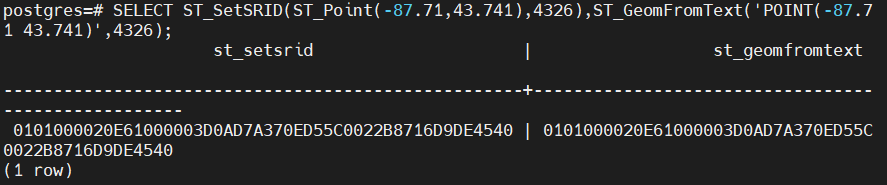
postgres=# SELECT ST_SetSRID(ST_Point(-87.71,43.741),4326),ST_GeomFromText('POINT(-87.71 43.741)',4326);
四、創(chuàng)建空間數據庫模板
1.模板及相關的函數,類型,操作符創(chuàng)建
# 創(chuàng)建無空間特性數據庫
[postgres@ysl ~]$ createdb template_postgis

# 創(chuàng)建相關空間數據庫相關的函數,類型,操作符等
[postgres@ysl ~]$ psql -f /home/postgres/soft/share/contrib/postgis-2.5/postgis.sql -d template_postgis
[postgres@ysl ~]$ psql -f /home/postgres/soft/share/contrib/postgis-2.5/rtpostgis.sql -d template_postgis

# 驗證空間數據庫版本
[postgres@ysl ~]$ psql template_postgis
psql (11.2)
Type "help" for help.

template_postgis=# select postgis_full_version();
                                                                               postgis_full_v
ersion
---------------------------------------------------------------------------------------------
--------------------------------------------------------------------------------------
 POSTGIS="2.5.0 r16836" PGSQL="110" GEOS="3.5.0-CAPI-1.9.0 r4084" PROJ="Rel. 4.8.0, 6 March 2
012" GDAL="GDAL 2.2.3, released 2017/11/20 GDAL_DATA not found" LIBXML="2.9.1" RASTER
(1 row)


template_postgis=# \d
               List of relations
 Schema |       Name        | Type  |  Owner
--------+-------------------+-------+----------
 public | geography_columns | view  | postgres
 public | geometry_columns  | view  | postgres
 public | raster_columns    | view  | postgres
 public | raster_overviews  | view  | postgres
 public | spatial_ref_sys   | table | postgres
(5 rows)
2.根據空間數據庫模板創(chuàng)建新的空間數據庫
[postgres@ysl ~]$ createdb -T template_postgis new_database

template_postgis=# \l
                                     List of databases
       Name       |  Owner   | Encoding |   Collate   |    Ctype    |   Access privileges
------------------+----------+----------+-------------+-------------+-----------------------
 new_database     | postgres | UTF8     | en_US.UTF-8 | en_US.UTF-8 |
 postgres         | postgres | UTF8     | en_US.UTF-8 | en_US.UTF-8 |
 template0        | postgres | UTF8     | en_US.UTF-8 | en_US.UTF-8 | =c/postgres          +
                  |          |          |             |             | postgres=CTc/postgres
 template1        | postgres | UTF8     | en_US.UTF-8 | en_US.UTF-8 | =c/postgres          +
                  |          |          |             |             | postgres=CTc/postgres
 template_postgis | postgres | UTF8     | en_US.UTF-8 | en_US.UTF-8 |
(5 rows)
3.測試
測試點(0, 0)是否在指定的多邊形內。
new_database=# select ST_Within(ST_GeomFromText('POINT(0 0)', 4326), ST_GeomFromText('POLYGON((1 1, 1 -1, -1 -1, -1 1, 1 1))', 4326)) ;
 st_within
-----------
 t
(1 row)
最后修改時間:2021-12-10 14:29:31
「喜歡這篇文章,您的關注和贊賞是給作者最好的鼓勵」
關注作者
【版權聲明】本文為墨天輪用戶原創(chuàng)內容,轉載時必須標注文章的來源(墨天輪),文章鏈接,文章作者等基本信息,否則作者和墨天輪有權追究責任。如果您發(fā)現墨天輪中有涉嫌抄襲或者侵權的內容,歡迎發(fā)送郵件至:contact@modb.pro進行舉報,并提供相關證據,一經查實,墨天輪將立刻刪除相關內容。
