



背景
生產環境是OceanBase 3-3-3的主備集群,一共18個節點,其中備機群一個X86節點在7.24版本期間observer無法連接,操作系統負載過高,收到告警信息如下:
集群:obxxxx,主機:192.168.66.11,告警:服務器CPU平均load1超限。CPU平均load1值 5.519 超過 2。
集群:obxxxx,主機:192.168.66.11,告警:OceanBase服務器無法連接。
集群:obxxxx,告警:OceanBase集群存在不工作 OBServer。不工作 OBServer 數量為 1,不工作 OBServer 有 192.168.66.11。
故障排查
首先確認告警信息,觀察OCP告警和該節點observer狀態確實顯示不可用,接著排查observer日志
在告警時間段數據庫日志,報錯 errcode=-4388 Unexpected internal error happen
**please checkout the internal errcode(errcode=0, file="**ob_freeze_info_snapshot_mgr.cpp", line_no=1121, info=“snapshot_gc_ts not refresh too long”)
遇到未知的內部錯誤發生,官方文檔解釋是請聯系技術支持人員協助排查。
[admin@panda-1 ~/oceanbase/log]$  grep -iE 'WARN|ERROR' observer.log.wf.20250725002035693
[2025-07-25 00:15:01.368501] ERROR issue_dba_error (ob_log.cpp:2322) [3396930][0][Y0-0000000000000000-0-0] [lt=9] [dc=0][errcode=-4388] Unexpected internal error happen, please checkout the internal errcode(errcode=0, file="ob_freeze_info_snapshot_mgr.cpp", line_no=1121, info="snapshot_gc_ts not refresh too long")
[2025-07-25 00:16:01.678594] ERROR issue_dba_error (ob_log.cpp:2322) [3396930][0][Y0-0000000000000000-0-0] [lt=12] [dc=0][errcode=-4388] Unexpected internal error happen, please checkout the internal errcode(errcode=0, file="ob_freeze_info_snapshot_mgr.cpp", line_no=1121, info="snapshot_gc_ts not refresh too long")
[2025-07-25 00:17:01.982843] ERROR issue_dba_error (ob_log.cpp:2322) [3396930][0][Y0-0000000000000000-0-0] [lt=9] [dc=0][errcode=-4388] Unexpected internal error happen, please checkout the internal errcode(errcode=0, file="ob_freeze_info_snapshot_mgr.cpp", line_no=1121, info="snapshot_gc_ts not refresh too long")
[2025-07-25 00:18:02.274850] ERROR issue_dba_error (ob_log.cpp:2322) [3396930][0][Y0-0000000000000000-0-0] [lt=9] [dc=0][errcode=-4388] Unexpected internal error happen, please checkout the internal errcode(errcode=0, file="ob_freeze_info_snapshot_mgr.cpp", line_no=1121, info="snapshot_gc_ts not refresh too long")
[2025-07-25 00:19:02.583788] ERROR issue_dba_error (ob_log.cpp:2322) [3396930][0][Y0-0000000000000000-0-0] [lt=9] [dc=0][errcode=-4388] Unexpected internal error happen, please checkout the internal errcode(errcode=0, file="ob_freeze_info_snapshot_mgr.cpp", line_no=1121, info="snapshot_gc_ts not refresh too long")
[2025-07-25 00:20:02.905195] ERROR issue_dba_error (ob_log.cpp:2322) [3396930][0][Y0-0000000000000000-0-0] [lt=10] [dc=0][errcode=-4388] Unexpected internal error happen, please checkout the internal errcode(errcode=0, file="ob_freeze_info_snapshot_mgr.cpp", line_no=1121, info="snapshot_gc_ts not refresh too long")
[admin@panda-1 ~/oceanbase/log]$  grep -iE 'WARN|ERROR' rootservice.log
**繼續排查,**觀察OCP各項指標平穩,CPU正常但是服務器負載很高
操作系統負載3000,CPU空閑卻有99%,說明CPU并不忙,可能大量進程在阻塞或者等待IO
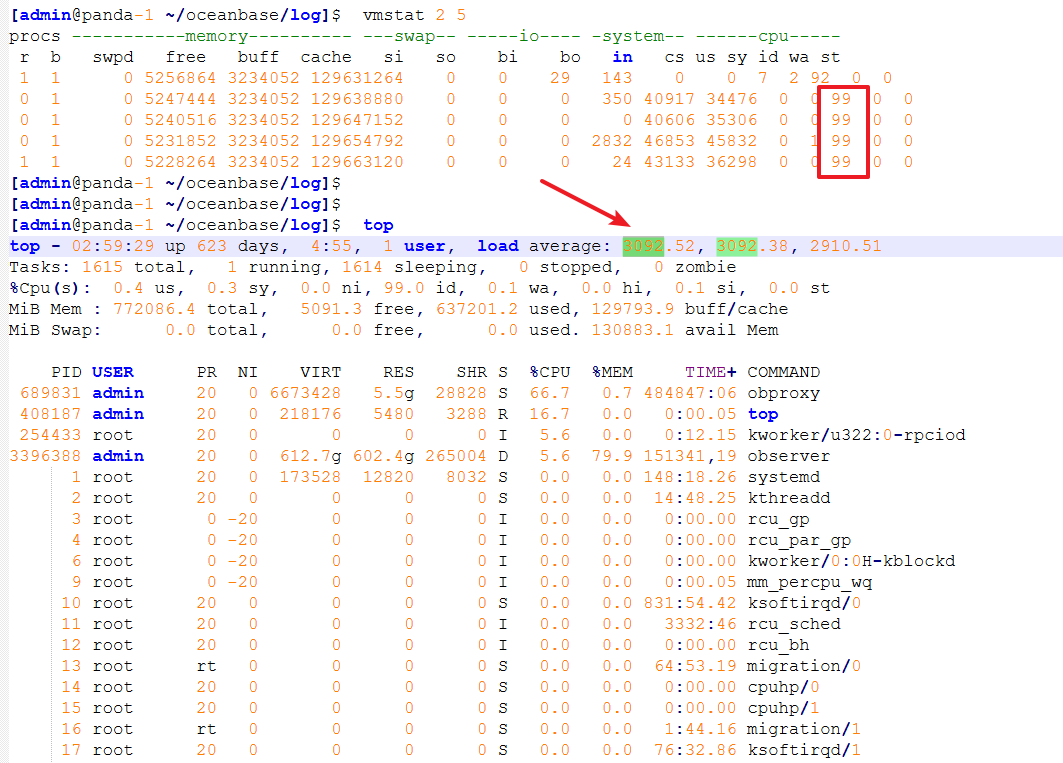
觀察有一個進程卡在內核態D(不可中斷睡眠狀態)
[admin@panda-1 ~/oceanbase/log]$  ps -eo state,pid,cmd | grep "^D" | wc -l
1
[admin@panda-1 ~/oceanbase/log]$  ps -eo state,pid,cmd | grep "^D" | head -20
D 3396388 /home/admin/oceanbase/bin/observer
observer大量線程卡在不可中斷的 D 狀態,猜測可能是在等待 I/O 或 資源阻塞

原因分析:內存硬件故障
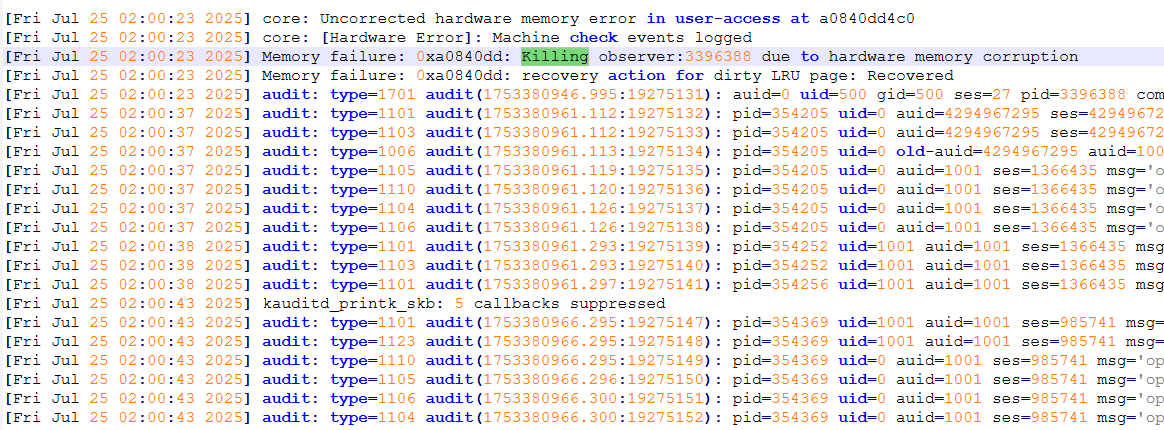
排查系統日志,最后確定是內存故障導致,內存故障可能導致observer獲取不到特定資源,處于D狀態。
該狀態是指進程處于睡眠狀態且進程是不可中斷的。而且這時候的不可睡眠狀態是不會立即響應異步信號的的,也就是說kill -9可能殺不死該進程。
[admin@panda-1 ~]$  dmesg -T|grep -iE error
[Fri Jul 25 02:00:23 2025] core: Uncorrected hardware memory error in user-access at a0840dd4c0
[Fri Jul 25 02:00:23 2025] core: [Hardware Error]: Machine check events logged

[admin@panda-1 ~]$  dmesg -T|grep -i memory
[Fri Jul 25 02:00:23 2025] core: Uncorrected hardware memory error in user-access at a0840dd4c0
[Fri Jul 25 02:00:23 2025] Memory failure: 0xa0840dd: Killing observer:3396388 due to hardware memory corruption
[Fri Jul 25 02:00:23 2025] Memory failure: 0xa0840dd: recovery action for dirty LRU page: Recovered
因為該節點不止一個部門的業務確定在下個版本維修,遷移數據源
恢復措施與建議
主要是硬件內存故障導致OBSERVER不可用,主要現象是CPU使用率很低,操作系統平均負載很高,并由此判斷出可能是IO阻塞、操作系統資源爭用等,排查發現操作系統進程作業超限,大量處于不可中斷的休眠狀態,再由demsg診斷是否是CPU、內存、磁盤等硬件故障。當晚持續1h沒有下去的跡象,因為是在版本期間并且是備庫節點,直接kill了observer進程,再在OCP重啟observer和OBproxy后恢復。但不建議這么操作。
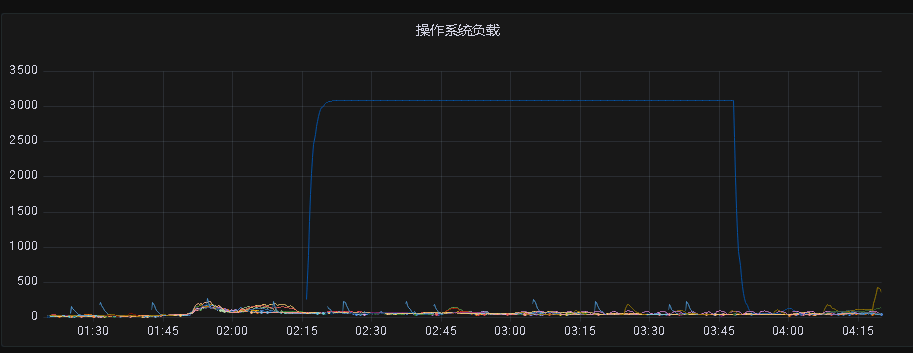
kill進程,OCP重啟
[admin@panda-1 ~]$  ps -ef | grep observer
admin     469260  464771  0 03:47 pts/0    00:00:00 grep --color=auto observer
admin    3396388       1 99  2023 ?        6305-21:20:04 /home/admin/oceanbase/bin/observer
[admin@panda-1 ~]$
[admin@panda-1 ~]$
[admin@panda-1 ~]$  kill -9 3396388
[admin@panda-1 ~]$  ps -ef | grep observer
admin     469683  464771  0 03:48 pts/0    00:00:00 grep --color=auto observer
admin    3396388       1 99  2023 ?        6305-21:35:17 [observer] <defunct>
[admin@panda-1 ~]$  ps -ef | grep observer
admin     471156  464771  0 03:49 pts/0    00:00:00 grep --color=auto observer
建議恢復過程可由OCP白屏操作重啟:進入OCP集群 -->概覽 -->下滑找到集群機器 -->重啟(ocp重啟obserevr,停止進程前執行轉儲操作,可加快恢復速度)
后續**observer節點維修**也可通過OCP白屏操作更加安全:停止服務前轉儲 --> 停止observer服務 --> 設置下線時間 --> 停止observer進程 --> 維修結束,啟動進程 --> 啟動服務
相關節點維修需要注意機器的是否存在業務,下線時間,如果 OBServer 停機時間超過server_permanent_offline_time下線時間觸發了永久下線,則需要執行副本 rebuild 操作,需要的時間可能很久。
-- 轉儲 root用戶sys租戶
alter system minor freeze;
-- 查詢結果為”0”表示轉儲結束
select count(*) from __all_virtual_memstore_info where is_active=0;
-- 查看業務IP
SELECT substr(host,1,13) proxy_ip, count(*) process_cnt
FROM oceanbase.__all_virtual_processlist
group by substr(host,1,13) order by process_cnt desc;
-- WHERE tenant = 'sys' OR tenant = 'oceanbase';
重啟主機或observer后需要判斷是否需要重啟OBPROXY、操作系統的綁核工作。
