



用戶需求:原庫是oracle exadata x8m 19c rac,需從愛數備份一體機中恢復一個pdb庫指定時間點,比如5月10日的,恢復到vm測試環境,用于查找當時某個表的記錄。
處理過程:
同事處理問題一波三折:當故事聽吧。
用愛數恢復pdb1庫到新測試環境,一開始就失敗了:
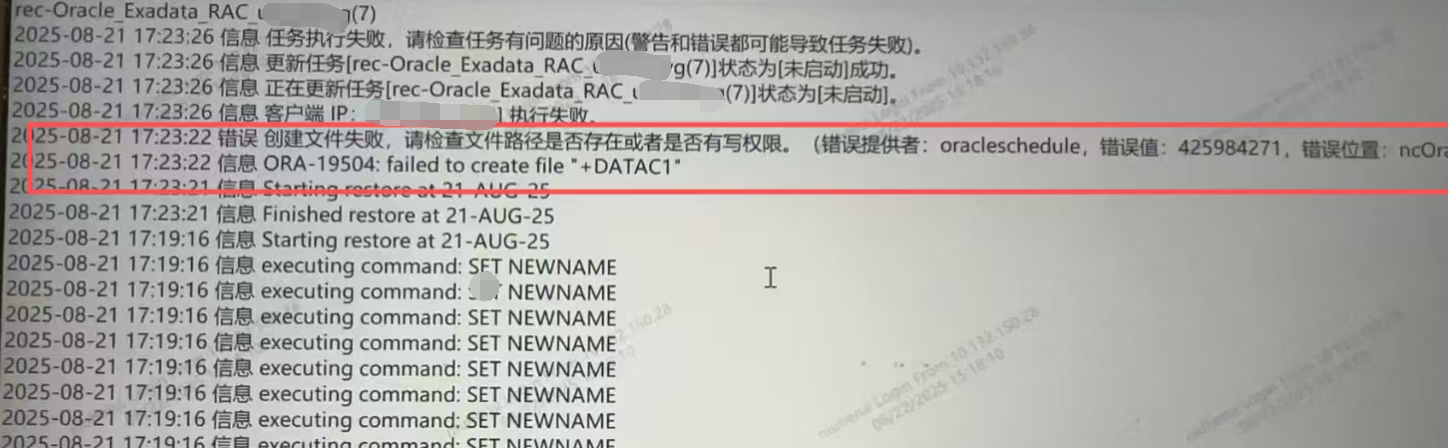
愛數工程師說是omf的問題導致,怎么可能?set newname就是解決更換新路徑的問題,
后來找愛數二線進行操作,上面的問題沒了,但遇到了新問題:
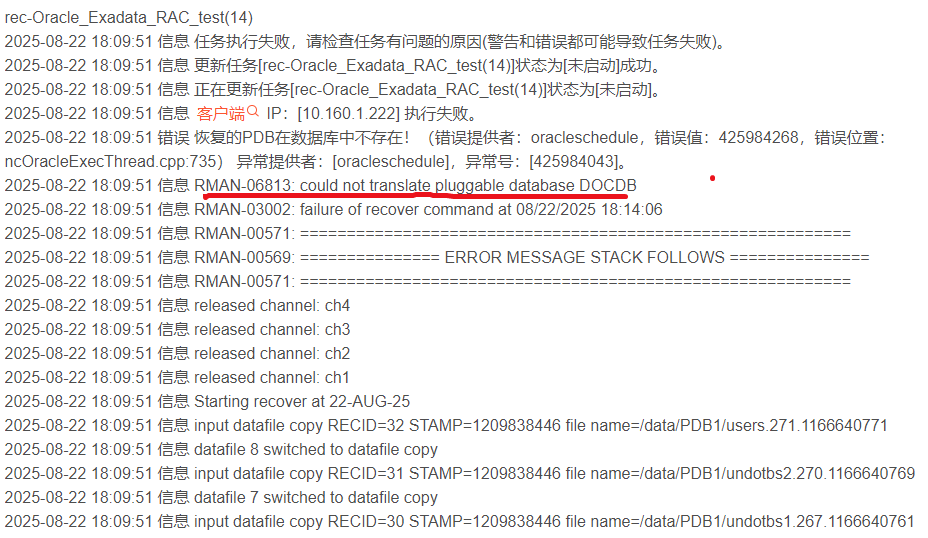
發現只restore恢復出了文件,recover失敗了,無法open。
提示另外的pdb庫沒找到,愛數二線工程師最后回復說是bug,需等研發補丁處理,用戶著急用怎么辦?等修復估計黃花菜都涼了。
思考一下:
既然恢復出了pdb的所有數據文件,那么就可以手動插拔方式恢復啟動數據庫了。
前面寫的文章,剛好就可以干這個的只有pdb租戶庫的備份,文件被rm和庫被drop是否可以恢復呢?
OK,關鍵的命令送上:
生成xml元數據文件:
BEGIN
   DBMS_PDB.RECOVER (
      pdb_descr_file    =>   '/home/oracle/PDB1.xml',
      pdb_name          =>   'PDB1',
      filenames         =>   '/data/PDB1/'
   );
END;
/
創建出租戶庫:
CREATE PLUGGABLE DATABASE PDB1 USING '/home/oracle/PDB1.xml' NOCOPY;
順利創建出pdb1,至少數據有了,但還有小毛病:
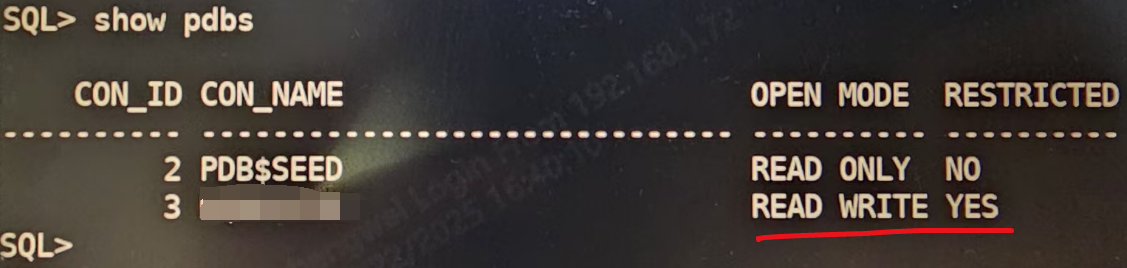
1)開關pdb1后,restricted報YES,說明存在問題:
檢查select * from PDB_PLUG_IN_VIOLATIONS;
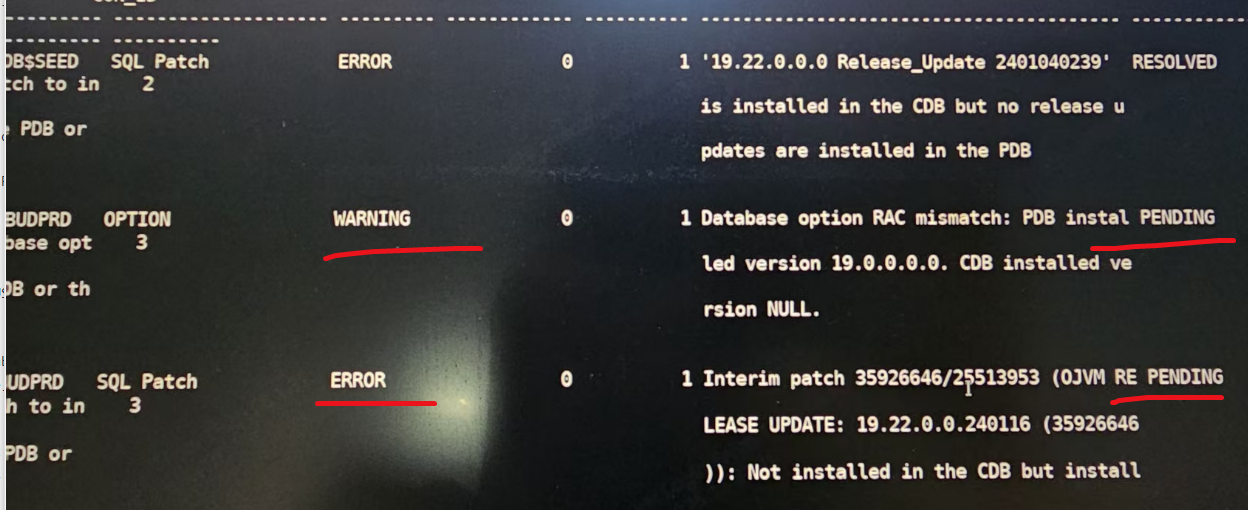
ojvm補丁沒打,另外是rac選件在單機需要關閉:exec dbms_registry.OPTION_OFF(‘RAC’);
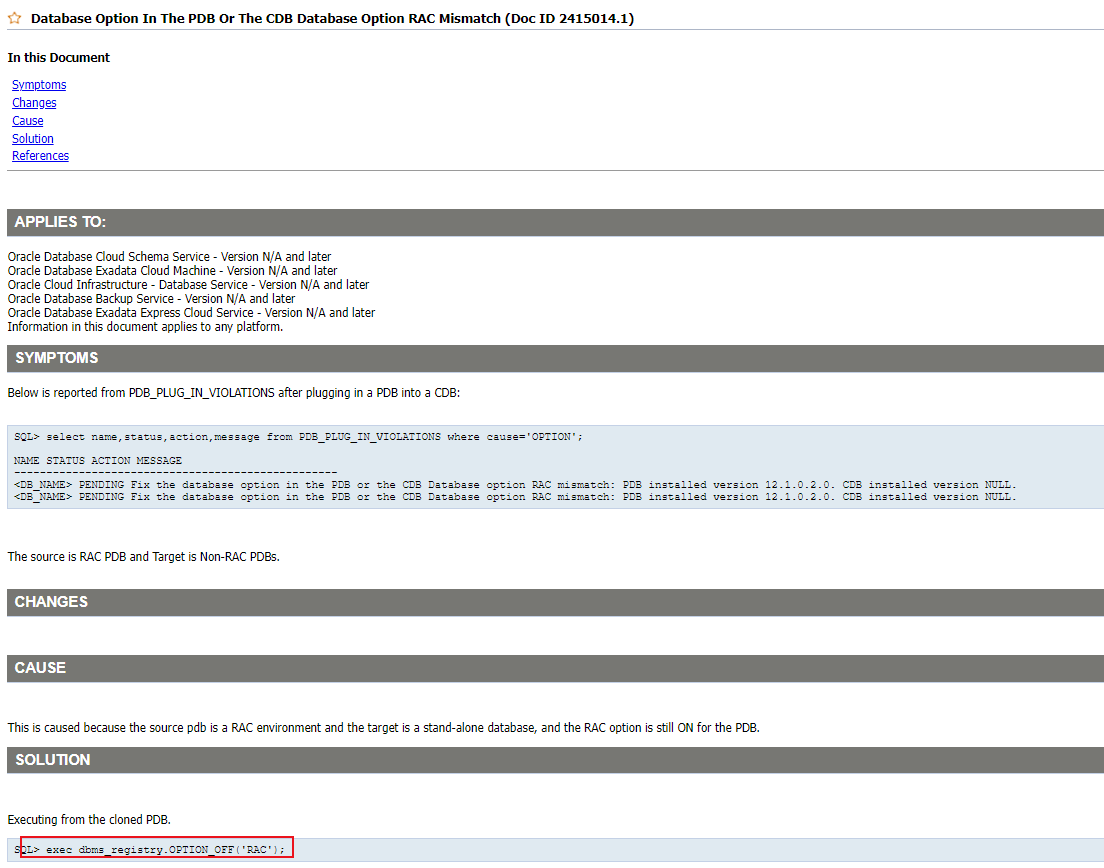
2)臨時表空間沒有創建,會導致expdp失敗,報錯如下
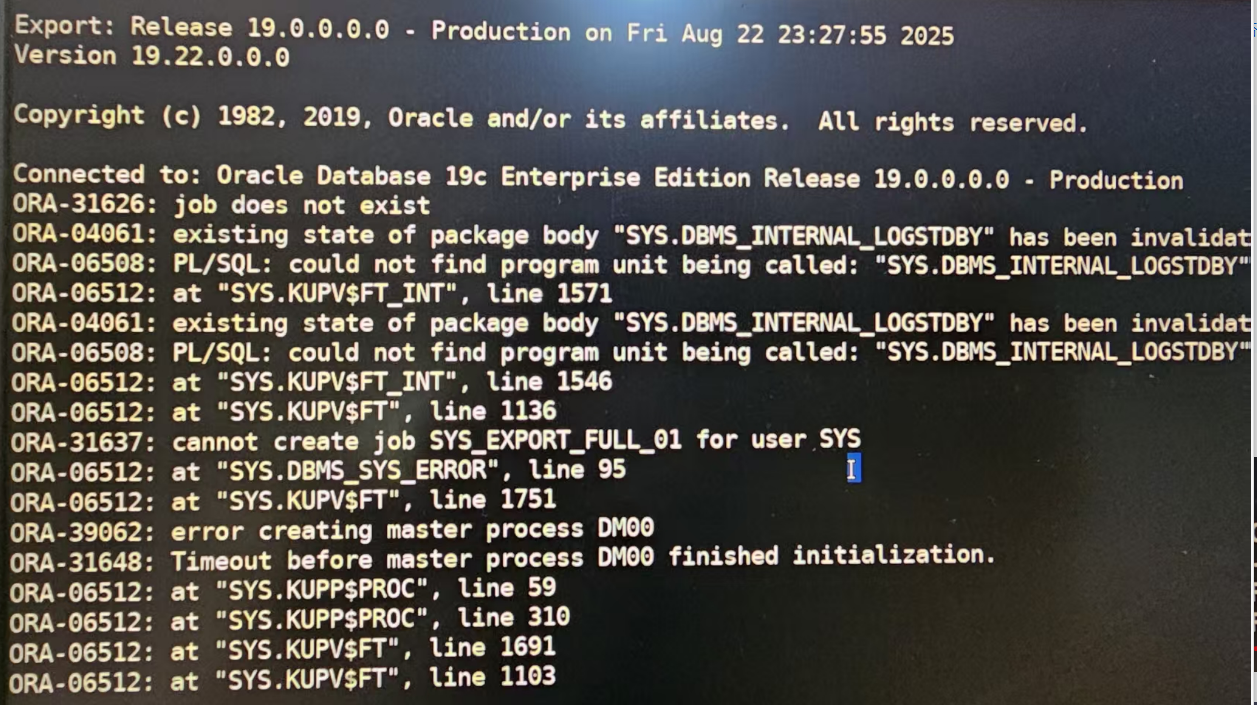
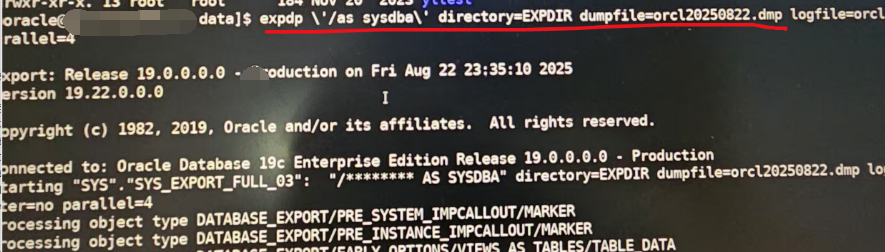
解決之后順利導出:
3)好不容易導出dmp了,再導入到另外的測試庫中時又報了如下的時區錯誤:

ORA-39405: Oracle Data Pump Does Not Support Importing From A Source Database With TSTZ Version 42 into a target database with TSTZ version 32.
由于目標端有生產不能停機升級時區,所以只能采用exp的方式重新從測試庫導出參考以前就遇到這種問題了
4)可是同事說測試機的監聽起不來
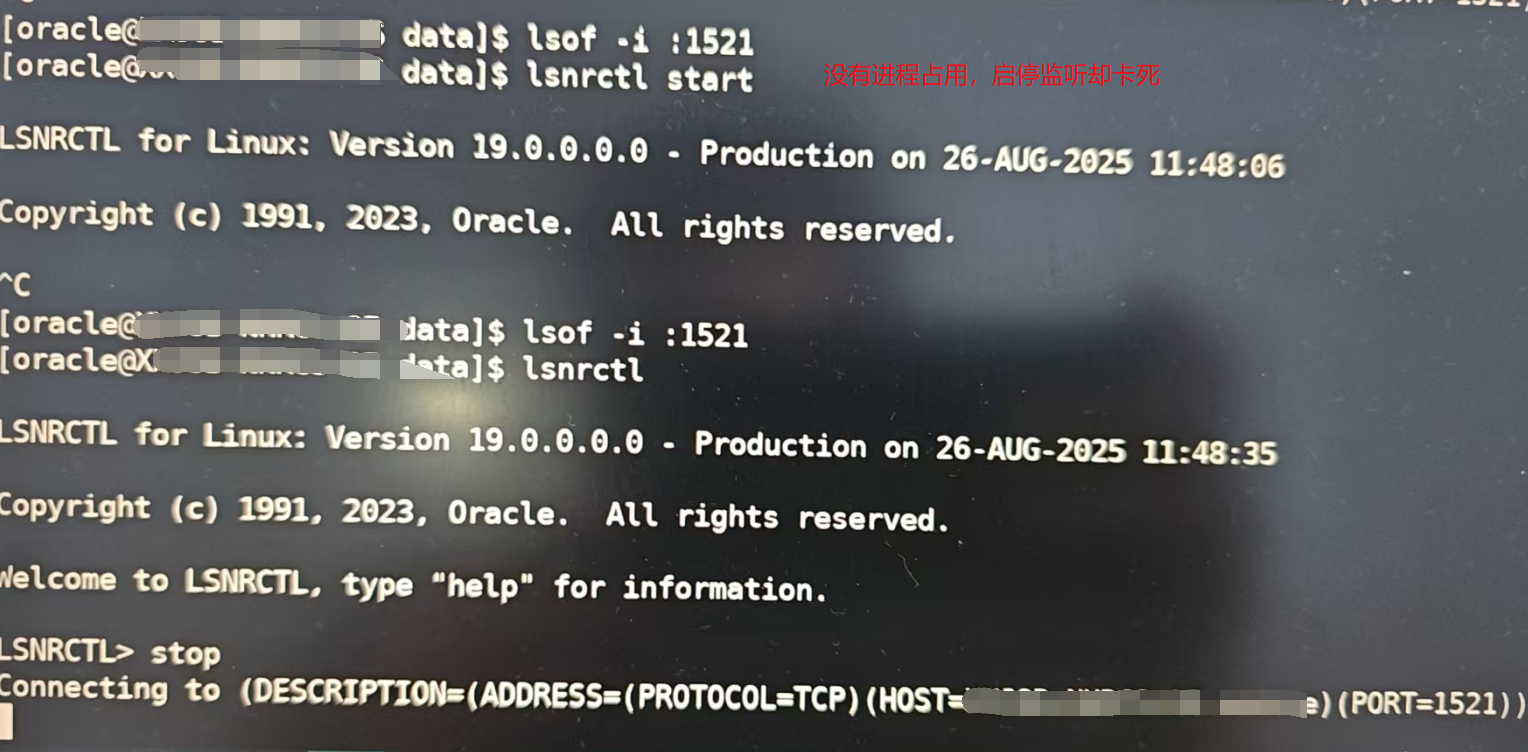
其實導出用不用監聽關系不大,測試環境先不管它,本地直接往外導出即可。
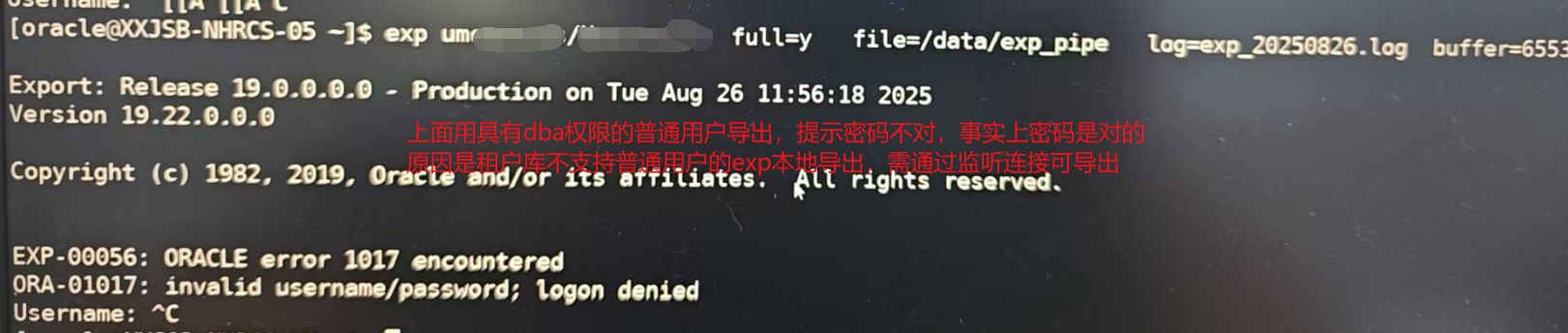
改用sys和system是可以本地導出的。注意修改sys和system的密碼需要在根容器下,否則提示報錯。

好不容易system的密碼改好了,重新導出full=y,又提示exp-00058錯誤
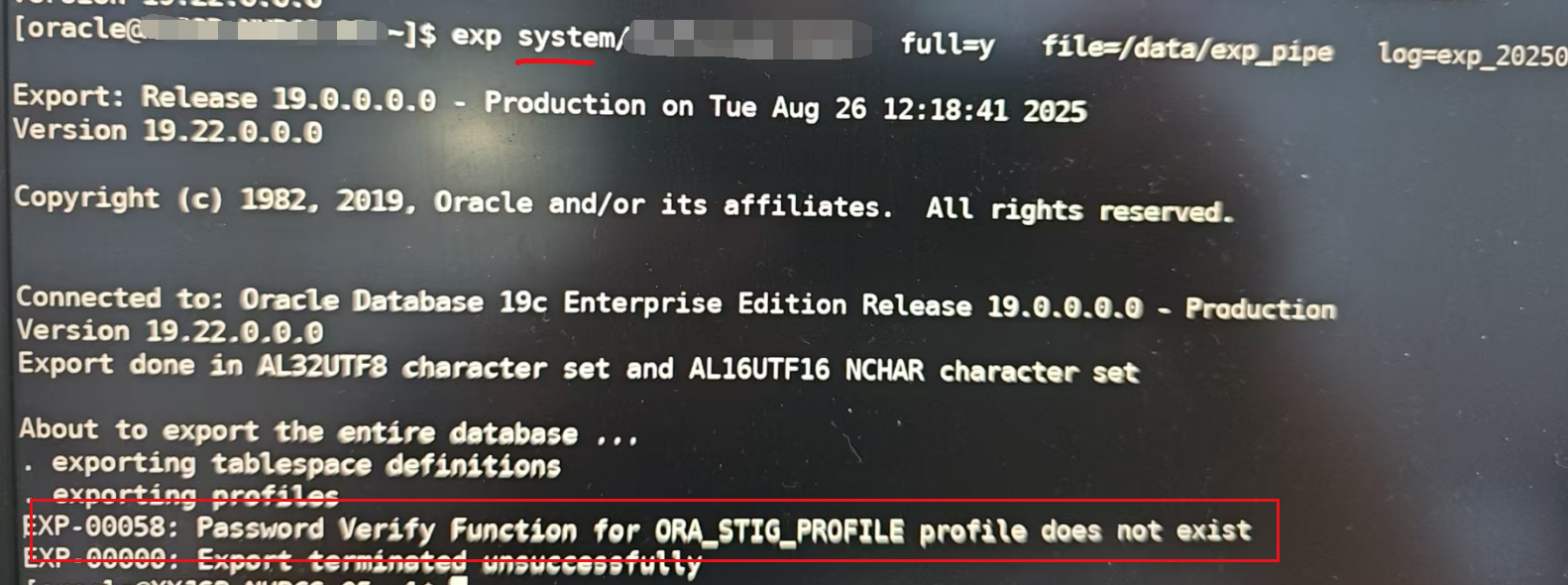
解決辦法簡單:要么導出不用full改成指定用戶owner,要么修復EXP-00058的錯誤。一般建議按用戶導出就好,需要的測試數據無非就在指定的用戶下,沒必要導出全部對象full,避免后期導入可能遇到更多未知問題。
select * FROM DBA_PROFILES WHERE  RESOURCE_NAME='PASSWORD_VERIFY_FUNCTION';
alter PROFILE ORA_STIG_PROFILE LIMIT  PASSWORD_VERIFY_FUNCTION NULL;
可參考:https://blog.csdn.net/laoli815/article/details/134113937
其實如果監聽解決了,直接在目標端exp就行了,不用本地exp后還得scp到目標端。監聽無非關注listener.ora文件,肯定好解決。
5)導出又報錯了?ORA-02002:0RA-01000:
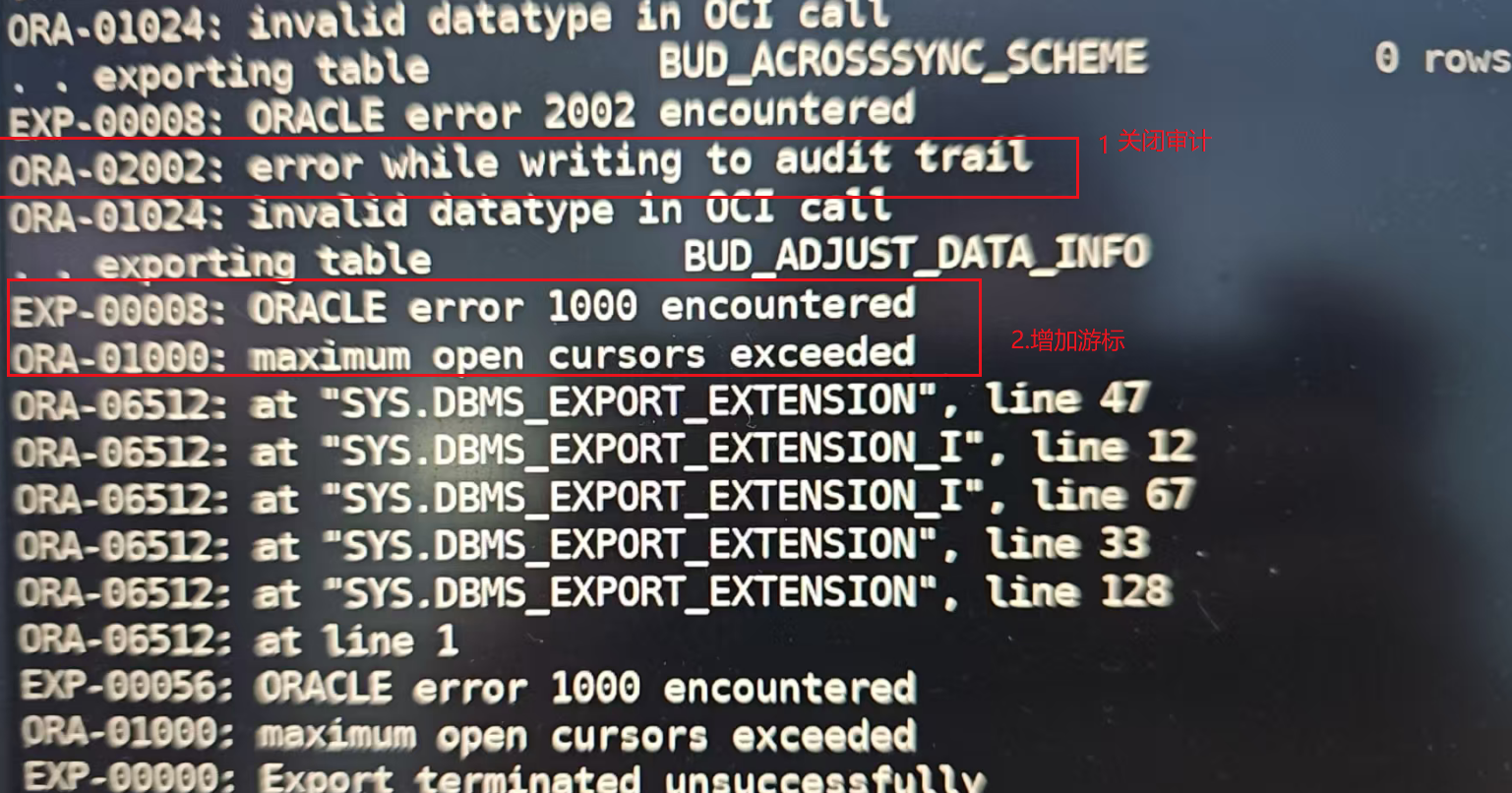
處理辦法:1.關閉審計2.增加游標,總之根據錯誤信息應對處理即可。
ALTER SYSTEM SET open_cursors=10000 SCOPE=BOTH sid=’’;
alter system set audit_trail=none scope=spfile sid=’’;–需重啟庫生效
*關于pdb的普通用戶不能本地exp的問題,做了個測試驗證,有興趣可以參看:
[oracle@oracle ~]$ export ORACLE_SID=jyc
==注意修改ORACLE_PDB_SID指定pdb1
[oracle@oracle ~]$ export ORACLE_PDB_SID=pdb1
[oracle@oracle ~]$ sqlplus jyc/jyc

SQL*Plus: Release 19.0.0.0.0 - Production on Tue Aug 26 12:14:19 2025
Version 19.3.0.0.0

Copyright (c) 1982, 2019, Oracle.  All rights reserved.

ERROR:
ORA-01017: invalid username/password; logon denied


Enter user-name: ^C
==看到提示密碼不對,其實是對的

[oracle@oracle ~]$ sqlplus / as sysdba

SQL*Plus: Release 19.0.0.0.0 - Production on Tue Aug 26 12:15:21 2025
Version 19.3.0.0.0

Copyright (c) 1982, 2019, Oracle.  All rights reserved.


Connected to:
Oracle Database 19c Enterprise Edition Release 19.0.0.0.0 - Production
Version 19.3.0.0.0

SQL> show pdbs;

    CON_ID CON_NAME                       OPEN MODE  RESTRICTED
---------- ------------------------------ ---------- ----------
         6 PDB1                           READ WRITE NO
SQL> select * from jyc.test;

        ID
----------
         1

SQL> exit
Disconnected from Oracle Database 19c Enterprise Edition Release 19.0.0.0.0 - Production
Version 19.3.0.0.0
[oracle@oracle ~]$ sqlplus jyc/jyc

SQL*Plus: Release 19.0.0.0.0 - Production on Tue Aug 26 12:15:43 2025
Version 19.3.0.0.0

Copyright (c) 1982, 2019, Oracle.  All rights reserved.

ERROR:
ORA-01017: invalid username/password; logon denied


Enter user-name: ^C

==看到提示密碼不對,其實是對的

[oracle@oracle ~]$ sqlplus / as sysdba

SQL*Plus: Release 19.0.0.0.0 - Production on Tue Aug 26 12:15:49 2025
Version 19.3.0.0.0

Copyright (c) 1982, 2019, Oracle.  All rights reserved.


Connected to:
Oracle Database 19c Enterprise Edition Release 19.0.0.0.0 - Production
Version 19.3.0.0.0

SQL> show pdbs;

    CON_ID CON_NAME                       OPEN MODE  RESTRICTED
---------- ------------------------------ ---------- ----------
         6 PDB1                           READ WRITE NO
SQL> alter user jyc identified by jyc;

User altered.

SQL> grant dba to jyc;

Grant succeeded.

SQL> exit
Disconnected from Oracle Database 19c Enterprise Edition Release 19.0.0.0.0 - Production
Version 19.3.0.0.0
[oracle@oracle ~]$ sqlplus jyc/jyc

SQL*Plus: Release 19.0.0.0.0 - Production on Tue Aug 26 12:16:12 2025
Version 19.3.0.0.0

Copyright (c) 1982, 2019, Oracle.  All rights reserved.

ERROR:
ORA-01017: invalid username/password; logon denied


Enter user-name: ^C

==看到提示密碼不對,其實是對的
==密碼確定是jyc為什么就連不了呢?


[oracle@oracle ~]$ sqlplus / as sysdba

SQL*Plus: Release 19.0.0.0.0 - Production on Tue Aug 26 12:16:29 2025
Version 19.3.0.0.0

Copyright (c) 1982, 2019, Oracle.  All rights reserved.


Connected to:
Oracle Database 19c Enterprise Edition Release 19.0.0.0.0 - Production
Version 19.3.0.0.0

SQL> alter user system identified by jyc;
alter user system identified by jyc
*
ERROR at line 1:
ORA-65066: The specified changes must apply to all containers


SQL> exit

==嘗試修改system的密碼來試一下,pdb內部不能修改


Disconnected from Oracle Database 19c Enterprise Edition Release 19.0.0.0.0 - Production
Version 19.3.0.0.0
===需要先取消ORACLE_PDB_SID的設置,才能進入根容器
[oracle@oracle ~]$ export ORACLE_PDB_SID=

[oracle@oracle ~]$ sqlplus / as sysdba

SQL*Plus: Release 19.0.0.0.0 - Production on Tue Aug 26 12:17:01 2025
Version 19.3.0.0.0

Copyright (c) 1982, 2019, Oracle.  All rights reserved.


Connected to:
Oracle Database 19c Enterprise Edition Release 19.0.0.0.0 - Production
Version 19.3.0.0.0

SQL> show pdbs;

    CON_ID CON_NAME                       OPEN MODE  RESTRICTED
---------- ------------------------------ ---------- ----------
         2 PDB$SEED                       READ ONLY  NO
         3 PDB5                           READ WRITE NO
         4 PDB2                           READ WRITE NO
         5 PDB3                           READ WRITE NO
         6 PDB1                           READ WRITE NO
         8 PDB6                           READ WRITE NO
SQL> alter user system identified by jyc;

User altered.

SQL> exit
Disconnected from Oracle Database 19c Enterprise Edition Release 19.0.0.0.0 - Production
Version 19.3.0.0.0
[oracle@oracle ~]$ export ORACLE_PDB_SID=pdb1
==測試system的連接正常
[oracle@oracle ~]$ sqlplus system/jyc

SQL*Plus: Release 19.0.0.0.0 - Production on Tue Aug 26 12:17:42 2025
Version 19.3.0.0.0

Copyright (c) 1982, 2019, Oracle.  All rights reserved.


Connected to:
Oracle Database 19c Enterprise Edition Release 19.0.0.0.0 - Production
Version 19.3.0.0.0

SQL> select * from jyc.test;

        ID
----------
         1

SQL> exit
Disconnected from Oracle Database 19c Enterprise Edition Release 19.0.0.0.0 - Production
Version 19.3.0.0.0
[oracle@oracle ~]$ exp system/jyc file=test.dmp log=test.log buffer=65535000 owner=jyc

Export: Release 19.0.0.0.0 - Production on Tue Aug 26 12:18:41 2025
Version 19.3.0.0.0

Copyright (c) 1982, 2019, Oracle and/or its affiliates.  All rights reserved.


Connected to: Oracle Database 19c Enterprise Edition Release 19.0.0.0.0 - Production
Version 19.3.0.0.0
Export done in US7ASCII character set and AL16UTF16 NCHAR character set
server uses ZHS16GBK character set (possible charset conversion)

About to export specified users ...
. exporting pre-schema procedural objects and actions
. exporting foreign function library names for user JYC
. exporting PUBLIC type synonyms
. exporting private type synonyms
. exporting object type definitions for user JYC
About to export JYC's objects ...
. exporting database links
. exporting sequence numbers
. exporting cluster definitions
. about to export JYC's tables via Conventional Path ...
. . exporting table                           TEST          1 rows exported
EXP-00091: Exporting questionable statistics.
. exporting synonyms
. exporting views
. exporting stored procedures
. exporting operators
. exporting referential integrity constraints
. exporting triggers
. exporting indextypes
. exporting bitmap, functional and extensible indexes
. exporting posttables actions
. exporting materialized views
. exporting snapshot logs
. exporting job queues
. exporting refresh groups and children
. exporting dimensions
. exporting post-schema procedural objects and actions
. exporting statistics
Export terminated successfully with warnings.
[oracle@oracle ~]$

==使用sys和system等公共用戶無需監聽可以本地導出。
