



作者:Maria Colgan
介紹
你是否經歷過因為執行計劃變得更差而導致的性能退化?如果是的話,那么我們有一個稱為SQL PLAN MANAGEMENT(SPM)的精致解決方案給到你。接下來的4篇博客將涵蓋SPM的詳情。讓我們從回顧執行計劃改變的主要原因開始。
執行計劃改變的發生可以歸因于多種系統變化。比如,你也許(手動或自動)更新了部分對象的統計信息,或者修改了少量優化器相關的參數。而更顯著的改變是數據庫升級(比如從11g升級到12c)。所有這些變化都會潛在導致很多SQL語句生成新的執行計劃。大多數新的執行計劃都是明顯的改進,因為它們是針對新的系統環境而定制的,但有些可能更糟,從而導致性能下降。正是后者導致許多dba徹夜難眠。
處理這些退化問題,DBA有幾個選項。然而,大多數dba想要的很簡單:只有當計劃能夠帶來性能提升時,才應該改變計劃。換句話說,優化器不應該挑選壞的執行計劃。
在這個系列文章中的第一篇,會描述SQL PLAN MANAGEMENT的概念以及如何創建SQL PLAN BASELINES(SQL執行計劃基線)。第二篇會描述Sql Plan Baseline是如何以及何時使用。第三篇將討論演進,即在SQL計劃基線中添加新的和改進的執行計劃的過程。最后,第四部分將描述用戶界面以及與其他Oracle對象(如存儲的大綱)的交互。
SQL PLAN MANAGEMENT
SQL Plan Management (SPM)允許數據庫用戶為一組SQL語句保持穩定而最佳的性能。SPM融合了計劃適應性和計劃穩定性的優點,同時又避免了它們的缺點。它有兩個主要目標:
- 當面對數據庫系統變化時,防止性能退化。
- 通過友好地適應數據庫系統變化,提供性能改善。
托管SQL語句是啟用了SPM的語句。SPM可以配置為自動工作,也可以全部或部分手動控制(稍后介紹)。SPM通過啟用對托管SQL語句的執行計劃更改的檢測,來幫助防止性能退化。為此,SPM在磁盤上維護一個執行計劃歷史記錄,其中包含了為每個托管SQL語句生成的不同執行計劃。Oracle優化器的增強版稱為SPM感知優化器,它訪問、使用和管理存儲在名為SQL Management Base(SMB)的存儲庫中的信息。
執行計劃歷史使SPM感知優化器能夠確定,使用基于成本的方法生成的最佳成本計劃是否是全新的計劃。一個全新的執行計劃代表了一個有可能導致性能退化的執行計劃。基于這個原因,SPM感知優化器不會選擇一個全新的最佳成本執行計劃。相反,它會從一系列已接受的執行計劃中進行選擇。一個已接受的執行計劃是一個已經被證實不會導致性能下降或被指定具有良好性能的執行計劃。一組可接受的執行計劃稱為SQL執行計劃基線,它是執行計劃歷史的子集。
全新執行計劃將作為未接受計劃添加到執行計劃歷史記錄中。稍后,SPM實用程序將驗證其性能,并將其作為不可接受的執行計劃(如果它會導致性能退化),或者將其更改為可接受的執行計劃(如果它將提供性能改進)。執行計劃性能驗證過程確保了計劃的穩定性和執行計劃的適應性。
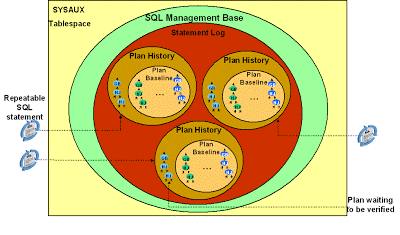
下圖展示了SMB中保存的三條語句的執行計劃歷史。每一個執行計劃歷史由已接受的執行計劃(SQL Plan Baseline)和未接受的執行計劃組成。
你可以通過若干種方法創建Sql Plan Baseline: 通過SQL Tuing Set(STS,SQL調優集);通過緩存的游標;從一個庫中導出然后導入到另一個庫;自動為每條語句創建。讓我們逐一看一看。此博客中的示例使用了Oracle數據庫示例SCHEMA,因此您可以自己嘗試它們。
通過SQL Tuing Set(STS)創建Sql plan Baselines
如果正在升級,則您可能已經有一個包含部分或全部SQL語句的STS。該STS可能包含令人滿意的執行計劃。我們把這個STS稱為 MY_STS。可以從該STS創建SQL計劃基線,如下所示:
SQL> variable pls number;
SQL> exec :pls := dbms_spm.load_plans_from_sqlset(sqlset_name => 'MY_STS', -
>                 basic_filter => 'sql_text like ''select%p.prod_name%''');
這將會為所有符合指定過濾條件的語句創建SQL Plan Baselines.
通過緩存的游標創建SQL plan baselines
您可以為當前緩存中的任意游標自動創建SQL plan baselines,如下所示:
SQL> exec :pls := dbms_spm.load_plans_from_cursor_cache( -
>                   attribute_name => 'SQL_TEXT', -
>                   attribute_value => 'select%p.prod_name%');
這將會為所有SQL文本匹配指定字符串的SQL創建SQL plan baseline。該函數有多個重載,允許你通過其它游標屬性進行過濾。
通過中間表創建SQL plan baselines
如果你已經有SQL plan baseline了(比如在11g的測試系統中),你可以導出它們到另一個系統中(比如一個生產系統)
首先,在測試系統中,創建一個中間表并將你要導出的SQL plan baseline打包:
SQL> exec dbms_spm.create_stgtab_baseline(table_name => 'MY_STGTAB', -
>           table_owner => 'SH');

PL/SQL procedure successfully completed.

SQL> exec :pls := dbms_spm.pack_stgtab_baseline( -
>                   table_name => 'MY_STGTAB', -
>                   table_owner => 'SH', -
>                   sql_text => 'select%p.prod_name%');
這將會對所有匹配指定過濾條件的語句的SQL plan baseline進行打包。中間表MY_STGTAB是一個常規表,你可以使用數據泵導出的功能將其導到生產系統中。
在生產系統上,就可以解包中間表來創建SQL plan baseline:
SQL> exec :pls := dbms_spm.unpack_stgtab_baseline( -
>                   table_name => 'MY_STGTAB', -
>                   table_owner => 'SH', -
>                   sql_text => 'select%p.prod_name%');
這將解包中間表并創建SQL plan baseline。注意,解包中間表時使用的過濾條件是可選項,是可以不同于打包時的條件的。這意味著,你可以打包若干個SQL plan baseline到中間表,然后僅解包其子集到目標系統中。
自動創建SQL plan baseline
您可以通過設置參數optimizer_capture_sql_plan_baselines為TRUE(默認為FALSE),為所有重復執行過的語句自動創建SQL plan baseline。這些語句首次被捕獲到的執行計劃會自動做為可接受的執行計劃并成為SQL plan baseline的一部分。因此,只有在你確認這些默認的執行計劃性能良好時,才應打開這個參數。
從以前的數據庫版本升級后,可以使用自動計劃捕獲模式。將optimizer_features_enable設置為早期版本并執行工作負載。每個重復執行的語句都將捕獲其計劃,從而創建SQL plan baseline。在確定工作負載中的所有語句都有機會執行之后,可以將optimizer_features_enable重置為其默認值。
請注意,此自動計劃捕獲僅適用于重復執行的語句,即至少執行兩次的語句。只執行一次的語句將不會從SQL plan baseline中獲益,因為接受的計劃只在后續的硬解析中使用。
以下示例顯示同一語句執行兩次時自動捕獲計劃:
SQL> alter session set optimizer_capture_sql_plan_baselines = true;

Session altered.

SQL> var pid number
SQL> exec :pid := 100;

PL/SQL procedure successfully completed.

SQL> select p.prod_name, s.amount_sold, t.calendar_year
2    from sales s, products p, times t
3    where s.prod_id = p.prod_id
4    and s.time_id = t.time_id
5    and p.prod_id < :pid;

PROD_NAME AMOUNT_SOLD CALENDAR_YEAR
--------- ----------- -------------
...
9 rows selected.

SQL> select p.prod_name, s.amount_sold, t.calendar_year
2    from sales s, products p, times t
3    where s.prod_id = p.prod_id
4    and s.time_id = t.time_id
5    and p.prod_id < :pid;

PROD_NAME AMOUNT_SOLD CALENDAR_YEAR
--------- ----------- -------------
...

9 rows selected.

SQL> alter session set optimizer_capture_sql_plan_baselines = false;

Session altered
如果一個語句存在存儲大綱,且參數use_stored_outlines為TRUE,那么自動計劃捕獲并不工作。在這種情況下,使用DBMS_SQLTUNE包中的函數capture_cursor_cache_sqlset()將計劃增量捕獲到STS中。在將工作負載的執行計劃收集到STS中之后,使用前面描述的方法手動創建SQL計劃基線。然后,禁用存儲大綱或將use_stored_outlines設置為FALSE。從現在起,SPM將管理您的工作負載,存儲大綱將不會用于這些語句。
在本文中,我們了解了如何創建SQL plan baseline。下一步,我們將描述SPM感知優化器是如何使用SQL plan baseline的(第二篇 SQL Plan Management (4-2) SPM感知優化器)。
原文鏈接:https://blogs.oracle.com/optimizer/sql-plan-management-part-1-of-4-creating-sql-plan-baselines
原文內容:
SQL Plan Management (Part 1 of 4) Creating SQL plan baselines
Maria Colgan
Master Product Manager
Introduction
Do you ever experience performance regressions because an execution plan has changed for the worse? If you have, then we have an elegant solution for you called SQL Plan Management (SPM). The next four posts on our blog will cover SPM in detail. Let’s begin by reviewing the primary causes for plan changes.
Execution plan changes occur due to various system changes. For example, you might have (manually or automatically) updated statistics for some objects, or changed a few optimizer-related parameters. A more dramatic change is a database upgrade (say from 11g to 12c). All of these changes have the potential to cause new execution plans to be generated for many of your SQL statements. Most new plans are obviously improvements because they are tailored to the new system environment, but some might be worse leading to performance regressions. It is the latter that cause sleepless nights for many DBAs.
DBAs have several options for addressing these regressions. However, what most DBAs want is simple: plans should only change when they will result in performance gains. In other words, the optimizer should not pick bad plans, period.
This first post in our series, describes the concepts of SQL Plan Management and how to create SQL plan baselines. The second part will describe how and when these SQL plan baselines are used. The third part will discuss evolution, the process of adding new and improved plans to SQL plan baselines. Finally, the fourth part will describe user interfaces and interactions with other Oracle objects (like stored outlines).
SQL Plan Management
SQL Plan Management (SPM) allows database users to maintain stable yet optimal performance for a set of SQL statements. SPM incorporates the positive attributes of plan adaptability and plan stability, while simultaneously avoiding their shortcomings. It has two main objectives:
- prevent performance regressions in the face of database system changes
- offer performance improvements by gracefully adapting to database system changes
A managed SQL statement is one for which SPM has been enabled. SPM can be configured to work automatically or it can be manually controlled either wholly or partially (described later). SPM helps prevent performance regressions by enabling the detection of plan changes for managed SQL statements. For this purpose, SPM maintains, on disk, a plan history consisting of different execution plans generated for each managed SQL statement. An enhanced version of the Oracle optimizer, called SPM aware optimizer, accesses, uses, and manages this information which is stored in a repository called the SQL Management Base (SMB).
The plan history enables the SPM aware optimizer to determine whether the best-cost plan it has produced using the cost-based method is a brand new plan or not. A brand new plan represents a plan change that has potential to cause performance regression. For this reason, the SPM aware optimizer does not choose a brand new best-cost plan. Instead, it chooses from a set of accepted plans. An accepted plan is one that has been either verified to not cause performance regression or designated to have good performance. A set of accepted plans is called a SQL plan baseline, which represents a subset of the plan history.
A brand new plan is added to the plan history as a non-accepted plan. Later, an SPM utility verifies its performance, and keeps it as a non-accepted plan if it will cause a performance regression, or changes it to an accepted plan if it will provide a performance improvement. The plan performance verification process ensures both plan stability and plan adaptability.
The figure below shows the SMB containing the plan history for three SQL statements. Each plan history contains some accepted plans (the SQL plan baseline) and some non-accepted plans.
You can create a SQL plan baseline in several ways: using a SQL Tuning Set (STS); from the cursor cache; exporting from one database and importing into another; and automatically for every statement. Let’s look at each in turn. The examples in this blog entry use the Oracle Database Sample Schemas so you can try them yourself.
Creating SQL plan baselines from STS
If you are upgrading you might already have an STS containing some or all of your SQL statements. This STS might contain plans that perform satisfactorily. Let’s call this STS MY_STS. You can create a SQL plan baseline from this STS as follows:
SQL> variable pls number;
SQL> exec :pls := dbms_spm.load_plans_from_sqlset(sqlset_name => 'MY_STS', -
>                 basic_filter => 'sql_text like ''select%p.prod_name%''');
This will create SQL plan baselines for all statements that match the specified filter.
Creating SQL plan baselines from cursor cache
You can automatically create SQL plan baselines for any cursor that is currently in the cache as follows:
SQL> exec :pls := dbms_spm.load_plans_from_cursor_cache( -
>                   attribute_name => 'SQL_TEXT', -
>                   attribute_value => 'select%p.prod_name%');
This will create SQL plan baselines for all statements whose text matches the specified string. Several overloaded variations of this function allow you to filter on other cursor attributes.
Creating SQL plan baselines using a staging table
If you already have SQL plan baselines (say on an 11g test system), you can export them to another system (a production system for instance).
First, on the test system, create a staging table and pack the SQL plan baselines you want to export:
SQL> exec dbms_spm.create_stgtab_baseline(table_name => 'MY_STGTAB', -
>           table_owner => 'SH');

PL/SQL procedure successfully completed.

SQL> exec :pls := dbms_spm.pack_stgtab_baseline( -
>                   table_name => 'MY_STGTAB', -
>                   table_owner => 'SH', -
>                   sql_text => 'select%p.prod_name%');
This will pack all SQL plan baselines for statements that match the specified filter. The staging table, MY_STGTAB, is a regular table that you should export to the production system using Datapump Export.
On the production system, you can now unpack the staging table to create the SQL plan baselines:
SQL> exec :pls := dbms_spm.unpack_stgtab_baseline( -
>                   table_name => 'MY_STGTAB', -
>                   table_owner => 'SH', -
>                   sql_text => 'select%p.prod_name%');
This will unpack the staging table and create SQL plan baselines. Note that the filter for unpacking the staging table is optional and may be different than the one used during packing. This means that you can pack several SQL plan baselines into a staging table and selectively unpack only a subset of them on the target system.
Creating SQL plan baselines automatically
You can create SQL plan baselines for all repeatable statements automatically by setting the parameter optimizer_capture_sql_plan_baselines to TRUE (default is FALSE). The first plan captured for any statement is automatically accepted and becomes part of the SQL plan baseline, so enable this parameter only when you are sure that the default plans are performing well.
You can use the automatic plan capture mode when you have upgraded from a previous database version. Set optimizer_features_enable to the earlier version and execute your workload. Every repeatable statement will have its plan captured thus creating SQL plan baselines. You can reset optimizer_features_enable to its default value after you are sure that all statements in your workload have had a chance to execute.
Note that this automatic plan capture occurs only for repeatable statements, that is, statements that are executed at least twice. Statements that are only executed once will not benefit from SQL plan baselines since accepted plans are only used in subsequent hard parses.
The following example shows a plan being captured automatically when the same statement is executed twice:
SQL> alter session set optimizer_capture_sql_plan_baselines = true;

Session altered.

SQL> var pid number
SQL> exec :pid := 100;

PL/SQL procedure successfully completed.

SQL> select p.prod_name, s.amount_sold, t.calendar_year
2    from sales s, products p, times t
3    where s.prod_id = p.prod_id
4    and s.time_id = t.time_id
5    and p.prod_id < :pid;

PROD_NAME AMOUNT_SOLD CALENDAR_YEAR
--------- ----------- -------------
...
9 rows selected.

SQL> select p.prod_name, s.amount_sold, t.calendar_year
2    from sales s, products p, times t
3    where s.prod_id = p.prod_id
4    and s.time_id = t.time_id
5    and p.prod_id < :pid;

PROD_NAME AMOUNT_SOLD CALENDAR_YEAR
--------- ----------- -------------
...

9 rows selected.

SQL> alter session set optimizer_capture_sql_plan_baselines = false;

Session altered
Automatic plan capture will not occur for a statement if a stored outline exists for it and is enabled and the parameter use_stored_outlines is TRUE. In this case, turn on incremental capture of plans into an STS using the function capture_cursor_cache_sqlset() in the DBMS_SQLTUNE package. After you have collected the plans for your workload into the STS, manually create SQL plan baselines using the method described earlier. Then, disable the stored outlines or set use_stored_outlines to FALSE. From now on, SPM will manage your workload and stored outlines will not be used for those statements.
In this article, we have seen how to create SQL plan baselines. In the next, we will describe the SPM aware optimizer and how it uses SQL plan baselines.
