



作者:Maria Colgan
Master Product Manager
在本文的前三部分中,我們已經了解了SQL計劃基線是如何創建、使用和演進的。在最后一篇中,我們將展示一些用戶界面,描述SPM與其他特性的交互,并回答您的一些問題。
DBMS_SPM 包
一個新的包DBMS_SPM允許您管理執行計劃歷史。我們已經在前面的示例中,看到了如何使用它來創建和演進SQL執行計劃基線。其他管理功能還包括更改執行計劃的屬性(如啟用狀態和計劃名稱)或刪除執行計劃。您需要“ADMINISTER SQL MANAGEMENT OBJECT”權限才能執行此包。無論執行計劃歷史記錄是如何創建的,您都可以在視圖DBA_SQL_PLAN_BASELINES中查看有關各種執行計劃的詳細信息。在本系列文章中的第3篇(點此查看)的末尾,我們看到SQL語句有兩個可接受的執行計劃:
SQL> select sql_text, sql_handle, plan_name, enabled, accepted
  2  from dba_sql_plan_baselines;

SQL_TEXT                 SQL_HANDLE               PLAN_NAME                     ENA ACC
------------------------ ------------------------ ----------------------------- --- ---
select p.prod_name, s.am SYS_SQL_4bf04d85fcc170b0 SYS_SQL_PLAN_fcc170b08cbcb825 YES YES
ount_sold, t.calendar_ye
ar
from sales s, products p
, times t
where s.prod_id = p.prod
_id
  and s.time_id = t.time
_id
  and p.prod_id < :pid

select p.prod_name, s.am SYS_SQL_4bf04d85fcc170b0 SYS_SQL_PLAN_fcc170b0a62d0f4d YES YES
ount_sold, t.calendar_ye
ar
from sales s, products p
, times t
where s.prod_id = p.prod
_id
  and s.time_id = t.time
_id
  and p.prod_id < :pid
在使用DBMS_SPM包管理執行計劃歷史時,SQL句柄是每個SQL語句的唯一標識符。通過修改SQL文本,有些人可能通過添加提示或修改SQL文本來手動調整SQL語句,并創建可接受的計劃。如果啟用SQL執行計劃的自動捕獲,然后執行此語句,則將為該修改后的語句創建SQL計劃基線。但是,您最希望的是將此計劃添加到原始SQL語句的計劃歷史中。下面使用上面的SQL語句作為示例,演示如何來實現這一點。讓我們修改SQL語句,執行它并查看計劃:
SQL> var pid number
SQL> exec :pid := 100;

PL/SQL procedure successfully completed.

SQL> select /*+ leading(t) */ p.prod_name, s.amount_sold, t.calendar_year
2    from sales s, products p, times t
3    where s.prod_id = p.prod_id
4      and s.time_id = t.time_id
5      and p.prod_id < :pid;

PROD_NAME AMOUNT_SOLD CALENDAR_YEAR
--------- ----------- -------------
...
9 rows selected.

SQL> select * from table(dbms_xplan.display_cursor('b17wnz4y8bqv1', 0, 'basic note'));

PLAN_TABLE_OUTPUT
-------------------------------------------------------------------------------
EXPLAINED SQL STATEMENT:
------------------------
select /*+ leading(t) */ p.prod_name, s.amount_sold, t.calendar_year
from sales s, products p, times t where s.prod_id = p.prod_id   and
s.time_id = t.time_id   and p.prod_id < :pid

Plan hash value: 2290436051

---------------------------------------------------------------
| Id  | Operation                            | Name           |
---------------------------------------------------------------
|   0 | SELECT STATEMENT                     |                |
|   1 |  HASH JOIN                           |                |
|   2 |   HASH JOIN                          |                |
|   3 |    TABLE ACCESS FULL                 | TIMES          |
|   4 |    PARTITION RANGE ALL               |                |
|   5 |     TABLE ACCESS BY LOCAL INDEX ROWID| SALES          |
|   6 |      BITMAP CONVERSION TO ROWIDS     |                |
|   7 |       BITMAP INDEX RANGE SCAN        | SALES_PROD_BIX |
|   8 |   TABLE ACCESS BY INDEX ROWID        | PRODUCTS       |
|   9 |    INDEX RANGE SCAN                  | PRODUCTS_PK    |
---------------------------------------------------------------
通過關聯已修改語句的執行計劃到原始語句的句柄(通過DBA_SQL_PLAN_BASELINES獲取),來為原始語句創建一個新的已接受的執行計劃:
SQL> var pls number
SQL> exec :pls := dbms_spm.load_plans_from_cursor_cache( -
>                    sql_id => 'b17wnz4y8bqv1', -
>                    plan_hash_value => 2290436051, -
>                    sql_handle => 'SYS_SQL_4bf04d85fcc170b0');
如果原始SQL語句還沒有執行計劃歷史(故沒有SQL句柄),則可以使用另一個版本的load_plans_from_cursor_cache指定原始語句的文本。為了確認SQL語句現在有三個已接受的計劃,讓我們檢查DBA_SQL_PLAN_BASELINES:
SQL> select sql_text, sql_handle, plan_name, enabled, accepted
  2  from dba_sql_plan_baselines;

SQL_TEXT                 SQL_HANDLE               PLAN_NAME                     ENA ACC
------------------------ ------------------------ ----------------------------- --- ---
select p.prod_name, s.am SYS_SQL_4bf04d85fcc170b0 SYS_SQL_PLAN_fcc170b0888547d3 YES YES
ount_sold, t.calendar_ye
ar
from sales s, products p
, times t
where s.prod_id = p.prod
_id
  and s.time_id = t.time
_id
  and p.prod_id < :pid

select p.prod_name, s.am SYS_SQL_4bf04d85fcc170b0 SYS_SQL_PLAN_fcc170b08cbcb825 YES YES
ount_sold, t.calendar_ye
ar
from sales s, products p
, times t
where s.prod_id = p.prod
_id
  and s.time_id = t.time
_id
  and p.prod_id < :pid

select p.prod_name, s.am SYS_SQL_4bf04d85fcc170b0 SYS_SQL_PLAN_fcc170b0a62d0f4d YES YES
ount_sold, t.calendar_ye
ar
from sales s, products p
, times t
where s.prod_id = p.prod
_id
  and s.time_id = t.time
_id
  and p.prod_id < :pid
展示執行計劃
當優化器對某SQL使用了一個已接受的執行計劃,你會在PLAN TABLE(EXPLAIN方式)或V$SQL_PLAN(共享游標)中看到這一點。
讓我們EXPLAIN上面的SQL語句并展示它的執行計劃:
SQL> explain plan for
  2  select p.prod_name, s.amount_sold, t.calendar_year
  3  from sales s, products p, times t
  4  where s.prod_id = p.prod_id
  5    and s.time_id = t.time_id
  6    and p.prod_id < :pid;

Explained.

SQL> select * from table(dbms_xplan.display('plan_table', null, 'basic note'));

PLAN_TABLE_OUTPUT
-------------------------------------------------------------------------------
Plan hash value: 2787970893

----------------------------------------------------------------
| Id  | Operation                             | Name           |
----------------------------------------------------------------
|   0 | SELECT STATEMENT                      |                |
|   1 |  NESTED LOOPS                         |                |
|   2 |   NESTED LOOPS                        |                |
|   3 |    HASH JOIN                          |                |
|   4 |     TABLE ACCESS BY INDEX ROWID       | PRODUCTS       |
|   5 |      INDEX RANGE SCAN                 | PRODUCTS_PK    |
|   6 |     PARTITION RANGE ALL               |                |
|   7 |      TABLE ACCESS BY LOCAL INDEX ROWID| SALES          |
|   8 |       BITMAP CONVERSION TO ROWIDS     |                |
|   9 |        BITMAP INDEX RANGE SCAN        | SALES_PROD_BIX |
|  10 |    INDEX UNIQUE SCAN                  | TIME_PK        |
|  11 |   TABLE ACCESS BY INDEX ROWID         | TIMES          |
----------------------------------------------------------------

Note
-----
- SQL plan baseline "SYS_SQL_PLAN_fcc170b0a62d0f4d" used for this statement
底部的NOTE告訴你優化器使用了一個已接受的執行計劃。一個執行計劃歷史可能有多個執行計劃。如果優化器選擇執行一個已接受的計劃,您可以看到它。但是如果你想展示部分或者所有其他的計劃呢?您可以使用DBMS_XPLAN包中的display_sql_plan_baseline函數來執行此操作。使用上面的示例,下面是如何顯示計劃歷史記錄中所有計劃的計劃。
SQL> select *
  2  from table(dbms_xplan.display_sql_plan_baseline(
  3               sql_handle => 'SYS_SQL_4bf04d85fcc170b0', format => 'basic'));

PLAN_TABLE_OUTPUT
--------------------------------------------------------------------------------

--------------------------------------------------------------------------------
SQL handle: SYS_SQL_4bf04d85fcc170b0
SQL text: select p.prod_name, s.amount_sold, t.calendar_year from sales s,
          products p, times t where s.prod_id = p.prod_id   and s.time_id =
          t.time_id   and p.prod_id < :pid
--------------------------------------------------------------------------------

--------------------------------------------------------------------------------
Plan name: SYS_SQL_PLAN_fcc170b0888547d3
Enabled: YES     Fixed: NO      Accepted: YES     Origin: MANUAL-LOAD
--------------------------------------------------------------------------------

Plan hash value: 2290436051

---------------------------------------------------------------
| Id  | Operation                            | Name           |
---------------------------------------------------------------
|   0 | SELECT STATEMENT                     |                |
|   1 |  HASH JOIN                           |                |
|   2 |   HASH JOIN                          |                |
|   3 |    TABLE ACCESS FULL                 | TIMES          |
|   4 |    PARTITION RANGE ALL               |                |
|   5 |     TABLE ACCESS BY LOCAL INDEX ROWID| SALES          |
|   6 |      BITMAP CONVERSION TO ROWIDS     |                |
|   7 |       BITMAP INDEX RANGE SCAN        | SALES_PROD_BIX |
|   8 |   TABLE ACCESS BY INDEX ROWID        | PRODUCTS       |
|   9 |    INDEX RANGE SCAN                  | PRODUCTS_PK    |
---------------------------------------------------------------

--------------------------------------------------------------------------------
Plan name: SYS_SQL_PLAN_fcc170b08cbcb825
Enabled: YES     Fixed: NO      Accepted: YES     Origin: AUTO-CAPTURE
--------------------------------------------------------------------------------

Plan hash value: 2361178149

------------------------------------------
| Id  | Operation             | Name     |
------------------------------------------
|   0 | SELECT STATEMENT      |          |
|   1 |  HASH JOIN            |          |
|   2 |   HASH JOIN           |          |
|   3 |    PARTITION RANGE ALL|          |
|   4 |     TABLE ACCESS FULL | SALES    |
|   5 |    TABLE ACCESS FULL  | TIMES    |
|   6 |   TABLE ACCESS FULL   | PRODUCTS |
------------------------------------------

--------------------------------------------------------------------------------
Plan name: SYS_SQL_PLAN_fcc170b0a62d0f4d
Enabled: YES     Fixed: NO      Accepted: YES     Origin: AUTO-CAPTURE
--------------------------------------------------------------------------------

Plan hash value: 2787970893

----------------------------------------------------------------
| Id  | Operation                             | Name           |
----------------------------------------------------------------
|   0 | SELECT STATEMENT                      |                |
|   1 |  NESTED LOOPS                         |                |
|   2 |   NESTED LOOPS                        |                |
|   3 |    HASH JOIN                          |                |
|   4 |     TABLE ACCESS BY INDEX ROWID       | PRODUCTS       |
|   5 |      INDEX RANGE SCAN                 | PRODUCTS_PK    |
|   6 |     PARTITION RANGE ALL               |                |
|   7 |      TABLE ACCESS BY LOCAL INDEX ROWID| SALES          |
|   8 |       BITMAP CONVERSION TO ROWIDS     |                |
|   9 |        BITMAP INDEX RANGE SCAN        | SALES_PROD_BIX |
|  10 |    INDEX UNIQUE SCAN                  | TIME_PK        |
|  11 |   TABLE ACCESS BY INDEX ROWID         | TIMES          |
----------------------------------------------------------------
參數
有兩個參數允許您控制SPM。第一個,optimizer_capture_sql_plan_baselines(默認為FALSE)允許您自動捕獲計劃。SPM將開始管理每個已重復執行的SQL語句,并為其創建執行計劃歷史。第一個被捕獲的執行計劃,將自動成為已接受的執行計劃。這些語句隨后產生的執行計劃在被演進前,是不會被接受的。在這些聲明的后續計劃得到完善之前,不會被接受。第二個參數 optimizer_use_sql_plan_baselines,其默認值為TRUE。它允許SPM感知優化器在編譯SQL語句時使用SQL執行計劃基線(如果可用)。如果將此參數設置為FALSE,則SPM感知優化器將被禁用,您將使用常規的基于成本的優化器,該優化器將根據評估的成本來選擇最佳計劃。
SPM and SQL profiles
一條SQL語句可以同時具有SQL profile文件和SQL執行計劃基線。在本系列的第3篇文章(點此查看)中描述了這種情況,我們通過接受SQL profile文件來演進SQL執行計劃基線。在這種情況下,SPM感知優化器將同時使用SQL profile文件和SQL執行計劃基線。SQL profile 文件包含有助于優化器準確計算每個已接受計劃的成本并選擇最佳執行計劃的附加信息。SPM感知優化器可能在SQL profile文件存在時,選擇一個與SQL profile文件不在時不同的,已接受的執行計劃。
SPM and Stored Outlines
SQL語句可能具有存儲大綱(Stored Outlines),也有SQL執行計劃基線。如果SQL語句中存在一個存儲大綱并已啟用,則優化器將使用它。如果使用的是存儲大綱,則可以通過創建SQL執行計劃基線并禁用存儲大綱來測試SPM。如果您對SPM(的結果)滿意,則即可以刪除存儲大綱,也可以禁用它們。如果SPM不適合您(我們很想知道原因),您可以重新啟用存儲大綱。如果使用的是存儲大綱,請注意它們的局限性:對于給定的SQL語句,一次只能有一個存儲大綱。在某些情況下,這可能是好的,但當語句在不同的條件下執行時(例如,綁定變量值),單個計劃不一定是最佳的。第二個限制與第一個限制有關。存儲大綱不允許進化。也就是說,即使存在更好的計劃,存儲大綱仍將繼續使用,這可能會降低系統的性能。為了得到更好的計劃,您必須手動刪除當前的存儲大綱并生成一個新的。如果存儲大綱中使用的訪問路徑(例如索引)被刪除或變得不可用,則部分存儲大綱將繼續使用,這可能有使用更差的執行計劃的可能性。
讀者的一個問題是,我們將來如何處理使用存儲大綱的特性。存儲大綱將在未來的版本中取消支持,而傾向于使用SQL plan management。在Oracle Database 12c Release 2中,存儲大綱仍像以前的版本一樣起作用。但是,Oracle強烈建議您對新應用程序使用SQL plan management。SQL plan management創建SQL執行計劃基線,與存儲大綱相比,SQL計劃基線提供了優異的SQL性能和穩定性。如果已有存儲大綱,請考慮使用DBMS_SPM包的LOAD_PLANS_FROM_CURSOR_CACHE或LOAD_PLANS_FROM_SQLSET過程將它們遷移到SQL執行計劃基線。遷移完成后,應禁用或刪除存儲的大綱。
SPM and Adaptive Cursor Sharin(自適應游標共享)
如果確定單個計劃在所有條件下都不是最優的,那么自適應游標共享(ACS)可能會為給定的綁定敏感的SQL語句生成多個游標。每個游標都是通過強制對語句進行硬解析來生成的。優化器通常會在每次硬解析時選擇成本最佳的計劃。當您有一個語句的SQL執行計劃基線時,SPM感知優化器將選擇已接受的最佳計劃,作為最佳計劃。這也適用于綁定敏感語句的硬解析。可能有多個可接受的計劃,每個計劃對不同的綁定集都是最優的。啟用SPM和ACS后,SPM感知優化器將為當前綁定集選擇最佳計劃。因此,如果發生硬解析,則不管語句是否對綁定敏感,都將使用通常的SPM計劃選擇算法。
Enterprise Manager
你可以通過企業管理器(EM)查看SQL執行計劃基線并管理大多數的SPM任務。以下截圖顯示了這些任務中的兩個:
Setting init.ora parameters for SPM
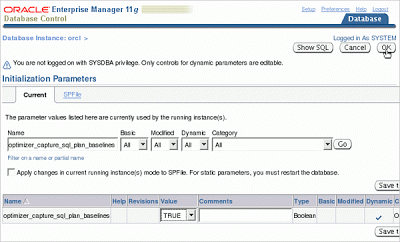
Loading SQL plan baselines from cursor cache
原文鏈接:https://blogs.oracle.com/optimizer/sql-plan-management-part-4-of-4:-user-interfaces-and-other-features
原文內容:
SQL Plan Management (Part 4 of 4): User Interfaces and Other Features
Maria Colgan
Master Product Manager
In the first three parts of this article, we have seen how SQL plan baselines are created, used and evolved. In this final installment, we will show some user interfaces, describe the interaction of SPM with other features and answer some of your questions.
DBMS_SPM package
A new package, DBMS_SPM, allows you to manage plan histories. We have already seen in previous examples how you can use it to create and evolve SQL plan baselines. Other management functions include changing attributes (like enabled status and plan name) of plans or dropping plans. You need the ADMINISTER SQL MANAGEMENT OBJECT privilege to execute this package. Viewing the plan history Regardless of how a plan history is created, you can view details about the various plans in the view DBA_SQL_PLAN_BASELINES. At the end of Part 3 of this blog, we saw that the SQL statement had two accepted plans:
SQL> select sql_text, sql_handle, plan_name, enabled, accepted
  2  from dba_sql_plan_baselines;

SQL_TEXT                 SQL_HANDLE               PLAN_NAME                     ENA ACC
------------------------ ------------------------ ----------------------------- --- ---
select p.prod_name, s.am SYS_SQL_4bf04d85fcc170b0 SYS_SQL_PLAN_fcc170b08cbcb825 YES YES
ount_sold, t.calendar_ye
ar
from sales s, products p
, times t
where s.prod_id = p.prod
_id
  and s.time_id = t.time
_id
  and p.prod_id < :pid

select p.prod_name, s.am SYS_SQL_4bf04d85fcc170b0 SYS_SQL_PLAN_fcc170b0a62d0f4d YES YES
ount_sold, t.calendar_ye
ar
from sales s, products p
, times t
where s.prod_id = p.prod
_id
  and s.time_id = t.time
_id
  and p.prod_id < :pid
The SQL handle is a unique identifier for each SQL statement that you can use when managing your plan history using the DBMS_SPM package. Creating an accepted plan by modifying the SQL text Some of you may be manually tuning SQL statements by adding hints or otherwise modifying the SQL text. If you enable automatic capture of SQL plans and then execute this statement, you will be creating a SQL plan baseline for this modified statement. What you most likely want, however, is to add this plan to the plan history of the original SQL statement. Here’s how you can do this using the above SQL statement as an example. Let’s modify the SQL statement, execute it and look at the plan:
SQL> var pid number
SQL> exec :pid := 100;

PL/SQL procedure successfully completed.

SQL> select /*+ leading(t) */ p.prod_name, s.amount_sold, t.calendar_year
2    from sales s, products p, times t
3    where s.prod_id = p.prod_id
4      and s.time_id = t.time_id
5      and p.prod_id < :pid;

PROD_NAME AMOUNT_SOLD CALENDAR_YEAR
--------- ----------- -------------
...
9 rows selected.

SQL> select * from table(dbms_xplan.display_cursor('b17wnz4y8bqv1', 0, 'basic note'));

PLAN_TABLE_OUTPUT
-------------------------------------------------------------------------------
EXPLAINED SQL STATEMENT:
------------------------
select /*+ leading(t) */ p.prod_name, s.amount_sold, t.calendar_year
from sales s, products p, times t where s.prod_id = p.prod_id   and
s.time_id = t.time_id   and p.prod_id < :pid

Plan hash value: 2290436051

---------------------------------------------------------------
| Id  | Operation                            | Name           |
---------------------------------------------------------------
|   0 | SELECT STATEMENT                     |                |
|   1 |  HASH JOIN                           |                |
|   2 |   HASH JOIN                          |                |
|   3 |    TABLE ACCESS FULL                 | TIMES          |
|   4 |    PARTITION RANGE ALL               |                |
|   5 |     TABLE ACCESS BY LOCAL INDEX ROWID| SALES          |
|   6 |      BITMAP CONVERSION TO ROWIDS     |                |
|   7 |       BITMAP INDEX RANGE SCAN        | SALES_PROD_BIX |
|   8 |   TABLE ACCESS BY INDEX ROWID        | PRODUCTS       |
|   9 |    INDEX RANGE SCAN                  | PRODUCTS_PK    |
---------------------------------------------------------------
We can now create a new accepted plan for the original SQL statement by associating the modified statement’s plan to the original statement’s sql handle (obtained from DBA_SQL_PLAN_BASELINES):
SQL> var pls number
SQL> exec :pls := dbms_spm.load_plans_from_cursor_cache( -
>                    sql_id => 'b17wnz4y8bqv1', -
>                    plan_hash_value => 2290436051, -
>                    sql_handle => 'SYS_SQL_4bf04d85fcc170b0');
If the original SQL statement does not already have a plan history (and thus no SQL handle), another version of load_plans_from_cursor_cache allows you to specify the original statement’s text. To confirm that we now have three accepted plans for our SQL statement, let’s check in DBA_SQL_PLAN_BASELINES:
SQL> select sql_text, sql_handle, plan_name, enabled, accepted
  2  from dba_sql_plan_baselines;

SQL_TEXT                 SQL_HANDLE               PLAN_NAME                     ENA ACC
------------------------ ------------------------ ----------------------------- --- ---
select p.prod_name, s.am SYS_SQL_4bf04d85fcc170b0 SYS_SQL_PLAN_fcc170b0888547d3 YES YES
ount_sold, t.calendar_ye
ar
from sales s, products p
, times t
where s.prod_id = p.prod
_id
  and s.time_id = t.time
_id
  and p.prod_id < :pid

select p.prod_name, s.am SYS_SQL_4bf04d85fcc170b0 SYS_SQL_PLAN_fcc170b08cbcb825 YES YES
ount_sold, t.calendar_ye
ar
from sales s, products p
, times t
where s.prod_id = p.prod
_id
  and s.time_id = t.time
_id
  and p.prod_id < :pid

select p.prod_name, s.am SYS_SQL_4bf04d85fcc170b0 SYS_SQL_PLAN_fcc170b0a62d0f4d YES YES
ount_sold, t.calendar_ye
ar
from sales s, products p
, times t
where s.prod_id = p.prod
_id
  and s.time_id = t.time
_id
  and p.prod_id < :pid
Displaying plans
When the optimizer uses an accepted plan for a SQL statement, you can see it in the plan table (for explain) or V$SQL_PLAN (for shared cursors). Let’s explain the SQL statement above and display its plan:
SQL> explain plan for
  2  select p.prod_name, s.amount_sold, t.calendar_year
  3  from sales s, products p, times t
  4  where s.prod_id = p.prod_id
  5    and s.time_id = t.time_id
  6    and p.prod_id < :pid;

Explained.

SQL> select * from table(dbms_xplan.display('plan_table', null, 'basic note'));

PLAN_TABLE_OUTPUT
-------------------------------------------------------------------------------
Plan hash value: 2787970893

----------------------------------------------------------------
| Id  | Operation                             | Name           |
----------------------------------------------------------------
|   0 | SELECT STATEMENT                      |                |
|   1 |  NESTED LOOPS                         |                |
|   2 |   NESTED LOOPS                        |                |
|   3 |    HASH JOIN                          |                |
|   4 |     TABLE ACCESS BY INDEX ROWID       | PRODUCTS       |
|   5 |      INDEX RANGE SCAN                 | PRODUCTS_PK    |
|   6 |     PARTITION RANGE ALL               |                |
|   7 |      TABLE ACCESS BY LOCAL INDEX ROWID| SALES          |
|   8 |       BITMAP CONVERSION TO ROWIDS     |                |
|   9 |        BITMAP INDEX RANGE SCAN        | SALES_PROD_BIX |
|  10 |    INDEX UNIQUE SCAN                  | TIME_PK        |
|  11 |   TABLE ACCESS BY INDEX ROWID         | TIMES          |
----------------------------------------------------------------

Note
-----
- SQL plan baseline "SYS_SQL_PLAN_fcc170b0a62d0f4d" used for this statement
The note at the bottom tells you that the optimizer used an accepted plan. A plan history might have multiple plans. You can see one of the accepted plans if the optimizer selects it for execution. But what if you want to display some or all of the other plans? You can do this using the display_sql_plan_baseline function in the DBMS_XPLAN package. Using the above example, here’s how you can display the plan for all plans in the plan history.
SQL> select *
  2  from table(dbms_xplan.display_sql_plan_baseline(
  3               sql_handle => 'SYS_SQL_4bf04d85fcc170b0', format => 'basic'));

PLAN_TABLE_OUTPUT
--------------------------------------------------------------------------------

--------------------------------------------------------------------------------
SQL handle: SYS_SQL_4bf04d85fcc170b0
SQL text: select p.prod_name, s.amount_sold, t.calendar_year from sales s,
          products p, times t where s.prod_id = p.prod_id   and s.time_id =
          t.time_id   and p.prod_id < :pid
--------------------------------------------------------------------------------

--------------------------------------------------------------------------------
Plan name: SYS_SQL_PLAN_fcc170b0888547d3
Enabled: YES     Fixed: NO      Accepted: YES     Origin: MANUAL-LOAD
--------------------------------------------------------------------------------

Plan hash value: 2290436051

---------------------------------------------------------------
| Id  | Operation                            | Name           |
---------------------------------------------------------------
|   0 | SELECT STATEMENT                     |                |
|   1 |  HASH JOIN                           |                |
|   2 |   HASH JOIN                          |                |
|   3 |    TABLE ACCESS FULL                 | TIMES          |
|   4 |    PARTITION RANGE ALL               |                |
|   5 |     TABLE ACCESS BY LOCAL INDEX ROWID| SALES          |
|   6 |      BITMAP CONVERSION TO ROWIDS     |                |
|   7 |       BITMAP INDEX RANGE SCAN        | SALES_PROD_BIX |
|   8 |   TABLE ACCESS BY INDEX ROWID        | PRODUCTS       |
|   9 |    INDEX RANGE SCAN                  | PRODUCTS_PK    |
---------------------------------------------------------------

--------------------------------------------------------------------------------
Plan name: SYS_SQL_PLAN_fcc170b08cbcb825
Enabled: YES     Fixed: NO      Accepted: YES     Origin: AUTO-CAPTURE
--------------------------------------------------------------------------------

Plan hash value: 2361178149

------------------------------------------
| Id  | Operation             | Name     |
------------------------------------------
|   0 | SELECT STATEMENT      |          |
|   1 |  HASH JOIN            |          |
|   2 |   HASH JOIN           |          |
|   3 |    PARTITION RANGE ALL|          |
|   4 |     TABLE ACCESS FULL | SALES    |
|   5 |    TABLE ACCESS FULL  | TIMES    |
|   6 |   TABLE ACCESS FULL   | PRODUCTS |
------------------------------------------

--------------------------------------------------------------------------------
Plan name: SYS_SQL_PLAN_fcc170b0a62d0f4d
Enabled: YES     Fixed: NO      Accepted: YES     Origin: AUTO-CAPTURE
--------------------------------------------------------------------------------

Plan hash value: 2787970893

----------------------------------------------------------------
| Id  | Operation                             | Name           |
----------------------------------------------------------------
|   0 | SELECT STATEMENT                      |                |
|   1 |  NESTED LOOPS                         |                |
|   2 |   NESTED LOOPS                        |                |
|   3 |    HASH JOIN                          |                |
|   4 |     TABLE ACCESS BY INDEX ROWID       | PRODUCTS       |
|   5 |      INDEX RANGE SCAN                 | PRODUCTS_PK    |
|   6 |     PARTITION RANGE ALL               |                |
|   7 |      TABLE ACCESS BY LOCAL INDEX ROWID| SALES          |
|   8 |       BITMAP CONVERSION TO ROWIDS     |                |
|   9 |        BITMAP INDEX RANGE SCAN        | SALES_PROD_BIX |
|  10 |    INDEX UNIQUE SCAN                  | TIME_PK        |
|  11 |   TABLE ACCESS BY INDEX ROWID         | TIMES          |
----------------------------------------------------------------
Parameters
Two parameters allow you to control SPM. The first, optimizer_capture_sql_plan_baselines, which is FALSE by default, allows you to automatically capture plans. SPM will start managing every repeatable SQL statement that is executed and will create a plan history for it. The first plan that is captured will beautomatically accepted. Subsequent plans for these statements will not be accepted until they are evolved. The second parameter, optimizer_use_sql_plan_baselines, is TRUE by default. It allows the SPM aware optimizer to use the SQL plan baseline if available when compiling a SQL statement. If you set this parameter to FALSE, the SPM aware optimizer will be disabled and you will get the regular cost-based optimizer which will select the best plan based on estimated cost.
SPM and SQL profiles
A SQL statement can have both a SQL profile and a SQL plan baseline. Such a case was described in Part 3 where we evolved a SQL plan baseline by accepting a SQL profile. In this case, the SPM aware optimizer will use both the SQL profile and the SQL plan baseline. The SQL profile contains additional information that helps the optimizer to accurately cost each accepted plan and select the best one. The SPM aware optimizer may choose a different accepted plan when a SQL profile is present than when it is not.
SPM and Stored Outlines
It is possible for a SQL statement to have a stored outline as well as a SQL plan baseline. If a stored outline exists for a SQL statement and is enabled for use, then the optimizer will use it. If you are using stored outlines, you can test SPM by creating SQL plan baselines and disabling the stored outlines. If you are satisfied with SPM, you can either drop the stored outlines or leave them disabled. If SPM doesn’t work for you (and we would love to know why), you can re-enable the stored outlines. If you are using stored outlines, be aware of their limitations: You can only have one stored outline at a time for a given SQL statement. This may be fine in some cases, but a single plan is not necessarily the best when the statement is executed under varying conditions (e.g., bind values). The second limitation is related to the first. Stored outlines do not allow for evolution. That is, even if a better plan exists, the stored outline will continue to be used, potentially degrading your system’s performance. To get the better plan, you have to manually drop the current stored outline and generate a new one. If an access path (e.g., an index) used in a stored outline is dropped or otherwise becomes unusable, the partial stored outline will continue to be used with the potential of a much worse plan.
One question that readers have is what we plan to do with the stored outlines feature. Stored outlines will be desupported in a future release in favor of SQL plan management. In Oracle Database 12c Release 2, stored outlines continue to function as in past releases. However, Oracle strongly recommends that you use SQL plan management for new applications. SQL plan management creates SQL plan baselines, which offer superior SQL performance and stability compared with stored outlines. If you have existing stored outlines, consider migrating them to SQL plan baselines by using the LOAD_PLANS_FROM_CURSOR_CACHE or LOAD_PLANS_FROM_SQLSET procedure of the DBMS_SPM package. When the migration is complete, you should disable or remove the stored outlines.
SPM and Adaptive Cursor Sharing
Adaptive cursor sharing (ACS) may generate multiple cursors for a given bind sensitive SQL statement if it is determined that a single plan is not optimal under all conditions. Each cursor is generated by forcing a hard parse of the statement. The optimizer will normally select the plan with the best cost upon each hard parse. When you have a SQL plan baseline for a statement, the SPM aware optimizer will select the best accepted plan as the optimal plan. This also applies for the hard parse of a bind sensitive statement. There may be multiple accepted plans, each of which is optimal for different bind sets. With SPM and ACS enabled, the SPM aware optimizer will select the best plan for the current bind set. Thus, if a hard parse occurs, the normal SPM plan selection algorithm is used regardless of whether a statement is bind sensitive.
Enterprise Manager
You can view SQL plan baselines and configure and manage most SPM tasks through the Enterprise Manager. The screenshots below show two of these tasks.
Setting init.ora parameters for SPM
