



PostgreSQL數據庫優化一優化概述及操作系統調優
優化概述及操作系統調優
優化概述
思路
把一些無用的步驟或用處不大的步驟去掉就是一種優化。
做同樣的一件事情,能夠更快地做,如讓SQL做到更優的執行計劃上。
度量指標
響應時間RT:衡量數據庫系統與用戶交互式多久能夠發出響應。
吞吐量QPS/TPS:衡量在單位時間里可以完成的數據庫任務。
常見依賴因素
環境:機器配置、網絡帶寬和時延、HA架構(同步/異步復制)、數據庫參數(刷盤參數等)
業務場景:表定義、數據量、SQL、事務隔離級別、并發度
優化是什么
合規性檢查
數據庫上線前的一次性檢查,是否符合規范
配置優化
數據庫系統運行過程中多次優化調整
對象優化
表分區、物化視圖、碎片整理、索引重建等
SQL優化
慢SQL,TopSQL
調優類型
- 預定義的:DBA制定調優的目標,來達到預定的效果;
- 主動式的:周期性去采集信息,目標不明確,主要范圍是集中在數據庫實例級別;
- 被動式的:客戶抱怨出現問題,這類優化主要集中在SQL語句級。
調優階段
調優設計
架構設計(單機或主從)、應用設計(模塊設計)
調優操作系統
共享內存段大小、文件緩存大小、網絡配置、文件系統、存儲緩存、異步IO等
調優I/O
使用表空間、存儲對象分布,文件存儲分布等
調優內存
數據庫共享內存、維護工作內存、工作內存、臨時內存
調優競爭
鎖等待
調優應用
代碼調優、應用存儲對象調優
主動式性能調優的基本步驟
-
詳細了解業務特性和優化需求調優應用
-
設計合理的性能優化目標
-
收集并記錄當前性能信息(包括數據庫和操作系統)
-
確定當前操作系統和數據庫的性能瓶頸
-
結合性能指標、用戶描述和性能信息分享瓶頸原因
-
確定合適的優化方法優化相關性能問題
-
逐步實施優化方法,記錄實施更改過程及場景
-
在業務穩定運行后重新收集性能信息,確定是否達到優化要求
-
如果沒有成功,重復前面的步驟,直到滿足優化目標
平衡性能與數據庫健壯性的需求
- Raid方式(讀多,可使用raid5,寫多,可使用raid10)
- 頻繁的檢查點
- 備份數據文件
- 執行歸檔
- 異地容災等
優化關注的問題
- 穩
- 改善用戶的使用體驗
- 幫助客戶省錢
硬件優化
操作系統硬件
CPU、內存、磁盤
CPU選擇及調優工具
-
< V9.6
? 單核計算能力強的CPU
-
<= V9.6
? 多核

[root@lxs1 ~]# cd /usr/lib/tuned
[root@lxs1 tuned]# mkdir pg_performance
[root@lxs1 tuned]# vi pg_performance/tuned.conf
[main]
summary=Tuned profile for PostgreSQL Instances
[bootloader]
cmdline=transparent_hugepage=never
[cpu]
force_latency=1
governor=performance
energy_perf_bias=performance
min_perf_pct=100
[disk]
readahead=>4096
[vm]
transparent_hugepages=never
[sysct1]
kernel.sched_min_granularity_ns = 10000000
kernel.sched_wakeup_granularity_ns = 15000000
# checkpoint performance
vm.dirty_background_bytes = 67108864
vm.dirty_background_ratio = 5
vm.dirty_bytes = 536870912
vm.dirty_ratio = 10
vm.dirty_expire_centisecs = 500
vm.dirty_writeback_centisecs = 250
vm.overcommit_memory= 2
net.ipv4.tcp_timestamps=0
#VM
vm.swappiness=1
[root@lxs1 tuned]# tuned-adm profile pg_performance
[root@lxs1 tuned]# tuned-adm active
Current active profile: pg_performance
[root@lxs1 tuned]#
CPU性能測試
通過使用generate_series函數對100萬個整數相加測試CPU
\timing
select sum(generate_series) from generate_series(1,1000000);
create table test (id integer primary key);
insert into test values (generate_series(1,1000000));
explain analyze select count(*) from test;
postgres=# \timing
Timing is on.
postgres=# select sum(generate_series) from generate_series(1,1000000);
     sum
--------------
 500000500000
(1 row)
Time: 429.659 ms
postgres=# create table test (id integer primary key);
CREATE TABLE
Time: 8.689 ms
postgres=# insert into test values (generate_series(1,1000000));
INSERT 0 1000000
Time: 4556.109 ms (00:04.556)
postgres=# explain analyze select count(*) from test;
                                                              QUERY PLAN
--------------------------------------------------------------------------------------------------------------
 Finalize Aggregate  (cost=11302.17..11302.18 rows=1 width=8) (actual time=127.750..130.163 rows=1 loops=1)
   ->  Gather  (cost=11301.95..11302.16 rows=2 width=8) (actual time=127.103..130.147 rows=3 loops=1)
         Workers Planned: 2
         Workers Launched: 2
         ->  Partial Aggregate  (cost=10301.95..10301.96 rows=1 width=8) (actual time=118.579..118.580 rows=1 loops=3)
               ->  Parallel Seq Scan on test  (cost=0.00..9126.56 rows=470156 width=0) (actual time=0.058..81.504 rows=333333 loops=3)
 Planning Time: 0.478 ms
 Execution Time: 130.249 ms
(8 rows)

Time: 131.683 ms
postgres=#
內存
到底應該給數據庫分配多大內存?
- 如果所處理的數據量相對于系統RAM來說非常小,此時需要使用更快的處理器。
- 當數據庫進行表掃描操作,但這些表的數據量遠遠大于可以我數據庫分配的內存,這時候需要選取更快的硬盤,而不是增加內存。
內存評測
-
Memtest86+
http://www.memtest.org
-
STREAM
http://www.cs.virginia.edu/stream/ref.html
https://github.com/jeffhammond/STREAM
磁盤設置
磁盤驅動器
- ATA驅動SATA磁盤
- SCSI啟動SAS磁盤
RAID技術
- raid0 – 提高讀寫性能、安全性較低
- raid1 – 安全性根據組里實體硬盤數增長,空間利用率低
- raid5 – 兼顧空間利用率與數據安全性(常用)
- raid10 – 先建立兩組raid1,在其基礎上促成raid0,代價較貴。
磁盤性能測試
-
dd block=250,000 * RAM(GB)
time sh -c “dd if=/dev/zero of=bigfile bs=8k count=${blocks} && sync”
time dd if=bigfile of=/dev/null bs=8k
-
fio/sysbench
sysbench fileio --file-total-size=15G --file-test-mode-rnderw --time=300 --max-requests=0 prepare
sysbench fileio --file-total-size=15G --file-test-mode-rnderw --time=300 --max-requests=0 run
sysbench fileio --file-total-size=15G --file-test-mode-rnderw --time=300 --max-requests=0 cleanup
磁盤設置
-
scheduler(調度策略)
- noop(SSD)
- deadline(低延遲高吞吐)
- cfq(默認平衡策略)
-
read-ahead(預讀)
-
分配足夠IO能力的磁盤(足夠多的磁盤)
-
raid組的設計
磁盤布局
| Location | Disks | RAID Level | Purpose |
|---|---|---|---|
| /(root) | 2 | 1 | OS |
| $PGDATA | 6+ | 10 | Database |
| $PADATA/pg_wal | 2 | 1 | WAL |
| Tablespace | 1+ | None | Temporary files |
| Function | Cache Flushes | Access Pattern |
|---|---|---|
| OS | Rare | Mix of sequential and random |
| Database | Regularly | Mix of sequential and random |
| WAL | Constant | Sequential |
| Templorary | Never | More random as client increases |
操作系統優化
文件系統及緩存
回寫緩存write-back cache
預防write-back cache出故障的措施
- 確保系統完整實現了fsync調用或者類似機制的功能(wal_sync_method)。
- 監控磁盤控制器電池。有些控制卡自身會監控其狀態,如果發現掉電或者工作不正常時,會從write-back改成write-through模式,當然其性能會下降。
- 禁止任何磁盤的write-cache模式。大部分RAID卡會來做這點,他們會優先使用BBC模式。
磁盤陣列一般都用write-back cache,因為他配置了電池,一般稱為battery-backed write cache(BBC or BBWC)
文件系統
- 選擇合適的文件系統
- ext4
- xfs
- zfs/btrfs
- 文件系統規劃
- PG_WAL命令
- PGDATA數據目錄
- 歸檔目錄
- 掛載參數
- noatime
- nobarrier
系統緩存
- 預留足夠的物理內存,用于文件的讀寫CACHE
- 根據業務系統的特點與硬件的IO能力調整臟塊刷新頻率
如果物理IO性能很強,則降低刷新頻率,減少臟塊比例,如果物理IO性能較弱,則往反方向調整。
操作系統內核參數
共享內存參數
-
kernel.shmmax
丹哥共享內存段的最大大小,以字節為單位
-
kernel.shmall
服務器上所有進程可以使用的共享內存的總頁數
-
kernal.sem = 250 32000 32 128
進程通信的系統信號量
[root@lxs1 ~]# more kernel.sh
#!/bin/bash
# simple shmsetup script
page_size=`getconf PAGE_SIZE`
phys_pages=`getconf _PHYS_PAGES`
shmall=`expr $phys_pages / 2`
shmmax=`expr $shmall \* $page_size`
echo kernel.shmmax = $shmmax
echo kernel.shmall = $shmall
[root@lxs1 ~]# sh kernel.sh
kernel.shmmax = 16868265984
kernel.shmall = 4118229
[root@lxs1 ~]#
VM參數
-
內存與換頁策略
-
vm.swappiness
建議設置為小于10(比如0或者1)
-
vm.overcommit_memory
0系統會判斷剩余可用的內存大小,如果可用內存不足就會失敗(試探性分配)
1系統不進行任何檢查,允許超量使用內存,知道內存用完為止(超分配)
2不允許超過可用內存的大小(超分配時做檢查)
-
vm.overcommit_ratio
-
-
文件緩存臟塊回寫策略
- vm.dirty_background_ratio = 5(10–>5)
- vm.dirty_ratio = 10~15
LIMITS設置
postgres soft nofile 1048576
postgres hard nofile 1048576
postgres soft nproc 131072
postgres hard nproc 131072
postgres soft memlock unlimited
postgres hard memlock unlimited
postgres soft core unlimited
postgres hard core unlimited
postgres soft stack unlimited
postgres hard stack unlimited

# core - limit the core file size (KB)
# memlock - max locked-in-memory address space (KB)
# nofile - max number of open files
# nproc - max number of processes
HugePages設置
-
HugePages
- SESSION數量很大的情況下,分配給進程的頁表(PAGETABLE)數量會增多。這種內存占用帶來的系統換頁、內存碎片化問題在某些場景下回變得十分嚴重。
- 對于會話數很多,并發訪問量較大的PG數據庫來說,一定要考慮HugePages的設置,否則內存的頁表占據很大的空間,同時頁表過大會引起整個OS性能下降
-
Transparent HugePages
- 為了解決HugePages配置的變化需要重啟服務器的問題,Linux推出了透明大頁技術。雖然透明大頁可以解決普通大頁管理的弊端,不過這種透明大頁對于一些高負載的應用場景,可能帶來內存嚴重碎片,影響操作系統內存分配性能的問題。在某些環境中,數據庫與操作系統的透明大頁技術并未實現很好的融合,使用透明大頁可能帶來一些負面的影響。因此在PG上暫時不建議使用透明大頁,并且在一些高負載的大型數據庫系統中建議關閉操作系統的透明大頁功能。
- transparent_hugepage = never
NUMA設置
- 大多數情況,我們可以在BIOS層面關閉NUMA支持,并且在OS啟動參數中設置numa off參數,那么我們再OS上就可以不用關注NUMA問題了。
- 如果在OS上沒有關閉NUMA,也可以通過下面的手段讓PG數據庫在分配內存的時候不理會NUMA的遠程內存。
vm.zone_reclaim_mode=0
vm.numa_balancing=0
numactl-interleave=all
?
其他系統優化
- 打開SWAP
- 禁用Selinux
- 禁用RemoveIPC
- 禁用IPV6
- 關閉不必要的服務
表空間優化
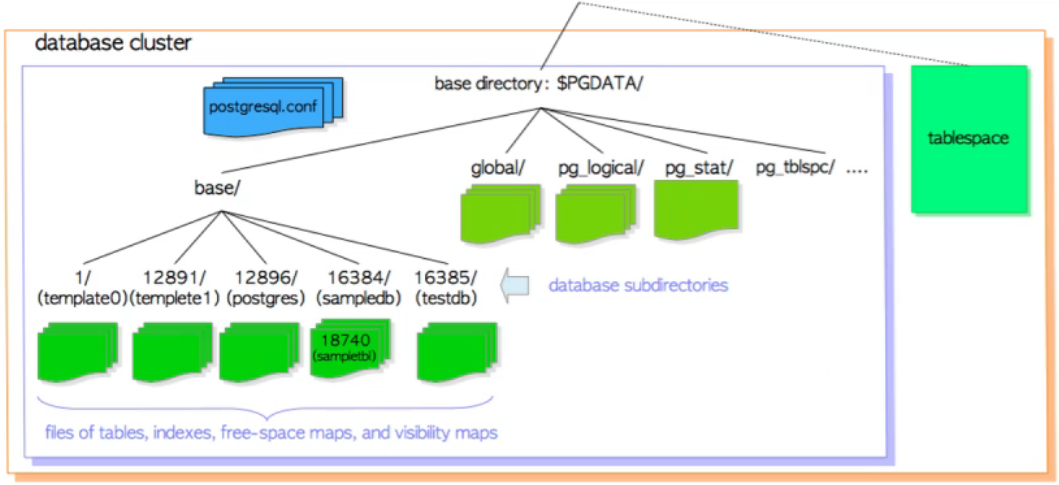
postgres=# \db
       List of tablespaces
    Name    |  Owner   | Location
------------+----------+----------
 pg_default | postgres |
 pg_global  | postgres |
(2 rows)
postgres=# create tablespace mytb1 location '/home/postgres/tbls_a';
CREATE TABLESPACE
postgres=# \db mytb1
           List of tablespaces
 Name  |  Owner   |       Location
-------+----------+-----------------------
 mytb1 | postgres | /home/postgres/tbls_a
(1 row)
postgres=# create table t(i int) tablespace mytb1;
CREATE TABLE
postgres=#
使用表空間的優點
- 分散IO
- 存儲擴容
- 限制單個table或db的size
- 對不同的磁盤進行參數調優
- 單獨設置臨時文件的路徑
總結
-
硬件優化
CPU、內存、磁盤的選配及相應的設置
-
操作系統參數調優
VM參數、LIMITS限制、Huge Pages、NUMA設置
-
表空間優化
使用表空間的優點
