



MySQL 8.0.28
CentOS 7.6
在開動前,首先推薦大家快速讀一遍 MySQL 官方文檔中 Group Replication 章節,內容雖厚重,但極其詳盡。相比網上總結的文章也包括本篇,官網是最靠譜的,畢竟每個人的操作環境、技能水平以及表達方式各有不同,建議實操以官網為主、總結篇為輔,少踩坑、高效完成部署。
本次基于 8.0.28 版本部署 MGR 花費時間并不短,從準備虛機環境、部署驗證加上文檔整理,斷斷續續折騰了近兩天的時間。結合部署過程,在正式部署前先分享幾個要點:
- 務必做好環境初始化工作,重點是防火墻的處理;
- MySQL 8 版本密碼認證方式和以往版本的差異;
- 如果是克隆的數據庫,需要刪除 auto.cnf 后重啟生成新 id,否則入組會產生沖突。
1. 環境準備
第一步是提前準備好3 個 MySQL 實例,部署文檔可以參考CentOS7.6 安裝部署 MySQL 8.0.28一文,官網說明請參考 第 2 章 “安裝和升級 MySQL”。
組復制是MySQL Server 8.0提供的內置 MySQL 插件,因此不需要進行額外安裝。有關 MySQL 插件的更多背景信息,請參見第 5.6 節 “MySQL 服務器插件”。
三實例的架構是最小規模的 MGR 架構,添加更多實例可提高 Group 的容錯能力,一個 Group 中最多可以有 9 個實例,詳細信息請參考第 17.1.4.2 節 “故障檢測”。
服務器列表
| IP | Role | Host Name | DB Port | Internal Port | |
|---|---|---|---|---|---|
| 1 | 192.168.56.103 | Primary | s1 | 3306 | 33061 |
| 2 | 192.168.56.104 | Secondary | s2 | 3306 | 33061 |
| 3 | 192.168.56.105 | Secondary | s3 | 3306 | 33061 |
基礎環境
修改 host 文件
cat >> /etc/hosts << EOF
192.168.56.103 s1
192.168.56.104 s2
192.168.56.105 s3
EOF
關閉防火墻
systemctl stop firewalld.service
systemctl disable firewalld.service
2. Server S1 (Primary)
為組復制配置實例屬性
-- 以下操作請在 S1 中執行
cp /etc/my.cnf /etc/my.cnf.bak
cat >> /etc/my.cnf << EOF
#
# Disable other storage engines
#
disabled_storage_engines="MyISAM,BLACKHOLE,FEDERATED,ARCHIVE,MEMORY"

#
# Replication configuration parameters
#
server_id=1
gtid_mode=ON
enforce_gtid_consistency=ON
log_bin=binlog
log_slave_updates=ON
#binlog_checksum=NONE           # Not needed from 8.0.21
binlog_format=ROW
master_info_repository=TABLE
relay_log_info_repository=TABLE
transaction_write_set_extraction=XXHASH64

#
# Group Replication configuration
#
plugin_load_add='group_replication.so'
group_replication_group_name="b309fcc3-93e8-11ec-b5bd-080027c850b1"
group_replication_start_on_boot=off
group_replication_local_address= "s1:33061"
group_replication_group_seeds= "s1:33061,s2:33061,s3:33061"
group_replication_bootstrap_group=off

EOF
- plugin-load-add:實例啟動時會將組復制插件加載到插件列表中;
- group_replication_group_name:在數據庫中使用 SELECT UUID() 命令生成;
- group_replication_start_on_boot:決定插件在服務啟動時是否自啟;
- group_replication_local_address:內部通訊端口,推薦使用 33061;
- group_replication_bootstrap_group:在首個實例聯機后,需要設置為 off。如果多次引導組則人為觸發裂腦,產生兩個具有相同名稱的不同組。
重啟 S1 的 MySQL 數據庫
systemctl restart mysqld
tail -200 /var/log/mysqld.log
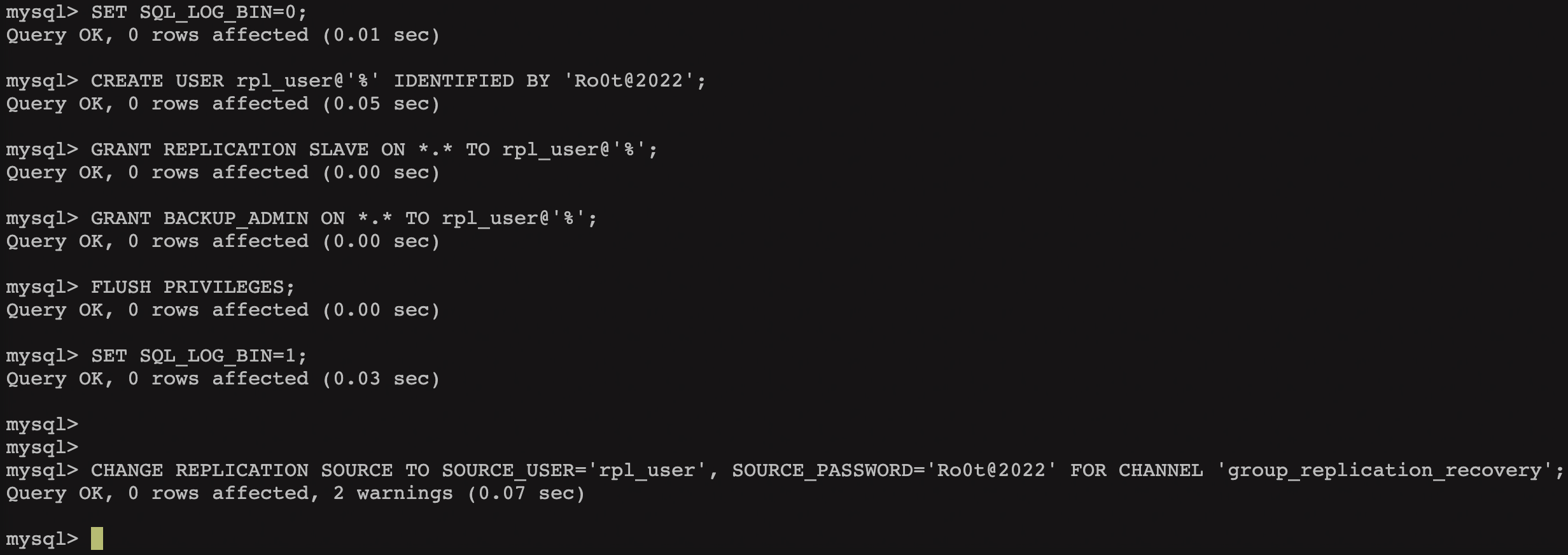
創建復制用戶
mysql -uroot -p

SET SQL_LOG_BIN=0;
CREATE USER rpl_user@'%' IDENTIFIED WITH mysql_native_password BY 'Ro0t@2022';
GRANT REPLICATION SLAVE ON *.* TO rpl_user@'%';
GRANT BACKUP_ADMIN ON *.* TO rpl_user@'%';
FLUSH PRIVILEGES;
啟動組復制
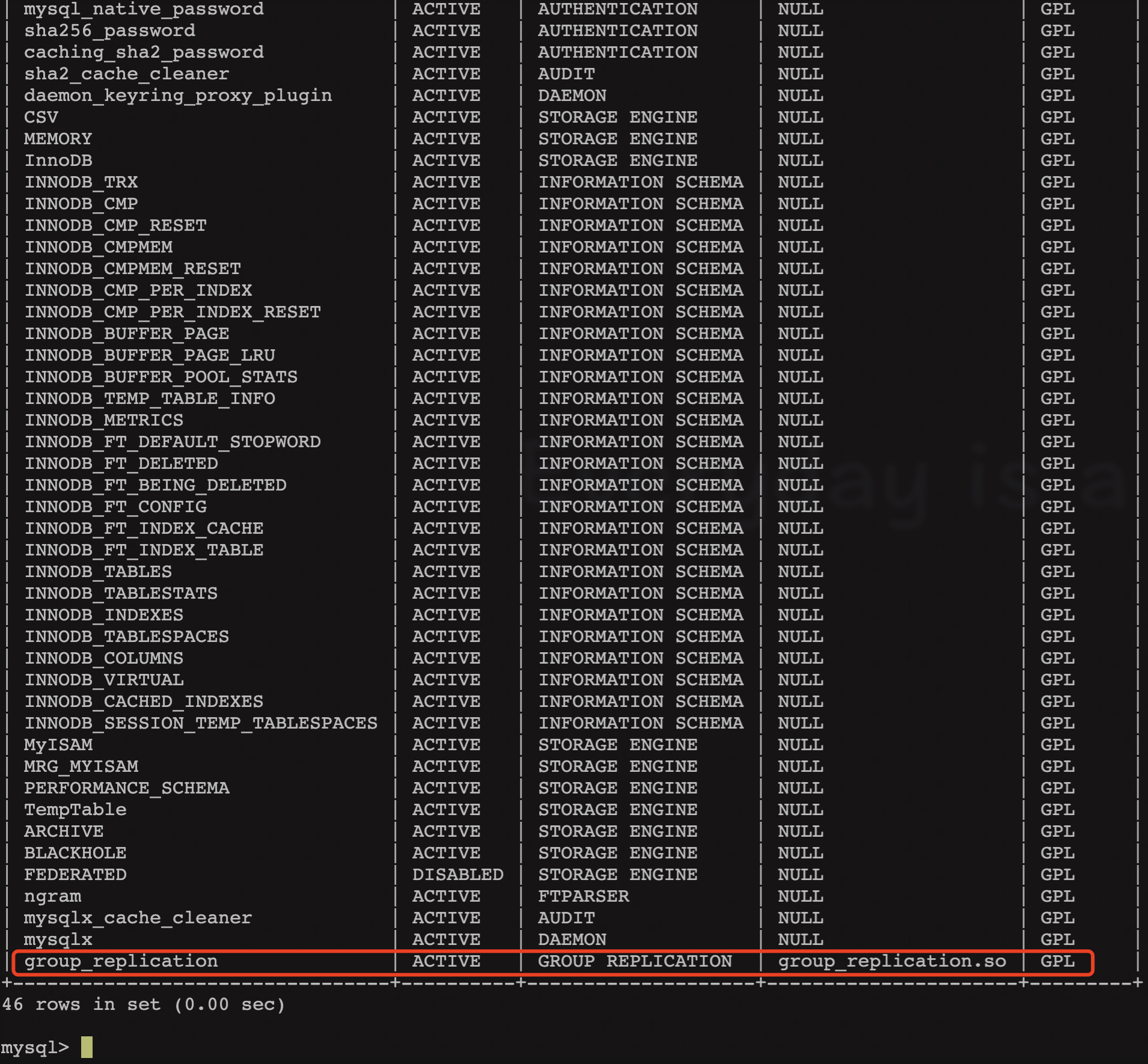
當上面配置文件中已經配置“plugin_load_add=‘group_replication.so’”參數后,需檢查插件是否已成功安裝,請執行命令并檢查輸出。
SHOW PLUGINS;
引導
首次啟動組的過程稱為引導。您可以使用group_replication_bootstrap_group系統變量來引導組。引導只能由單個服務器完成,該服務器啟動組并且只能執行一次。
這就是group_replication_bootstrap_group選項的值未存儲在實例的選項文件中的原因。如果它保存在選項文件中,則在重新啟動服務器時,服務器會自動引導具有相同名稱的第二個組。這將導致兩個具有相同名稱的不同組。
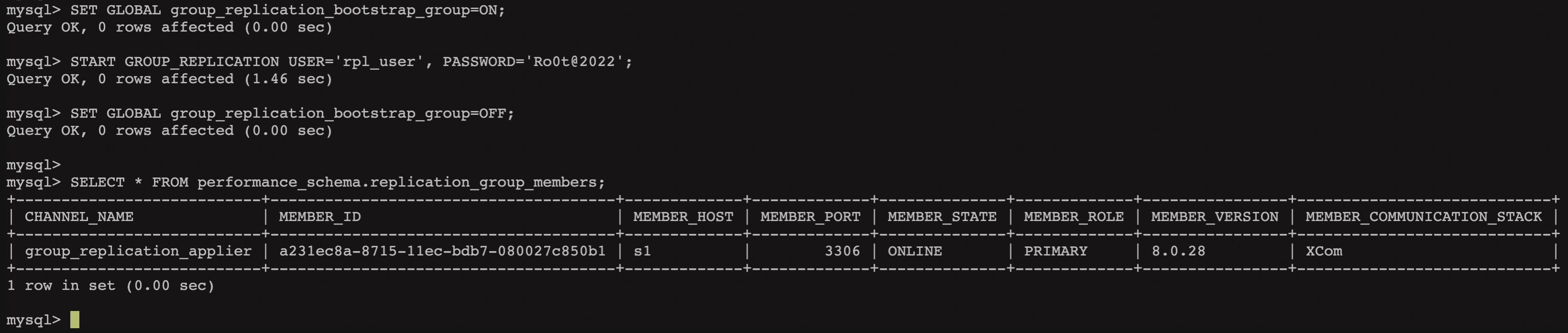
若正確地引導組,請連接到 s1 執行如下語句:
SET GLOBAL group_replication_bootstrap_group=ON;
START GROUP_REPLICATION USER='rpl_user', PASSWORD='Ro0t@2022';
SET GLOBAL group_replication_bootstrap_group=OFF;

--確認成員信息
SELECT * FROM performance_schema.replication_group_members;
為了驗證后續其他節點入組情況,下面將創建一個表并向其中添加一些數據進行驗證。
CREATE DATABASE test;
USE test;
CREATE TABLE t1 (c1 INT PRIMARY KEY, c2 TEXT NOT NULL);
INSERT INTO t1 VALUES (1, 'Tank');
檢查表的內容和二進制日志信息。
SELECT * FROM t1;
SHOW BINLOG EVENTS;
此時,組中有一個成員 s1,也包括一些測試數據。下面繼續添加其他實例擴展組。
3. Server S2 (Secondary)
在 s2 中,首先修改 MySQL 配置文件,該配置類似于用于服務器 s1 的配置,但 server_id 和 group_replication_local_address 除外。
cp /etc/my.cnf /etc/my.cnf.bak

cat >> /etc/my.cnf << EOF
[mysqld]

#
# Disable other storage engines
#
disabled_storage_engines="MyISAM,BLACKHOLE,FEDERATED,ARCHIVE,MEMORY"

#
# Replication configuration parameters
#
server_id=2
gtid_mode=ON
enforce_gtid_consistency=ON
# binlog_checksum=NONE           # Not needed from 8.0.21

#
# Group Replication configuration
#
plugin_load_add='group_replication.so'
group_replication_group_name="b309fcc3-93e8-11ec-b5bd-080027c850b1"
group_replication_start_on_boot=off
group_replication_local_address= "s2:33061"
group_replication_group_seeds= "s1:33061,s2:33061,s3:33061"
group_replication_bootstrap_group= off

EOF
與服務器 s1 的配置過程類似,在配置文件就位后可以啟動服務器。
systemctl restart mysqld
tail -200 /var/log/mysqld.log
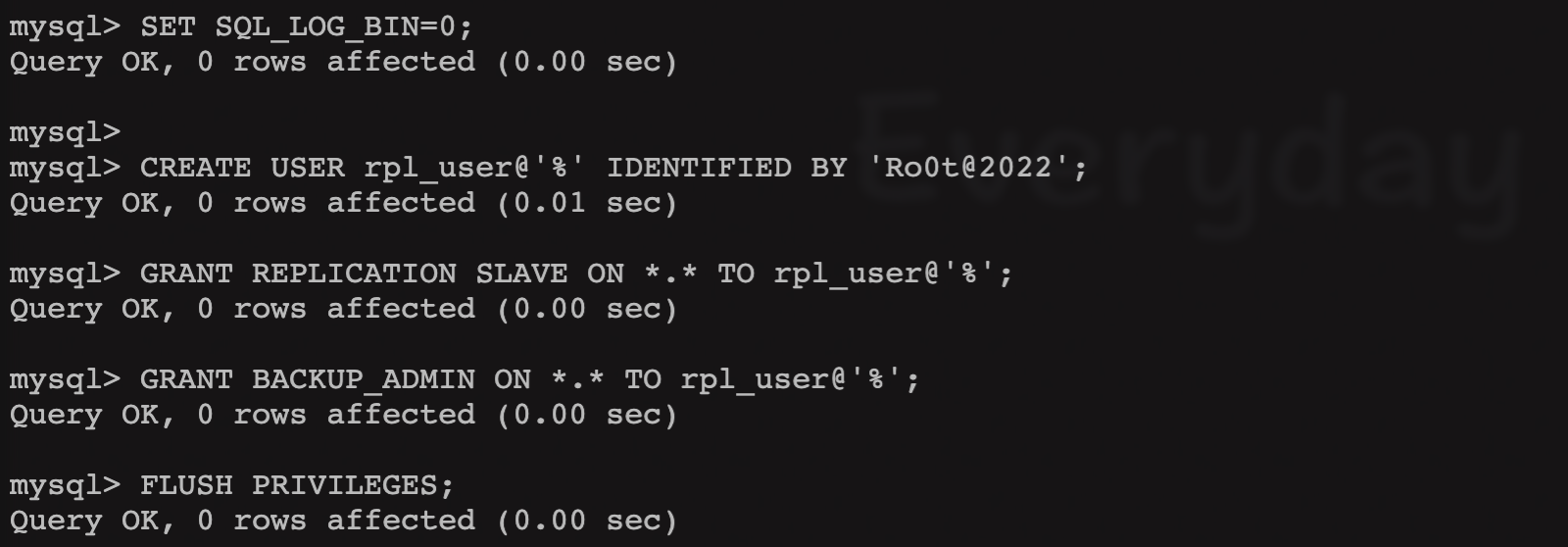
然后按如下所示配置進行配置,這些命令與設置服務器 s1 時使用的命令相同,因為用戶是在組內共享。
mysql -uroot -p

SET SQL_LOG_BIN=0;
CREATE USER rpl_user@'%' IDENTIFIED WITH mysql_native_password BY 'Ro0t@2022';
GRANT REPLICATION SLAVE ON *.* TO rpl_user@'%';
GRANT BACKUP_ADMIN ON *.* TO rpl_user@'%';
FLUSH PRIVILEGES;
SET SQL_LOG_BIN=1;
CHANGE REPLICATION SOURCE TO SOURCE_USER='rpl_user', SOURCE_PASSWORD='Ro0t@2022' FOR CHANNEL 'group_replication_recovery';
啟動組復制,s2 啟動加入組中。
START GROUP_REPLICATION USER='rpl_user', PASSWORD='Ro0t@2022';
SELECT * FROM performance_schema.replication_group_members;

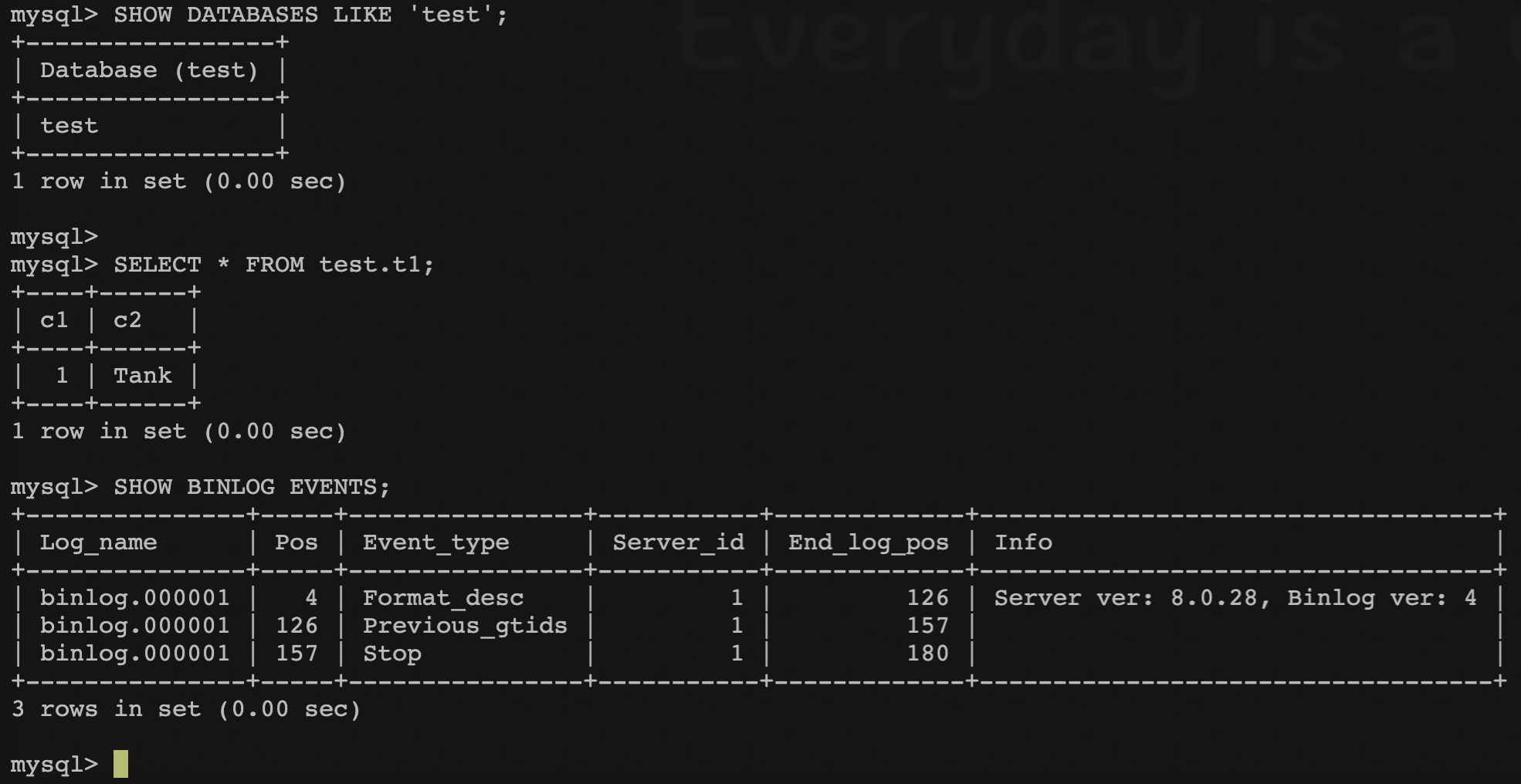
確認數據同步情況。
SHOW DATABASES LIKE 'test';
SELECT * FROM test.t1;
SHOW BINLOG EVENTS;
4. Server S3 (Secondary)
向組添加其他實例與添加第 2 臺服務器的步驟順序基本相同,只是必須更改配置。總結所需的命令如下。
1.修改配置文件
cp /etc/my.cnf /etc/my.cnf.bak

cat >> /etc/my.cnf << EOF
[mysqld]

#
# Disable other storage engines
#
disabled_storage_engines="MyISAM,BLACKHOLE,FEDERATED,ARCHIVE,MEMORY"

#
# Replication configuration parameters
#
server_id=3
gtid_mode=ON
enforce_gtid_consistency=ON
binlog_checksum=NONE           # Not needed from 8.0.21

#
# Group Replication configuration
#
plugin_load_add='group_replication.so'
group_replication_group_name="b309fcc3-93e8-11ec-b5bd-080027c850b1"
group_replication_start_on_boot=off
group_replication_local_address= "s3:33061"
group_replication_group_seeds= "s1:33061,s2:33061,s3:33061"

EOF
2.啟動服務器并連接到實例,創建復制用戶。
mysql -uroot -p

SET SQL_LOG_BIN=0;
CREATE USER rpl_user@'%' IDENTIFIED WITH mysql_native_password BY 'Ro0t@2022';
GRANT REPLICATION SLAVE ON *.* TO rpl_user@'%';
GRANT BACKUP_ADMIN ON *.* TO rpl_user@'%';
FLUSH PRIVILEGES;
SET SQL_LOG_BIN=1;
CHANGE REPLICATION SOURCE TO SOURCE_USER='rpl_user', SOURCE_PASSWORD='Ro0t@2022' FOR CHANNEL 'group_replication_recovery';
3.啟動復制
START GROUP_REPLICATION USER='rpl_user', PASSWORD='Ro0t@2022';
SELECT * FROM performance_schema.replication_group_members;

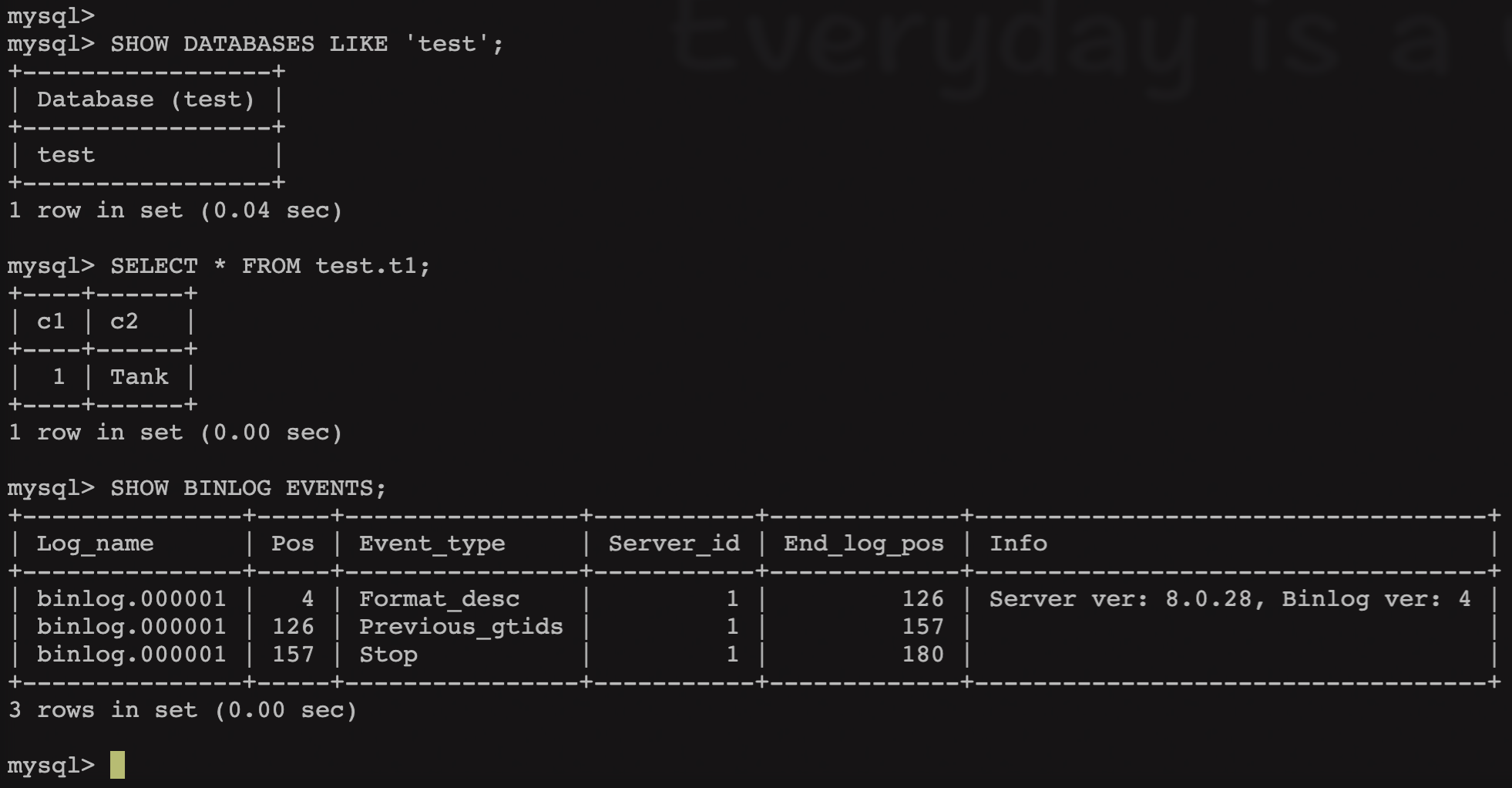
此時,服務器 s3 已引導并運行,再次確認數據同步情況。
SHOW DATABASES LIKE 'test';
SELECT * FROM test.t1;
SHOW BINLOG EVENTS;
5. 錯誤記錄
MY-011735
在第 2 個實例上執行“START GROUP_REPLICATION;”命令后,報出 IP 地址不匹配的信息。
前臺錯誤信息:
ERROR 3096 (HY000): The START GROUP_REPLICATION command failed as there was an error when initializing the group communication layer.
log 錯誤信息:
[ERROR] [MY-011735] [Repl] Plugin group_replication reported: '[GCS] There is no local IP address matching the one configured for the local node (s2:33061).'
解決方法:
檢查 /etc/hosts 或 IP 地址信息填寫是否正確,修改正確后可正常執行。
MY-010897
報錯描述:
在第 2 個實例上執行“START GROUP_REPLICATION;”命令后,日志報出密碼認證相關錯誤信息。
[Warning] [MY-010897] [Repl] Storing MySQL user name or password information in the master info repository is not secure and is therefore not recommended. Please consider using the USER and PASSWORD connection options for START SLAVE; see the 'START SLAVE Syntax' in the MySQL Manual for more information.
解決方法:
本文檔所使用 MySQL 版本為 8.0.28,因此語法需參考下方寫法。
Or if you are providing user credentials for distributed recovery on the START GROUP_REPLICATION statement (which you can from MySQL 8.0.21):

mysql> START GROUP_REPLICATION USER='rpl_user', PASSWORD='password';
MY-010584
[ERROR] [MY-010584] [Repl] Slave I/O for channel 'group_replication_recovery': error connecting to master 'rpl_user@s1:3306' - retry-time: 60 retries: 1 message: Authentication plugin 'caching_sha2_password' reported error: Authentication requires secure connection. Error_code: MY-002061
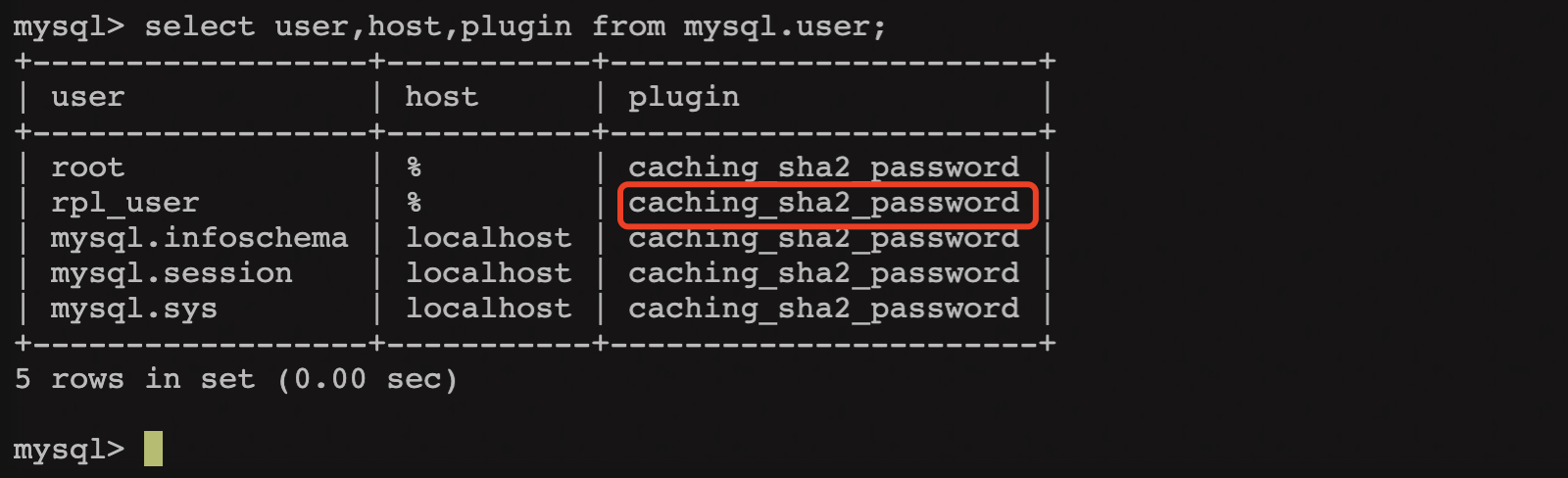
解決方法:
- 修改 user 屬性(MySQL 安裝后)
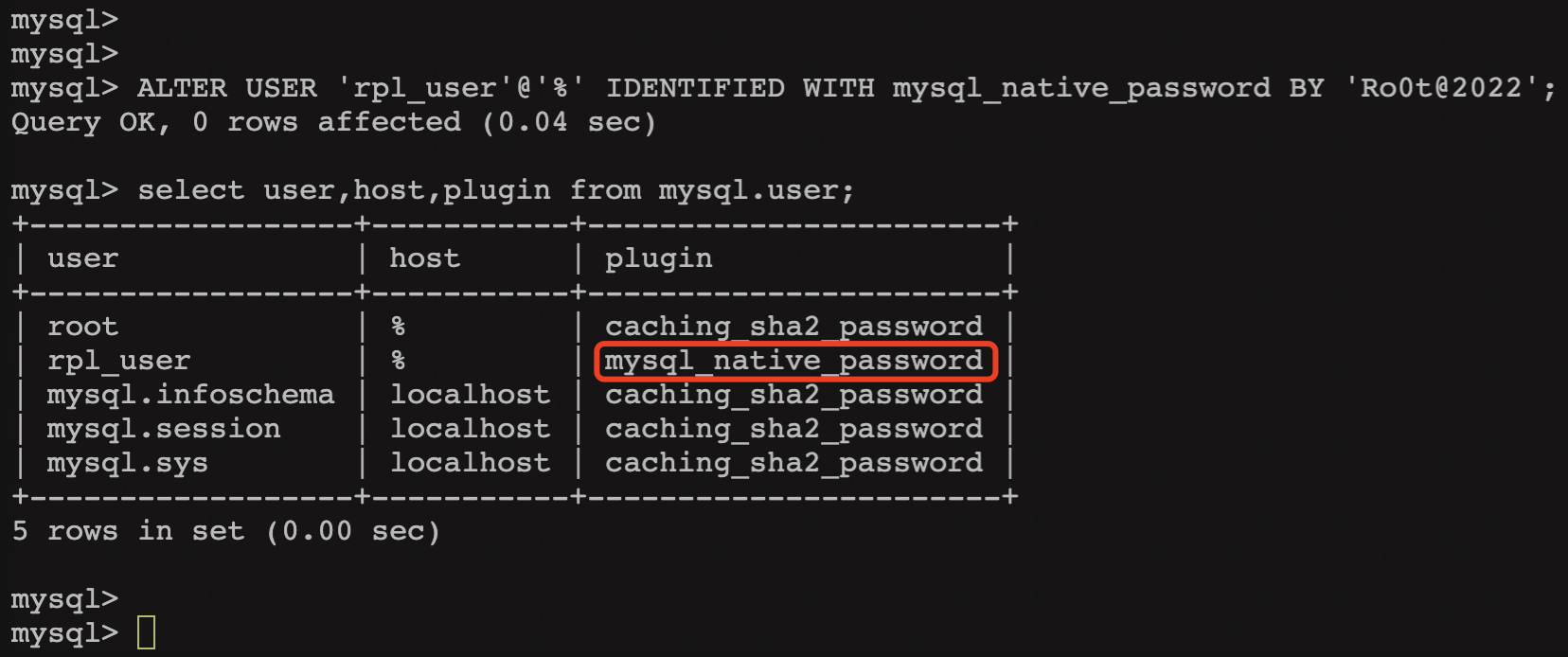
ALTER USER 'rpl_user'@'%' IDENTIFIED WITH mysql_native_password BY 'Ro0t@2022';
select user,host,plugin from mysql.user;
- 創建 rpl_user 用戶時直接加上屬性參數(MySQL 安裝后)
CREATE USER rpl_user@'%' IDENTIFIED WITH mysql_native_password BY 'Ro0t@2022';
- MySQL 安裝前在配置文件中加上對應的參數(MySQL 安裝前)
--/etc/my.cnf

#
# Authentication
#
default_authentication_plugin=mysql_native_password
MY-011516
第 3 個實例啟動組復制失敗,后臺提示 server_uuid 有沖突。
-- 前臺
mysql> START GROUP_REPLICATION USER='rpl_user', PASSWORD='Ro0t@2022';
ERROR 3092 (HY000): The server is not configured properly to be an active member of the group. Please see more details on error log.

-- 日志
[ERROR] [MY-011516] [Repl] Plugin group_replication reported: 'There is already a member with server_uuid c2e82b68-8737-11ec-bb84-0800278bd58e. The member will now exit the group.'
由于第 3 個虛機是以鏡像方式拷貝來的,因此 server_uuid 信息一致,需處理。
解決方法:
在$datadir 路徑中刪除或重命名 auto.cnf 文件,重啟數據庫后會自動生成新的文件,此時 server_uuid 沖突的問題就不會出現了。
cd /var/lib/mysql
mv auto.cnf auto.cnf.bak
systemctl restart mysqld

上圖為再次執行“START GROUP_REPLICATION …”之后日志的輸出,已無異常信息。
參考
[1] MySQL :: MySQL 8.0 Reference Manual :: 18 Group Replication
[3] MySQL8.0登錄提示caching_sha2_password問題
Tank 2022.2.23
