



Table of Contents
摘要
Psycopg是一種用于執行SQL語句的PythonAPI,可以為PostgreSQL、GaussDB數據庫提供統一訪問接口,應用程序可基于它進行數據操作。Psycopg2是對libpq的封裝,主要使用C語言實現,既高效又安全。它具有客戶端游標和服務器端游標、異步通信和通知、支持“COPY TO/COPY FROM”功能。支持多種類型Python開箱即用,適配PostgreSQL數據類型;通過靈活的對象適配系統,可以擴展和定制適配。Psycopg2兼容Unicode和Python 3。
獲取安裝包
- 下載地址:https://opengauss.org/zh/download.html
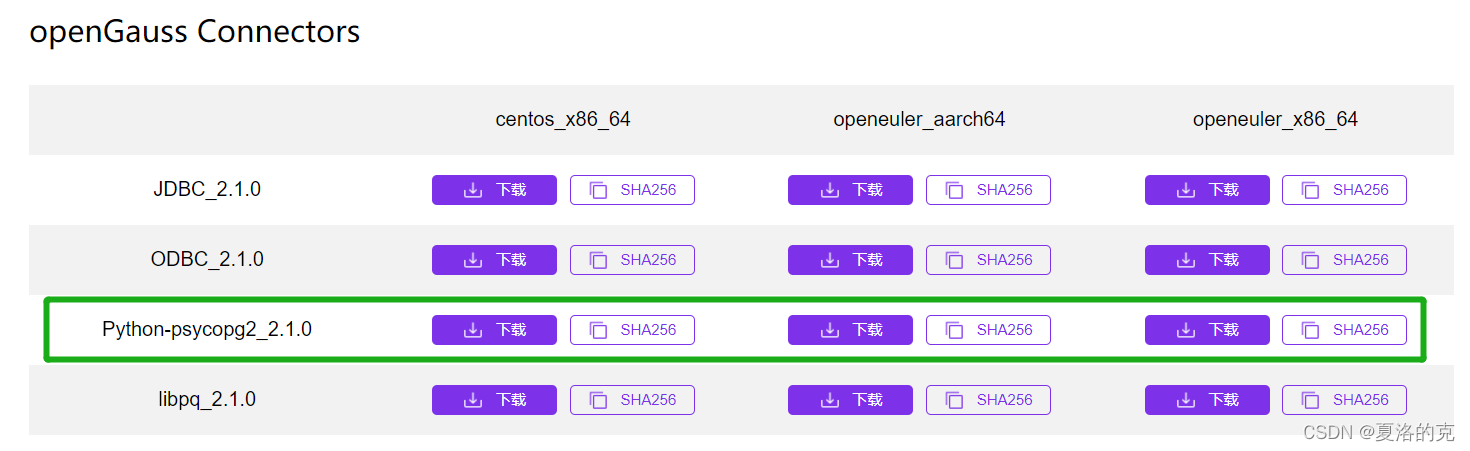
選擇你需要的版本進行下載。
安裝驅動
- 解壓安裝包
[postgres@10 ~]$ tar -zxvf openGauss-2.1.0-CentOS-x86_64-Python.tar.gz
[postgres@10 ~]$ cd psycopg2/
[postgres@10 psycopg2]$ ll
total 1224
-rw-r--r-- 1 postgres postgres   14277 Sep 28 20:08 errorcodes.py
-rw-r--r-- 1 postgres postgres    1425 Sep 28 20:08 errors.py
-rw-r--r-- 1 postgres postgres    6797 Sep 28 20:08 extensions.py
-rw-r--r-- 1 postgres postgres   42863 Sep 28 20:08 extras.py
-rw-r--r-- 1 postgres postgres    4768 Sep 28 20:08 __init__.py
-rw-r--r-- 1 postgres postgres    2922 Sep 28 20:08 _ipaddress.py
-rw-r--r-- 1 postgres postgres    7153 Sep 28 20:08 _json.py
-rw-r--r-- 1 postgres postgres    6316 Sep 28 20:08 pool.py
-rwxr-xr-x 1 postgres postgres 1104672 Sep 30 14:41 _psycopg.so
-rw-r--r-- 1 postgres postgres   17608 Sep 28 20:08 _range.py
-rw-r--r-- 1 postgres postgres   14699 Sep 28 20:08 sql.py
-rw-r--r-- 1 postgres postgres    4870 Sep 28 20:08 tz.py
- 找到python安裝目錄
[postgres@10 psycopg2]$ whereis python
python: /usr/bin/python3.7 /usr/bin/python3.7m /usr/bin/python3.7-config /usr/bin/python3.7m-config /usr/bin/python3.7m-x86_64-config /usr/lib/python3.7 /usr/lib/python2.7 /usr/lib64/python3.7 /usr/lib64/python2.7 /usr/local/lib/python3.7 /usr/include/python3.7m /usr/include/python2.7-debug /usr/include/python2.7
我的服務器上面有兩個版本的python,分別是python3.7和python2.7。
- 找到site-packages目錄
[postgres@10 lib]$ pwd
/usr/lib
[postgres@10 lib]$ ll python
python2.7/ python3.7/
- 使用root用戶將psycopg2目錄copy到對應版本的site-packages目錄下
[root@10 postgres]# cp -r /home/postgres/psycopg2/ /usr/lib/python3.7/site-packages/
- 賦權
[root@10 site-packages]# chmod -R 775 psycopg2/
測試
[postgres@10 ~]$ python3
Python 3.7.9 (default, Jan 25 2022, 15:12:36)
[GCC 7.3.0] on linux
Type "help", "copyright", "credits" or "license" for more information.
>>> import psycopg2
>>> conn=psycopg2.connect(database="postgres",user="postgres",password="frank@123",host="localhost",port=5432)
>>> cur=conn.cursor()
>>> cur.execute("CREATE TABLE student(id integer,name varchar,sex varchar);")
>>> cur.execute("INSERT INTO student(id,name,sex) VALUES(%s,%s,%s)",(1,'Aspirin','M'))
>>> cur.execute("INSERT INTO student(id,name,sex) VALUES(%s,%s,%s)",(2,'Taxol','F'))
>>> cur.execute('SELECT * FROM student')
>>> results=cur.fetchall()
>>> print (results)
[(1, 'Aspirin', 'M'), (2, 'Taxol', 'F')]
>>> conn.commit()
>>> cur.close()
>>> conn.close()
>>>
FQA
第一次嘗試的時候使用的是centos_x86_64版本,測試是會報錯。
>>> import psycopg2
Traceback (most recent call last):
  File "<stdin>", line 1, in <module>
  File "/usr/local/lib/python3.6/site-packages/psycopg2/__init__.py", line 51, in <module>
    from psycopg2._psycopg import (                     # noqa
ImportError: libpython3.6m.so.1.0: cannot open shared object file: No such file or directory
試圖通過編譯安裝3.6版本解決這個問題,但是編譯安裝后沒有編譯出libpython3.6m.so.1.0,只有libpython3.6m.a。
后來直接下載openeuler_x86_64版本,問題解決。PS. 我是kylin v10的操作系統,其他系統可能遇到不同問題,可以評論區留言。
最后修改時間:2022-08-05 20:35:08
「喜歡這篇文章,您的關注和贊賞是給作者最好的鼓勵」
關注作者
【版權聲明】本文為墨天輪用戶原創內容,轉載時必須標注文章的來源(墨天輪),文章鏈接,文章作者等基本信息,否則作者和墨天輪有權追究責任。如果您發現墨天輪中有涉嫌抄襲或者侵權的內容,歡迎發送郵件至:contact@modb.pro進行舉報,并提供相關證據,一經查實,墨天輪將立刻刪除相關內容。
