



一個問題引出本篇文章,作為工具類,方便維護(hù) Kafka
基于這篇文章:在Docker環(huán)境上使用Kafka Connect JDBC將變更數(shù)據(jù)從Kafka應(yīng)用到PostgreSQL
- 我把目標(biāo)端 PostgreSQL 里的表給刪除了,怎么讓 Kafka 重新同步這個表呢?
需要修改或刪除消費(fèi)者組的偏移量offset
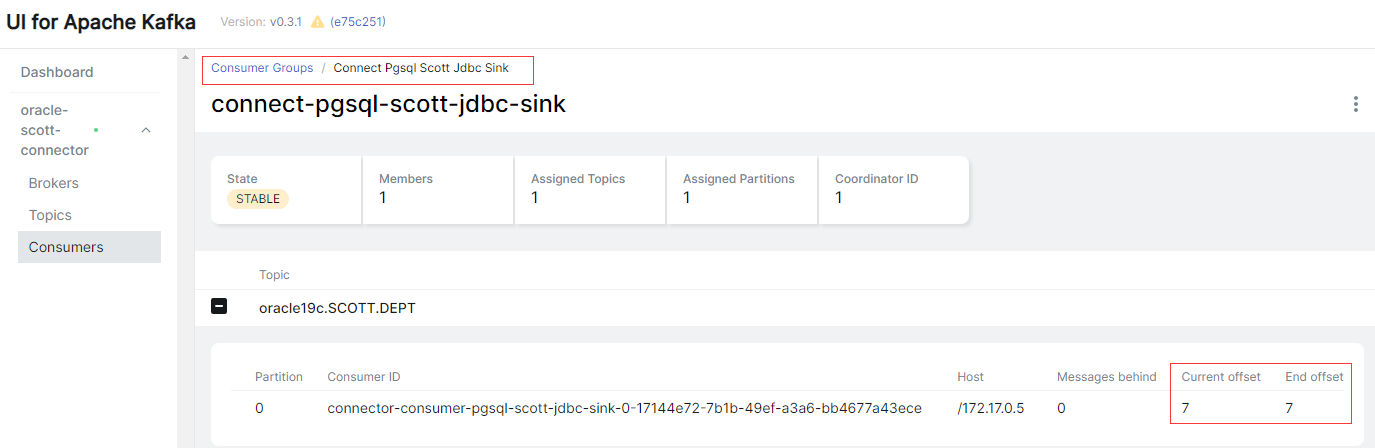
- 怎么修改或刪除消費(fèi)者組的偏移量offset? --見文章末尾
- 這一個問題研究了一天,太難了
Kafka Connect REST API
參考文檔:https://kafka.apache.org/documentation.html#connect_rest
獲取 Connect 集群的基本信息
# curl -s -X GET localhost:8083/ | jq

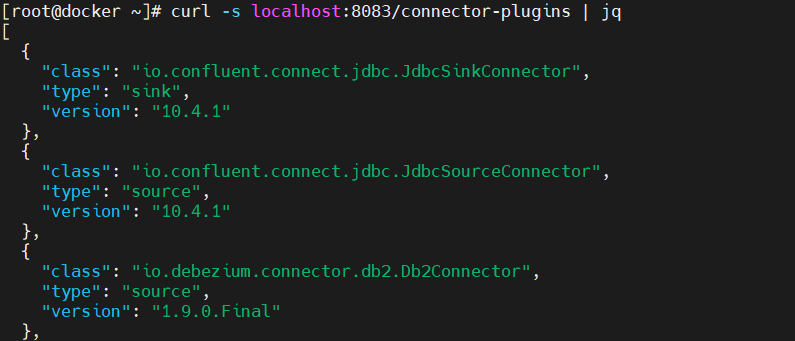
列出 Kafka Connect Worker 上安裝的插件
# curl -s -X GET localhost:8083/connector-plugins | jq
創(chuàng)建一個連接器
# vi pgsql-scott-jdbc-sink.json

{
    "name": "pgsql-scott-jdbc-sink",
	"config": {
        "connector.class": "io.confluent.connect.jdbc.JdbcSinkConnector",
        "connection.url": "jdbc:postgresql://172.17.0.7:5432/scott?user=postgres&password=postgres&sslMode=require",
        "tasks.max": "1",
        "topics": "oracle19c.SCOTT.DEPT",
        "table.name.format": "dept",
        "dialect.name": "PostgreSqlDatabaseDialect",
        "transforms": "unwrap",
        "transforms.unwrap.type": "io.debezium.transforms.ExtractNewRecordState",
        "transforms.unwrap.drop.tombstones": "false",
        "auto.create": "true",
        "auto.evolve": "true"
	}
}

# curl -i -X POST -H "Accept:application/json" -H "Content-Type:application/json" 192.168.0.40:8083/connectors/ -d @pgsql-scott-jdbc-sink.json
獲取所有現(xiàn)有的連接器名稱
# curl -s -X GET localhost:8083/connectors/ | jq

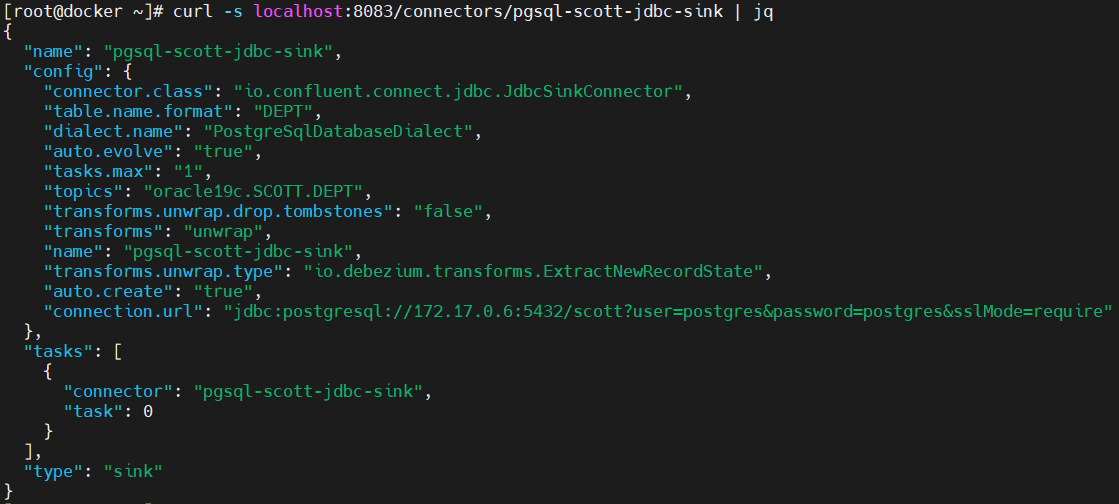
獲取連接器的配置信息
# curl -s -X GET localhost:8083/connectors/pgsql-scott-jdbc-sink | jq
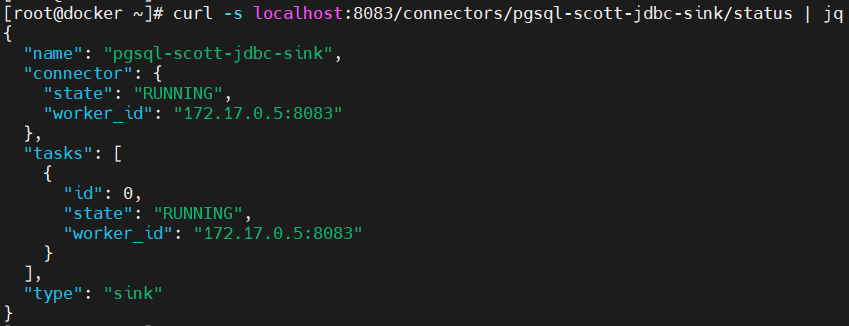
獲取連接器的狀態(tài)信息
# curl -s -X GET localhost:8083/connectors/pgsql-scott-jdbc-sink/status | jq
獲取當(dāng)前為連接器運(yùn)行的任務(wù)列表
# curl -s -X GET localhost:8083/connectors/pgsql-scott-jdbc-sink/tasks | jq
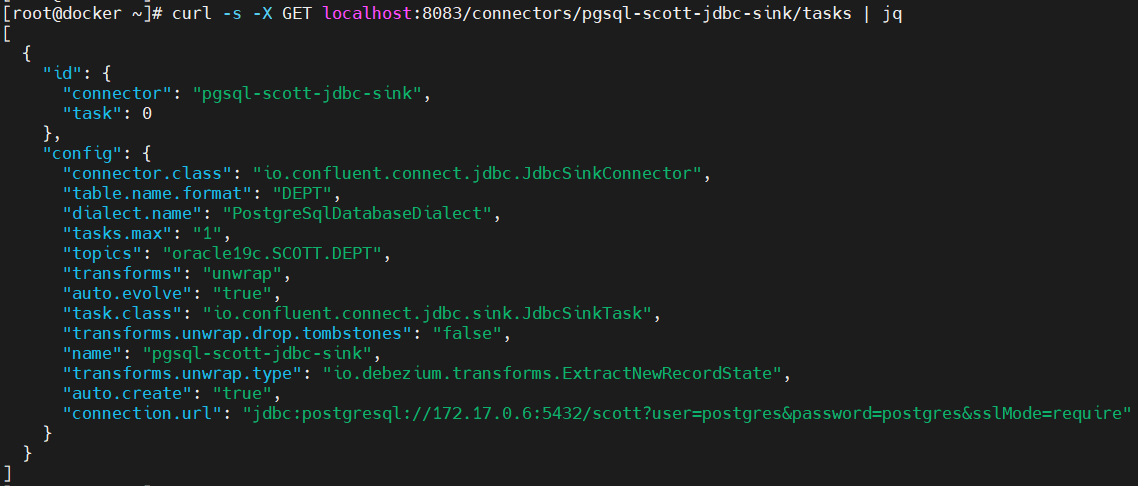
獲取任務(wù)的當(dāng)前狀態(tài)
# curl -s -X GET localhost:8083/connectors/pgsql-scott-jdbc-sink/tasks/0/status | jq

獲取連接器使用的主題(topics)列表
# curl -s -X GET localhost:8083/connectors/oracle-scott-connector/topics | jq
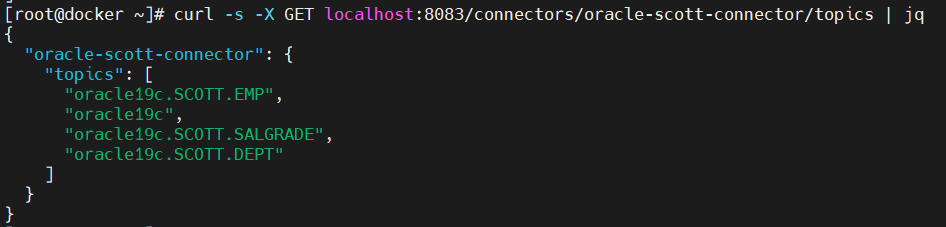
清空連接器的活動主題(topics)列表
# curl -s -X PUT localhost:8083/connectors/oracle-scott-connector/topics/reset
暫停連接器任務(wù)
# curl -s -X PUT localhost:8083/connectors/pgsql-scott-jdbc-sink/pause
恢復(fù)連接器任務(wù)
# curl -s -X PUT localhost:8083/connectors/pgsql-scott-jdbc-sink/resume
刪除連接器
# curl -s -X DELETE localhost:8083/connectors/pgsql-scott-jdbc-sink
更新連接器
# cat pgsql-scott-jdbc-sink.json
{
    "connector.class": "io.confluent.connect.jdbc.JdbcSinkConnector",
    "connection.url": "jdbc:postgresql://172.17.0.6:5432/scott?user=postgres&password=postgres&sslMode=require",
    "tasks.max": "1",
    "topics": "oracle19c.SCOTT.DEPT",
    "table.name.format": "DEPT",
    "dialect.name": "PostgreSqlDatabaseDialect",
    "transforms": "unwrap",
    "transforms.unwrap.type": "io.debezium.transforms.ExtractNewRecordState",
    "transforms.unwrap.drop.tombstones": "false",
    "auto.create": "true",
    "auto.evolve": "true"
}

# curl -i -X PUT -H "Accept:application/json" -H "Content-Type:application/json" localhost:8083/connectors/pgsql-scott-jdbc-sink/config -d @pgsql-scott-jdbc-sink.json
重啟連接器和任務(wù)(tasks)
- 語法
POST /connectors/{name}/restart?includeTasks=<true|false>&onlyFailed=<true|false>
# "includeTasks=true": 重新啟動連接器實(shí)例和任務(wù)實(shí)例
# "includeTasks=false"(默認(rèn)): 僅重新啟動連接器實(shí)例
# "onlyFailed=true": 僅重新啟動具有 FAILED 狀態(tài)的實(shí)例
# "onlyFailed=false"(默認(rèn)): 重新所有實(shí)例
- 示例
# curl -s -X POST localhost:8083/connectors/pgsql-scott-jdbc-sink/restart
- 默認(rèn)只重新啟動連接器并不會重新啟動其所有任務(wù)。因此,您也可以重新啟動失敗的單個任務(wù),然后再次獲取其狀態(tài):
# curl -s -X POST localhost:8083/connectors/pgsql-scott-jdbc-sink/tasks/0/restart
# curl -s -X GET localhost:8083/connectors/pgsql-scott-jdbc-sink/tasks/0/status | jq
kafka-consumer-groups.sh 消費(fèi)者組管理
參考文章:https://blog.csdn.net/u010634066/article/details/119670405
相關(guān)可選參數(shù)
| 參數(shù) | 描述 |
|---|---|
| –bootstrap-server | 連接到指定的kafka服務(wù) |
| –list | 列出所有消費(fèi)者組名稱 |
| –describe | 查詢消費(fèi)者描述信息 |
| –group | 指定消費(fèi)者組 |
| –all-groups | 指定所有消費(fèi)者組 |
| –members | 查詢消費(fèi)者組的成員信息 |
| –state | 查詢消費(fèi)者的狀態(tài)信息 |
| –offsets | 列出消息的偏移量信息 |
| –delete | 刪除消費(fèi)者組 |
| –reset-offsets | 重置消費(fèi)組的偏移量 |
| –dry-run | 重置偏移量的命令預(yù)執(zhí)行 |
| –excute | 真正的執(zhí)行重置偏移量的操作 |
| –delete-offsets | 刪除偏移量 |
查看消費(fèi)者列表 --list
# bin/kafka-consumer-groups.sh --bootstrap-server kafka:9092 --list
查看消費(fèi)者組詳情 --describe --group/all-groups
# bin/kafka-consumer-groups.sh --bootstrap-server kafka:9092 --describe --group connect-pgsql-scott-jdbc-sink

GROUP                         TOPIC                PARTITION  CURRENT-OFFSET  LOG-END-OFFSET  LAG             CONSUMER-ID                                                                     HOST            CLIENT-ID
connect-pgsql-scott-jdbc-sink oracle19c.SCOTT.DEPT 0          7               7               0               connector-consumer-pgsql-scott-jdbc-sink-0-17144e72-7b1b-49ef-a3a6-bb4677a43ece /172.17.0.5     connector-consumer-pgsql-scott-jdbc-sink-0

# 查看所有消費(fèi)者組信息
# bin/kafka-consumer-groups.sh --bootstrap-server kafka:9092 --describe --all-groups
查看消費(fèi)者成員信息 --members
# bin/kafka-consumer-groups.sh --bootstrap-server kafka:9092 --describe --members --group connect-pgsql-scott-jdbc-sink

GROUP                         CONSUMER-ID                                                                     HOST            CLIENT-ID                                  #PARTITIONS
connect-pgsql-scott-jdbc-sink connector-consumer-pgsql-scott-jdbc-sink-0-17144e72-7b1b-49ef-a3a6-bb4677a43ece /172.17.0.5     connector-consumer-pgsql-scott-jdbc-sink-0 1

# bin/kafka-consumer-groups.sh --bootstrap-server kafka:9092 --describe --members --all-groups
消費(fèi)者狀態(tài)信息 --state
# bin/kafka-consumer-groups.sh --bootstrap-server kafka:9092 --describe --state --group connect-pgsql-scott-jdbc-sink

GROUP                     COORDINATOR (ID)          ASSIGNMENT-STRATEGY  STATE           #MEMBERS
connect-pgsql-scott-jdbc-sink 172.17.0.4:9092 (1)       range                Stable          1

# bin/kafka-consumer-groups.sh --bootstrap-server kafka:9092 --describe --state --all-groups
刪除消費(fèi)者組 --delete
- 想要刪除消費(fèi)組前提是這個消費(fèi)組的所有客戶端都停止消費(fèi)/不在線才能夠成功刪除
# bin/kafka-consumer-groups.sh --bootstrap-server kafka:9092 --delete --group pgsql-scott-jdbc-sink

Deletion of requested consumer groups ('pgsql-scott-jdbc-sink') was successful.

# bin/kafka-consumer-groups.sh --bootstrap-server kafka:9092 --delete --all-groups
重置消費(fèi)組的偏移量 --reset-offsets
- 能夠執(zhí)行成功的一個前提是 消費(fèi)組是不可用狀態(tài)
- 相關(guān)重置 offset 的模式
| 參數(shù) | 描述 |
|---|---|
| –to-earliest | 重置 offset 到最開始的那條 offset (找到還未被刪除最早的那個 offset ) |
| –to-current | 直接重置 offset 到當(dāng)前的 offset,也就是 LOE |
| –to-latest | 重置到最后一個 offset |
| –to-datetime | 重置到指定時間的 offset,格式為:YYYY-MM-DDTHH:mm:SS.sss; |
| - | 例如: --to-datetime “2021-6-26T00:00:00.000” |
| –to-offset | 重置到指定的 offset,一般不用這個,例如:–to-offset 3465 |
| –shift-by | 按照偏移量增加或者減少多少個 offset,例如:–shift-by 100 、–shift-by -100 |
| –from-file | 根據(jù)CVS文檔來重置 |
- 上面其他的一些模式重置的都是匹配到的所有分區(qū); 不能夠每個分區(qū)重置到不同的 offset;不過 --from-file 可以讓我們更靈活一點(diǎn)
# 先配置cvs文檔,格式為: Topic:分區(qū)號:重置目標(biāo)偏移量
oracle19c.SCOTT.DEPT:0:100
oracle19c.SCOTT.DEPT:1:200
oracle19c.SCOTT.DEPT:2:300

# 執(zhí)行命令
bin/kafka-consumer-groups.sh --bootstrap-server kafka:9092 --reset-offsets --from-file config/reset-offset.csv --group test2_consumer_group --dry-run
- 示例
# --dry-run 預(yù)執(zhí)行,不會真正執(zhí)行命令,為了看看效果
bin/kafka-consumer-groups.sh --bootstrap-server kafka:9092 --reset-offsets --all-topics --to-earliest --dry-run --group connect-pgsql-scott-jdbc-sink
# --execute 真正執(zhí)行命令
bin/kafka-consumer-groups.sh --bootstrap-server kafka:9092 --reset-offsets --all-topics --to-earliest --execute --group connect-pgsql-scott-jdbc-sink
# --topic 指定主題
bin/kafka-consumer-groups.sh --bootstrap-server kafka:9092 --reset-offsets --topic oracle19c.SCOTT.DEPT --to-earliest --execute --group connect-pgsql-scott-jdbc-sink
# --to-offset 指定偏移量
bin/kafka-consumer-groups.sh --bootstrap-server kafka:9092 --reset-offsets --topic oracle19c.SCOTT.DEPT --to-offset 2 --execute --group connect-pgsql-scott-jdbc-sink
# --topic :0 指定分區(qū)
bin/kafka-consumer-groups.sh --bootstrap-server kafka:9092 --reset-offsets --topic oracle19c.SCOTT.DEPT:0 --to-offset 2 --execute --group connect-pgsql-scott-jdbc-sink
刪除偏移量 --delete-offsets
- 能夠執(zhí)行成功的一個前提是 消費(fèi)組是不可用狀態(tài)
- 偏移量被刪除了之后,Consumer Group下次啟動的時候,會從頭消費(fèi)
bin/kafka-consumer-groups.sh --bootstrap-server kafka:9092 --delete-offsets --topic oracle19c.SCOTT.DEPT --group connect-pgsql-scott-jdbc-sink
解決問題
- 怎么修改或刪除消費(fèi)者組的偏移量offset?
# 查詢需要修改的主題名
bin/kafka-topics.sh --list --bootstrap-server kafka:9092
# 查詢需要修改的消費(fèi)者組名
bin/kafka-consumer-groups.sh --bootstrap-server kafka:9092 --list
# 確認(rèn)修改的主題名和消費(fèi)者組名是否正確
bin/kafka-consumer-groups.sh --bootstrap-server kafka:9092 --describe --group connect-pgsql-scott-jdbc-sink
- 修改或刪除消費(fèi)組的偏移量的前提是:消費(fèi)組是不可用狀態(tài)
# bin/kafka-consumer-groups.sh --bootstrap-server kafka:9092 --describe --group connect-pgsql-scott-jdbc-sink
如果 CONSUMER-ID、HOST、CLIENT-ID 存在信息,則消費(fèi)組是處于活動狀態(tài),修改或刪除消費(fèi)組的偏移量將會失敗,報(bào)出以下錯誤信息:
Error: Assignments can only be reset if the group 'connect-pgsql-scott-jdbc-sink' is inactive, but the current state is Stable.
- 嘗試暫停連接器任務(wù),消費(fèi)者組還是處于活動狀態(tài)
curl -s -X PUT localhost:8083/connectors/pgsql-scott-jdbc-sink/pause
- 先刪除連接器,消費(fèi)者組處于非活動狀態(tài),不知道這個地方有什么好的方法能讓消費(fèi)者組處于非活動狀態(tài)
curl -s -X DELETE localhost:8083/connectors/pgsql-scott-jdbc-sink

5. 修改或刪除消費(fèi)組的偏移量
# 修改消費(fèi)組的偏移量
bin/kafka-consumer-groups.sh --bootstrap-server kafka:9092 --reset-offsets --topic oracle19c.SCOTT.DEPT --to-earliest --execute --group connect-pgsql-scott-jdbc-sink

GROUP                          TOPIC                          PARTITION  NEW-OFFSET
connect-pgsql-scott-jdbc-sink  oracle19c.SCOTT.DEPT           0          0

# 刪除消費(fèi)者組的偏移量
# bin/kafka-consumer-groups.sh --bootstrap-server kafka:9092 --delete-offsets --topic oracle19c.SCOTT.DEPT --group connect-pgsql-scott-jdbc-sink

Request succeed for deleting offsets with topic oracle19c.SCOTT.DEPT group connect-pgsql-scott-jdbc-sink
TOPIC                          PARTITION       STATUS
oracle19c.SCOTT.DEPT           0               Successful
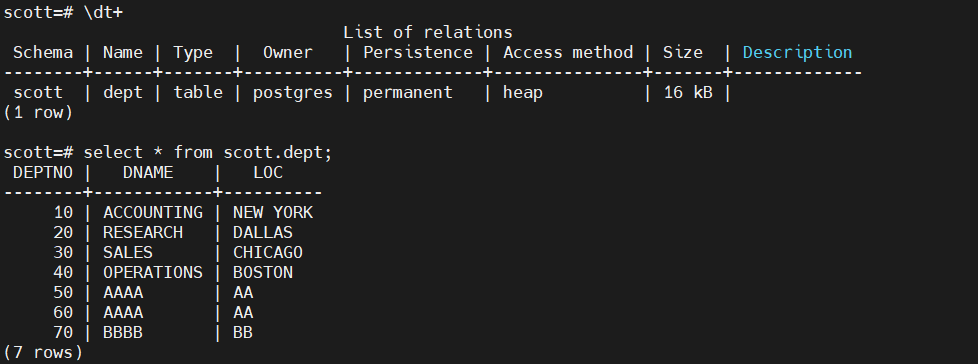
- 添加連接器,此時 PostgreSQL 上的目標(biāo)表已重新同步
vi pgsql-scott-jdbc-sink.json

{
    "name": "pgsql-scott-jdbc-sink",
	"config": {
        "connector.class": "io.confluent.connect.jdbc.JdbcSinkConnector",
        "connection.url": "jdbc:postgresql://172.17.0.6:5432/scott?user=postgres&password=postgres&sslMode=require",
        "tasks.max": "1",
        "topics": "oracle19c.SCOTT.DEPT",
        "table.name.format": "scott.dept",
        "dialect.name": "PostgreSqlDatabaseDialect",
        "transforms": "unwrap",
        "transforms.unwrap.type": "io.debezium.transforms.ExtractNewRecordState",
        "transforms.unwrap.drop.tombstones": "false",
        "auto.create": "true",
        "auto.evolve": "true"
	}
}

curl -i -X POST -H "Accept:application/json" -H "Content-Type:application/json" 192.168.0.40:8083/connectors/ -d @pgsql-scott-jdbc-sink.json
最后修改時間:2022-04-19 09:04:16
「喜歡這篇文章,您的關(guān)注和贊賞是給作者最好的鼓勵」
關(guān)注作者
【版權(quán)聲明】本文為墨天輪用戶原創(chuàng)內(nèi)容,轉(zhuǎn)載時必須標(biāo)注文章的來源(墨天輪),文章鏈接,文章作者等基本信息,否則作者和墨天輪有權(quán)追究責(zé)任。如果您發(fā)現(xiàn)墨天輪中有涉嫌抄襲或者侵權(quán)的內(nèi)容,歡迎發(fā)送郵件至:contact@modb.pro進(jìn)行舉報(bào),并提供相關(guān)證據(jù),一經(jīng)查實(shí),墨天輪將立刻刪除相關(guān)內(nèi)容。
