



一個(gè)問題困擾我好長時(shí)間,重建同名連接器不能重新執(zhí)行一致性快照
我在測試 Debezium Connector for Oracle ,將 Oracle 中的數(shù)據(jù)同步到 Kafka 中,創(chuàng)建了一個(gè)源端連接器,用于捕獲 Oracle 中的數(shù)據(jù),連接器的名稱為 snapshot-mode-initial,出于一些測試的原因,我刪除了這個(gè)連接器,并且刪除了這個(gè)連接器在 Kafka 創(chuàng)建的所有 Topic,再次使用相同的連接器名稱(snapshot-mode-initial)創(chuàng)建連接器時(shí),數(shù)據(jù)不能重新初始化,以下是測試示例:
- 創(chuàng)建源端連接器,連接器命名 snapshot-mode-initial
[root@docker ~]# cat oracle-snapshot-mode.json
{
    "name": "snapshot-mode-initial",
    "config": {
        "connector.class" : "io.debezium.connector.oracle.OracleConnector",
        "database.hostname" : "172.17.0.2",
        "database.port" : "1521",
        "database.user" : "c##dbzuser",
        "database.password" : "dbz",
        "database.dbname" : "ORCL",
        "database.pdb.name" : "PDBTT",
        "database.server.name" : "initial",
        "tasks.max" : "1",
        "schema.include.list": "SCOTT",
        "snapshot.mode": "initial",
        "database.history.kafka.bootstrap.servers" : "192.168.0.40:9092",
        "database.history.kafka.topic": "schema-changes.initial"
    }
}

curl -i -X POST -H "Accept:application/json" -H "Content-Type:application/json" 192.168.0.40:8083/connectors/ -d @oracle-snapshot-mode.json
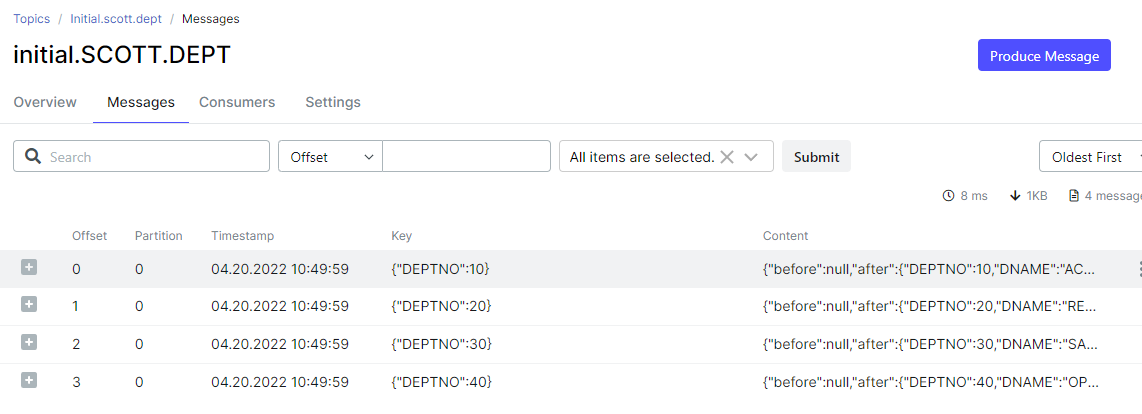
- 連接器創(chuàng)建并自動啟動后執(zhí)行一致性快照,進(jìn)行數(shù)據(jù)初始化,自動在Kafka中創(chuàng)建了以下幾個(gè) Topic
[kafka@839c4a43b889 ~]$ bin/kafka-topics.sh --bootstrap-server kafka:9092 --list

__consumer_offsets
my_connect_configs
my_connect_offsets
my_connect_statuses
initial
initial.SCOTT.DEPT
initial.SCOTT.EMP
initial.SCOTT.SALGRADE
schema-changes.initial
- 出于測試原因,刪除了連接器和Topic
# 刪除連接器
curl -s -X DELETE localhost:8083/connectors/snapshot-mode-initial
# 刪除Topic
docker exec -it connect bash
bin/kafka-topics.sh --bootstrap-server kafka:9092 --delete --topic initial
bin/kafka-topics.sh --bootstrap-server kafka:9092 --delete --topic initial.SCOTT.DEPT
bin/kafka-topics.sh --bootstrap-server kafka:9092 --delete --topic initial.SCOTT.EMP
bin/kafka-topics.sh --bootstrap-server kafka:9092 --delete --topic initial.SCOTT.SALGRADE
bin/kafka-topics.sh --bootstrap-server kafka:9092 --delete --topic schema-changes.initial
- 重建連接器,還以為可以重新創(chuàng)建 Topic 并初始化數(shù)據(jù)呢,結(jié)果報(bào)出以下錯(cuò)誤
# 重新注冊連接器
curl -i -X POST -H "Accept:application/json" -H "Content-Type:application/json" 192.168.0.40:8083/connectors/ -d @oracle-snapshot-mode.json

# Kafka Connect 日志報(bào)以下錯(cuò)誤
2022-04-20T12:13:45.826691242Z 2022-04-20 12:13:45,826 ERROR  ||  WorkerSourceTask{id=snapshot-mode-initial-0} Task threw an uncaught and unrecoverable exception. Task is being killed and will not recover until manually restarted   [org.apache.kafka.connect.runtime.WorkerTask]
2022-04-20T12:13:45.826696807Z io.debezium.DebeziumException: The db history topic is missing. You may attempt to recover it by reconfiguring the connector to SCHEMA_ONLY_RECOVERY
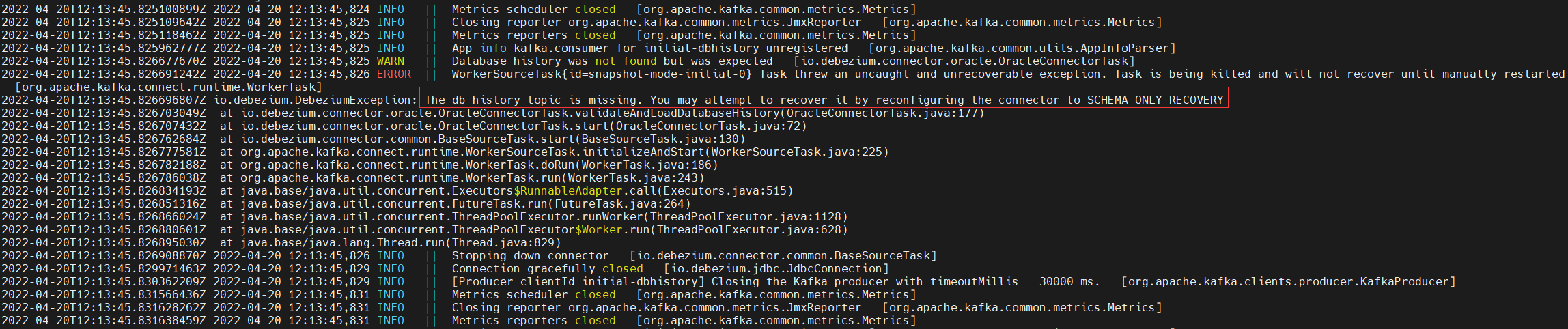
- 沒想象中的重新初始化數(shù)據(jù),確報(bào)出找不到 history topic,這里的 history topic 就是注冊連接器時(shí)配置的 “database.history.kafka.topic”: “schema-changes.initial”,至于是干什么用的,這里先不提了,然而 schema-changes.initial topic 已經(jīng)被我 delete 了,這可以證明一點(diǎn),新注冊的連接器還在用之前的信息。
那么如果重新執(zhí)行一致性快照呢?–兩種方法
- 第一種方法:重新注冊一個(gè)其他名稱的連接器,例如:snapshot-mode-initial2,但是這個(gè)方法總是有一種不舒適的感覺。
[root@docker ~]# cat oracle-snapshot-mode.json
{
    "name": "snapshot-mode-initial2",
    "config": {
        "connector.class" : "io.debezium.connector.oracle.OracleConnector",
        "database.hostname" : "172.17.0.2",
        "database.port" : "1521",
        "database.user" : "c##dbzuser",
        "database.password" : "dbz",
        "database.dbname" : "ORCL",
        "database.pdb.name" : "PDBTT",
        "database.server.name" : "initial",
        "tasks.max" : "1",
        "schema.include.list": "SCOTT",
        "snapshot.mode": "initial",
        "database.history.kafka.bootstrap.servers" : "192.168.0.40:9092",
        "database.history.kafka.topic": "schema-changes.initial"
    }
}

curl -i -X POST -H "Accept:application/json" -H "Content-Type:application/json" 192.168.0.40:8083/connectors/ -d @oracle-snapshot-mode.json
- 第二種方法:如標(biāo)題所說,刪除連接器上的 committed offsets,這種方法需要使用 kafkacat
如何刪除連接器上的 committed offsets,沒有測試成功,不知道啥情況
- 有時(shí)在進(jìn)行實(shí)驗(yàn)時(shí)(或者當(dāng)連接器在開始時(shí)配置錯(cuò)誤時(shí)),有必要刪除連接器偏移(offsets)以從干凈狀態(tài)開始。
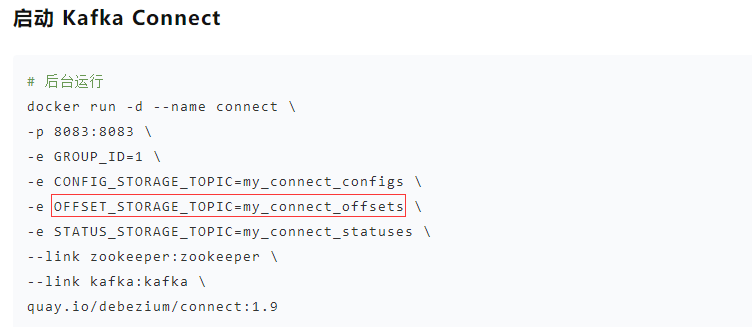
- 第一步是找出包含連接器偏移量的主題(Topic)的名稱,這是在 offset.storage.topic 選項(xiàng)中配置的,一般默認(rèn)是 my_connect_offsets,也可以在 Kafka Connect 日志找到。

- 下一步是找出給定連接器的最后一個(gè)偏移量,存儲它的鍵,并確定用于存儲偏移量的分區(qū),需要使用 kafkacat 工具。
# Docker 運(yùn)行 kafkacat
alias kafkacat='docker run --rm edenhill/kcat:1.7.1 kcat'
kafkacat -b 172.17.0.5:9092 -C -t my_connect_offsets -f 'Partition(%p) %k %s\n'
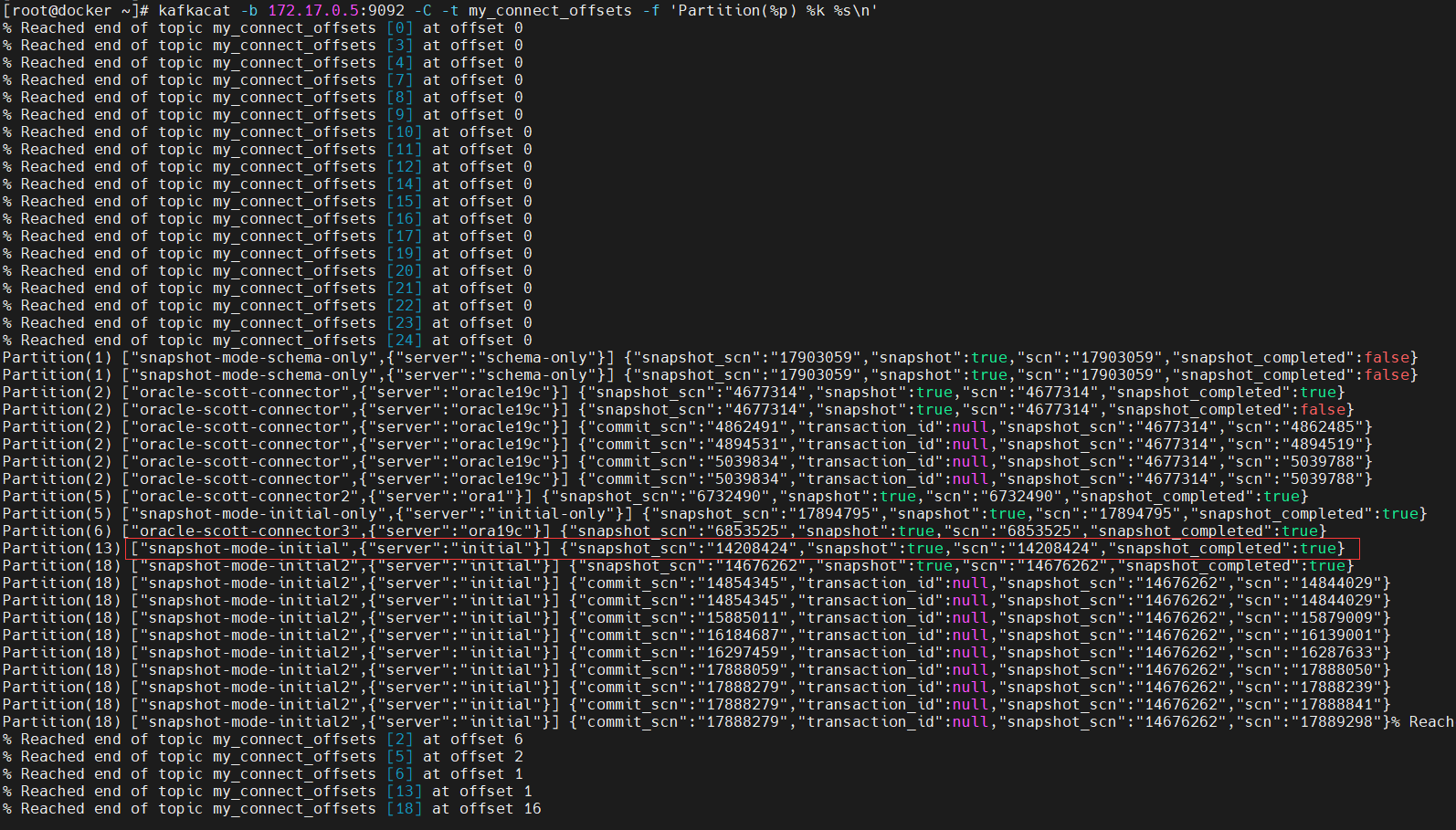
連接器 snapshot-mode-initial,分區(qū)號是13,但是 {“snapshot_scn”:“14208424”,“snapshot”:true,“scn”:“14208424”,“snapshot_completed”:true} 不像是最后的偏移量,這像是記錄第一次啟動源端連接器執(zhí)行的一致性快照的信息,執(zhí)行快照的scn已經(jīng)快照是否執(zhí)行完成等。
{“commit_scn”:“14854345”,“transaction_id”:null,“snapshot_scn”:“14676262”,“scn”:“14844029”}像是最后的偏移量。
- 修改連接器的信息,應(yīng)停止連接器并且發(fā)出以下命令:
# 停止連接器,不知道咋停止單個(gè)連接器,還是先刪了吧
curl -s -X DELETE localhost:8083/connectors/snapshot-mode-initial
# 修改連接器的信息,不起作用
echo '["snapshot-mode-initial",{"server":"initial"}]#' | kafkacat -P -Z -b 172.17.0.5:9092 -t my_connect_offsets -K# -p 13
echo '["snapshot-mode-initial",{"server":"initial"}]#{"snapshot_scn":"14208424","snapshot":false,"scn":"14208424","snapshot_completed":false}' |kafkacat -P -b 172.17.0.5:9092 -t my_connect_offsets -K# -p 13
- 查找了好多資料,還是沒有搞明白,太難了,這個(gè)問題先放著吧,但是我懷疑可能跟 Debezium Connector for Oracle 連接器有關(guān)系,因?yàn)橛涗浧屏康?Topic my_connect_offsets 是由連接器管理,而 Debezium Connector for Oracle 在第一次啟動執(zhí)行完成一致性快照后只支持增量快照,如果使用 Debezium Connector for MySQL 可能會成功。
- 參考文章:
https://debezium.io/documentation/faq/#how_to_change_the_offsets_of_the_source_database
https://rmoff.net/2019/08/15/reset-kafka-connect-source-connector-offsets/
https://soojong.tistory.com/entry/Source-Connector-Offset-%EC%B4%88%EA%B8%B0%ED%99%94-%ED%95%98%EA%B8%B0
https://www.confluent.io/blog/kafka-connect-deep-dive-jdbc-source-connector/
https://github.com/edenhill/kcat/issues/371
https://issues.redhat.com/browse/DBZ-4820
最后修改時(shí)間:2022-04-21 22:11:43
「喜歡這篇文章,您的關(guān)注和贊賞是給作者最好的鼓勵」
關(guān)注作者
【版權(quán)聲明】本文為墨天輪用戶原創(chuàng)內(nèi)容,轉(zhuǎn)載時(shí)必須標(biāo)注文章的來源(墨天輪),文章鏈接,文章作者等基本信息,否則作者和墨天輪有權(quán)追究責(zé)任。如果您發(fā)現(xiàn)墨天輪中有涉嫌抄襲或者侵權(quán)的內(nèi)容,歡迎發(fā)送郵件至:contact@modb.pro進(jìn)行舉報(bào),并提供相關(guān)證據(jù),一經(jīng)查實(shí),墨天輪將立刻刪除相關(guān)內(nèi)容。
