




實驗環境
- Debezium 版本 1.9 (2022-04-05)
- Debezium Tested Versions
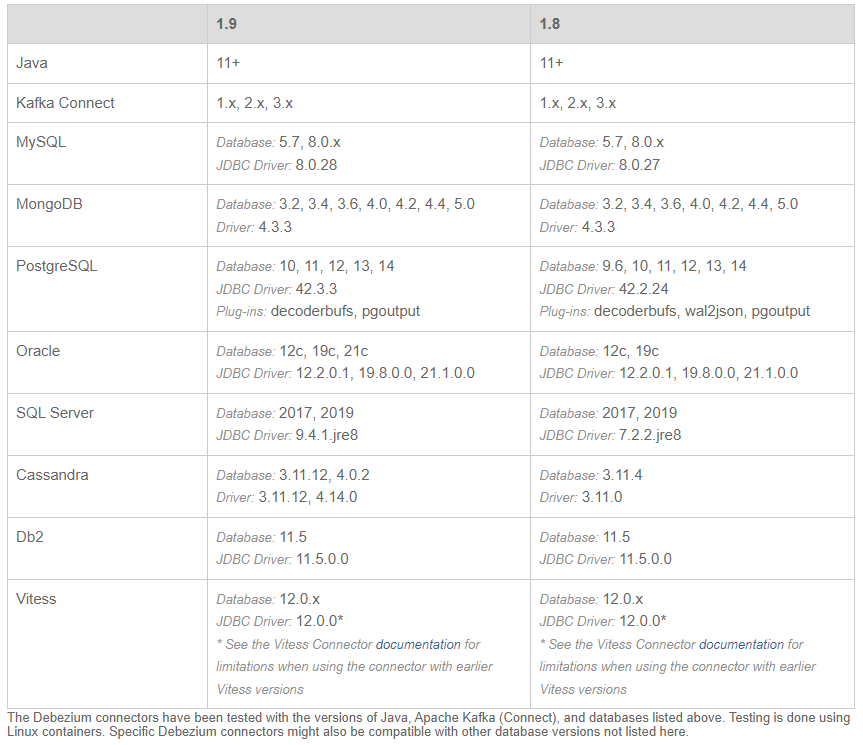
- PostgreSQL 版本是單機的 14.2
- 本測試參考文檔:https://debezium.io/documentation/reference/1.9/
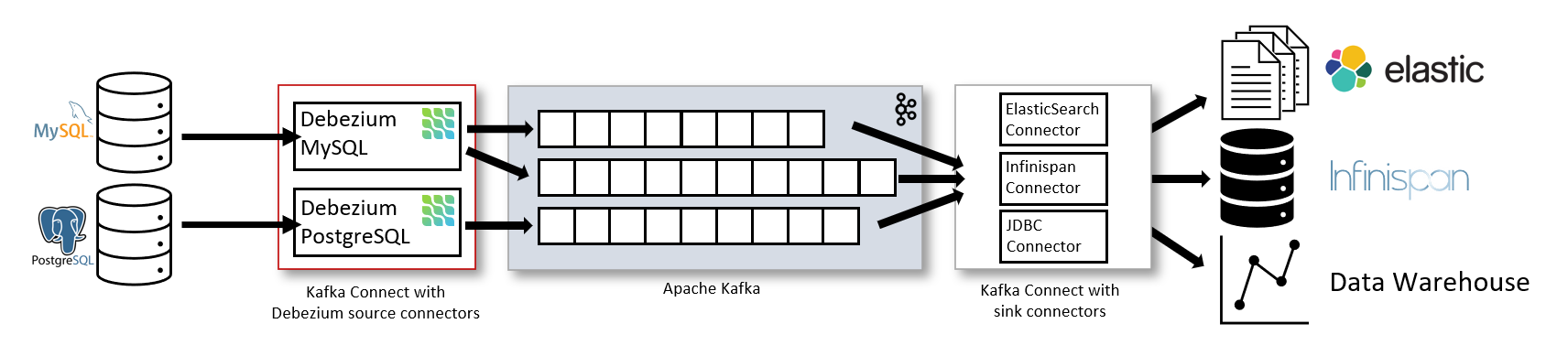
- 基于 Debezium 的變更數據捕獲的架構:
- https://github.com/debezium/docker-images
啟動 Zookeeper
# 后臺運行
docker run -d --name zookeeper -p 2181:2181 -p 2888:2888 -p 3888:3888 quay.io/debezium/zookeeper

# 實時查看 zookeeper 的日志信息
docker logs -f -t --tail 10 zookeeper
啟動 Kafka
# 后臺運行
docker run -d --name kafka -p 9092:9092 --link zookeeper:zookeeper quay.io/debezium/kafka

# 實時查看 kafka 的日志信息
docker logs -f -t --tail 10 kafka
啟動 PostgreSQL 14.2,使用 debezium 提供的示例鏡像,里面自帶了一個測試的 schemas inventory
# 創建一個數據持久化目錄
mkdir -p /docker_data/postgres
chmod -R a+rwx /docker_data/postgres/
# 后臺運行 14.2 版本的 PostgreSQL 數據庫
docker run -d --name postgres \
 -p 5432:5432 \
 -e POSTGRES_PASSWORD=postgres \
 -e PGDATA=/var/lib/pgdata \
 -v /docker_data/postgres:/var/lib/pgdata \
 quay.io/debezium/example-postgres

# 運行 psql 容器
[root@docker ~]# alias psql='docker run -it --rm --name psql debezium/example-postgres psql -h 192.168.0.40 -U postgres -p 5432'
[root@docker ~]# psql
Password for user postgres:
psql (14.2 (Debian 14.2-1.pgdg110+1))
Type "help" for help.

postgres=# select version();
                                                           version
-----------------------------------------------------------------------------------------------------------------------------
 PostgreSQL 14.2 (Debian 14.2-1.pgdg110+1) on x86_64-pc-linux-gnu, compiled by gcc (Debian 10.2.1-6) 10.2.1 20210110, 64-bit
(1 row)

postgres=# \l
                                 List of databases
   Name    |  Owner   | Encoding |  Collate   |   Ctype    |   Access privileges
-----------+----------+----------+------------+------------+-----------------------
 postgres  | postgres | UTF8     | en_US.utf8 | en_US.utf8 |
 template0 | postgres | UTF8     | en_US.utf8 | en_US.utf8 | =c/postgres          +
           |          |          |            |            | postgres=CTc/postgres
 template1 | postgres | UTF8     | en_US.utf8 | en_US.utf8 | =c/postgres          +
           |          |          |            |            | postgres=CTc/postgres
(3 rows)

postgres=# \dn
   List of schemas
   Name    |  Owner
-----------+----------
 inventory | postgres
 public    | postgres
(2 rows)

postgres=# \dt inventory.*
                List of relations
  Schema   |       Name       | Type  |  Owner
-----------+------------------+-------+----------
 inventory | customers        | table | postgres
 inventory | geom             | table | postgres
 inventory | orders           | table | postgres
 inventory | products         | table | postgres
 inventory | products_on_hand | table | postgres
 inventory | spatial_ref_sys  | table | postgres
(6 rows)

postgres=# select schemaname,relname,n_live_tup from pg_stat_user_tables;
 schemaname |     relname      | n_live_tup
------------+------------------+------------
 inventory  | customers        |          4
 inventory  | products_on_hand |          9
 inventory  | orders           |          4
 inventory  | products         |          9
 inventory  | spatial_ref_sys  |       8500
 inventory  | geom             |          3
(6 rows)
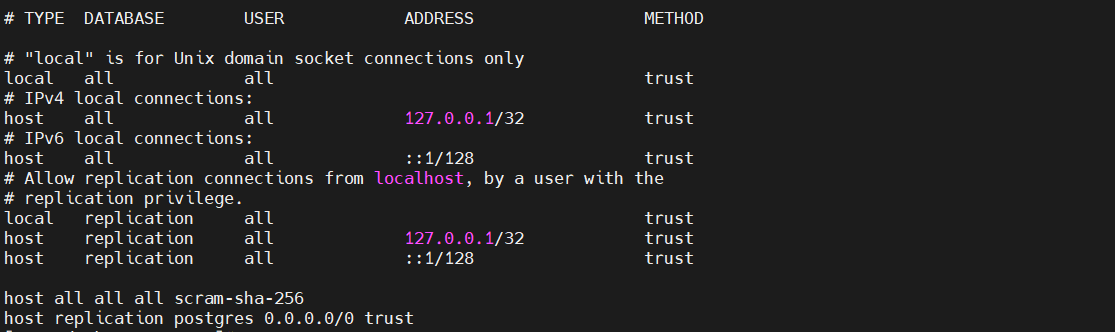
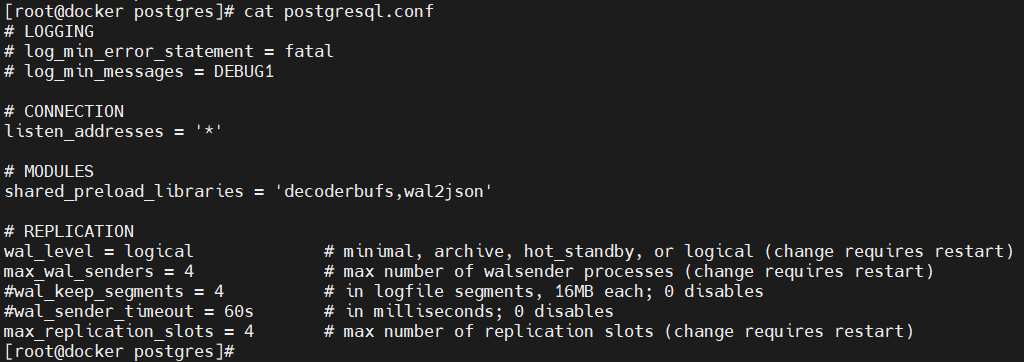
看看這個 debezium 提供的 PostgreSQL 鏡像中都做了哪些配置
- pg_hba.conf
[root@docker ~]# cd /docker_data/postgres/
[root@docker postgres]# cat pg_hba.conf
host all all all scram-sha-256
host replication postgres 0.0.0.0/0 trust
- postgresql.conf
listen_addresses = '*'
shared_preload_libraries = 'decoderbufs,wal2json'
wal_level = logical
max_wal_senders = 4
#wal_keep_segments = 4
#wal_sender_timeout = 60s
max_replication_slots = 4
啟動 Kafka Connect
# 后臺運行
docker run -d --name connect \
-p 8083:8083 \
-e GROUP_ID=1 \
-e CONFIG_STORAGE_TOPIC=my_connect_configs \
-e OFFSET_STORAGE_TOPIC=my_connect_offsets \
-e STATUS_STORAGE_TOPIC=my_connect_statuses \
--link zookeeper:zookeeper \
--link kafka:kafka \
--link postgres:postgres \
quay.io/debezium/connect

# 實時查看 Kafka Connect 的日志信息
docker logs -f -t --tail 10 connect
Debezium PostgreSQL connector
- 準備 Debezium PostgreSQL connector 配置文件
將配置文件創建在 docker 宿主機上即可,connect 容器開放了 REST API 來管理 Debezium 的連接器
[root@docker ~]# vi pgsql-inventory-connector.json

{
    "name": "pgsql-inventory-connector",
    "config": {
	    "connector.class": "io.debezium.connector.postgresql.PostgresConnector",
	    "database.hostname": "postgres",
	    "database.port": "5432",
	    "database.user": "postgres",
	    "database.password": "postgres",
	    "database.dbname": "postgres",
	    "database.server.name": "pgsql",
	    "slot.name": "inventory_slot",
	    "table.include.list": "inventory.orders,inventory.products",
	    "publication.name": "dbz_inventory_connector",
	    "publication.autocreate.mode": "filtered",
	    "plugin.name": "pgoutput"
    }
}
- 向 Kafka 連接器注冊 Debezium PostgreSQL connector
[root@docker ~]# curl -i -X POST -H "Accept:application/json" -H "Content-Type:application/json" 192.168.0.40:8083/connectors/ -d @pgsql-inventory-connector.json

HTTP/1.1 201 Created
Date: Fri, 22 Apr 2022 00:08:47 GMT
Location: http://192.168.0.40:8083/connectors/pgsql-inventory-connector
Content-Type: application/json
Content-Length: 551
Server: Jetty(9.4.43.v20210629)

{"name":"pgsql-inventory-connector","config":{"connector.class":"io.debezium.connector.postgresql.PostgresConnector","database.hostname":"postgres","database.port":"5432","database.user":"postgres","database.password":"postgres","database.dbname":"postgres","database.server.name":"pgsql","slot.name":"inventory_slot","table.include.list":"inventory.orders,inventory.products","publication.name":"dbz_inventory_connector","publication.autocreate.mode":"filtered","plugin.name":"pgoutput","name":"pgsql-inventory-connector"},"tasks":[],"type":"source"}
使用 kafka-ui 核對捕獲到的數據
kafka-ui:Open-Source Web GUI for Apache Kafka Management:https://github.com/provectus/kafka-ui
docker run -p 8811:8080 \
 -e KAFKA_CLUSTERS_0_NAME=oracle-scott-connector \
 -e KAFKA_CLUSTERS_0_BOOTSTRAPSERVERS=192.168.0.40:9092 \
 -d provectuslabs/kafka-ui:latest
網頁登錄:http://192.168.0.40:8811/
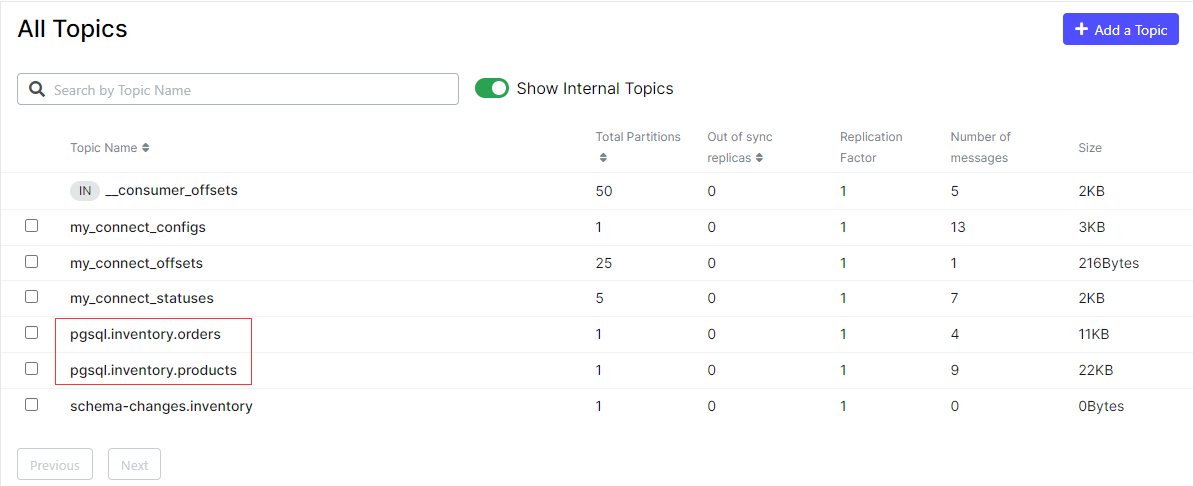
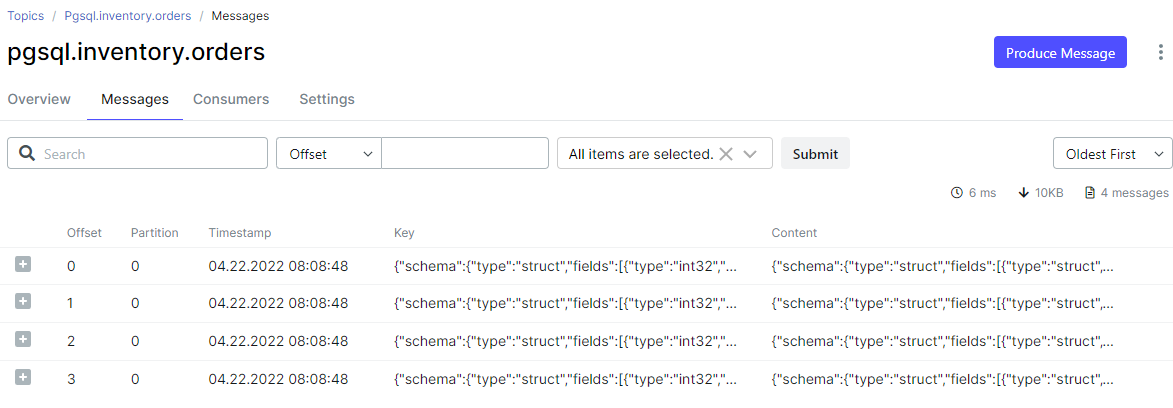
模擬業務
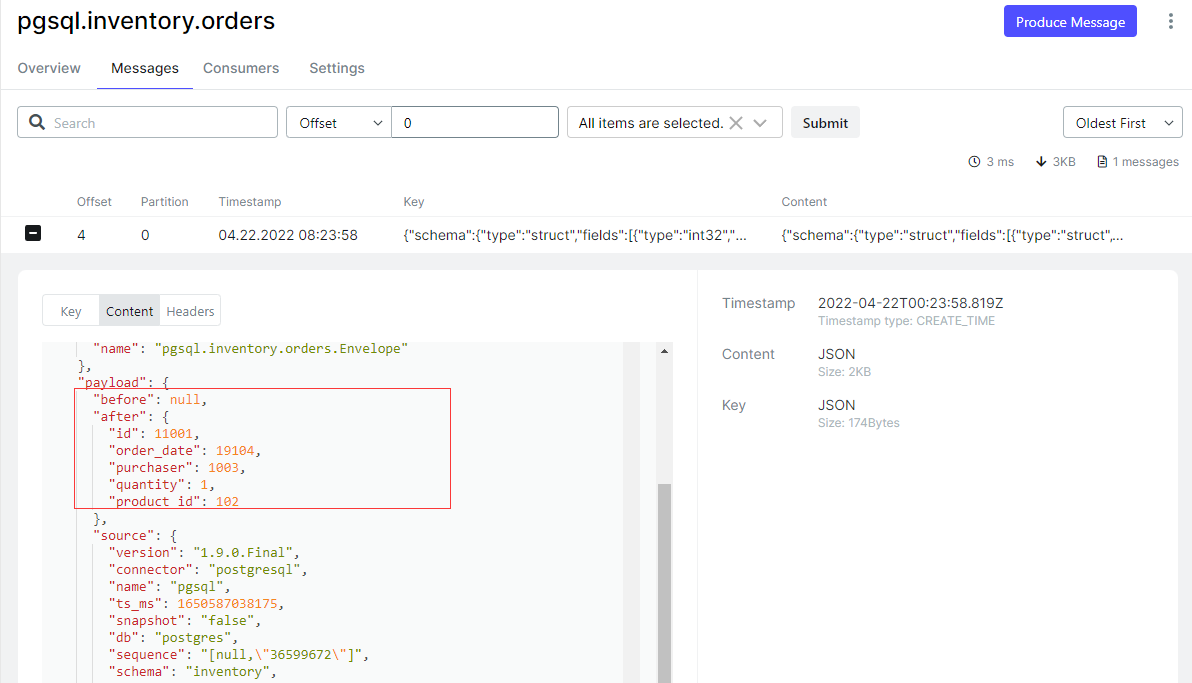
- INSERT
postgres=# select * from inventory.orders;
  id   | order_date | purchaser | quantity | product_id
-------+------------+-----------+----------+------------
 10001 | 2016-01-16 |      1001 |        1 |        102
 10002 | 2016-01-17 |      1002 |        2 |        105
 10003 | 2016-02-19 |      1002 |        2 |        106
 10004 | 2016-02-21 |      1003 |        1 |        107
(4 rows)

postgres=# insert into inventory.orders values (11001,now(),1003,1,102);
INSERT 0 1

postgres=# select * from inventory.orders;
  id   | order_date | purchaser | quantity | product_id
-------+------------+-----------+----------+------------
 10001 | 2016-01-16 |      1001 |        1 |        102
 10002 | 2016-01-17 |      1002 |        2 |        105
 10003 | 2016-02-19 |      1002 |        2 |        106
 10004 | 2016-02-21 |      1003 |        1 |        107
 11001 | 2022-04-22 |      1003 |        1 |        102
(5 rows)
- UPDATE
postgres=# select * from inventory.orders;
  id   | order_date | purchaser | quantity | product_id
-------+------------+-----------+----------+------------
 10001 | 2016-01-16 |      1001 |        1 |        102
 10002 | 2016-01-17 |      1002 |        2 |        105
 10003 | 2016-02-19 |      1002 |        2 |        106
 10004 | 2016-02-21 |      1003 |        1 |        107
 11001 | 2022-04-22 |      1003 |        1 |        102
(5 rows)

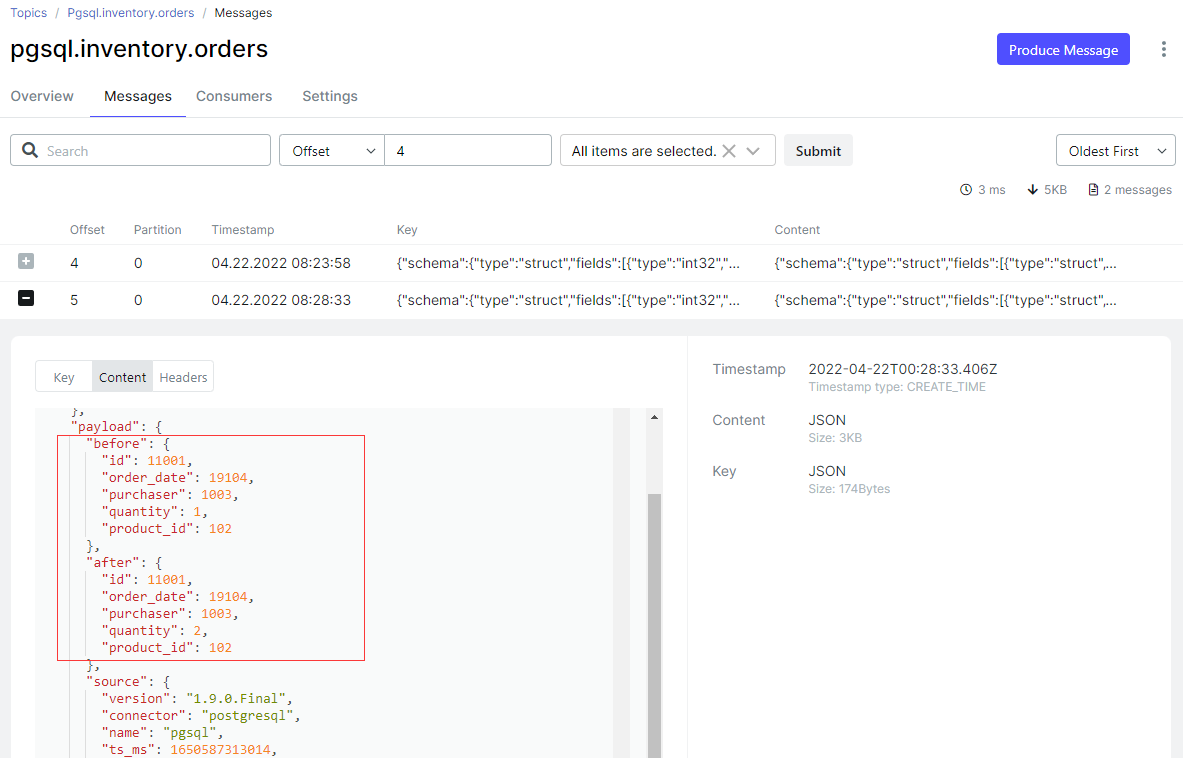
postgres=# update inventory.orders set quantity=2 where id=11001;
UPDATE 1

postgres=# select * from inventory.orders;
  id   | order_date | purchaser | quantity | product_id
-------+------------+-----------+----------+------------
 10001 | 2016-01-16 |      1001 |        1 |        102
 10002 | 2016-01-17 |      1002 |        2 |        105
 10003 | 2016-02-19 |      1002 |        2 |        106
 10004 | 2016-02-21 |      1003 |        1 |        107
 11001 | 2022-04-22 |      1003 |        2 |        102
(5 rows)
- DELETE
postgres=# select * from inventory.orders;
  id   | order_date | purchaser | quantity | product_id
-------+------------+-----------+----------+------------
 10001 | 2016-01-16 |      1001 |        1 |        102
 10002 | 2016-01-17 |      1002 |        2 |        105
 10003 | 2016-02-19 |      1002 |        2 |        106
 10004 | 2016-02-21 |      1003 |        1 |        107
 11001 | 2022-04-22 |      1003 |        2 |        102
(5 rows)

postgres=# delete from inventory.orders where id = 11001;
DELETE 1

postgres=# select * from inventory.orders;
  id   | order_date | purchaser | quantity | product_id
-------+------------+-----------+----------+------------
 10001 | 2016-01-16 |      1001 |        1 |        102
 10002 | 2016-01-17 |      1002 |        2 |        105
 10003 | 2016-02-19 |      1002 |        2 |        106
 10004 | 2016-02-21 |      1003 |        1 |        107
(4 rows)
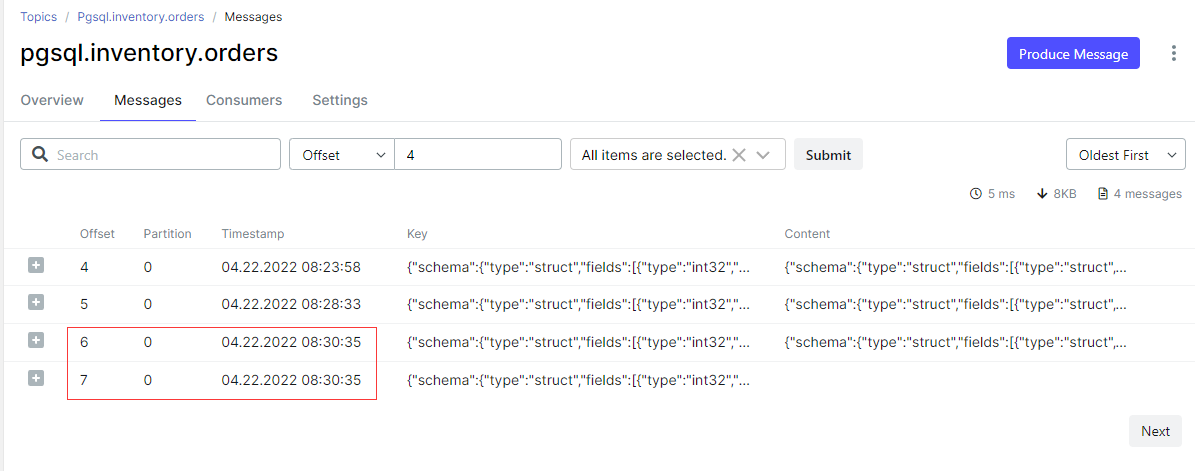
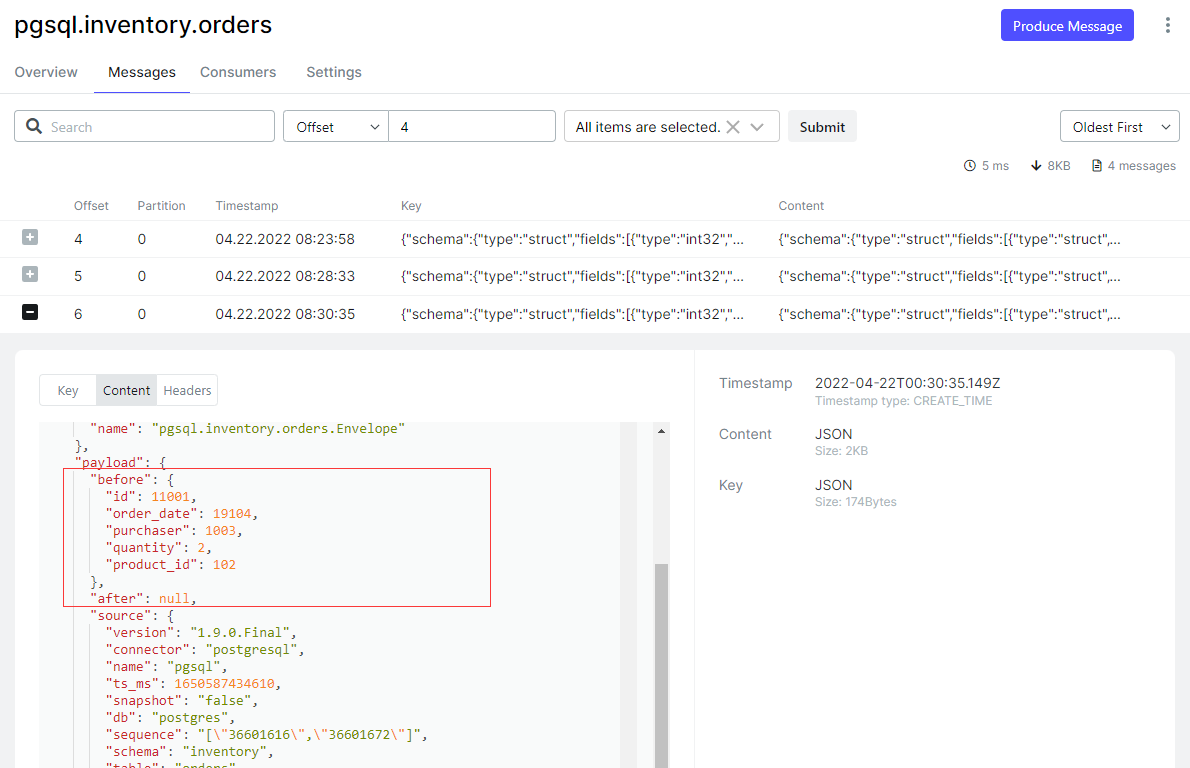
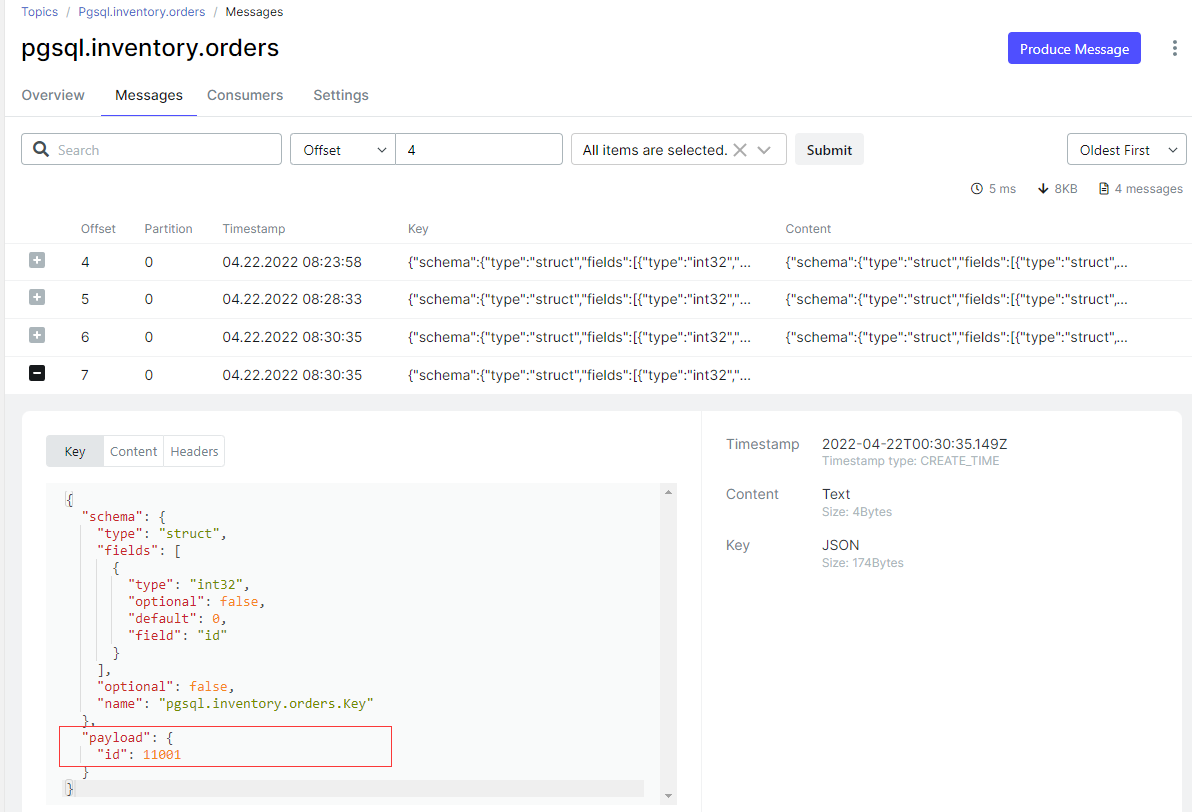
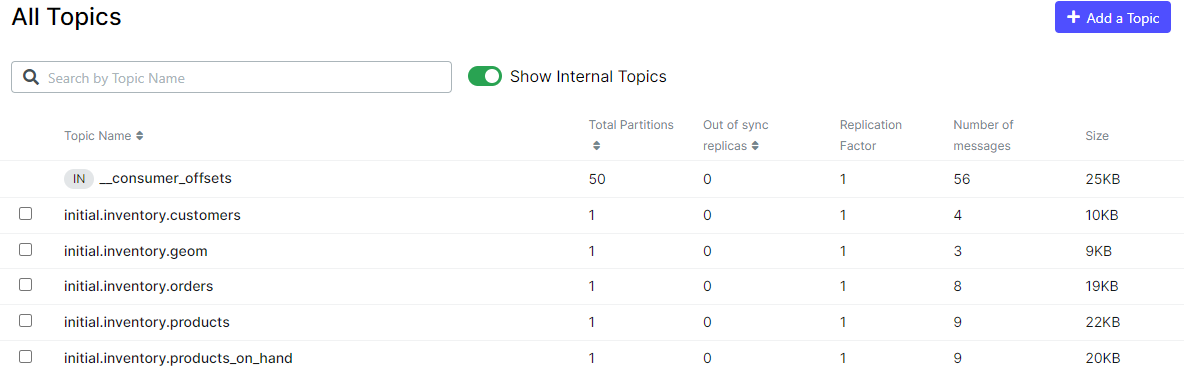
一個問題,“schema.include.list” 捕獲的表不全
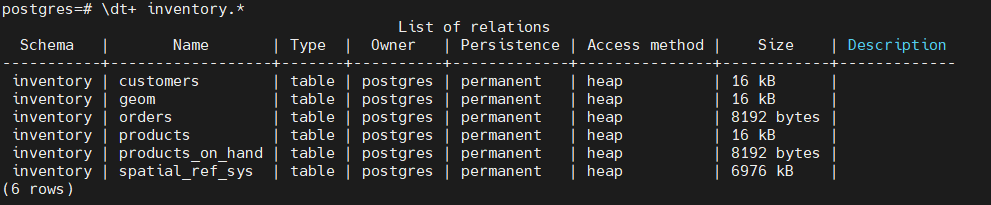
當連接器屬性配置 “schema.include.list”: “inventory”,正常來說會捕獲 schema inventory 里面的所有表,但是測試發現少捕獲一張 spatial_ref_sys 表,沒整明白啥情況。
{
    "name": "snapshot-mode-initial",
    "config": {
        "connector.class" : "io.debezium.connector.postgresql.PostgresConnector",
        "database.hostname" : "postgres",
        "database.port" : "5432",
        "database.user" : "postgres",
        "database.password" : "postgres",
        "database.dbname" : "postgres",
        "database.server.name" : "initial",
        "slot.name": "initial_slot",
        "schema.include.list": "inventory",
        "snapshot.mode": "initial",
        "plugin.name": "pgoutput",
        "publication.name": "dbz_inventory_connector",
        "publication.autocreate.mode": "filtered"
    }
}
監控 PostgreSQL 的復制槽
postgres=# select * from pg_replication_slots;

最后修改時間:2022-04-27 16:17:38
「喜歡這篇文章,您的關注和贊賞是給作者最好的鼓勵」
關注作者
【版權聲明】本文為墨天輪用戶原創內容,轉載時必須標注文章的來源(墨天輪),文章鏈接,文章作者等基本信息,否則作者和墨天輪有權追究責任。如果您發現墨天輪中有涉嫌抄襲或者侵權的內容,歡迎發送郵件至:contact@modb.pro進行舉報,并提供相關證據,一經查實,墨天輪將立刻刪除相關內容。
