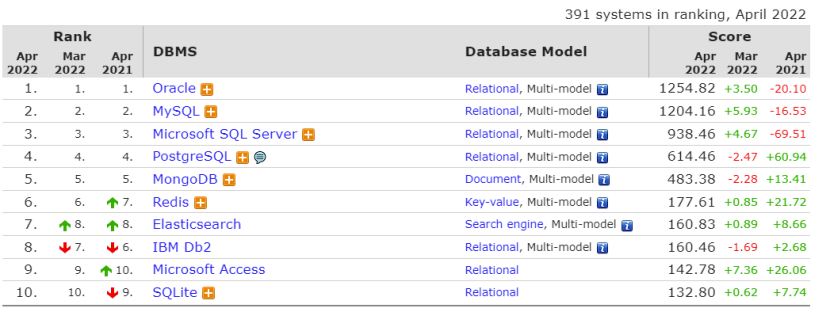
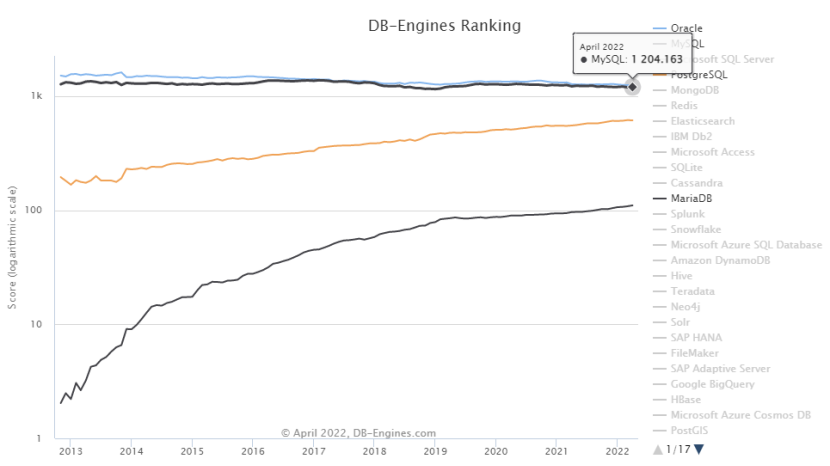
首先在介紹MySQL 主從時,我們來看看 DB-Engines 排行榜上四月數(shù)據(jù)庫的變化,前三甲居然都有小幅度增長,相反增長迅猛的 PG 和 MongoDB 有所減少,一個月的增長趨勢說明不了問題,下圖是從 13 年開始的趨勢圖,Oracle 和 MySQL 漸漸趨平,學(xué)習(xí)了解 MySQL 還是很有必要的。下面開始進(jìn)入正題。
(圖源:http://db-engines.com/en/ranking)
主從復(fù)制的原理
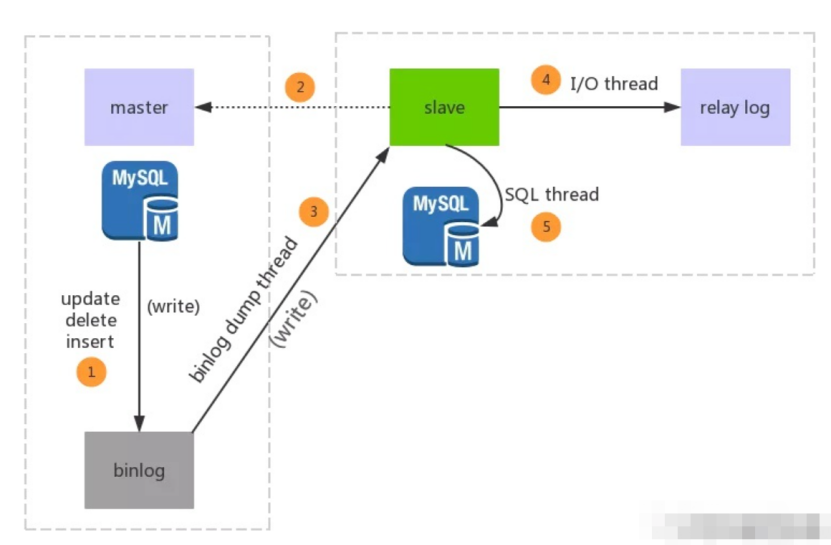
MySQL的主從復(fù)制中主要有三個線程:master(binlog dump thread)、slave(I/O thread 、SQL thread),Master一條線程和Slave中的兩條線程。
(1)master服務(wù)器將數(shù)據(jù)的改變記錄二進(jìn)制binlog日志,當(dāng)master上的數(shù)據(jù)發(fā)生改變時,則將其改變寫入二進(jìn)制日志中;
(2)slave服務(wù)器會在一定時間間隔內(nèi)對master二進(jìn)制日志進(jìn)行探測其是否發(fā)生改變,如果發(fā)生改變,則開始一個I/OThread請求master二進(jìn)制事件
(3)同時主節(jié)點(diǎn)為每個I/O線程啟動一個dump線程,用于向其發(fā)送二進(jìn)制事件,并保存至從節(jié)點(diǎn)本地的中繼日志中,從節(jié)點(diǎn)將啟動SQL線程從中繼日志中讀取二進(jìn)制日志,在本地重放,使得其數(shù)據(jù)和主節(jié)點(diǎn)的保持一致,最后I/OThread和SQLThread將進(jìn)入睡眠狀態(tài),等待下一次被喚醒。
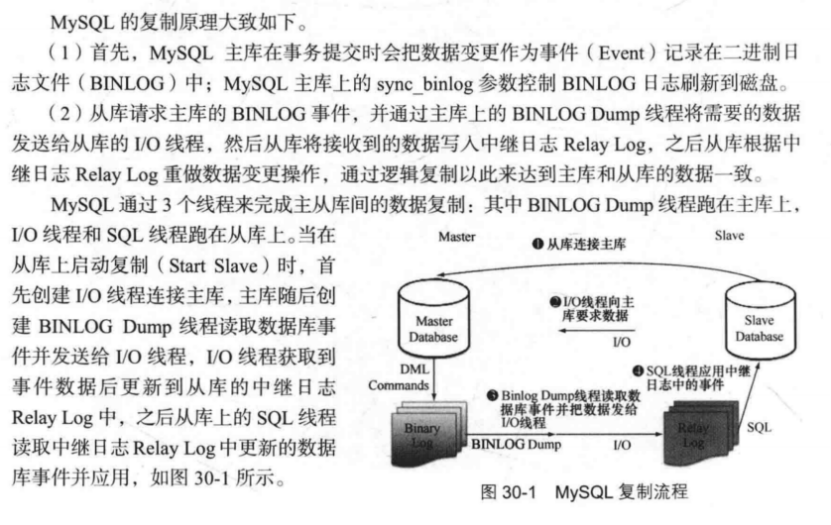
(圖源 深入淺出 MySQL 數(shù)據(jù)庫開發(fā)、優(yōu)化與管理維護(hù))
由于資源限制沒有那么多機(jī)器,本次使用一臺原先裝過 Oracle 和 OGG 的主機(jī)構(gòu)建一主兩從的MySQL 環(huán)境,通過三個不同的端口 3306、3307、3308 加以區(qū)分。
一、系統(tǒng)準(zhǔn)備
0、查看系統(tǒng)版本
cat /etc/redhat-release
Red Hat Enterprise Linux Server release 7.6 (Maipo)
1、關(guān)閉防火墻
systemctl stop firewalld.service或者systemctl stop firewalld
systemctl disable firewalld.service或者systemctl disable firewalld
systemctl status firewalld
2、關(guān)閉 selinux
getenforce
setenforce 0
vim /etc/selinux/config

SELINUX=disabled

[root@Ops-11gOGG ~]# systemctl status firewalld
? firewalld.service - firewalld - dynamic firewall daemon
   Loaded: loaded (/usr/lib/systemd/system/firewalld.service; disabled; vendor preset: enabled)
   Active: inactive (dead)
     Docs: man:firewalld(1)
[root@Ops-11gOGG ~]# getenforce
Disabled
3、/etc/hosts解析
示例如下
192.168.77.86 Ops-11gOGG
4、配置 yum 源,安裝依賴 rpm 包
yum -y groupinstall "DeveLopment tools"
yum -y install ncurses ncurses-devel openssl-devel bison gcc gcc-c++ make
5、清理系統(tǒng)環(huán)境
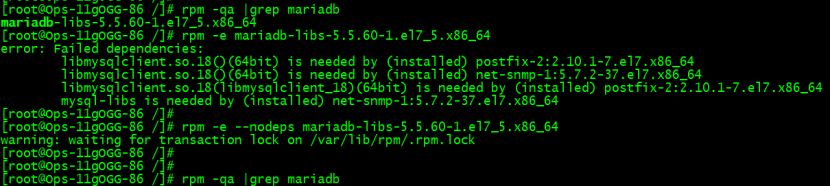
Linux7 版本的系統(tǒng)默認(rèn)自帶安裝了MariaDB,需要先清理。
## 查詢已安裝的mariadb
rpm -qa |grep mariadb
或
yum list installed | grep mariadb
## 卸載mariadb包,文件名為上述命令查詢出來的文件
rpm -e --nodeps mariadb-libs-5.5.60-1.el7_5.x86_64
yum -y remove mariadb-libs.x86_64
二、安裝 MySQL8.0.28
0、創(chuàng)建實(shí)例所需目錄
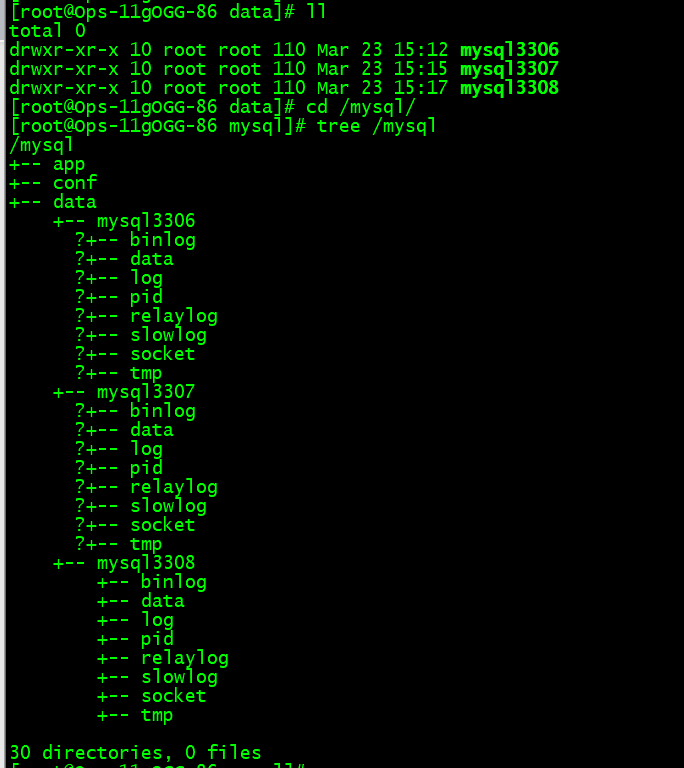
本手冊中 3306 為一個實(shí)例,如部署多實(shí)例請按照下面目錄結(jié)構(gòu)創(chuàng)建目錄
--root用戶操作:
mkdir -p /mysql/data/mysql3306
mkdir -p /mysql/app/
mkdir -p /mysql/conf/
mkdir -p /mysql/data/mysql3306/data/
mkdir -p /mysql/data/mysql3306/pid/
mkdir -p /mysql/data/mysql3306/socket/
mkdir -p /mysql/data/mysql3306/log/
mkdir -p /mysql/data/mysql3306/binlog/
mkdir -p /mysql/data/mysql3306/relaylog/
mkdir -p /mysql/data/mysql3306/slowlog/
mkdir -p /mysql/data/mysql3306/tmp/

mkdir -p /mysql/data/mysql3307
mkdir -p /mysql/data/mysql3307/data/
mkdir -p /mysql/data/mysql3307/pid/
mkdir -p /mysql/data/mysql3307/socket/
mkdir -p /mysql/data/mysql3307/log/
mkdir -p /mysql/data/mysql3307/binlog/
mkdir -p /mysql/data/mysql3307/relaylog/
mkdir -p /mysql/data/mysql3307/slowlog/
mkdir -p /mysql/data/mysql3307/tmp/

mkdir -p /mysql/data/mysql3308
mkdir -p /mysql/data/mysql3308/data/
mkdir -p /mysql/data/mysql3308/pid/
mkdir -p /mysql/data/mysql3308/socket/
mkdir -p /mysql/data/mysql3308/log/
mkdir -p /mysql/data/mysql3308/binlog/
mkdir -p /mysql/data/mysql3308/relaylog/
mkdir -p /mysql/data/mysql3308/slowlog/
mkdir -p /mysql/data/mysql3308/tmp/
1、創(chuàng)建數(shù)據(jù)庫用戶和組
groupadd mysql
useradd -g mysql mysql
chown -R mysql:mysql /mysql
passwd mysql

2、上傳解壓安裝包并重命名
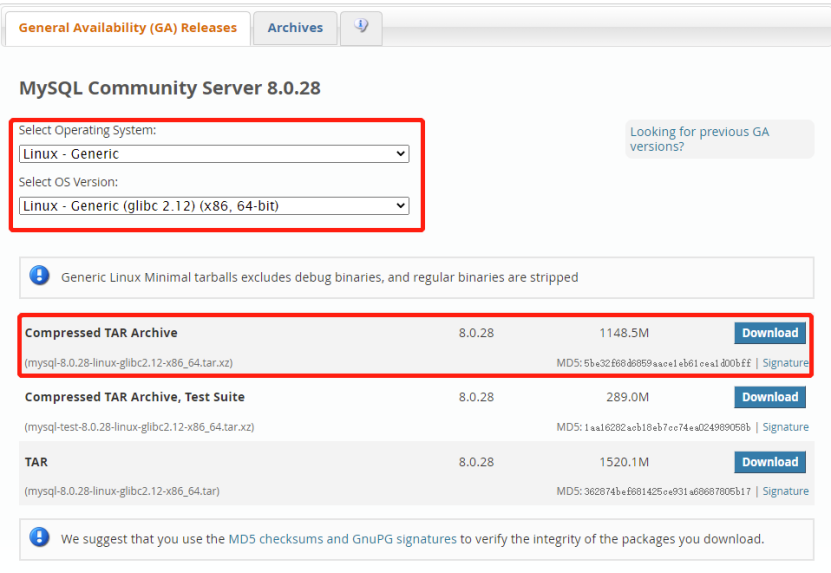
如下鏈接,選擇相關(guān)的版本和系統(tǒng)。
https://dev.mysql.com/downloads/mysql/8.0.html
MD5:?5be32f68d6859aace1eb61cea1d00bff?
mysql用戶操作:
cd /mysql/app
md5sum mysql-8.0.28-linux-glibc2.12-x86_64.tar.xz  --檢驗(yàn) MD5 值和上面一樣,說明包無損
tar xvf mysql-8.0.28-linux-glibc2.12-x86_64.tar.xz
mv  mysql-8.0.28-linux-glibc2.12-x86_64 mysql8.0.28
3、配置mysql用戶環(huán)境變量
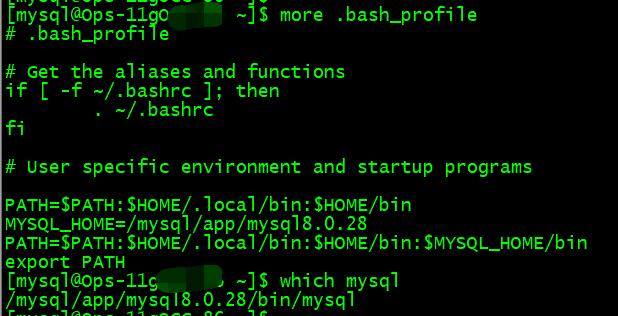
vim ~/.bash_profile
MYSQL_HOME=/mysql/app/mysql8.0.28
PATH=$PATH:$HOME/.local/bin:$HOME/bin:$MYSQL_HOME/bin
source ~/.bash_profile
which mysql
4、創(chuàng)建參數(shù)文件
由于是二進(jìn)制文件安裝,數(shù)據(jù)庫參數(shù)文件需要自己配置,以下是簡單的參數(shù)配置。其他參數(shù)可依照個人需求添加。
vim  my3306.cnf
[mysqld]
# basic settings #
server_id = 863306
basedir = /mysql/app/mysql8.0.28
datadir = /mysql/data/mysql3306/data/
socket = /mysql/data/mysql3306/socket/mysql3306.sock
pid_file = /mysql/data/mysql3306/pid/mysqld3306.pid
port = 3306
default-time_zone = '+8:00'
character_set_server = utf8mb4
explicit_defaults_for_timestamp = 1
autocommit = 1
transaction_isolation = READ-COMMITTED
secure_file_priv = "/mysql/data/mysql3306/tmp/"
max_allowed_packet = 64M
lower_case_table_names = 1
default_authentication_plugin = mysql_native_password
sql_mode = 'STRICT_TRANS_TABLES,NO_ZERO_IN_DATE,NO_ZERO_DATE,ERROR_FOR_DIVISION_BY_ZERO,NO_ENGINE_SUBSTITUTION'

# connection #
back_log = 500
interactive_timeout = 300
wait_timeout = 300
lock_wait_timeout = 300
max_user_connections = 800
skip_name_resolve = 1
max_connections = 3000
max_connect_errors = 1000

#table cache performance settings
#table_open_cache = 1024
#table_definition_cache = 1024
#table_open_cache_instances = 16

#session memory settings #
#read_buffer_size = 16M
#read_rnd_buffer_size = 32M
#sort_buffer_size = 32M
#tmp_table_size = 64M
#join_buffer_size = 128M
#thread_cache_size = 256

# log settings #
slow_query_log = ON
slow_query_log_file = /mysql/data/mysql3306/slowlog/slow3306.log
log_error = /mysql/data/mysql3306/log/mysqld3306.log
log_error_verbosity = 3
log_bin = /mysql/data/mysql3306/binlog/mysql_bin
log_bin_index = /mysql/data/mysql3306/binlog/mysql_binlog.index
# general_log_file = /data/mysql/mysql57_3306/generallog/general.log
log_queries_not_using_indexes = 1
log_slow_admin_statements = 1
#log_slow_slave_statements = 1
#expire_logs_days = 15
binlog_expire_logs_seconds = 2592000
long_query_time = 2
min_examined_row_limit = 100
log_throttle_queries_not_using_indexes = 1000
#log_bin_trust_function_creators = 1
log_slave_updates = 1
mysqlx_port = 33060
mysqlx_socket = /mysql/data/mysql3306/socket/mysqlx.sock

# innodb settings #
innodb_buffer_pool_size = 512M
#innodb_buffer_pool_instances = 16
innodb_log_buffer_size = 100M
innodb_buffer_pool_load_at_startup = 1
innodb_buffer_pool_dump_at_shutdown = 1
innodb_lru_scan_depth = 4096
innodb_lock_wait_timeout = 20
innodb_io_capacity = 5000
innodb_io_capacity_max = 10000
innodb_flush_method = O_DIRECT
innodb_log_file_size = 1G
innodb_log_files_in_group = 2
innodb_purge_threads = 4
innodb_thread_concurrency = 200
innodb_print_all_deadlocks = 1
innodb_strict_mode = 1
innodb_sort_buffer_size = 32M
innodb_write_io_threads = 16
innodb_read_io_threads = 16
innodb_file_per_table = 1
innodb_stats_persistent_sample_pages = 64
innodb_autoinc_lock_mode = 2
innodb_online_alter_log_max_size = 1G
innodb_open_files = 4096
innodb_buffer_pool_dump_pct = 25
innodb_page_cleaners = 16
innodb_undo_log_truncate = 1
innodb_max_undo_log_size = 2G
innodb_purge_rseg_truncate_frequency = 128
innodb_flush_log_at_trx_commit = 1

# replication settings #
master_info_repository = TABLE
relay_log_info_repository = TABLE
sync_binlog = 1
binlog_format = ROW
gtid_mode = ON
enforce_gtid_consistency = ON
relay_log_recovery = 1
relay_log = /mysql/data/mysql3306/relaylog/relay.log
relay_log_index = /mysql/data/mysql3306/relaylog/mysql_relay.index
slave_parallel_type = LOGICAL_CLOCK
slave_parallel_workers = 16
binlog_gtid_simple_recovery = 1
slave_preserve_commit_order = 1
binlog_rows_query_log_events = 1
slave_transaction_retries = 10
log_timestamps = system
report_host = 192.168.75.86
report_port = 3306
–report_host復(fù)制副本注冊期間要報告給源庫的復(fù)制副本的主機(jī)名或IP地址。此值顯示在源服務(wù)器上顯示副本的輸出中。如果不希望復(fù)制副本向源注冊,請將該值保留為未設(shè)置。
其他兩節(jié)點(diǎn)參數(shù)文件my3307.cnf、my3308.cnf中將上述文件中的 3306 全部替換為 3307、3308 即可。
5、數(shù)據(jù)庫初始化
mysql用戶操作,注意同主機(jī)參數(shù)文件名my3306.cnf 各不相同,間隔約兩分鐘分別初始化三個 MySQL 實(shí)例。
mysqld  --defaults-file=/mysql/conf/my3306.cnf --initialize --user=mysql --basedir=/mysql/app/mysql8.0.28  --datadir=/mysql/data/mysql3306/data

mysqld  --defaults-file=/mysql/conf/my3307.cnf --initialize --user=mysql --basedir=/mysql/app/mysql8.0.28  --datadir=/mysql/data/mysql3307/data

mysqld  --defaults-file=/mysql/conf/my3308.cnf --initialize --user=mysql --basedir=/mysql/app/mysql8.0.28  --datadir=/mysql/data/mysql3307/data
6、啟動三個數(shù)據(jù)庫實(shí)例
mysqld_safe --defaults-file=/mysql/conf/my3306.cnf --user=mysql &

mysqld_safe --defaults-file=/mysql/conf/my3307.cnf --user=mysql &

mysqld_safe --defaults-file=/mysql/conf/my3308.cnf --user=mysql &

--關(guān)閉數(shù)據(jù)庫
mysqladmin -uroot -p -h 127.0.0.1 -P 3306 shutdown
7、查看初始化 root 密碼并修改
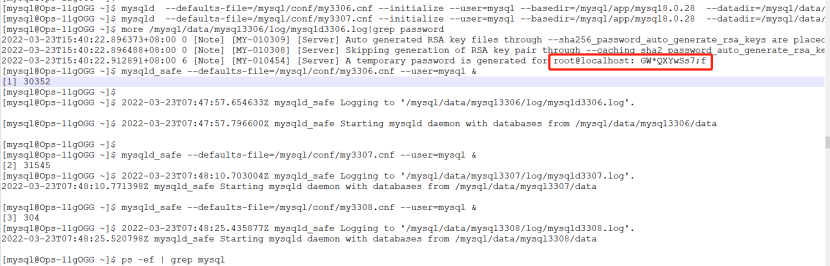
more /mysql/data/mysql3306/log/mysqld3306.log|grep password
more /mysql/data/mysql3306/log/mysqld3307.log|grep password
more /mysql/data/mysql3306/log/mysqld3308.log|grep password
如下圖所示,3306 端口 root@localhost密碼為“GW*QXYwSs7;f”,初始化密碼比較復(fù)雜,這里由于是測試環(huán)境,將其修改為“root”;
[mysql@Ops-11gOGG ~]$ mysql -uroot -p  -P 3306 -S /mysql/data/mysql3306/socket/mysql3306.sock
Enter password:
Welcome to the MySQL monitor.  Commands end with ; or \g.
Your MySQL connection id is 8
Server version: 8.0.28

Copyright (c) 2000, 2022, Oracle and/or its affiliates.

Oracle is a registered trademark of Oracle Corporation and/or its
affiliates. Other names may be trademarks of their respective
owners.

Type 'help;' or '\h' for help. Type '\c' to clear the current input statement.

mysql> alter user root@'localhost' identified by 'root';
Query OK, 0 rows affected (0.01 sec)

mysql> create user root@'%' identified by 'root';
Query OK, 0 rows affected (0.02 sec)

mysql> grant all  privileges on *.* to root@'%'  with grant option;
Query OK, 0 rows affected (0.00 sec)
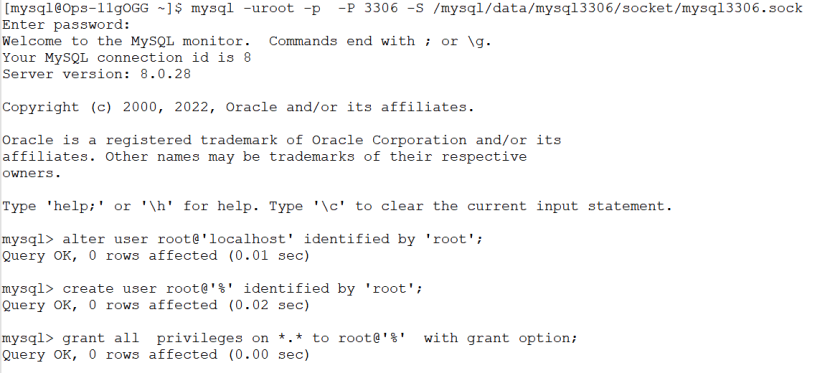
其他兩臺也是如此,并創(chuàng)建遠(yuǎn)程 root 登錄賬號。
三、構(gòu)建主從環(huán)境
1、主庫 3306 創(chuàng)建復(fù)制賬號 rep
create user rep@'%' identified by 'rep';
grant REPLICATION CLIENT,REPLICATION SLAVE on *.* to rep@'%';
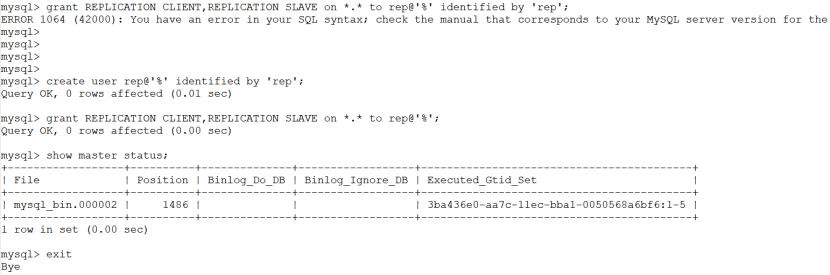
我這里需要置空 gtid 信息。
reset master;
show master status;
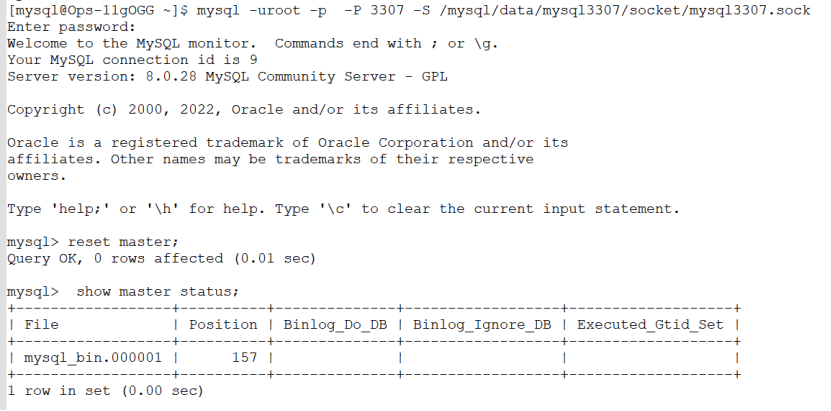
快速構(gòu)建主從
登錄3307
mysql -uroot -p  -P 3307 -S /mysql/data/mysql3307/socket/mysql3307.sock
Enter password:
Welcome to the MySQL monitor.  Commands end with ; or \g.
Your MySQL connection id is 10
Server version: 8.0.28 MySQL Community Server - GPL

Copyright (c) 2000, 2022, Oracle and/or its affiliates.

Oracle is a registered trademark of Oracle Corporation and/or its
affiliates. Other names may be trademarks of their respective
owners.

Type 'help;' or '\h' for help. Type '\c' to clear the current input statement.

mysql>
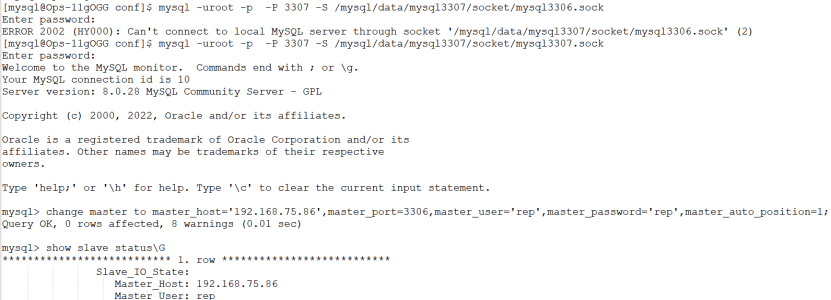
change master to master_host='192.168.75.86',master_port=3306,master_user='rep',master_password='rep',master_auto_position=1;
show slave status\G
start slave;
show slave status\G

mysql> start slave;
Query OK, 0 rows affected, 1 warning (1.04 sec)

mysql> show slave status\G
*************************** 1. row ***************************
               Slave_IO_State: Waiting for source to send event
                  Master_Host: 192.168.75.86
                  Master_User: rep
                  Master_Port: 3306
                Connect_Retry: 60
              Master_Log_File: mysql_bin.000002
          Read_Master_Log_Pos: 1486
               Relay_Log_File: relay.000002
                Relay_Log_Pos: 373
        Relay_Master_Log_File: mysql_bin.000002
             Slave_IO_Running: Yes
            Slave_SQL_Running: No
              Replicate_Do_DB:
          Replicate_Ignore_DB:
           Replicate_Do_Table:
       Replicate_Ignore_Table:
      Replicate_Wild_Do_Table:
  Replicate_Wild_Ignore_Table:
                   Last_Errno: 1396
                   Last_Error: Coordinator stopped because there were error(s) in the worker(s). The most recent failure being: Worker 1 failed executing transaction '3ba436e0-aa7c-11ec-bba1-0050568a6bf6:2' at master log mysql_bin.000002, end_log_pos 730. See error log and/or performance_schema.replication_applier_status_by_worker table for more details about this failure or others, if any.
                 Skip_Counter: 0
          Exec_Master_Log_Pos: 157
              Relay_Log_Space: 1902
              Until_Condition: None
               Until_Log_File:
                Until_Log_Pos: 0
           Master_SSL_Allowed: No
           Master_SSL_CA_File:
           Master_SSL_CA_Path:
              Master_SSL_Cert:
            Master_SSL_Cipher:
               Master_SSL_Key:
        Seconds_Behind_Master: NULL
Master_SSL_Verify_Server_Cert: No
                Last_IO_Errno: 0
                Last_IO_Error:
               Last_SQL_Errno: 1396
               Last_SQL_Error: Coordinator stopped because there were error(s) in the worker(s). The most recent failure being: Worker 1 failed executing transaction '3ba436e0-aa7c-11ec-bba1-0050568a6bf6:2' at master log mysql_bin.000002, end_log_pos 730. See error log and/or performance_schema.replication_applier_status_by_worker table for more details about this failure or others, if any.
  Replicate_Ignore_Server_Ids:
             Master_Server_Id: 863306
                  Master_UUID: 3ba436e0-aa7c-11ec-bba1-0050568a6bf6
             Master_Info_File: mysql.slave_master_info
                    SQL_Delay: 0
          SQL_Remaining_Delay: NULL
      Slave_SQL_Running_State:
           Master_Retry_Count: 86400
                  Master_Bind:
      Last_IO_Error_Timestamp:
     Last_SQL_Error_Timestamp: 220323 16:03:06
               Master_SSL_Crl:
           Master_SSL_Crlpath:
           Retrieved_Gtid_Set: 3ba436e0-aa7c-11ec-bba1-0050568a6bf6:1-5
            Executed_Gtid_Set: 3ba436e0-aa7c-11ec-bba1-0050568a6bf6:1
                Auto_Position: 1
         Replicate_Rewrite_DB:
                 Channel_Name:
           Master_TLS_Version:
       Master_public_key_path:
        Get_master_public_key: 0
            Network_Namespace:
1 row in set, 1 warning (0.01 sec)
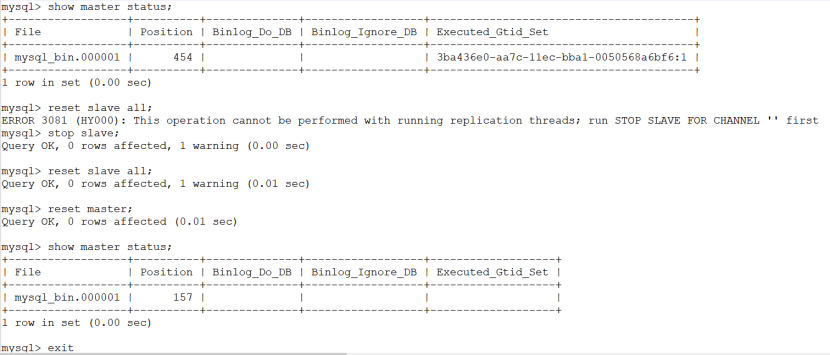
修復(fù)問題
show master status;
stop slave;
reset slave all;
reset master;
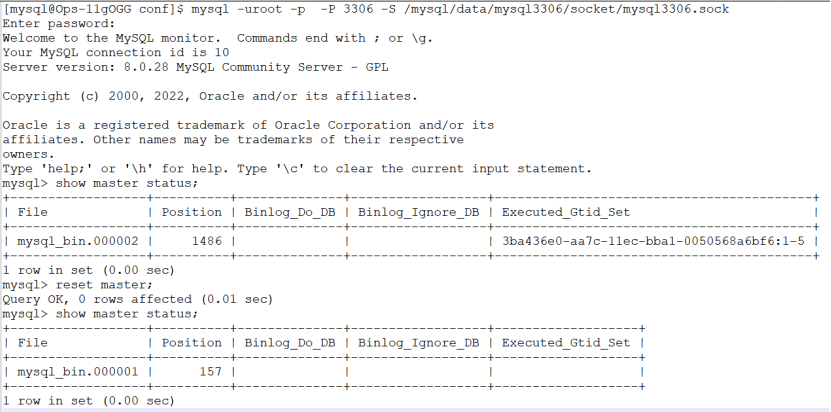
登錄3306
mysql -uroot -p  -P 3306 -S /mysql/data/mysql3306/socket/mysql3306.sock
show master status;
reset master;
show master status;
重新構(gòu)建主從
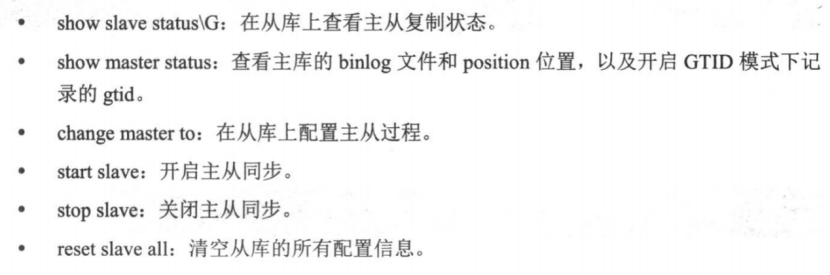
注意:從 MySQL 8.0.22 開始,START SLAVE、STOP SLAVE、SHOW SLAVE STATUS、SHOW SLAVE HOST、RESET SLAVE 均被棄用,取而代之的則是 start replica、stop replica、show replica status、show replicas 和 reset replica。 MySQL 8.0.23 版本開始,change replication source to 取代了以前一直使用的 change master to 命令。MySQL 8.0.26 版本開始,系統(tǒng)變量、參數(shù)等標(biāo)識符中的 MASTER、SLAVE、MTS(multithreaded slave)將被 SOURCE、REPLICA 和 MTA(multithreaded applier) 取代。
登錄3307
[mysql@Ops-11gOGG conf]$ mysql -uroot -p  -P 3307 -S /mysql/data/mysql3307/socket/mysql3307.sock
Enter password:
Welcome to the MySQL monitor.  Commands end with ; or \g.
Your MySQL connection id is 29
Server version: 8.0.28 MySQL Community Server - GPL

Copyright (c) 2000, 2022, Oracle and/or its affiliates.

Oracle is a registered trademark of Oracle Corporation and/or its
affiliates. Other names may be trademarks of their respective
owners.

Type 'help;' or '\h' for help. Type '\c' to clear the current input statement.

mysql> change master to master_host='192.168.75.86',master_port=3306,master_user='rep',master_password='rep',master_auto_position=1;
Query OK, 0 rows affected, 8 warnings (0.03 sec)

mysql> start slave;
Query OK, 0 rows affected, 1 warning (0.05 sec)

mysql> show slave status\G
*************************** 1. row ***************************
               Slave_IO_State: Waiting for source to send event
                  Master_Host: 192.168.75.86
                  Master_User: rep
                  Master_Port: 3306
                Connect_Retry: 60
              Master_Log_File: mysql_bin.000001
          Read_Master_Log_Pos: 157
               Relay_Log_File: relay.000002
                Relay_Log_Pos: 373
        Relay_Master_Log_File: mysql_bin.000001
             Slave_IO_Running: Yes
            Slave_SQL_Running: Yes
              Replicate_Do_DB:
          Replicate_Ignore_DB:
           Replicate_Do_Table:
       Replicate_Ignore_Table:
      Replicate_Wild_Do_Table:
  Replicate_Wild_Ignore_Table:
                   Last_Errno: 0
                   Last_Error:
                 Skip_Counter: 0
          Exec_Master_Log_Pos: 157
              Relay_Log_Space: 573
              Until_Condition: None
               Until_Log_File:
                Until_Log_Pos: 0
           Master_SSL_Allowed: No
           Master_SSL_CA_File:
           Master_SSL_CA_Path:
              Master_SSL_Cert:
            Master_SSL_Cipher:
               Master_SSL_Key:
        Seconds_Behind_Master: 0
Master_SSL_Verify_Server_Cert: No
                Last_IO_Errno: 0
                Last_IO_Error:
               Last_SQL_Errno: 0
               Last_SQL_Error:
  Replicate_Ignore_Server_Ids:
             Master_Server_Id: 863306
                  Master_UUID: 3ba436e0-aa7c-11ec-bba1-0050568a6bf6
             Master_Info_File: mysql.slave_master_info
                    SQL_Delay: 0
          SQL_Remaining_Delay: NULL
      Slave_SQL_Running_State: Replica has read all relay log; waiting for more updates
           Master_Retry_Count: 86400
                  Master_Bind:
      Last_IO_Error_Timestamp:
     Last_SQL_Error_Timestamp:
               Master_SSL_Crl:
           Master_SSL_Crlpath:
           Retrieved_Gtid_Set:
            Executed_Gtid_Set:
                Auto_Position: 1
         Replicate_Rewrite_DB:
                 Channel_Name:
           Master_TLS_Version:
       Master_public_key_path:
        Get_master_public_key: 0
            Network_Namespace:
1 row in set, 1 warning (0.01 sec)
登錄 3308
[mysql@Ops-11gOGG conf]$ mysql -uroot -p  -P 3308 -S /mysql/data/mysql3308/socket/mysql3308.sock
Enter password:
Welcome to the MySQL monitor.  Commands end with ; or \g.
Your MySQL connection id is 9
Server version: 8.0.28 MySQL Community Server - GPL

Copyright (c) 2000, 2022, Oracle and/or its affiliates.

Oracle is a registered trademark of Oracle Corporation and/or its
affiliates. Other names may be trademarks of their respective
owners.

Type 'help;' or '\h' for help. Type '\c' to clear the current input statement.

mysql>
mysql> show master status;
+------------------+----------+--------------+------------------+-------------------+
| File             | Position | Binlog_Do_DB | Binlog_Ignore_DB | Executed_Gtid_Set |
+------------------+----------+--------------+------------------+-------------------+
| mysql_bin.000001 |      157 |              |                  |                   |
+------------------+----------+--------------+------------------+-------------------+
1 row in set (0.00 sec)

mysql> change master to master_host='192.168.75.86',master_port=3306,master_user='rep',master_password='rep',master_auto_position=1;
Query OK, 0 rows affected, 8 warnings (0.03 sec)

mysql> start slave;
Query OK, 0 rows affected, 1 warning (0.35 sec)

mysql> show slave status\G
*************************** 1. row ***************************
               Slave_IO_State: Waiting for source to send event
                  Master_Host: 192.168.75.86
                  Master_User: rep
                  Master_Port: 3306
                Connect_Retry: 60
              Master_Log_File: mysql_bin.000001
          Read_Master_Log_Pos: 157
               Relay_Log_File: relay.000002
                Relay_Log_Pos: 373
        Relay_Master_Log_File: mysql_bin.000001
             Slave_IO_Running: Yes
            Slave_SQL_Running: Yes
              Replicate_Do_DB:
          Replicate_Ignore_DB:
           Replicate_Do_Table:
       Replicate_Ignore_Table:
      Replicate_Wild_Do_Table:
  Replicate_Wild_Ignore_Table:
                   Last_Errno: 0
                   Last_Error:
                 Skip_Counter: 0
          Exec_Master_Log_Pos: 157
              Relay_Log_Space: 573
              Until_Condition: None
               Until_Log_File:
                Until_Log_Pos: 0
           Master_SSL_Allowed: No
           Master_SSL_CA_File:
           Master_SSL_CA_Path:
              Master_SSL_Cert:
            Master_SSL_Cipher:
               Master_SSL_Key:
        Seconds_Behind_Master: 0
Master_SSL_Verify_Server_Cert: No
                Last_IO_Errno: 0
                Last_IO_Error:
               Last_SQL_Errno: 0
               Last_SQL_Error:
  Replicate_Ignore_Server_Ids:
             Master_Server_Id: 863306
                  Master_UUID: 3ba436e0-aa7c-11ec-bba1-0050568a6bf6
             Master_Info_File: mysql.slave_master_info
                    SQL_Delay: 0
          SQL_Remaining_Delay: NULL
      Slave_SQL_Running_State: Replica has read all relay log; waiting for more updates
           Master_Retry_Count: 86400
                  Master_Bind:
      Last_IO_Error_Timestamp:
     Last_SQL_Error_Timestamp:
               Master_SSL_Crl:
           Master_SSL_Crlpath:
           Retrieved_Gtid_Set:
            Executed_Gtid_Set:
                Auto_Position: 1
         Replicate_Rewrite_DB:
                 Channel_Name:
           Master_TLS_Version:
       Master_public_key_path:
        Get_master_public_key: 0
            Network_Namespace:
1 row in set, 1 warning (0.01 sec)
登錄主庫 3306 查看
show slave hosts;
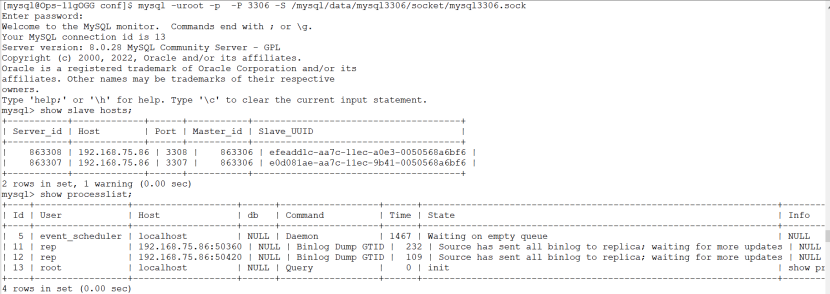
[mysql@Ops-11gOGG conf]$ mysql -uroot -p  -P 3306 -S /mysql/data/mysql3306/socket/mysql3306.sock
Enter password:
Welcome to the MySQL monitor.  Commands end with ; or \g.
Your MySQL connection id is 13
Server version: 8.0.28 MySQL Community Server - GPL

Copyright (c) 2000, 2022, Oracle and/or its affiliates.

Oracle is a registered trademark of Oracle Corporation and/or its
affiliates. Other names may be trademarks of their respective
owners.

Type 'help;' or '\h' for help. Type '\c' to clear the current input statement.

mysql> show slave hosts;
+-----------+-------------+------+-----------+--------------------------------------+
| Server_id | Host        | Port | Master_id | Slave_UUID                           |
+-----------+-------------+------+-----------+--------------------------------------+
|    863308 | 192.168.75.86 | 3308 |    863306 | efeadd1c-aa7c-11ec-a0e3-0050568a6bf6 |
|    863307 | 192.168.75.86 | 3307 |    863306 | e0d081ae-aa7c-11ec-9b41-0050568a6bf6 |
+-----------+-------------+------+-----------+--------------------------------------+
2 rows in set, 1 warning (0.00 sec)

mysql> show processlist;
+----+-----------------+-------------------+------+------------------+------+-----------------------------------------------------------------+------------------+
| Id | User            | Host              | db   | Command          | Time | State                                                           | Info             |
+----+-----------------+-------------------+------+------------------+------+-----------------------------------------------------------------+------------------+
|  5 | event_scheduler | localhost         | NULL | Daemon           | 1467 | Waiting on empty queue                                          | NULL             |
| 11 | rep             | 192.168.75.86:50360 | NULL | Binlog Dump GTID |  232 | Source has sent all binlog to replica; waiting for more updates | NULL             |
| 12 | rep             | 192.168.75.86:50420 | NULL | Binlog Dump GTID |  109 | Source has sent all binlog to replica; waiting for more updates | NULL             |
| 13 | root            | localhost         | NULL | Query            |    0 | init                                                            | show processlist |
+----+-----------------+-------------------+------+------------------+------+-----------------------------------------------------------------+------------------+
4 rows in set (0.00 sec)
兩從庫分別修改參數(shù)限制只讀模式
show variables like '%read_only%';
set global read_only=1;
set global super_read_only=1;
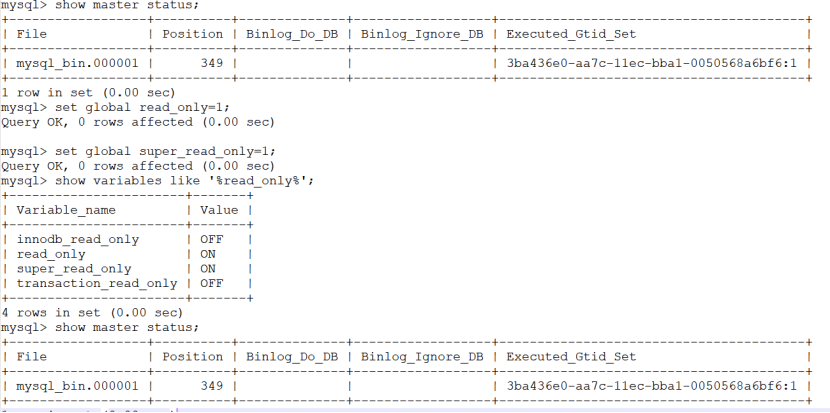
[mysql@Ops-11gOGG conf]$ mysql -uroot -p  -P 3308 -S /mysql/data/mysql3308/socket/mysql3308.sock
Enter password:
Welcome to the MySQL monitor.  Commands end with ; or \g.
Your MySQL connection id is 28
Server version: 8.0.28 MySQL Community Server - GPL

Copyright (c) 2000, 2022, Oracle and/or its affiliates.

Oracle is a registered trademark of Oracle Corporation and/or its
affiliates. Other names may be trademarks of their respective
owners.

Type 'help;' or '\h' for help. Type '\c' to clear the current input statement.

mysql> show master status;
+------------------+----------+--------------+------------------+------------------------------------------+
| File             | Position | Binlog_Do_DB | Binlog_Ignore_DB | Executed_Gtid_Set                        |
+------------------+----------+--------------+------------------+------------------------------------------+
| mysql_bin.000001 |      544 |              |                  | 3ba436e0-aa7c-11ec-bba1-0050568a6bf6:1-2 |
+------------------+----------+--------------+------------------+------------------------------------------+
1 row in set (0.00 sec)

mysql> show variables like '%read_only%';
+-----------------------+-------+
| Variable_name         | Value |
+-----------------------+-------+
| innodb_read_only      | OFF   |
| read_only             | OFF   |
| super_read_only       | OFF   |
| transaction_read_only | OFF   |
+-----------------------+-------+
4 rows in set (0.02 sec)

mysql> set global read_only=1;
Query OK, 0 rows affected (0.00 sec)

mysql> set global super_read_only=1;
Query OK, 0 rows affected (0.00 sec)

mysql> show variables like '%read_only%';
+-----------------------+-------+
| Variable_name         | Value |
+-----------------------+-------+
| innodb_read_only      | OFF   |
| read_only             | ON    |
| super_read_only       | ON    |
| transaction_read_only | OFF   |
+-----------------------+-------+
4 rows in set (0.01 sec)

mysql> show master status;
+------------------+----------+--------------+------------------+------------------------------------------+
| File             | Position | Binlog_Do_DB | Binlog_Ignore_DB | Executed_Gtid_Set                        |
+------------------+----------+--------------+------------------+------------------------------------------+
| mysql_bin.000001 |      544 |              |                  | 3ba436e0-aa7c-11ec-bba1-0050568a6bf6:1-2 |
+------------------+----------+--------------+------------------+------------------------------------------+
1 row in set (0.00 sec)
————————————————————————————
公眾號:JiekeXu DBA之路
墨天輪:http://www.sunline.cc/u/4347
CSDN :https://blog.csdn.net/JiekeXu
騰訊云:https://cloud.tencent.com/developer/user/5645107
————————————————————————————