



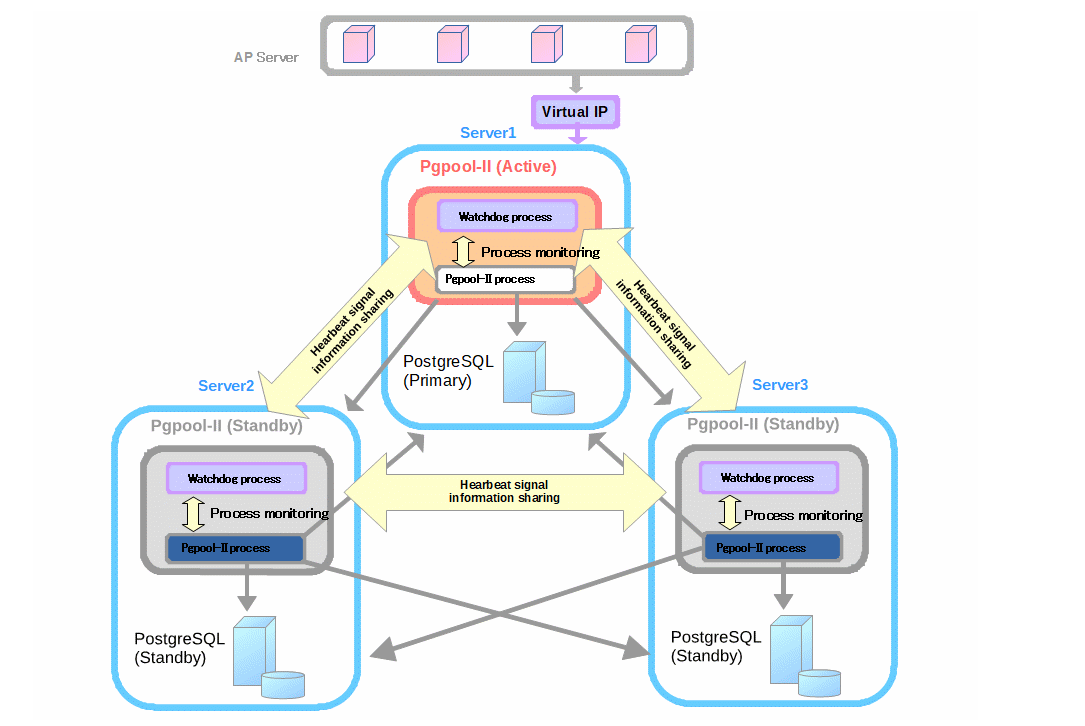
大家好,這次大表哥帶來技術分享是 PGPOOL II 這個連接池自身的HA方案: Watch dog.
本文參考官網的 configuration Examples:
https://tatsuo-ishii.github.io/pgpool-II/current/example-cluster.html
Watch dog 是PGPool 的內置的監控進程不需要獨立安裝,打開相關的參數開關即可。
具體的配置步驟如下:
1)官方建議配置至少3臺(奇數個)幾點配置Watch dog 進程。

| IP | pg pool role | pg instance role |
|---|---|---|
| 10.67.38.50 | LEADER | primary database |
| 10.67.39.149 | STANDBY | standby database |
| 10.67.39.49 | STANDBY | standy database |
2)手動創建 pgpool_node_id 文件, 在路徑下:${PGPOOL_HOME}/etc
這一步是必須的,否則啟動會報錯:If watchdog is enable, pgpool_node_id file is required
INFRA [root@wqdcsrv3352 etc]# /opt/postgreSQL/pgpool4.3/bin/pgpool
2022-06-30 14:53:25.867: main pid 69061: 2022-06-30 14:53:25FATAL:  Pgpool node id file /opt/postgreSQL/pgpool4.3/etc/pgpool_node_id does not exist
2022-06-30 14:53:25.867: main pid 69061: 2022-06-30 14:53:25DETAIL:  If watchdog is enable, pgpool_node_id file is required
INFRA [postgres@wqdcsrv3352 pgpool4.3]# vi pgpool_node_id
INFRA [postgres@wqdcsrv3352 pgpool4.3]# cat pgpool_node_id
0

INFRA [postgres@wqdcsrv3354 pgpool]# vi pgpool_node_id
INFRA [postgres@wqdcsrv3354 pgpool]# cat pgpool_node_id
1

INFRA [postgres@wqdcsrv3353 pgpool]# vi pgpool_node_id
INFRA [postgres@wqdcsrv3353 pgpool]# cat pgpool_node_id
2
3)關于watch dog 核心參數的配置: 配置文件 ${PGPOOL_HOME}/etc/pgpool.conf
#------------------------------------------------------------------------------
# WATCHDOG
#------------------------------------------------------------------------------

## watch dog的開關
use_watchdog = on
## watch 的節點 IP,PORT 信息
hostname0 = '10.67.38.50'
wd_port0 = 9000
pgpool_port0 = 9999

hostname1 = '10.67.39.149'
wd_port1 = 9000
pgpool_port1 = 9999

hostname2 = '10.67.39.49'
wd_port2 = 9000
pgpool_port2 = 9999

### 優先級的設置 這里我們設置成一致的 為1 ,
### 沒有設置加密方式
### 進程文件設置在了 /tmp下面
wd_priority = 1
wd_authkey = ''
wd_ipc_socket_dir = '/tmp'


###VIP相關的設置 需要根據實際的 網卡設備名稱 eth0
### 這個我們PGPOOL 是通過 PG POOL 啟動的,所以 不需要 sudo 可以直接執行, 如果是 postgres等普通權限的用戶,需要添加 /sbin/sudo
delegate_IP = '10.67.39.200'
if_up_cmd = '/sbin/ip addr add $_IP_$/24 dev eth0 label eth0:0'
if_down_cmd = '/sbin/ip addr del $_IP_$/24 dev eth0'
arping_cmd = '/usr/sbin/arping -U $_IP_$ -w 1 -I eth0'
wd_escalation_command = '/opt/postgreSQL/pgpool4.3/etc/escalation.sh' ### 這個腳本的執行發生在掛上VIP之前,需要把所有的節點VIP 卸載一遍,以防止腦裂的發生

###watch dog 的心跳方式配置:
###通過網卡端口監控, 10秒為超時

wd_lifecheck_method = 'heartbeat'
wd_interval = 10

heartbeat_hostname0 = '10.67.38.50'
heartbeat_port0 = 9694
heartbeat_device0 = 'eth0'

heartbeat_hostname1 = '10.67.39.149'
heartbeat_port1 = 9694
heartbeat_device1 = 'eth0'

heartbeat_hostname2 = '10.67.39.49'
heartbeat_port2 = 9694
heartbeat_device2 = 'eth0'

wd_heartbeat_keepalive = 2
wd_heartbeat_deadtime = 30
- 需要修改一下 escalation.sh 這個shell 文件
修改成實際節點的IP和VIP
#!/bin/bash
# This script is run by wd_escalation_command to bring down the virtual IP on other pgpool nodes
# before bringing up the virtual IP on the new active pgpool node.

set -o xtrace

PGPOOLS=(10.67.38.50 10.67.39.149 10.67.39.49)
HOSTNAME=`hostname -i`
VIP=10.67.39.200
DEVICE=eth0

for pgpool in "${PGPOOLS[@]}"; do
    [ "$HOSTNAME" = "$pgpool" ] && continue

    ssh -T -o StrictHostKeyChecking=no -o UserKnownHostsFile=/dev/null postgres@$pgpool -i ~/.ssh/id_rsa_pgpool "
        /usr/bin/sudo /sbin/ip addr del $VIP/24 dev $DEVICE
    "
done
exit 0
5)依次啟動3個節點的 watch dog (這里我們用大權限的賬戶 root ), 觀察 watch dog的 節點狀態
INFRA [root@wqdcsrv3352 etc]# /opt/postgreSQL/pgpool4.3/bin/pgpool
INFRA [root@wqdcsrv3353 etc]# /opt/postgreSQL/pgpool4.3/bin/pgpool
INFRA [root@wqdcsrv3354 etc]# /opt/postgreSQL/pgpool4.3/bin/pgpool

INFRA [postgres@wqdcsrv3352 etc]# /opt/postgreSQL/pgpool4.3/bin/pcp_watchdog_info -h localhost  -p 9898 -U postgres
Password:
3 3 YES 10.67.38.50:9999 Linux wqdcsrv3352.cn.infra 10.67.38.50


10.67.38.50:9999 Linux wqdcsrv3352.cn.infra 10.67.38.50 9999 9000 4 LEADER 0 MEMBER
10.67.39.149:9999 Linux wqdcsrv3354.cn.infra 10.67.39.149 9999 9000 7 STANDBY 0 MEMBER
10.67.39.49:9999 Linux wqdcsrv3353.cn.infra 10.67.39.49 9999 9000 7 STANDBY 0 MEMBER
6)手動測試VIP 漂移
我們嘗試關閉 LEADER 節點上的PGPOOL : 10.67.38.50
INFRA [root@wqdcsrv3352 ~]# /opt/postgreSQL/pgpool4.3/bin/pgpool -m fast stop
2022-06-29 17:34:33.552: main pid 76158: 2022-06-29 17:34:33LOG:  stop request sent to pgpool (pid: 73720). waiting for termination...
.done.
我們可以從pgpool 的日志中,看到VIP已經被移除了
2022-06-29 17:34:33.552: main pid 73720: 2022-06-29 17:34:33LOG:  terminating all child processes
2022-06-29 17:34:33.556: watchdog pid 73723: 2022-06-29 17:34:33LOG:  Watchdog is shutting down
2022-06-29 17:34:33.556: watchdog_utility pid 76159: 2022-06-29 17:34:33LOG:  watchdog: de-escalation started
2022-06-29 17:34:33.558: watchdog_utility pid 76159: 2022-06-29 17:34:33LOG:  successfully released the delegate IP:"10.67.39.200"
2022-06-29 17:34:33.558: watchdog_utility pid 76159: 2022-06-29 17:34:33DETAIL:  'if_down_cmd' returned with success
2022-06-29 17:34:33.559: main pid 73720: 2022-06-29 17:34:33LOG:  Pgpool-II system is shutdown
INFRA [root@wqdcsrv3352 ~]# ip addr | grep 10.67.39.200
我們這個時候發現VIP 10.67.39.200 已經漂移到了節點 149:
INFRA [root@wqdcsrv3354 ~]# ip addr |grep 10.67.39.200
   inet 10.67.39.200/24 scope global eth0:0
此時我們再次觀察PGPOOL 集群的狀態:
INFRA [root@wqdcsrv3354 ~]# /opt/postgreSQL/pgpool4.3/bin/pcp_watchdog_info -h localhost  -p 9898 -U postgres
Password:
3 3 YES 10.67.39.149:9999 Linux wqdcsrv3354.cn.infra 10.67.39.149


10.67.39.149:9999 Linux wqdcsrv3354.cn.infra 10.67.39.149 9999 9000 4 LEADER 0 MEMBER
10.67.38.50:9999 Linux wqdcsrv3352.cn.infra 10.67.38.50 9999 9000 10 SHUTDOWN 0 MEMBER
10.67.39.49:9999 Linux wqdcsrv3353.cn.infra 10.67.39.49 9999 9000 7 STANDBY 0 MEMBER
我們手動起來 10.67.38.50 節點上的 pgpool:
INFRA [root@wqdcsrv3352 ~]# /opt/postgreSQL/pgpool4.3/bin/pgpool -f /opt/postgreSQL/pgpool4.3/etc/pgpool.conf -F /opt/postgreSQL/pgpool4.3/etc/pcp.conf > /tmp/pgpool.log
這個時候10.67.38.50 的節點 恢復成了 standby 的狀態:
3 3 YES 10.67.39.149:9999 Linux wqdcsrv3354.cn.infra 10.67.39.149


10.67.39.149:9999 Linux wqdcsrv3354.cn.infra 10.67.39.149 9999 9000 4 LEADER 0 MEMBER
10.67.38.50:9999 Linux wqdcsrv3352.cn.infra 10.67.38.50 9999 9000 7 STANDBY 0 MEMBER
10.67.39.49:9999 Linux wqdcsrv3353.cn.infra 10.67.39.49 9999 9000 7 STANDBY 0 MEMBER
下面我們來用springboot的小程序測試一下 PGPOOL 的HA :
我們的程序的數據庫配置是 這次是連接到 VIP 10.67.39.200 上面
連接池的配置是 最大允許 200 個連接,最小空閑的連接數是10
//數據庫的地址以及端口號
spring.datasource.url=jdbc:postgresql://10.67.39.200:9999/postgres
spring.datasource.username=app_ha_user
spring.datasource.password=app_ha_user
spring.datasource.driverClassName=org.postgresql.Driver
spring.jpa.properties.hibernate.dialect=org.hibernate.dialect.PostgreSQLDialect
spring.jpa.properties.hibernate.hbm2ddl.auto=update
spring.datasource.maximum-pool-size=200
spring.datasource.min-idle=10
測試生成很簡單,就是網頁輸出一下數據庫的IP地址:
String sql = "select inet_server_addr()";
   // 通過jdbcTemplate查詢數據庫
   String hostname = (String)jdbcTemplate.queryForObject(
           sql, String.class);
return "Hello ,you are connecting to " + hostname;
啟動測試程序后,觀察初始化的連接池:
postgres=> show pool_processes;
pool_pid |                      start_time                      | client_connection_count | database |  username   | backend_connection_time | pool_counter |       status
----------+------------------------------------------------------+-------------------------+----------+-------------+-------------------------+--------------+---------------------
80665    | 2022-06-29 17:30:21                                  | 0                       |          |             |                         |              | Wait for connection
80666    | 2022-06-29 17:30:21                                  | 0                       | postgres | app_ha_user | 2022-06-30 11:29:50     | 1            | Idle
64166    | 2022-06-30 11:11:51                                  | 2                       |          |             |                         |              | Wait for connection
80668    | 2022-06-29 17:30:21                                  | 0                       | postgres | app_ha_user | 2022-06-30 11:29:51     | 1            | Idle
80669    | 2022-06-29 17:30:21                                  | 1                       |          |             |                         |              | Wait for connection
65854    | 2022-06-30 11:27:54                                  | 0                       |          |             |                         |              | Wait for connection
80671    | 2022-06-29 17:30:21                                  | 0                       | postgres | app_ha_user | 2022-06-30 11:29:50     | 1            | Idle
80672    | 2022-06-29 17:30:21                                  | 0                       | postgres | app_ha_user | 2022-06-30 11:29:50     | 1            | Idle
80673    | 2022-06-29 17:30:21                                  | 0                       |          |             |                         |              | Wait for connection
80674    | 2022-06-29 17:30:21                                  | 0                       | postgres | app_ha_user | 2022-06-30 11:29:51     | 1            | Idle
80675    | 2022-06-29 17:30:21                                  | 0                       |          |             |                         |              | Wait for connection
80676    | 2022-06-29 17:30:21                                  | 0                       |          |             |                         |              | Wait for connection
80677    | 2022-06-29 17:30:21                                  | 0                       | postgres | app_ha_user | 2022-06-30 11:29:51     | 1            | Idle
80678    | 2022-06-29 17:30:21                                  | 1                       | postgres | app_ha_user | 2022-06-30 11:29:50     | 1            | Idle
80679    | 2022-06-29 17:30:21                                  | 0                       | postgres | app_ha_user | 2022-06-30 11:29:50     | 1            | Idle
80680    | 2022-06-29 17:30:21 (4:15 before process restarting) | 1                       |          |             |                         |              | Wait for connection
80681    | 2022-06-29 17:30:21                                  | 0                       |          |             |                         |              | Wait for connection
80682    | 2022-06-29 17:30:21                                  | 0                       | postgres | app_ha_user | 2022-06-30 11:29:51     | 1            | Idle
80683    | 2022-06-29 17:30:21                                  | 0                       |          |             |                         |              | Wait for connection
80684    | 2022-06-29 17:30:21                                  | 2                       |          |             |                         |              | Wait for connection
80685    | 2022-06-29 17:30:21                                  | 0                       |          |             |                         |              | Wait for connection
80686    | 2022-06-29 17:30:21                                  | 0                       |          |             |                         |              | Wait for connection
80687    | 2022-06-29 17:30:21                                  | 0                       |          |             |                         |              | Wait for connection
80688    | 2022-06-29 17:30:21                                  | 0                       |          |             |                         |              | Wait for connection
80689    | 2022-06-29 17:30:21                                  | 0                       |          |             |                         |              | Wait for connection
80690    | 2022-06-29 17:30:21                                  | 0                       |          |             |                         |              | Wait for connection
80691    | 2022-06-29 17:30:21                                  | 0                       |          |             |                         |              | Wait for connection
80692    | 2022-06-29 17:30:21                                  | 0                       |          |             |                         |              | Wait for connection
80693    | 2022-06-29 17:30:21                                  | 0                       | postgres | app_ha_user | 2022-06-30 11:29:51     | 1            | Idle
80694    | 2022-06-29 17:30:21                                  | 0                       |          |             |                         |              | Wait for connection
80695    | 2022-06-29 17:30:21                                  | 0                       | postgres | app_ha_user | 2022-06-30 11:30:30     | 1            | Execute command
80696    | 2022-06-29 17:30:21                                  | 0                       |          |             |                         |              | Wait for connection
嘗試訪問web界面: http://127.0.0.1:8066/ 我們可以看到 50這個節點是主庫

關閉VIP所在節點的PGPOOL :
INFRA [root@wqdcsrv3354 ~]# ip addr
1: lo: <LOOPBACK,UP,LOWER_UP> mtu 65536 qdisc noqueue state UNKNOWN group default qlen 1000
    link/loopback 00:00:00:00:00:00 brd 00:00:00:00:00:00
    inet 127.0.0.1/8 scope host lo
       valid_lft forever preferred_lft forever
2: eth0: <BROADCAST,MULTICAST,UP,LOWER_UP> mtu 1500 qdisc mq state UP group default qlen 1000
    link/ether 00:50:56:ae:f7:e7 brd ff:ff:ff:ff:ff:ff
    inet 10.67.39.149/22 brd 10.67.39.255 scope global eth0
       valid_lft forever preferred_lft forever
    inet 10.67.39.200/24 scope global eth0:0
       valid_lft forever preferred_lft forever
INFRA [root@wqdcsrv3354 ~]# /opt/postgreSQL/pgpool4.3/bin/pgpool -m fast stop
2022-06-30 11:34:08.821: main pid 66716: 2022-06-30 11:34:08LOG:  stop request sent to pgpool (pid: 80655). waiting for termination...
.done.
這個時候我們看到VIP 漂移到了 49這個節點:
INFRA [postgres@wqdcsrv3353 ~]# ip addr
1: lo: <LOOPBACK,UP,LOWER_UP> mtu 65536 qdisc noqueue state UNKNOWN group default qlen 1000
    link/loopback 00:00:00:00:00:00 brd 00:00:00:00:00:00
    inet 127.0.0.1/8 scope host lo
       valid_lft forever preferred_lft forever
2: eth0: <BROADCAST,MULTICAST,UP,LOWER_UP> mtu 1500 qdisc mq state UP group default qlen 1000
    link/ether 00:50:56:ae:99:07 brd ff:ff:ff:ff:ff:ff
    inet 10.67.39.49/22 brd 10.67.39.255 scope global eth0
       valid_lft forever preferred_lft forever
    inet 10.67.39.200/24 scope global eth0:0
       valid_lft forever preferred_lft forever
再次訪問網頁: http://127.0.0.1:8066/ 我們可以看到通過VIP 依然可以連接到 主庫 50 這個節點.

我們可以觀察到 測試程序的連接池進行了重連
2022-06-30 11:39:01,161 WARN (PoolBase.java:184)- HikariPool-1 - Failed to validate connection org.postgresql.jdbc.PgConnection@51849c83 (This connection has been closed.). Possibly consider using a shorter maxLifetime value.
2022-06-30 11:39:01,164 WARN (PoolBase.java:184)- HikariPool-1 - Failed to validate connection org.postgresql.jdbc.PgConnection@46432d85 (This connection has been closed.). Possibly consider using a shorter maxLifetime value.
2022-06-30 11:39:01,168 WARN (PoolBase.java:184)- HikariPool-1 - Failed to validate connection org.postgresql.jdbc.PgConnection@33d6c14a (This connection has been closed.). Possibly consider using a shorter maxLifetime value.
2022-06-30 11:39:01,169 WARN (PoolBase.java:184)- HikariPool-1 - Failed to validate connection org.postgresql.jdbc.PgConnection@64116a2c (This connection has been closed.). Possibly consider using a shorter maxLifetime value.
2022-06-30 11:39:01,169 WARN (PoolBase.java:184)- HikariPool-1 - Failed to validate connection org.postgresql.jdbc.PgConnection@6641e508 (This connection has been closed.). Possibly consider using a shorter maxLifetime value.
2022-06-30 11:39:01,170 WARN (PoolBase.java:184)- HikariPool-1 - Failed to validate connection org.postgresql.jdbc.PgConnection@3931c340 (This connection has been closed.). Possibly consider using a shorter maxLifetime value.
2022-06-30 11:39:01,170 WARN (PoolBase.java:184)- HikariPool-1 - Failed to validate connection org.postgresql.jdbc.PgConnection@3ce889bd (This connection has been closed.). Possibly consider using a shorter maxLifetime value.
2022-06-30 11:39:01,171 WARN (PoolBase.java:184)- HikariPool-1 - Failed to validate connection org.postgresql.jdbc.PgConnection@5347c406 (This connection has been closed.). Possibly consider using a shorter maxLifetime value.
2022-06-30 11:39:01,172 WARN (PoolBase.java:184)- HikariPool-1 - Failed to validate connection org.postgresql.jdbc.PgConnection@3a4712c3 (This connection has been closed.). Possibly consider using a shorter maxLifetime value.
2022-06-30 11:39:01,172 WARN (PoolBase.java:184)- HikariPool-1 - Failed to validate connection org.postgresql.jdbc.PgConnection@ddbed08 (This connection has been closed.). Possibly consider using a shorter maxLifetime value.
