



目錄
- 一、前言
- 二、安裝包(二進(jìn)制)的下載
- 三、配置安裝環(huán)境
- 3.1、先創(chuàng)建目錄
- 3.2、創(chuàng)建組和用戶
- 3.3、創(chuàng)建安裝目錄并修改目錄權(quán)限
- 3.4、開始解壓二進(jìn)制安裝包
- 3.5、使用yum方式安裝依賴包
- 3.6、設(shè)置環(huán)境變量
- 4、開始初始化數(shù)據(jù)庫
- 5、修改mogdb的配置文件,添加如下參數(shù)
- 6、開始啟動(dòng)數(shù)據(jù)庫
- 7、開始登錄數(shù)據(jù)庫
- 8、錯(cuò)誤總結(jié)
一、前言
有時(shí)間,安裝下mogdb這款數(shù)據(jù)庫,在安裝過程中,難免會(huì)遇到一些報(bào)錯(cuò),導(dǎo)致安裝不成功的情況,我把我在安裝中遇到的一些問題,和大家分享出來,一方面是做個(gè)筆記,另一方面可以讓其他小伙伴在遇到類似的問題,可以方便解決。
本文是基于centos7.9安裝的mogdb3.0.1數(shù)據(jù)庫
二、安裝包(二進(jìn)制)的下載
1、下載mogdb二進(jìn)制安裝包
下載地址:https://mogdb.io/downloads/mogdb/

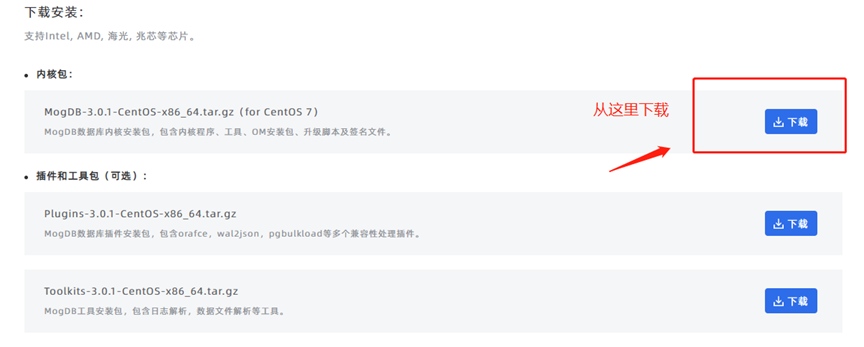
說明:從圖中可以看到,mogdb 3.0.1版本只支持centos 7的版本
centos 6.x的版本是不支持的(mogdb 2.0.3版本也支持centos7的版本)
注意:如果你的實(shí)驗(yàn)環(huán)境或生產(chǎn)環(huán)境是centos6.x、centos 8.x 和redhat 6.x redhat 8.x的版本,要重新安裝操作系統(tǒng)。
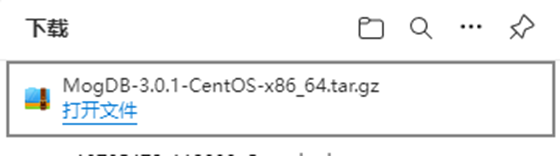
下載完成,如下
三、配置安裝環(huán)境
| 實(shí)驗(yàn)環(huán)境 | ip地址 | mogdb版本 | 安裝方式 |
|---|---|---|---|
| centos 7.9 | 10.201.0.221 | 3.0.1 | 單機(jī) |
3.1、先創(chuàng)建目錄
mkdir -p /opt/mogdb/software
通過xftp開始上傳安裝包

3.2、創(chuàng)建組和用戶
創(chuàng)建組
groupadd dbgrp -g 2000
創(chuàng)建用戶并指定用戶的組為dbgrp
useradd omm -g 2000 -u 2000
給用戶omm設(shè)置密碼
passwd omm
qwe123
qwe123
設(shè)置密碼也可以使用如下方式
echo "qwe123" | passwd --stdin omm
3.3、創(chuàng)建安裝目錄并修改目錄權(quán)限
mkdir -p /opt/mogdb/data
chown -R omm:dbgrp /opt/mogdb
3.4、開始解壓二進(jìn)制安裝包
修改安裝包的用戶和組,方便后面進(jìn)行解壓
chown omm:dbgrp MogDB-3.0.1-CentOS-x86_64.tar.gz

使用用戶omm進(jìn)行解壓,解壓到當(dāng)前目錄中
su - omm
cd /opt/mogdb/software
tar -xvf MogDB-3.0.1-CentOS-x86_64.tar.gz
我們發(fā)現(xiàn)解壓出來的還是壓縮包
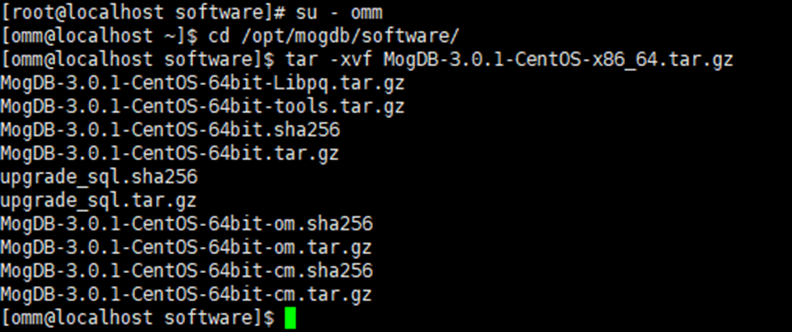
這些壓縮包還需要進(jìn)一步解壓到本地
下面是二種批量解壓的方法
for tar in *.tar.gz; do tar xvf $tar; done
或
ls *.tar.gz|xargs -n1 tar xzvf
解壓完成后,最終的目錄內(nèi)容是這樣的

3.5、使用yum方式安裝依賴包
yum install -y libaio-devel
3.6、設(shè)置環(huán)境變量
vi /home/omm/.bashrc
#家目錄
export GAUSSHOME=/opt/mogdb/software
export PATH=$GAUSSHOME/bin:$PAT
export LD_LIBRARY_PATH=$GAUSSHOME/lib:$LD_LIBRARY_PATH
使變量生效
source /home/omm/.bashrc
報(bào)錯(cuò)一
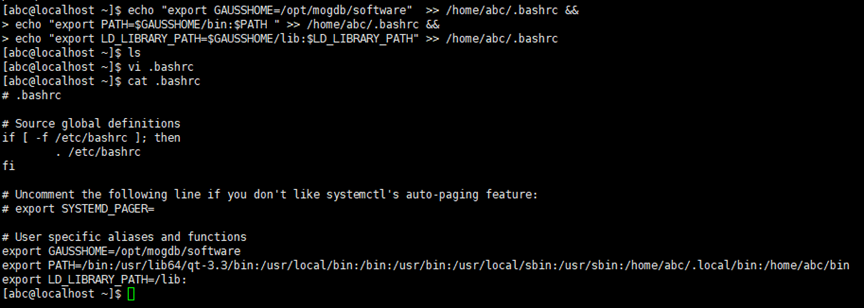
注意:下面是官方提供的添加環(huán)境變量的方法,但是這種添加環(huán)境變量是有問題的
echo “export GAUSSHOME=/opt/mogdb/software” >> /home/omm/.bashrc &&
echo "export PATH=PATH " >> /home/omm/.bashrc &&
echo “export LD_LIBRARY_PATH=LD_LIBRARY_PATH” >> /home/omm/.bashrc
我們發(fā)現(xiàn)里面的內(nèi)容不是我們要求的內(nèi)容。
而且在后面進(jìn)行初始化數(shù)據(jù)庫的過程種會(huì)報(bào)如下錯(cuò)誤
bin/gs_initdb: error while loading shared libraries: libssl.so.1.1: cannot open shared object file: No such file or directory

4、開始初始化數(shù)據(jù)庫
使用如下命令開始初始化數(shù)據(jù)庫
pwd
/opt/mogdb/software

bin/gs_initdb --pgdata=/opt/mogdb/data --nodename=primary --pwpasswd=qwe123 --encoding=UTF-8 --locale=en_US.UTF-8
開始執(zhí)行
[omm@localhost software]$ bin/gs_initdb --pgdata=/opt/mogdb/data --nodename=primary --pwpasswd=qwe123 --encoding=UTF-8 --locale=en_US.UTF-8
The files belonging to this database system will be owned by user "omm".
This user must also own the server process.

The database cluster will be initialized with locale "en_US.UTF-8".
The default text search configuration will be set to "english".

fixing permissions on existing directory /opt/mogdb/data ... ok
creating subdirectories ... ok
selecting default max_connections ... 100
selecting default shared_buffers ... 32MB
creating configuration files ... ok
Begin init undo subsystem meta.
[INIT UNDO] Init undo subsystem meta successfully.
creating template1 database in /opt/mogdb/data/base/1 ... The core dump path from /proc/sys/kernel/core_pattern is an invalid directory:|/usr/libexec/
2022-08-29 02:52:11.237 [unknown] [unknown] localhost 140043335244032 0[0:0#0]  [BACKEND] WARNING:  macAddr is 10350/3565745836, sysidentifier is 678352008/4138495285, randomNum is 2177199413
ok
initializing pg_authid ... The core dump path from /proc/sys/kernel/core_pattern is an invalid directory:|/usr/libexec/
ok
passwd must contain at least eight characters \\這里報(bào)錯(cuò)
gs_initdb: removing contents of data directory "/opt/mogdb/data"
未安裝成功
報(bào)錯(cuò)二
由于密碼的問題報(bào)錯(cuò)
設(shè)置的密碼為:pwpasswd=qwe123
passwd must contain at least eight characters
設(shè)置的密碼為:pwpasswd=qwer1234
Password must contain at least three kinds of characters.
以上都是不符合密碼要求,無法安裝成功的
修改好密碼后,繼續(xù)安裝
omm@master software]$ bin/gs_initdb --pgdata=/opt/mogdb/data --nodename=primary --pwpasswd=qwer@1234 --encoding=UTF-8 --locale=en_US.UTF-8
The files belonging to this database system will be owned by user "omm".
This user must also own the server process.

The database cluster will be initialized with locale "en_US.UTF-8".
The default text search configuration will be set to "english".

fixing permissions on existing directory /opt/mogdb/data ... ok
creating subdirectories ... ok
selecting default max_connections ... 100
selecting default shared_buffers ... 32MB
creating configuration files ... ok
Begin init undo subsystem meta.
[INIT UNDO] Init undo subsystem meta successfully.
creating template1 database in /opt/mogdb/data/base/1 ... The core dump path from /proc/sys/kernel/core_pattern is an invalid directory:|/usr/libexec/
2022-08-29 03:25:47.655 [unknown] [unknown] localhost 140218595481856 0[0:0#0]  [BACKEND] WARNING:  macAddr is 10350/3565745836, sysidentifier is 678352008/4138468234, randomNum is 1256063882
ok
initializing pg_authid ... The core dump path from /proc/sys/kernel/core_pattern is an invalid directory:|/usr/libexec/
ok
setting password ... The core dump path from /proc/sys/kernel/core_pattern is an invalid directory:|/usr/libexec/
ok
initializing dependencies ... The core dump path from /proc/sys/kernel/core_pattern is an invalid directory:|/usr/libexec/
ok
loading PL/pgSQL server-side language ... The core dump path from /proc/sys/kernel/core_pattern is an invalid directory:|/usr/libexec/
ok
creating system views ... The core dump path from /proc/sys/kernel/core_pattern is an invalid directory:|/usr/libexec/
ok
creating performance views ... The core dump path from /proc/sys/kernel/core_pattern is an invalid directory:|/usr/libexec/
ok
loading system objects' descriptions ... The core dump path from /proc/sys/kernel/core_pattern is an invalid directory:|/usr/libexec/
ok
creating collations ... The core dump path from /proc/sys/kernel/core_pattern is an invalid directory:|/usr/libexec/
ok
creating conversions ... The core dump path from /proc/sys/kernel/core_pattern is an invalid directory:|/usr/libexec/
ok
creating dictionaries ... The core dump path from /proc/sys/kernel/core_pattern is an invalid directory:|/usr/libexec/
ok
setting privileges on built-in objects ... The core dump path from /proc/sys/kernel/core_pattern is an invalid directory:|/usr/libexec/
ok
initialize global configure for bucketmap length ... The core dump path from /proc/sys/kernel/core_pattern is an invalid directory:|/usr/libexec/
ok
creating information schema ... The core dump path from /proc/sys/kernel/core_pattern is an invalid directory:|/usr/libexec/
The core dump path from /proc/sys/kernel/core_pattern is an invalid directory:|/usr/libexec/
ok
loading foreign-data wrapper for distfs access ... The core dump path from /proc/sys/kernel/core_pattern is an invalid directory:|/usr/libexec/
ok
loading foreign-data wrapper for hdfs access ... The core dump path from /proc/sys/kernel/core_pattern is an invalid directory:|/usr/libexec/
ok
loading foreign-data wrapper for log access ... The core dump path from /proc/sys/kernel/core_pattern is an invalid directory:|/usr/libexec/
ok
loading hstore extension ... The core dump path from /proc/sys/kernel/core_pattern is an invalid directory:|/usr/libexec/
ok
loading foreign-data wrapper for MOT access ... The core dump path from /proc/sys/kernel/core_pattern is an invalid directory:|/usr/libexec/
ok
loading security plugin ... The core dump path from /proc/sys/kernel/core_pattern is an invalid directory:|/usr/libexec/
ok
update system tables ... The core dump path from /proc/sys/kernel/core_pattern is an invalid directory:|/usr/libexec/
ok
creating snapshots catalog ... The core dump path from /proc/sys/kernel/core_pattern is an invalid directory:|/usr/libexec/
The core dump path from /proc/sys/kernel/core_pattern is an invalid directory:|/usr/libexec/
The core dump path from /proc/sys/kernel/core_pattern is an invalid directory:|/usr/libexec/
The core dump path from /proc/sys/kernel/core_pattern is an invalid directory:|/usr/libexec/
The core dump path from /proc/sys/kernel/core_pattern is an invalid directory:|/usr/libexec/
The core dump path from /proc/sys/kernel/core_pattern is an invalid directory:|/usr/libexec/
ok
vacuuming database template1 ... The core dump path from /proc/sys/kernel/core_pattern is an invalid directory:|/usr/libexec/
ok
copying template1 to template0 ... The core dump path from /proc/sys/kernel/core_pattern is an invalid directory:|/usr/libexec/
ok
copying template1 to postgres ... The core dump path from /proc/sys/kernel/core_pattern is an invalid directory:|/usr/libexec/
ok
freezing database template0 ... ok
freezing database template1 ... ok
freezing database postgres ... ok

WARNING: enabling "trust" authentication for local connections
You can change this by editing pg_hba.conf or using the option -A, or
--auth-local and --auth-host, the next time you run gs_initdb.

Success. You can now start the database server of single node using:

    bin/mogdb -D /opt/mogdb/data --single_node
or
    bin/gs_ctl start -D /opt/mogdb/data -Z single_node -l logfile
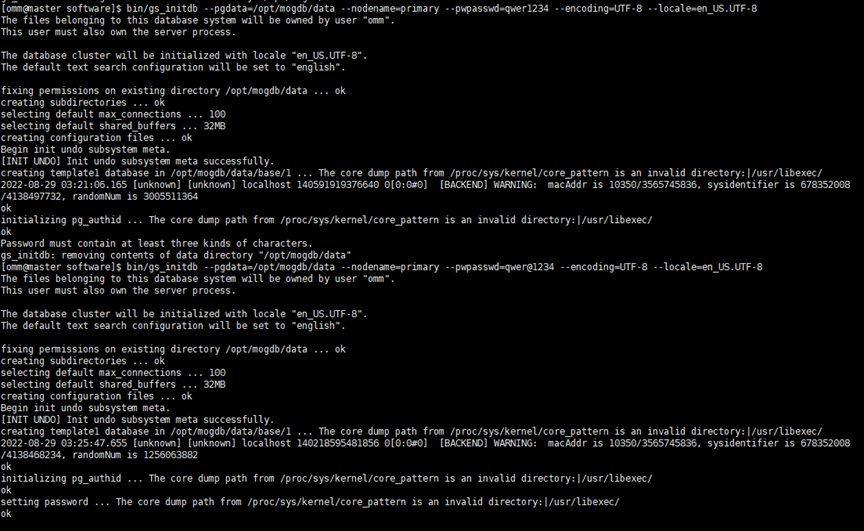
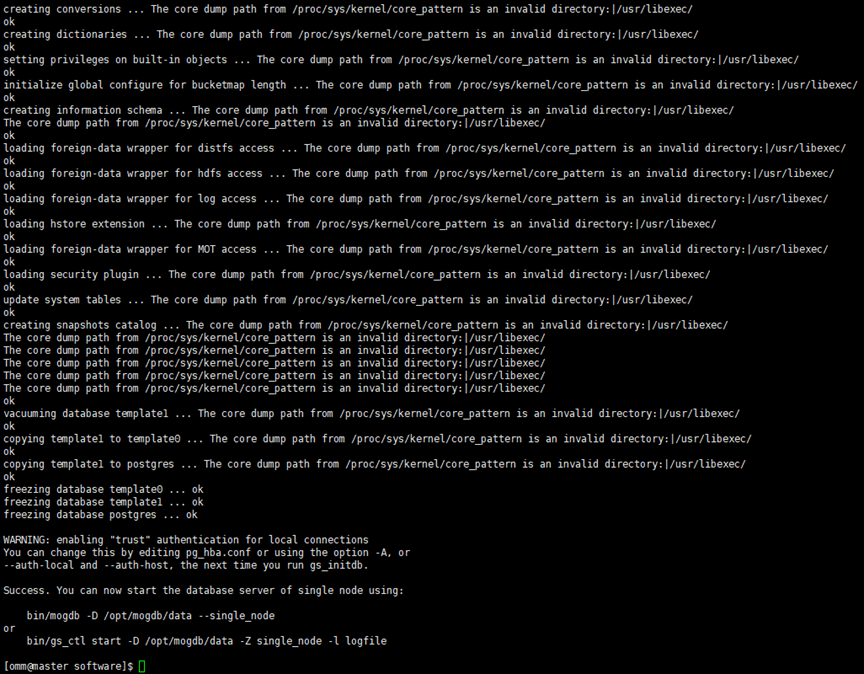
至此、安裝成功
5、修改mogdb的配置文件,添加如下參數(shù)
vi /opt/mogdb/data/postgresql.conf
#端口使用26000
port=26000
#監(jiān)聽地址:不限制IP
listen_addresses = '0.0.0.0'
password_encryption_type = 0
log_directory = 'pg_log'
remote_read_mode=non_authentication
vi /opt/mogdb/data/pg_hba.conf
echo "host all all 0.0.0.0/0 md5
或者使用如下方式添加
echo "port=26000" >> /opt/mogdb/data/postgresql.conf
echo "listen_addresses = '0.0.0.0'" >> /opt/mogdb/data/postgresql.conf
echo "password_encryption_type = 0" >> /opt/mogdb/data/postgresql.conf
echo "log_directory = 'pg_log'" >> /opt/mogdb/data/postgresql.conf
echo "remote_read_mode=non_authentication" >> /opt/mogdb/data/postgresql.conf
echo "host all all 0.0.0.0/0 md5" >> /opt/mogdb/data/pg_hba.conf
6、開始啟動(dòng)數(shù)據(jù)庫
gs_ctl start -D /opt/mogdb/data
[omm@master software]$ gs_ctl start -D /opt/mogdb/data
[2022-08-29 03:30:53.313][58788][][gs_ctl]: gs_ctl started,datadir is /opt/mogdb/data
[2022-08-29 03:30:53.467][58788][][gs_ctl]: waiting for server to start...
.0 LOG:  [Alarm Module]can not read GAUSS_WARNING_TYPE env.

0 LOG:  [Alarm Module]Host Name: master

0 LOG:  [Alarm Module]Host IP: 10.201.0.221

0 LOG:  [Alarm Module]Get ENV GS_CLUSTER_NAME failed!

0 WARNING:  failed to open feature control file, please check whether it exists: FileName=gaussdb.version, Errno=2, Errmessage=No such file or directory.
0 WARNING:  failed to parse feature control file: gaussdb.version.
0 WARNING:  Failed to load the product control file, so gaussdb cannot distinguish product version.
The core dump path from /proc/sys/kernel/core_pattern is an invalid directory:|/usr/libexec/
2022-08-29 03:30:53.870 [unknown] [unknown] localhost 139670608431360 0[0:0#0]  0 [BACKEND] LOG:  when starting as multi_standby mode, we couldn't support data replicaton.
gaussdb.state does not exist, and skipt setting since it is optional.2022-08-29 03:30:53.962 [unknown] [unknown] localhost 139670608431360 0[0:0#0]  0 [BACKEND] LOG:  [Alarm Module]can not read GAUSS_WARNING_TYPE env.

2022-08-29 03:30:53.962 [unknown] [unknown] localhost 139670608431360 0[0:0#0]  0 [BACKEND] LOG:  [Alarm Module]Host Name: master

2022-08-29 03:30:53.962 [unknown] [unknown] localhost 139670608431360 0[0:0#0]  0 [BACKEND] LOG:  [Alarm Module]Host IP: 10.201.0.221

2022-08-29 03:30:53.962 [unknown] [unknown] localhost 139670608431360 0[0:0#0]  0 [BACKEND] LOG:  [Alarm Module]Get ENV GS_CLUSTER_NAME failed!

2022-08-29 03:30:54.307 [unknown] [unknown] localhost 139670608431360 0[0:0#0]  0 [BACKEND] LOG:  loaded library "security_plugin"
2022-08-29 03:30:54.311 [unknown] [unknown] localhost 139670608431360 0[0:0#0]  0 [BACKEND] WARNING:  could not create any HA TCP/IP sockets
2022-08-29 03:30:54.311 [unknown] [unknown] localhost 139670608431360 0[0:0#0]  0 [BACKEND] WARNING:  could not create any HA TCP/IP sockets
2022-08-29 03:30:54.476 [unknown] [unknown] localhost 139670608431360 0[0:0#0]  0 [BACKEND] WARNING:  No explicit IP is configured for listen_addresses GUC.
2022-08-29 03:30:54.477 [unknown] [unknown] localhost 139670608431360 0[0:0#0]  0 [BACKEND] LOG:  InitNuma numaNodeNum: 1 numa_distribute_mode: none inheritThreadPool: 0.
2022-08-29 03:30:54.478 [unknown] [unknown] localhost 139670608431360 0[0:0#0]  0 [BACKEND] LOG:  reserved memory for backend threads is: 220 MB
2022-08-29 03:30:54.478 [unknown] [unknown] localhost 139670608431360 0[0:0#0]  0 [BACKEND] LOG:  reserved memory for WAL buffers is: 128 MB
2022-08-29 03:30:54.478 [unknown] [unknown] localhost 139670608431360 0[0:0#0]  0 [BACKEND] LOG:  Set max backend reserve memory is: 348 MB, max dynamic memory is: 11064 MB
2022-08-29 03:30:54.478 [unknown] [unknown] localhost 139670608431360 0[0:0#0]  0 [BACKEND] LOG:  shared memory 363 Mbytes, memory context 11412 Mbytes, max process memory 12288 Mbytes
2022-08-29 03:30:54.554 [unknown] [unknown] localhost 139670608431360 0[0:0#0]  0 [CACHE] LOG:  set data cache  size(402653184)
2022-08-29 03:30:54.576 [unknown] [unknown] localhost 139670608431360 0[0:0#0]  0 [CACHE] LOG:  set metadata cache  size(134217728)
2022-08-29 03:30:54.661 [unknown] [unknown] localhost 139670608431360 0[0:0#0]  0 [SEGMENT_PAGE] LOG:  Segment-page constants: DF_MAP_SIZE: 8156, DF_MAP_BIT_CNT: 65248, DF_MAP_GROUP_EXTENTS: 4175872, IPBLOCK_SIZE: 8168, EXTENTS_PER_IPBLOCK: 1021, IPBLOCK_GROUP_SIZE: 4090, BMT_HEADER_LEVEL0_TOTAL_PAGES: 8323072, BktMapEntryNumberPerBlock: 2038, BktMapBlockNumber: 25, BktBitMaxMapCnt: 512
2022-08-29 03:30:54.714 [unknown] [unknown] localhost 139670608431360 0[0:0#0]  0 [BACKEND] LOG:  mogdb: fsync file "/opt/mogdb/data/gaussdb.state.temp" success
2022-08-29 03:30:54.714 [unknown] [unknown] localhost 139670608431360 0[0:0#0]  0 [BACKEND] LOG:  create gaussdb state file success: db state(STARTING_STATE), server mode(Normal), connection index(1)
2022-08-29 03:30:54.738 [unknown] [unknown] localhost 139670608431360 0[0:0#0]  0 [BACKEND] LOG:  max_safe_fds = 976, usable_fds = 1000, already_open = 14
The core dump path from /proc/sys/kernel/core_pattern is an invalid directory:|/usr/libexec/
2022-08-29 03:30:54.742 [unknown] [unknown] localhost 139670608431360 0[0:0#0]  0 [BACKEND] LOG:  user configure file is not found, it will be created.
2022-08-29 03:30:54.754 [unknown] [unknown] localhost 139670608431360 0[0:0#0]  0 [BACKEND] LOG:  the configure file /opt/mogdb/software/etc/gscgroup_omm.cfg doesn't exist or the size of configure file has changed. Please create it by root user!
2022-08-29 03:30:54.754 [unknown] [unknown] localhost 139670608431360 0[0:0#0]  0 [BACKEND] LOG:  Failed to parse cgroup config file.
2022-08-29 03:30:54.777 [unknown] [unknown] localhost 139670608431360 0[0:0#0]  0 [EXECUTOR] WARNING:  Failed to obtain environment value $GAUSSLOG!
2022-08-29 03:30:54.777 [unknown] [unknown] localhost 139670608431360 0[0:0#0]  0 [EXECUTOR] DETAIL:  N/A
2022-08-29 03:30:54.777 [unknown] [unknown] localhost 139670608431360 0[0:0#0]  0 [EXECUTOR] CAUSE:  Incorrect environment value.
2022-08-29 03:30:54.777 [unknown] [unknown] localhost 139670608431360 0[0:0#0]  0 [EXECUTOR] ACTION:  Please refer to backend log for more details.
2022-08-29 03:30:54.778 [unknown] [unknown] localhost 139670608431360 0[0:0#0]  0 [EXECUTOR] WARNING:  Failed to obtain environment value $GAUSSLOG!
2022-08-29 03:30:54.778 [unknown] [unknown] localhost 139670608431360 0[0:0#0]  0 [EXECUTOR] DETAIL:  N/A
2022-08-29 03:30:54.778 [unknown] [unknown] localhost 139670608431360 0[0:0#0]  0 [EXECUTOR] CAUSE:  Incorrect environment value.
2022-08-29 03:30:54.778 [unknown] [unknown] localhost 139670608431360 0[0:0#0]  0 [EXECUTOR] ACTION:  Please refer to backend log for more details.
.
[2022-08-29 03:30:55.801][58788][][gs_ctl]:  done
[2022-08-29 03:30:55.802][58788][][gs_ctl]: server started (/opt/mogdb/data)
[omm@master software]$
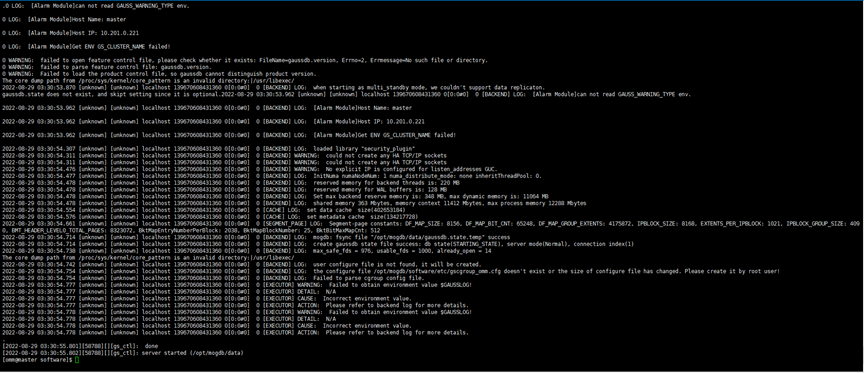
啟動(dòng)成功
7、開始登錄數(shù)據(jù)庫
直接執(zhí)行g(shù)sql,發(fā)現(xiàn)如下錯(cuò)誤
[omm@master bin]$ gsql
gsql: FATAL:  database "omm" does not exist
使用postgres庫登錄
[omm@master bin]$ gsql -d postgres
gsql ((MogDB 3.0.1 build 1a363ea9) compiled at 2022-08-05 17:31:04 commit 0 last mr  )
Non-SSL connection (SSL connection is recommended when requiring high-security)
Type "help" for help.
MogDB=#
登錄成功。
8、錯(cuò)誤總結(jié)
- 錯(cuò)誤一、環(huán)境變量未配置好
error while loading shared libraries: libssl.so.1.1: cannot open shared object file: No such file or directory
報(bào)錯(cuò)一
注意:下面是官方提供的添加環(huán)境變量的方法,但是這種添加環(huán)境變量是有問題的
echo “export GAUSSHOME=/opt/mogdb/software” >> /home/omm/.bashrc &&
echo "export PATH=PATH " >> /home/omm/.bashrc &&
echo “export LD_LIBRARY_PATH=LD_LIBRARY_PATH” >> /home/omm/.bashrc
我們發(fā)現(xiàn)里面的內(nèi)容不是我們要求的內(nèi)容。
而且在后面進(jìn)行初始化數(shù)據(jù)庫的過程種會(huì)報(bào)如下錯(cuò)誤
bin/gs_initdb: error while loading shared libraries: libssl.so.1.1: cannot open shared object file: No such file or directory
- 錯(cuò)誤二、密碼不符合要求
passwd must contain at least eight characters
Password must contain at least three kinds of characters.
報(bào)錯(cuò)二
由于密碼的問題報(bào)錯(cuò)
設(shè)置的密碼為:pwpasswd=qwe123
passwd must contain at least eight characters
設(shè)置的密碼為:pwpasswd=qwer1234
Password must contain at least three kinds of characters.
以上都是不符合密碼要求,無法安裝成功的
- 錯(cuò)誤三、登錄時(shí)未指定庫
[omm@master bin]$ gsql
gsql: FATAL: database “omm” does not exist
使用postgres庫登錄
[omm@master bin]$ gsql -d postgres
