



一、基礎環境
操作系統:Red Hat Enterprise Linux Server release 7.6 (Maipo)
數據庫:Oracle 12.1.0.2 RAC
二、問題描述
2022年11月18日一套業務系統主機因硬件故障發生重啟,主機重啟后數據庫節點1無法正常啟動,節點2可以正常對外提供服務。節點1css進程無法啟動到real time,關閉安全加固相關的titanagent 服務后,重啟操作系統,可以正常啟動集群和數據庫。
三、分析過程
1、檢查主機重啟后集群狀態
--------------------------------------------------------------------------------
NAME           TARGET  STATE        SERVER                   STATE_DETAILS
--------------------------------------------------------------------------------
Cluster Resources
--------------------------------------------------------------------------------
ora.asm
      1        ONLINE  OFFLINE
ora.cluster_interconnect.haip
      1        ONLINE  OFFLINE
ora.crf
      1        ONLINE  ONLINE       nadb01
ora.crsd
      1        ONLINE  OFFLINE
ora.cssd
      1        ONLINE  OFFLINE                               STARTING
ora.cssdmonitor
      1        ONLINE  ONLINE       nadb01
ora.ctssd
      1        ONLINE  OFFLINE
ora.diskmon
      1        OFFLINE OFFLINE
ora.evmd
      1        ONLINE  OFFLINE
ora.gipcd
      1        ONLINE  ONLINE       nadb01
ora.gpnpd
      1        ONLINE  ONLINE       nadb01
ora.mdnsd
      1        ONLINE  ONLINE       nadb01
cssd進程啟動異常。
2、檢查數據庫集群日志
[gpnpd(231513)]CRS-2328:GPNPD started on node zadb03.
2022-11-18 10:56:09.210:
[cssd(231620)]CRS-1713:CSSD daemon is started in clustered mode
2022-11-18 10:56:09.219:
[cssd(231620)]CRS-1656:The CSS daemon is terminating due to a fatal error; Details at (:CSSSC00011:) in /u01/app/11.2.0.4/grid/log/newdb01/cssd/ocssd.log
2022-11-18 10:56:11.034:
[ohasd(229354)]CRS-2767:Resource state recovery not attempted for 'ora.diskmon' as its target state is OFFLINE
從日志看]CRS-1656:The CSS daemon is terminating due to a fatal error; Details at (:CSSSC00011:) in /u01/app/12.1.0.2/grid/log/newdb01/cssd/ocssd.log
檢查 ocssd日志
2022-11-18 10:56:09.210: [    CSSD][3219912512]clssscmain: Starting CSS daemon, version 11.2.0.4.0, in (clustered) mode with uniqueness value 1668740169
2022-11-18 10:56:09.210: [    CSSD][3219912512]clssscmain: Environment is production
2022-11-18 10:56:09.210: [    CSSD][3219912512]clssscmain: Core file size limit extended
2022-11-18 10:56:09.212: [    CSSD][3219912512]clssscmain: GIPCHA down 0
2022-11-18 10:56:09.213: [    CSSD][3219912512]clssscGetParameterOLR: OLR fetch for parameter logsize (8) failed with rc 21
2022-11-18 10:56:09.213: [    CSSD][3219912512]clssscExtendLimits: The current soft limit for file descriptors is 65536, hard limit is 65536
2022-11-18 10:56:09.213: [    CSSD][3219912512]clssscExtendLimits: The current soft limit for locked memory is 4294967295, hard limit is 4294967295
2022-11-18 10:56:09.213: [    CSSD][3219912512]clssscGetParameterOLR: OLR fetch for parameter priority (15) failed with rc 21
2022-11-18 10:56:09.213: [    CSSD][3219912512]clssscSetPrivEnv: Setting priority to 4
2022-11-18 10:56:09.219: [    CSSD][3219912512]clssscSetPrivEnv: unable to set priority to 4
2022-11-18 10:56:09.219: [    CSSD][3219912512]SLOS: cat=-2, opn=scls_set_priority_realtime, dep=1, loc=setsched
unable to escalate to real time
從ocss日志中可以看到ocssd進程啟動時無法得到較高的優先級,無法啟動到real time。
Linux: GI OCSSD Fails to Start After cgroups Setting Change (Doc ID 1577784.1) 描述與此現象高度相似
Deployed Puppet which created a new cgroup-configuration by default.

ls /cgroups/cpu.rt_*
/cgroups/cpu.rt_period_us /cgroups/cpu.rt_runtime_us

cat /cgroups/cpu.rt_*
1000000
950000

cat /cgroups/sysdefault/cpu.rt_*
1000000
0                      ====>> 0


SOLUTION
Option 1: Restore the default value and reboot the node:

cat /etc/cgconfig.conf
mount {
memory = /cgroups;
cpu = /cgroups;
}

group lu-adm {
cpu {
cpu.shares = 50;
}
memory {
memory.memsw.limit_in_bytes = 500m;
memory.limit_in_bytes = 200m;
}
}

group sysdefault {
cpu {
cpu.shares = 1024;
cpu.rt_period_us = 1000000;
cpu.rt_runtime_us = 950000; ====>> changed from 0 back to default
}
}

Workaround is to clear cgroup setting through 'cgclear' after consulting sysadmin.

cgroup-configuration file changed in RHEL 6 and later versions

  RHEL 6 cd /sys/fs/cgroup/cpuacct/user.slice
         cat cpu.rt_period_us

  RHEL 7 path i.e File location : ls /sys/fs/cgroup/cpu/cpu.rt_*
The file is not availble in all OS -- check with the OS Vendor for details.
3、檢查操作系統相關配置和服務
[root@ ~]# cat /etc/cgconfig.conf
cat: /etc/cgconfig.conf: No such file or directory
沒有cgconfig.conf 文件
[root@ ~]# ls /sys/fs/cgroup/cpu/cpu.rt_*
/sys/fs/cgroup/cpu/cpu.rt_period_us /sys/fs/cgroup/cpu/cpu.rt_runtime_us
[root@ ~]#
[root@ ~]# cat /sys/fs/cgroup/cpu/cpu.rt_period_us
1000000
[root@ ~]# cat /sys/fs/cgroup/cpu/cpu.rt_runtime_us
950000
[root@~]#
cpu.rt_period_us和cpu.rt_runtime_us設置的就是推薦值950000
該文檔《Linux: GI OCSSD Fails to Start After cgroups Setting Change (Doc ID 1577784.1)》的解決方案不適用。
4、reahat官方關于CPU的相關設置說明
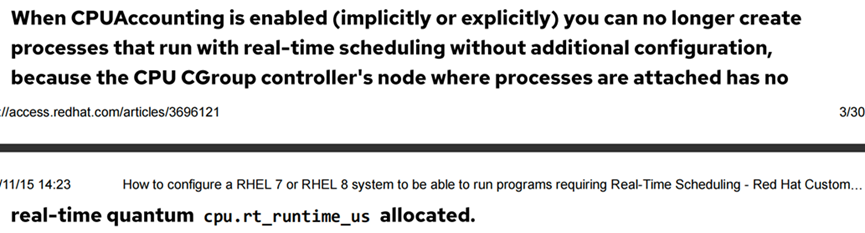
How to configure a RHEL 7 or RHEL 8 system to be able to run programs requiring Real-Time Scheduling
當CPUAccounting參數enabled時,將不能創建real-time進程。排查system.conf配置文件發現并沒有開啟CPUAccounting參數
5、檢查操作系統CPU Accounting、CPUQuots等
[root@ ~]# grep DefaultCPUAccounting /etc/systemd/system.conf
#DefaultCPUAccounting=no
但是在titanagent.service服務文件中發現配置了CPUQuota=50%
[root@~]# cat /usr/lib/systemd/system/titanagent.service
[Unit]
Description=titanagent
After=network.target
[Service]
User=root
CPUQuota=50%
Type=forking
PIDFile=/var/run/titanagent.pid
ExecStartPre=/bin/bash -c “/titan/agent/titanagent -s”
ExecStart=/bin/bash -c “/titan/agent/titanagent -d -b /etc/titanagent”
ExecStop=/bin/bash -c “/titan/agent/titanagent -s”
ExecReload=/bin/bash -c “/titan/agent/titanagent -d -b /etc/titanagent”
PrivateTmp=no
Restart=always
RestartSec=60s
TimeoutSec=20s
TimeoutStopSec=30s
[Install]
WantedBy=multi-user.target
CPUQuota參數會隱性開啟CPUAccounting

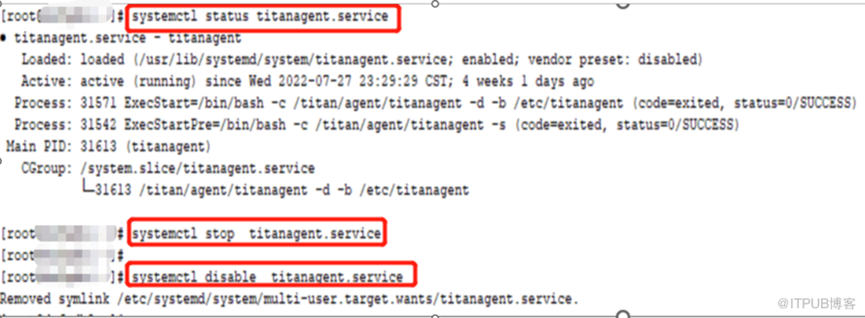
6、禁用titanagent.service后,重啟主機集群啟動正常
-the end-
