



Gradual Database Password Rollover for Applications特性是Oracle 21c引入的功能,主要是為了防止密碼修改導致應用連接失敗和密碼延時驗證等特性對數據庫的性能產生影響和造成不必要的生產故障,所以允許密碼修改有個“過渡期”,密碼修改可以逐步進行,修改數據庫用戶密碼,同時在“一定時期”內原來的密碼仍然可以使用。在此期間,應用程序可以使用舊密碼或新密碼成功連接數據庫。
該功能不建議對sys等特權用戶使用,建議生產中業務用戶可以使用該功能。
19c中19.12開始支持這個功能,數據庫中COMPATIBLE參數是19(或者更大值)。用戶密碼password version 11g以上支持該功能。
一、在多租戶環境中創建具有新特性profile
Gradual Database Password Rollover for Applications特性需要在profile中使PASSWORD_ROLLOVER_TIME 。
Password Rollover Time Limits
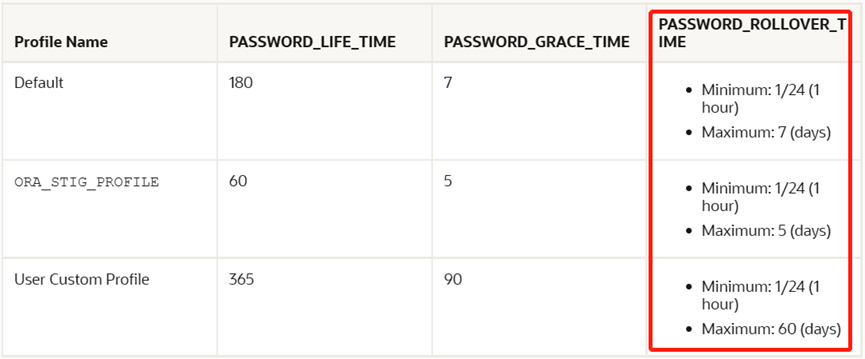
PASSWORD_ROLLOVER_TIME 最小值1小時(1/24),最大值是60days。
1、CDB中創建公共profile
[oracle@19cdb01 ~]$ sqlplus / as sysdba
SQL*Plus: Release 19.0.0.0.0 - Production on Wed Dec 21 13:49:07 2022
Version 19.17.0.0.0
Copyright (c) 1982, 2022, Oracle.  All rights reserved.
Connected to:
Oracle Database 19c Enterprise Edition Release 19.0.0.0.0 - Production
Version 19.17.0.0.0
SQL> CREATE PROFILE cdb_profile_userpw LIMIT PASSWORD_ROLLOVER_TIME 1/24;
CREATE PROFILE cdb_profile_userpw LIMIT PASSWORD_ROLLOVER_TIME 1/24
               *
ERROR at line 1:
ORA-65140: invalid common profile name
在cdb中創建公共profile需要使用c##前綴
SQL> CREATE PROFILE c##cdb_profile_userpw LIMIT PASSWORD_ROLLOVER_TIME 1/24;
Profile created.
SQL>
驗證cdb中創建的profile
col PROFILE FOR a15
col limit FOR a25
  SELECT *
        FROM dba_profiles
        WHERE PROFILE='C##CDB_PROFILE_USERPW'
        AND resource_name='PASSWORD_ROLLOVER_TIME';
PROFILE                   RESOURCE_NAME                    RESOURCE LIMIT                COM INH IMP
------------------------- -------------------------------- -------- -------------------- --- --- ---
C##CDB_PROFILE_USERPW     PASSWORD_ROLLOVER_TIME           PASSWORD 3600                 YES NO  NO
SQL>
2、在pdb中創建本地profile
將容器切換到pdb中
SQL> alter session set container=hrpdb;
Session altered.
SQL> show pdbs
    CON_ID CON_NAME                       OPEN MODE  RESTRICTED
---------- ------------------------------ ---------- ----------
         3 HRPDB                          READ WRITE NO
SQL>
SQL> CREATE PROFILE pdb_profile_userpw LIMIT PASSWORD_ROLLOVER_TIME 1/24;
Profile created.
SQL>
驗證profile
SQL> SELECT *
        FROM dba_profiles
        WHERE PROFILE='PDB_PROFILE_USERPW'
        AND resource_name='PASSWORD_ROLLOVER_TIME';  2    3    4
PROFILE                   RESOURCE_NAME                    RESOURCE LIMIT                COM INH IMP
------------------------- -------------------------------- -------- -----------
PDB_PROFILE_USERPW        PASSWORD_ROLLOVER_TIME           PASSWORD 3600                 NO  NO  NO
SQL>
二、在多租戶環境中創建用戶
1、創建公共用戶并授權
SQL> create user c##xfadmin identified by Oracle_123 profile c##cdb_profile_userpw container=all;
User created.
SQL>
SQL> grant connect,resource to  c##xfadmin container=all;
Grant succeeded.
SQL>
連接到cdb容器
[oracle@19cdb01 ~]$ sqlplus c##xfadmin/Oracle_123@19cdb01:1525/cdb19c
SQL*Plus: Release 19.0.0.0.0 - Production on  Wed Dec 21 14:04:36 2022
Version 19.17.0.0.0
Copyright (c) 1982, 2022, Oracle.  All rights reserved.
Last Successful login time:   Wed Dec 21 2022 14:03:54 +08:00
Connected to:
Oracle Database 19c Enterprise Edition Release 19.0.0.0.0 - Production
Version 19.17.0.0.0
SQL> show user
USER is "C##XFADMIN"
SQL> show con_name
CON_NAME
------------------------------
CDB$ROOT
SQL>
連接pdb容器
[oracle@19cdb01 ~]$ sqlplus c##xfadmin/Oracle_123@19cdb01:1525/hrpdb
SQL*Plus: Release 19.0.0.0.0 - Production on  Wed Dec 21 14:03:54 2022
Version 19.17.0.0.0
Copyright (c) 1982, 2022, Oracle.  All rights reserved.
Last Successful login time: Wed Dec 21  2022 14:03:22 +08:00
Connected to:
Oracle Database 19c Enterprise Edition Release 19.0.0.0.0 - Production
Version 19.17.0.0.0
SQL> show user
USER is "C##XFADMIN"
SQL> show con_name
CON_NAME
------------------------------
HRPDB
SQL>
2、創建本地用戶并授權
SQL> create user hfxf identified by Hfxf_123 profile pdb_profile_userpw;
User created.
SQL> grant connect,resource to hfxf;
Grant succeeded.
SQL>
[oracle@19cdb01 ~]$ sqlplus hfxf/Hfxf_123@19cdb01:1525/hrpdb
SQL*Plus: Release 19.0.0.0.0 - Production on  Wed Dec 21 14:09:34 2022
Version 19.17.0.0.0
Copyright (c) 1982, 2022, Oracle.  All rights reserved.
Last Successful login time: Wed Dec 21 2022 14:09:25 +08:00
Connected to:
Oracle Database 19c Enterprise Edition Release 19.0.0.0.0 - Production
Version 19.17.0.0.0
SQL> show con_name
CON_NAME
------------------------------
HRPDB
SQL> show user
USER is "HFXF"
SQL>
三、在多租戶環境中修改用戶密碼
1、修改公共用戶密碼
SQL> alter user  c##xfadmin identified by Oracle_456 container=all;
User altered.
SQL>
2、修改本地用戶密碼
SQL> alter user hfxf identified by Hfxf_456;
User altered.
四、使用新舊密碼驗證登錄
1、驗證公共用戶登錄
[oracle@19cdb01 ~]$ sqlplus c##xfadmin/Oracle_123@19cdb01:1525/cdb19c
SQL*Plus: Release 19.0.0.0.0 - Production on   Wed Dec 21  14:11:31 2022
Version 19.17.0.0.0
Copyright (c) 1982, 2022, Oracle.  All rights reserved.
Last Successful login time: Wed Dec 21  2022 14:04:36 +08:00
Connected to:
Oracle Database 19c Enterprise Edition Release 19.0.0.0.0 - Production
Version 19.17.0.0.0
SQL> show user
USER is "C##XFADMIN"
SQL> show con_name
CON_NAME
------------------------------
CDB$ROOT
SQL> exit
Disconnected from Oracle Database 19c Enterprise Edition Release 19.0.0.0.0 - Production
Version 19.17.0.0.0
[oracle@19cdb01 ~]$ sqlplus c##xfadmin/Oracle_456@19cdb01:1525/cdb19c
SQL*Plus: Release 19.0.0.0.0 - Production on   Wed Dec 21  14:11:44 2022
Version 19.17.0.0.0
Copyright (c) 1982, 2022, Oracle.  All rights reserved.
Last Successful login time: Wed Dec 21  2022 14:11:31 +08:00
Connected to:
Oracle Database 19c Enterprise Edition Release 19.0.0.0.0 - Production
Version 19.17.0.0.0
SQL> show user
USER is "C##XFADMIN"
SQL> show con_name
CON_NAME
------------------------------
CDB$ROOT
SQL>
?
2、驗證本地用戶登錄
[oracle@19cdb01 ~]$ sqlplus hfxf/Hfxf_123@19cdb01:1525/hrpdb
SQL*Plus: Release 19.0.0.0.0 - Production on   Wed Dec 21  14:13:10 2022
Version 19.17.0.0.0
Copyright (c) 1982, 2022, Oracle.  All rights reserved.
Last Successful login time: Wed Dec 21  2022 14:09:35 +08:00
Connected to:
Oracle Database 19c Enterprise Edition Release 19.0.0.0.0 - Production
Version 19.17.0.0.0
SQL> show con_name
CON_NAME
------------------------------
HRPDB
SQL> show user
USER is "HFXF"
SQL> exit
Disconnected from Oracle Database 19c Enterprise Edition Release 19.0.0.0.0 - Production
Version 19.17.0.0.0
[oracle@19cdb01 ~]$ sqlplus hfxf/Hfxf_456@19cdb01:1525/hrpdb
SQL*Plus: Release 19.0.0.0.0 - Production on   Wed Dec 21  14:13:39 2022
Version 19.17.0.0.0
Copyright (c) 1982, 2022, Oracle.  All rights reserved.
Last Successful login time: Wed Dec 21  2022 14:13:10 +08:00
Connected to:
Oracle Database 19c Enterprise Edition Release 19.0.0.0.0 - Production
Version 19.17.0.0.0
SQL> show con_name
CON_NAME
------------------------------
HRPDB
SQL> show user
USER is "HFXF"
檢查公共用戶狀態
SQL> col username for a30
SQL> col ACCOUNT_STATUS for a25
SQL> col PROFILE for a30
SQL> col COMMON for a15
SQL> col con_id for 999
SQL>  select username,ACCOUNT_STATUS,PROFILE,COMMON,con_id from cdb_users
  2  where username='C##XFADMIN';
USERNAME                       ACCOUNT_STATUS            PROFILE                        COMMON          CON_ID
------------------------------ ------------------------- ------------------------------ --------------- ------
C##XFADMIN                     OPEN & IN ROLLOVER        C##CDB_PROFILE_USERPW          YES                  1
C##XFADMIN                     OPEN & IN ROLLOVER        C##CDB_PROFILE_USERPW          YES                  3
檢查本地用戶狀態
SQL> select username,ACCOUNT_STATUS,PROFILE,COMMON,con_id from cdb_users
    where username='HFXF';
USERNAME                       ACCOUNT_STATUS            PROFILE                        COMMON          CON_ID
------------------------------ ------------------------- ------------------------------ --------------- ------
HFXF                           OPEN & IN ROLLOVER        PDB_PROFILE_USERPW             NO                   3
SQL>
此刻,公共用戶和本地用戶的狀態均為OPEN & IN ROLLOVER。
五、關閉密碼翻轉的特性
SQL> alter session set container=hrpdb;
Session altered.
SQL> alter user hfxf expire password rollover period;
User altered.
SQL>
使用舊密碼登錄本地用戶
[oracle@19cdb01 ~]$ sqlplus hfxf/Hfxf_123@19cdb01:1525/hrpdb
SQL*Plus: Release 19.0.0.0.0 - Production on   Wed Dec 21  14:26:20 2022
Version 19.17.0.0.0
Copyright (c) 1982, 2022, Oracle.  All rights reserved.
ERROR:
ORA-01017: invalid username/password; logon denied
Enter user-name:
顯示密碼錯誤,使用舊密碼已經無法登錄hfxf用戶
[oracle@19cdb01 ~]$ sqlplus hfxf/Hfxf_456@19cdb01:1525/hrpdb
SQL*Plus: Release 19.0.0.0.0 - Production on   Wed Dec 21  14:27:03 2022
Version 19.17.0.0.0
Copyright (c) 1982, 2022, Oracle.  All rights reserved.
Last Successful login time:Wed Dec 21  2022 14:13:39 +08:00
Connected to:
Oracle Database 19c Enterprise Edition Release 19.0.0.0.0 - Production
Version 19.17.0.0.0
SQL> show con_name
CON_NAME
------------------------------
HRPDB
SQL> show user
USER is "HFXF"
SQL> exit
Disconnected from Oracle Database 19c Enterprise Edition Release 19.0.0.0.0 - Production
Version 19.17.0.0.0
修改cdb中profile的PASSWORD_ROLLOVER_TIME為0,即關閉該特性
SQL> alter profile c##cdb_profile_userpw LIMIT PASSWORD_ROLLOVER_TIME 0;
Profile altered.
[oracle@19cdb01 ~]$ sqlplus c##xfadmin/Oracle_123@19cdb01:1525/cdb19c
SQL*Plus: Release 19.0.0.0.0 - Production on   Wed Dec 21  14:30:51 2022
Version 19.17.0.0.0
Copyright (c) 1982, 2022, Oracle.  All rights reserved.
ERROR:
ORA-01017: invalid username/password; logon denied
Enter user-name:
ERROR:
ORA-12162: TNS:net service name is incorrectly specified
Enter user-name:
ERROR:
ORA-12162: TNS:net service name is incorrectly specified
SP2-0157: unable to CONNECT to ORACLE after 3 attempts, exiting SQL*Plus
[oracle@19cdb01 ~]$ sqlplus c##xfadmin/Oracle_123@19cdb01:1525/hrpdb
SQL*Plus: Release 19.0.0.0.0 - Production on   Wed Dec 21  14:31:15 2022
Version 19.17.0.0.0
Copyright (c) 1982, 2022, Oracle.  All rights reserved.
ERROR:
ORA-01017: invalid username/password; logon denied
Enter user-name:
ERROR:
ORA-12162: TNS:net service name is incorrectly specified
Enter user-name:
ERROR:
ORA-12162: TNS:net service name is incorrectly specified
SP2-0157: unable to CONNECT to ORACLE after 3 attempts, exiting SQL*Plus
[oracle@19cdb01 ~]$ sqlplus c##xfadmin/Oracle_456@19cdb01:1525/cdb19c
SQL*Plus: Release 19.0.0.0.0 - Production on   Wed Dec 21  14:31:31 2022
Version 19.17.0.0.0
Copyright (c) 1982, 2022, Oracle.  All rights reserved.
Last Successful login time: Wed Dec 21  2022 14:11:44 +08:00
Connected to:
Oracle Database 19c Enterprise Edition Release 19.0.0.0.0 - Production
Version 19.17.0.0.0
SQL> show con_name
CON_NAME
------------------------------
CDB$ROOT
SQL> show user
USER is "C##XFADMIN"
SQL> exit
Disconnected from Oracle Database 19c Enterprise Edition Release 19.0.0.0.0 - Production
Version 19.17.0.0.0
[oracle@19cdb01 ~]$ sqlplus c##xfadmin/Oracle_456@19cdb01:1525/hrpdb
SQL*Plus: Release 19.0.0.0.0 - Production on   Wed Dec 21  14:31:47 2022
Version 19.17.0.0.0
Copyright (c) 1982, 2022, Oracle.  All rights reserved.
Last Successful login time: Wed Dec 21  2022 14:31:31 +08:00
Connected to:
Oracle Database 19c Enterprise Edition Release 19.0.0.0.0 - Production
Version 19.17.0.0.0
SQL> show con_name
CON_NAME
------------------------------
HRPDB
SQL> show user
USER is "C##XFADMIN"
SQL> exit
Disconnected from Oracle Database 19c Enterprise Edition Release 19.0.0.0.0 - Production
Version 19.17.0.0.0
[oracle@19cdb01 ~]$
關閉Gradual Database Password Rollover特性后,使用舊的密碼無法使用公共用戶連接cdb和pdb,使用修改后的密碼可以正常連接。
另外,啟用密碼翻轉特性的用戶不能被授予特權
SQL> grant sysdba to hfxf;
grant sysdba to hfxf
*
ERROR at line 1:
ORA-28227: Gradual password rollover is not supported for administrative users.
SQL>
SQL> grant sysdg to hfxf;
grant sysdg to hfxf
*
ERROR at line 1:
ORA-28227: Gradual password rollover is not supported for administrative users.
SQL> grant sysbackup to hfxf;
grant sysbackup to hfxf
*
ERROR at line 1:
ORA-28227: Gradual password rollover is not supported for administrative users.
以下場景不能適用Gradual Database Password Rollover功能:
Oracle RAC安全用戶的直接登錄
Kerberos、證書或基于半徑的外部認證連接
CMU (central managed user)連接
使用外部密碼文件的管理連接
主備之間的Oracle Data Guard連接
-the end-
