



MySQL8.0開始提供的MySQL Shell功能,是DBA推向了另一個高度,除SQL外,正式踏入Cloud數據庫服務 和 shell操作數據庫領域(MGR是一個代表點)。
日常DBA工作可以通過MySQL Shell更容易實現。因為MySQL Shell處理用JavaScript、Python和SQL編寫的代碼,提供了一種交互式代碼執行模式。Shell是一個新的知識點,可用于Microsoft Windows、Linux和64位平臺的macOS。并且也支持任何GA版本的MySQL 5.7或8.0一起使用。
MySQL8.0 推出Clone功能之后,8.0.21增加了一種新的邏輯備份恢復API接口:
- 多線程 ;
- 控制速率 ;
- 支持zstd壓縮 ;
- 支持chunk并行導出 ;
- load data并行導入 ;
- 輸出執行信息,行數,進度條 等;
- 備份到第三方存儲設備中 如:OCI,S3等 ;
MySQL shell腳本里邏輯備份7個API接口:
1. util.dumpInstance()  用于備份整個實例
2. util.dumpSchemas()   用于備份指定schema
3. util.dumpTables()    用于備份表
4. util.loadDump()      用于恢復備份
5. util.importTable()   用于導入表
6. util.importJson()    用戶JSON導入
7. util.export_table()  用于導出表
在原有的邏輯備份恢復工具中(mysqldump,mysqlpump,mydumper)又多了一種并行備份恢復方式。
導出
不同級別的邏輯dump:實例,庫,表。
dump-schemas指定schema級別進行備份:
輸出信息中,打印了 線程,DDL, rows,schema,tables ,Compressed 等信息。這些記錄信息是可觀判斷進度的很好依據。
shell> mysqlsh shadmin@172.17.27.48:3380  -- util dump-schemas employees  --outputUrl=/tmp/dump

Please provide the password for 'shadmin@172.17.27.48:3380': ******
Save password for 'shadmin@172.17.27.48:3380'? [Y]es/[N]o/Ne[v]er (default No): N

Acquiring global read lock
Global read lock acquired
Initializing - done
1 schemas will be dumped and within them 11 tables, 2 views.
Gathering information - done
All transactions have been started
Locking instance for backup
Global read lock has been released
Writing global DDL files
NOTE: Could not select columns to be used as an index for table `employees`.`employees01`. Chunking has been disabled for this table, data will be dumped to a single file.
Running data dump using 4 threads.
NOTE: Progress information uses estimated values and may not be accurate.
Writing schema metadata - done
Writing DDL - done
Writing table metadata - done
Starting data dump
100% (2.52M rows / ~2.51M rows), 744.64K rows/s, 28.66 MB/s uncompressed, 7.84 MB/s compressed
Dump duration: 00:00:03s
Total duration: 00:00:03s
Schemas dumped: 1
Tables dumped: 11
Uncompressed data size: 96.44 MB
Compressed data size: 27.11 MB
Compression ratio: 3.6
Rows written: 2518358
Bytes written: 27.11 MB
Average uncompressed throughput: 27.77 MB/s
Average compressed throughput: 7.81 MB/s
MySQL服務器general日志記錄里 RR隔離級別 ,多線程處理機制,FTWRL等操作都包含。
2022-12-16T11:43:58.787526+08:00	24 Query	FLUSH NO_WRITE_TO_BINLOG TABLES
2022-12-16T11:43:58.789720+08:00	24 Query	FLUSH TABLES WITH READ LOCK
2022-12-16T11:43:58.789994+08:00	24 Query	SET SESSION TRANSACTION ISOLATION LEVEL REPEATABLE READ
2022-12-16T11:43:58.790235+08:00	24 Query	START TRANSACTION WITH CONSISTENT SNAPSHOT
2022-12-16T11:43:58.790951+08:00	24 Query	SELECT @@GLOBAL.VERSION
2022-12-16T11:43:58.791192+08:00	24 Query	EXPLAIN SELECT 1
2022-12-16T11:43:58.791488+08:00	24 Query	SELECT SCHEMA_NAME,DEFAULT_COLLATION_NAME FROM information_schema.schemata WHERE (STRCMP(SCHEMA_NAME COLLATE utf8_bin,'employees'))=0
2022-12-16T11:43:58.792735+08:00	24 Query	SELECT COUNT(*) FROM information_schema.schemata
2022-12-16T11:43:58.794541+08:00	24 Query	SELECT TABLE_SCHEMA,TABLE_NAME,TABLE_TYPE,TABLE_ROWS,AVG_ROW_LENGTH,ENGINE,CREATE_OPTIONS,TABLE_COMMENT FROM information_schema.tables WHERE (STRCMP(TABLE_SCHEMA COLLATE utf8_bin,'employees'))=0
2022-12-16T11:43:58.797286+08:00	28 Connect	shadmin@iZuf6178v14ipc59jbbpfnZ on  using TCP/IP
2022-12-16T11:43:58.797528+08:00	26 Connect	shadmin@iZuf6178v14ipc59jbbpfnZ on  using TCP/IP
2022-12-16T11:43:58.797749+08:00	27 Connect	shadmin@iZuf6178v14ipc59jbbpfnZ on  using TCP/IP
2022-12-16T11:43:58.797988+08:00	25 Connect	shadmin@iZuf6178v14ipc59jbbpfnZ on  using TCP/IP
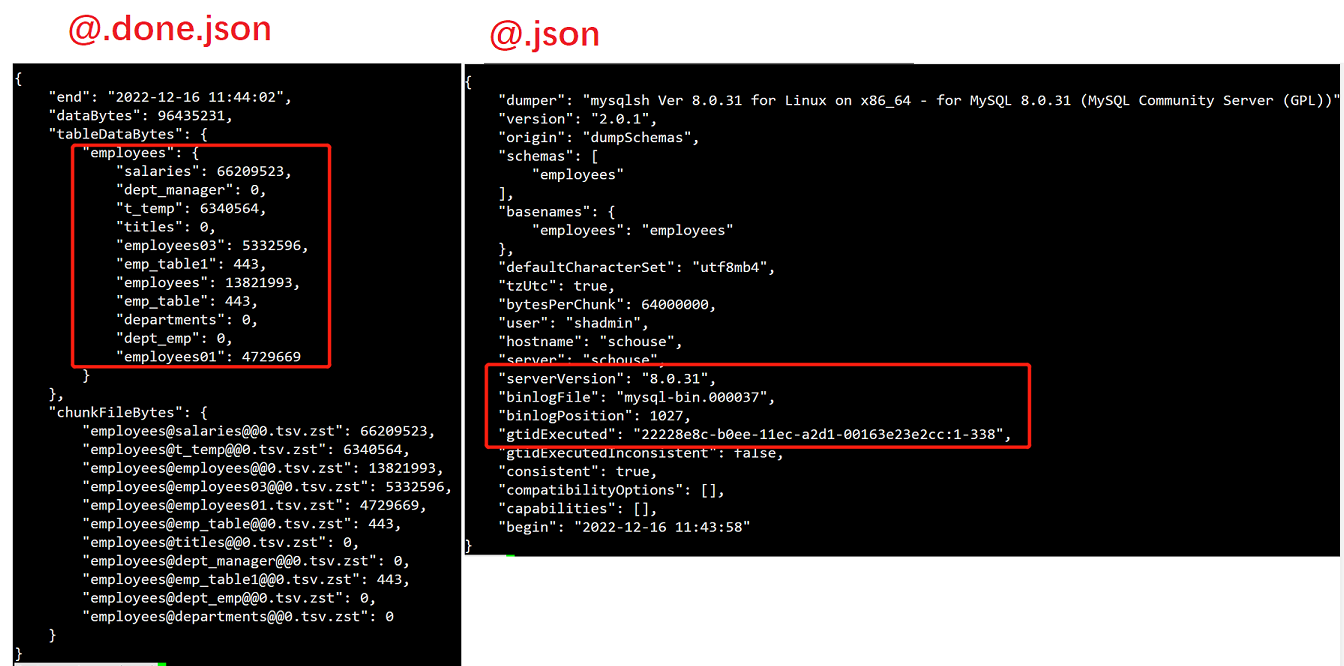
導出表文件結構如下:
[root@schouse dump]# tree
。。。
├── employees@titles@@0.tsv.zst      #數據信息
├── employees@titles@@0.tsv.zst.idx  #索引對應信息
├── employees@titles.json            #表基礎信息
├── employees@titles.sql             #表創建語句
├── @.done.json                      #導出表名 表行數等信息
├── @.json                           #gtid binlog postion信息
├── @.post.sql                       #版本信息
└── @.sql
核心控制參數
| dump參數 | 說明 |
|---|---|
| dryRun | dump的內容以及MySQL數據庫服務兼容性檢查結果的信息 |
| showProgress | 顯示(true)或隱藏(false)執行的進度信息。 |
| maxRate | dump期間每個線程每秒用于數據讀取吞吐量的最大字節數。 |
| defaultCharacterSet | 導出時使用的字符集。 |
| consistent | 備份一致數據,使用FLUSH TABLES WITH read lock語句,設置全局讀鎖,或者使用lock TABLES語句 |
| threads | 并行線程數。每個線程都有自己的MySQL實例連接。默認值為4。 |
| compression | 寫入數據轉儲文件時使用的壓縮算法:“none”,“gzip”、“zstd”。默認值:“zstd”。 |
除此之外:dump-instance,dump-tables使用也比較簡單
#util dump-instance <outputUrl> [<options>]
shell> mysqlsh root@localhost  -- util dump-instance  /tmp/dump  --excludeSchemas=employees

#util dump-tables <schema> <tables> --outputUrl=<str> [<options>]
shell> mysqlsh shadmin@172.17.27.48:3380  -- util dump-tables employees employees03  --outputUrl=/tmp/dump
導入
數據導入的接口loadDump
指定之前備份的文件路徑:整個過程執行ddl語句 load數據。
MySQL  127.0.0.1:3380  JS > util.loadDump("/tmp/dump/")
Loading DDL and Data from '/tmp/dump/' using 4 threads.
Opening dump...
Target is MySQL 8.0.31. Dump was produced from MySQL 8.0.31
NOTE: Load progress file detected. Load will be resumed from where it was left, assuming no external updates were made.
You may enable the 'resetProgress' option to discard progress for this MySQL instance and force it to be completely reloaded.
Scanning metadata - done
Executing common preamble SQL
Executing DDL - done
Executing view DDL - done
Starting data load
Executing common postamble SQL
100% (257 bytes / 257 bytes), 0.00 B/s, 2 / 2 tables done
Recreating indexes - done
2 chunks (11 rows, 257 bytes) for 2 tables in 1 schemas were loaded in 0 sec (avg throughput 257.00 B/s)
0 warnings were reported during the load.
單表結構創建,數據導入操作
#單獨導入表結構
 util.loadDump("/tmp/dump", {  includeTables: ["worldb.city"], loadDdl: true,  loadData: false});

#單獨導入數據
 util.importTable ("/tmp/dump/worldb@city@@0.tsv.zst", {  schema: "worldb",   table: "city"});
執行結果日志記錄:
shell# cat load-progress.22228e8c-b0ee-11ec-a2d1-00163e23e2cc.json
{"op":"SERVER-UUID","done":true,"timestamp":1672108993998,"uuid":"22228e8c-b0ee-11ec-a2d1-00163e23e2cc"}
{"op":"SCHEMA-DDL","done":false,"timestamp":1672109012555,"schema":"worldb"}
{"op":"TABLE-DDL","done":false,"timestamp":1672109012555,"schema":"worldb","table":"city"}
{"op":"TABLE-DDL","done":false,"timestamp":1672109012555,"schema":"worldb","table":"ct"}
{"op":"SCHEMA-DDL","done":true,"timestamp":1672109012578,"schema":"worldb"}
{"op":"TABLE-DATA","done":false,"timestamp":1672109012579,"schema":"worldb","table":"city","chunk":0}
{"op":"TABLE-DATA","done":false,"timestamp":1672109012579,"schema":"worldb","table":"ct","chunk":-1}
{"op":"TABLE-DATA","done":true,"timestamp":1672109012593,"schema":"worldb","table":"city","chunk":0,"bytes":210,"raw_bytes":148,"rows":9}
util.loadDump 優點如下:
- 多線程并行操作。
- 支持斷點續傳功能:progressFile文件記錄執行進度,從上次完成的地方繼續執行(如上述load-progress…progress記錄文件)。如需從頭開始resetProgress 設置為 true。
- 支持延遲創建二級索引。
- 通過LOAD DATA LOCAL INFILE 命令來導入數據(一個事務)。
- 如果單個文件過大,自動進行切割,以避免產生大事務。
其他
export_table
跟SQL【SELECT。。。INTO OUTFILE】語句中一樣的功效,支持多種文件格式[default|csv|csv unix|tsv]。
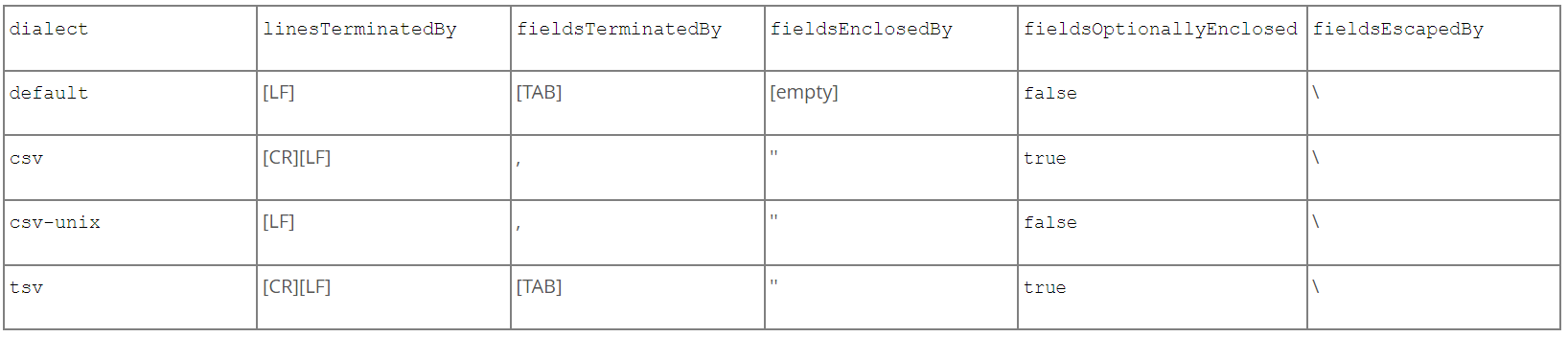
為導出數據文件的格式指定一組字段和行處理選項。還可以通過指定一個或多個行TerminatedBy、fieldsTerminatedBy,fieldsEnclosedBy、fieldsOptionallyEnclosed和fieldsScapedBy選項來更改設置。
MySQL  127.0.0.1:3380  JS > util.exportTable("test.employees", "/tmp/employees.txt")
Initializing - done
Gathering information - done
Running data dump using 1 thread.
NOTE: Progress information uses estimated values and may not be accurate.
Starting data dump
100% (300.02K rows / ~299.47K rows), 0.00 rows/s, 0.00 B/s
Dump duration: 00:00:00s
Total duration: 00:00:00s
Data size: 13.82 MB
Rows written: 300024
Bytes written: 13.82 MB
Average throughput: 13.82 MB/s

The dump can be loaded using:
util.importTable("/tmp/employees.txt", {
    "characterSet": "utf8mb4",
    "schema": "test",
    "table": "employees"
})
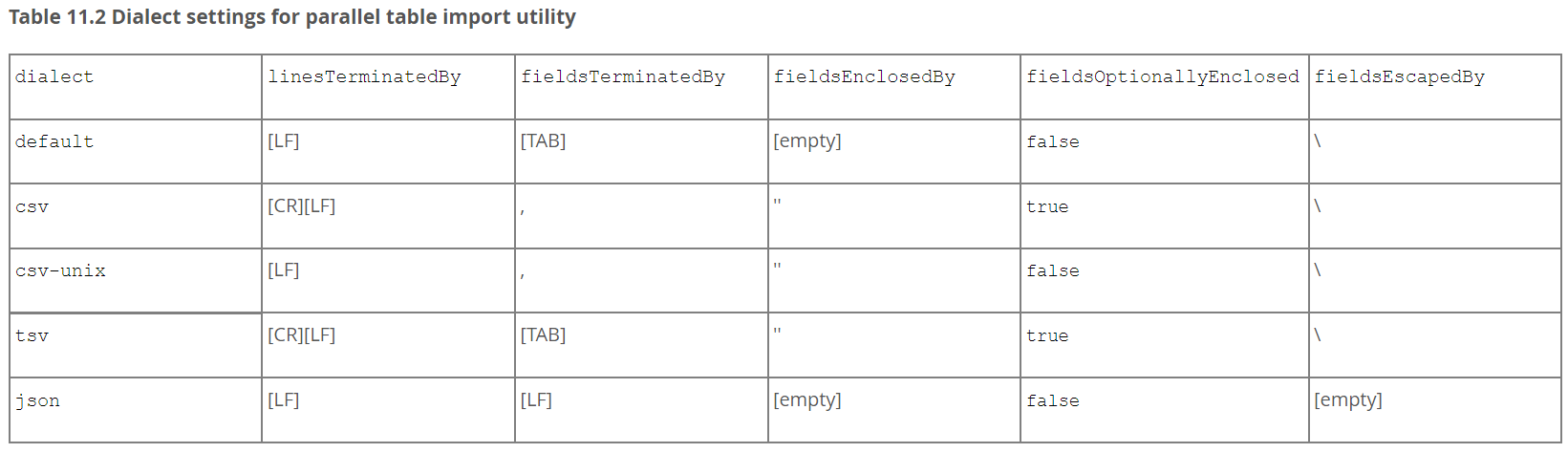
import-table
并行表導入實用程序使用LOAD DATA LOCAL INFILE語句上載數據,因此目標服務器上的LOCAL_INFILE系統變量必須設置為ON。
 MySQL  127.0.0.1:3380  JS  > \sql SET GLOBAL local_infile = 1;

 MySQL  127.0.0.1:3380  JS > util.importTable("/tmp/employees.txt",
{"characterSet": "utf8mb4","schema": "test","table": "employees" ,
"threads":4 , "showProgress": true})

Importing from file '/tmp/employees.txt' to table `test`.`employees` in MySQL Server at 127.0.0.1:3380 using 1 thread
[Worker000] employees.txt: Records: 300024  Deleted: 0  Skipped: 0  Warnings: 0
100% (13.82 MB / 13.82 MB), 2.46 MB/s
File '/tmp/employees.txt' (13.82 MB) was imported in 6.0851 sec at 2.27 MB/s
Total rows affected in test.employees: Records: 300024  Deleted: 0  Skipped: 0  Warnings: 0
總結
MySQL Shell備份恢復API,按照官方Relase記錄 8.0.27版本之后,是一個比較穩定的版本。按照提供的速度和功能性方面,可以說一些邏輯處理場景中,MySQL shell應該是效率最高。目前API 支持5.7和8.0版本。
| mysqldump | mysqlpump | mydumper | mysql shell | |
|---|---|---|---|---|
| 線程 | 單線程 | 多線程 | 多線程 | 多線程 |
| 壓縮 | 支持 | 支持 | 支持 | 支持 |
| 遠程 | 支持 | 支持 | 支持 | 支持 |
| 備份速度 | 慢 | 快 | 快 | 快 |
| 恢復速度 | 慢 | 慢 | 快 | 快 |
| 分割 | 不支持 | 不支持 | 支持 | 支持 |
| 第三方存儲 | 不支持 | 不支持 | 不支持 | 支持 |
參考
https://dev.mysql.com/doc/mysql-shell/8.0/en/mysql-shell-utilities.html
幫助指南
mysqlsh  -- util dump-instance  --help
mysqlsh  -- util dump-schemas   --help
mysqlsh  -- util dump-tables    --help
mysqlsh  -- util import-table   --help
mysqlsh  -- util exportTable    --help
mysqlsh  -- util loadDump       --help
