



摘要
在編譯完成openGauss或者已download了openGauss的bin后,想要做簡易安裝,官方給的使用方法是使用simpleInstall。本文主要介紹simpleInstall的腳本的功能,來了解一下簡易安裝內部實現原理。
openGauss簡易安裝
postgres初始化數據庫
了解openGauss安裝之前簡單說一下postgres的安裝過程,postgres沒有提供安裝腳本,但是初始化數據庫集簇的命令很簡單:
initdb -D $PGDATA
會在指定的PGDATA目錄下創建數據庫,可以參考之前的一篇文章postgresql 15源碼淺析(1)—— postgres中的1號數據庫 。
openGauss腳本安裝
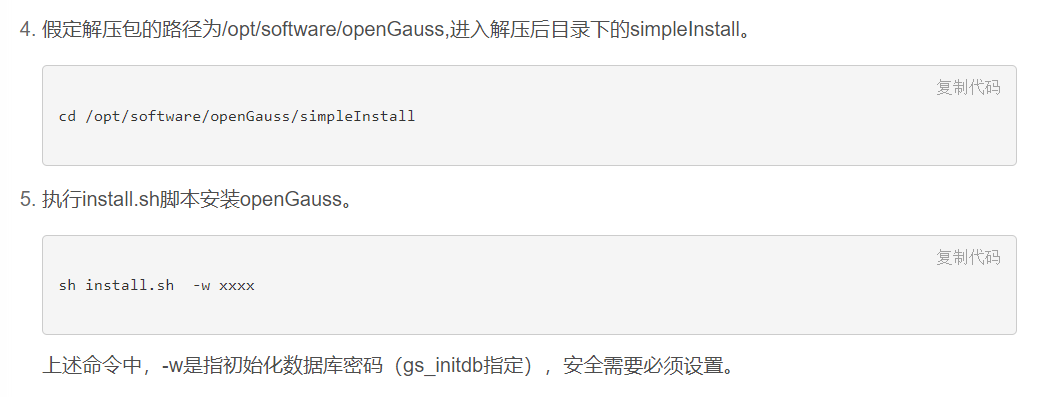
openGauss簡易安裝是使用simpleInstall下面的install.sh腳本。
simpleInstall源碼解析
step1獲取命令行參數(get_param)
先看一下需要那些參數
function usage()
{
    echo "
Usage: sh $0 -w password
Arguments:
   -w                   login password
   -p                   datanode port, default 5432
   --multinode          if specify, will install master_slave cluster. default install single node.
   -h, --help           Show this help, then exit
   "
}
主要有3個參數:
-w 設置超級用戶的源碼,這個是必選項,如不設置后續初始化流程無法完成,這也是和postgres的一個區別,postgres不強制要求超級用戶密碼。且使用-W(大寫)設置密碼,設置形式是交互的。-w(小寫)是openGauss引入的新參數;
-p 設置服務端口,非必選,默認是5432;
–multinode 初始化數據庫提供兩種形式,及單節點和主備兩種;
-w 和 -W的區別

兩個參數的功能是一樣的,但是-W是postgres保留的功能,是交互是的,需要手動數據密碼;-w 是自動的方式將密碼通過命令行傳入程序,我猜openGauss是為了兼容原有的用法,所以新加了-w的參數,且出于安全性考慮,是必須設置的。
step2 檢查參數(check_param)
主要檢查一下幾項:
- -w參數必須填寫,且不能為空
- 密碼必須大于8個字符
- 不能使用root用戶安裝
- 如不設置-p,怎使用默認端口5432,否則使用-p的設置
- 如果設置了–multinode,則備節點的端口為主節點端口+200
step3 檢查安裝環境(check_install_env)
- 檢查目錄是否存在,如果是單節點模式,檢查data下是否存在single_node目錄,是否為空目錄,如果是主備檢查 master 和 slave是否存在,是否為空;
- 檢查端口是否被占用;
- 檢查unix sock是否有權限,是否被占用
step4 檢查操作系統參數(check_os)
- 檢查系統共享內存和頁大小
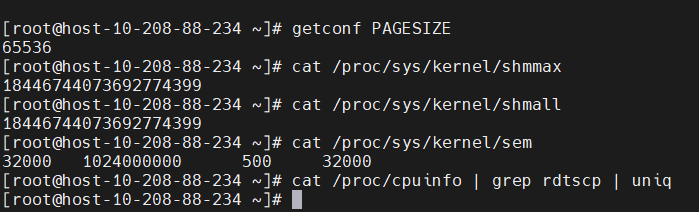
- x86下還要檢查rdtscp,應該是和指令順序有關
這塊有留個坑吧,不是很了解,后續有機會在填上。
step5 修改應用目錄的屬組和權限(change_gausshome_owner)
- 修改屬組:chown omm:dbgrp $app
- 修改權限:chmod 700 $app
step6 設置omm用戶的環境變量
設置的環境變量包括:PATH、GAUSSHOME、LD_LIBRARY_PATH、GS_CLUSTER_NAME、ulimit -n 1000000
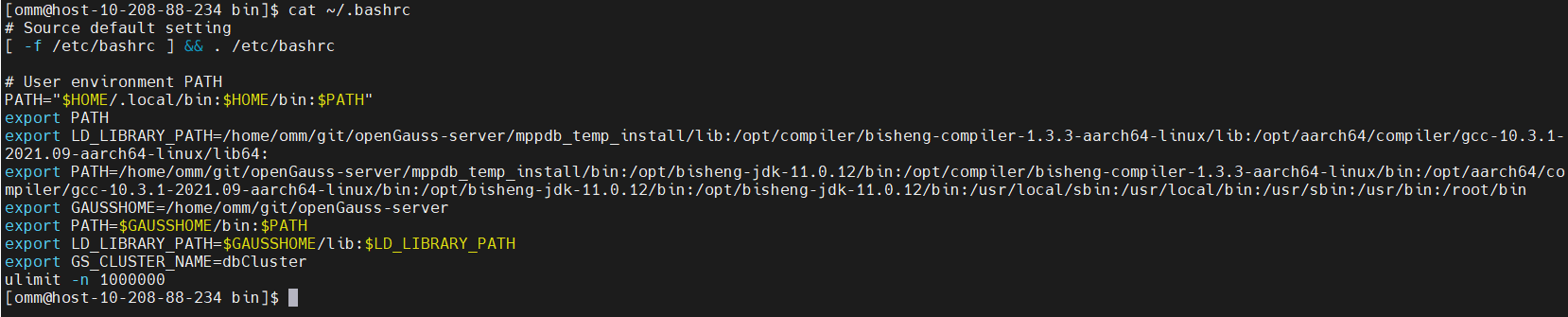
上圖是omm用戶的.bashrc的內容
step7-1 初始化數據庫(single_install)
- 初始化數據庫集簇,參考postgresql 15源碼淺析(1)—— postgres中的1號數據庫 基本流程沒有太大區別;
第二個坑,后續會對比一下initdb過程postgres和openGauss的有哪些差別。
gs_initdb -w $password -D $app/data/single_node --nodename "sgnode" --locale="en_US.UTF-8"
- 修改配置文件postgres.conf中的端口
sed -i "/^#port =/c\port = $port" $app/data/single_node/postgresql.conf
- 啟動數據庫
gs_ctl start -D $app/data/single_node -Z single_node
step7-2 初始化數據庫(master_standby_install)
init_db
function init_db() {
    info "[init primary datanode.]"
    gs_initdb -D $app/data/master --nodename=datanode1 -E UTF-8 --locale=en_US.UTF-8 -U $user  -w $password
    info "[init slave datanode.]"
    gs_initdb -D $app/data/slave --nodename=datanode2 -E UTF-8 --locale=en_US.UTF-8 -U $user  -w $password
}
分別對主備兩個庫進行初始化。
config_db
function config_db() {
    info "[config datanode.]"
    local -a ip_arr
    local -i index=0
    for line in $(/sbin/ifconfig -a|grep inet|grep -v 127.0.0.1|grep -v inet6|awk '{print $2}'|tr -d "addr:")
    do
        ip_arr[index]=$line
        let index=$index+1
    done
    sed -i "/^#listen_addresses/c\listen_addresses = 'localhost,${ip_arr[0]}'"  $app/data/master/postgresql.conf
    sed -i "/^#listen_addresses/c\listen_addresses = 'localhost,${ip_arr[0]}'"  $app/data/slave/postgresql.conf
    sed -i "/^#port/c\port = $port"  $app/data/master/postgresql.conf
    sed -i "/^#port/c\port = $slave_port"  $app/data/slave/postgresql.conf
    sed -i "/^#replconninfo1/c\replconninfo1 = 'localhost=${ip_arr[0]} localport=$(($port+1)) localheartbeatport=$(($port+5)) localservice=$(($port+4)) remotehost=${ip_arr[0]} remoteport=$(($slave_port+1)) remoteheartbeatport=$(($slave_port+5)) remoteservice=$(($slave_port+4))'"  $app/data/master/postgresql.conf
    sed -i "/^#replconninfo1/c\replconninfo1 = 'localhost=${ip_arr[0]} localport=$(($slave_port+1)) localheartbeatport=$(($slave_port+5)) localservice=$(($slave_port+4)) remotehost=${ip_arr[0]} remoteport=$(($port+1)) remoteheartbeatport=$(($port+5)) remoteservice=$(($port+4))'"  $app/data/slave/postgresql.conf
    echo "remote_read_mode = non_authentication" | tee -a $app/data/master/postgresql.conf $app/data/slave/postgresql.conf
    echo "host    all             all             ${ip_arr[0]}/32            trust" | tee -a $app/data/master/pg_hba.conf $app/data/slave/pg_hba.conf
}
主要修改主備的服務提供端口、主備通信端口 和 客戶端登錄權限等,涉及配置文件postgres.conf和pg_hba.conf。
start_db
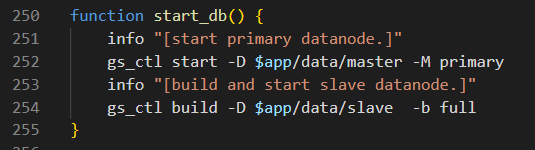
-b,  --mode=MODE       the mode of building the datanode or coordinator.MODE can be "full", "incremental", "auto", "standby_full", "copy_secure_files", "copy_upgrade_file", "cross_cluster_full", "cross_cluster_incremental", "cross_cluster_standby_full"
-M                     the database start as the appointed  mode
-D, --pgdata=DATADIR   location of the database storage area
step8 導入范例SQL(import_sql)
read -p "Would you like to create a demo database (yes/no)? " input
接收輸入,是否要建立范例數據庫
導入兩個sql文件中的內容
function fn_load_demoDB()
{
    cd $shell_path
    gsql -d postgres -p $port -f school.sql
    gsql -d postgres -p $port -f finance.sql
}
結束
以上步驟執行成功后,即完成了數據庫集簇的初始化和啟動過程。如果大家在啟動本地安裝過程中遇到問題,可以對照以上步驟進行排查。
啟動日志
[omm@host-10-208-88-234 simpleInstall]$ sh install.sh -w xk.xmx190035
[step 1]: check parameter
[step 2]: check install env and os setting
[step 3]: change_gausshome_owner
[step 4]: set environment variables

/home/omm/.bashrc: line 13: ulimit: open files: cannot modify limit: Operation not permitted
[step 6]: init datanode
The files belonging to this database system will be owned by user "omm".
This user must also own the server process.

The database cluster will be initialized with locale "en_US.UTF-8".
The default database encoding has accordingly been set to "UTF8".
The default text search configuration will be set to "english".

creating directory /home/omm/git/openGauss-server/data/single_node ... ok
creating subdirectories ... ok
selecting default max_connections ... 100
selecting default shared_buffers ... 32MB
creating configuration files ... ok
Begin init undo subsystem meta.
[INIT UNDO] Init undo subsystem meta successfully.
creating template1 database in /home/omm/git/openGauss-server/data/single_node/base/1 ... The core dump path is an invalid directory
2022-05-23 12:30:32.064 [unknown] [unknown] localhost 281459036192784 0[0:0#0]  [BACKEND] WARNING:  macAddr is 64022/1056020634, sysidentifier is 4195761905/2560264540, randomNum is 246122844
ok
initializing pg_authid ... ok
setting password ... ok
initializing dependencies ... ok
loading PL/pgSQL server-side language ... ok
creating system views ... ok
creating performance views ... ok
loading system objects' descriptions ... ok
creating collations ... ok
creating conversions ... ok
creating dictionaries ... ok
setting privileges on built-in objects ... ok
initialize global configure for bucketmap length ... ok
creating information schema ... ok
loading foreign-data wrapper for distfs access ... ok
loading foreign-data wrapper for hdfs access ... ok
loading foreign-data wrapper for log access ... ok
loading hstore extension ... ok
loading foreign-data wrapper for MOT access ... ok
loading security plugin ... ok
update system tables ... ok
creating snapshots catalog ... ok
vacuuming database template1 ... ok
copying template1 to template0 ... ok
copying template1 to postgres ... ok
freezing database template0 ... ok
freezing database template1 ... ok
freezing database postgres ... ok

WARNING: enabling "trust" authentication for local connections
You can change this by editing pg_hba.conf or using the option -A, or
--auth-local and --auth-host, the next time you run gs_initdb.

Success. You can now start the database server of single node using:

    gaussdb -D /home/omm/git/openGauss-server/data/single_node --single_node
or
    gs_ctl start -D /home/omm/git/openGauss-server/data/single_node -Z single_node -l logfile

[step 7]: start datanode
[2022-05-23 12:30:51.410][991625][][gs_ctl]: gs_ctl started,datadir is /home/omm/git/openGauss-server/data/single_node
[2022-05-23 12:30:51.446][991625][][gs_ctl]: waiting for server to start...
.0 LOG:  [Alarm Module]can not read GAUSS_WARNING_TYPE env.

0 LOG:  [Alarm Module]Host Name: host-10-208-88-234

0 LOG:  [Alarm Module]Host IP: 10.208.88.234

0 LOG:  [Alarm Module]Cluster Name: dbCluster

0 LOG:  [Alarm Module]Get real path of alarmItem.conf failed!

0 WARNING:  failed to open feature control file, please check whether it exists: FileName=gaussdb.version, Errno=2, Errmessage=No such file or directory.
0 WARNING:  failed to parse feature control file: gaussdb.version.
0 WARNING:  Failed to load the product control file, so gaussdb cannot distinguish product version.
The core dump path is an invalid directory
2022-05-23 12:30:51.581 [unknown] [unknown] localhost 281460165246992 0[0:0#0]  0 [BACKEND] LOG:  when starting as multi_standby mode, we couldn't support data replicaton.
gaussdb.state does not exist, and skipt setting since it is optional.2022-05-23 12:30:51.587 [unknown] [unknown] localhost 281460165246992 0[0:0#0]  0 [BACKEND] LOG:  [Alarm Module]can not read GAUSS_WARNING_TYPE env.

2022-05-23 12:30:51.587 [unknown] [unknown] localhost 281460165246992 0[0:0#0]  0 [BACKEND] LOG:  [Alarm Module]Host Name: host-10-208-88-234

2022-05-23 12:30:51.636 [unknown] [unknown] localhost 281460165246992 0[0:0#0]  0 [BACKEND] LOG:  [Alarm Module]Host IP: 10.208.88.234

2022-05-23 12:30:51.636 [unknown] [unknown] localhost 281460165246992 0[0:0#0]  0 [BACKEND] LOG:  [Alarm Module]Cluster Name: dbCluster

2022-05-23 12:30:51.636 [unknown] [unknown] localhost 281460165246992 0[0:0#0]  0 [BACKEND] LOG:  [Alarm Module]Get real path of alarmItem.conf failed!

2022-05-23 12:30:51.641 [unknown] [unknown] localhost 281460165246992 0[0:0#0]  0 [BACKEND] LOG:  loaded library "security_plugin"
2022-05-23 12:30:51.642 [unknown] [unknown] localhost 281460165246992 0[0:0#0]  0 [BACKEND] WARNING:  could not create any HA TCP/IP sockets
2022-05-23 12:30:51.642 [unknown] [unknown] localhost 281460165246992 0[0:0#0]  0 [BACKEND] WARNING:  could not create any HA TCP/IP sockets
2022-05-23 12:30:51.645 [unknown] [unknown] localhost 281460165246992 0[0:0#0]  0 [BACKEND] WARNING:  No explicit IP is configured for listen_addresses GUC.
2022-05-23 12:30:51.645 [unknown] [unknown] localhost 281460165246992 0[0:0#0]  0 [BACKEND] LOG:  InitNuma numaNodeNum: 1 numa_distribute_mode: none inheritThreadPool: 0.
2022-05-23 12:30:51.645 [unknown] [unknown] localhost 281460165246992 0[0:0#0]  0 [BACKEND] LOG:  reserved memory for backend threads is: 220 MB
2022-05-23 12:30:51.645 [unknown] [unknown] localhost 281460165246992 0[0:0#0]  0 [BACKEND] LOG:  reserved memory for WAL buffers is: 128 MB
2022-05-23 12:30:51.645 [unknown] [unknown] localhost 281460165246992 0[0:0#0]  0 [BACKEND] LOG:  Set max backend reserve memory is: 348 MB, max dynamic memory is: 11027 MB
2022-05-23 12:30:51.645 [unknown] [unknown] localhost 281460165246992 0[0:0#0]  0 [BACKEND] LOG:  shared memory 400 Mbytes, memory context 11375 Mbytes, max process memory 12288 Mbytes
2022-05-23 12:30:51.681 [unknown] [unknown] localhost 281460165246992 0[0:0#0]  0 [CACHE] LOG:  set data cache  size(402653184)
2022-05-23 12:30:51.726 [unknown] [unknown] localhost 281460165246992 0[0:0#0]  0 [CACHE] LOG:  set metadata cache  size(134217728)
2022-05-23 12:30:51.741 [unknown] [unknown] localhost 281460165246992 0[0:0#0]  0 [SEGMENT_PAGE] LOG:  Segment-page constants: DF_MAP_SIZE: 8156, DF_MAP_BIT_CNT: 65248, DF_MAP_GROUP_EXTENTS: 4175872, IPBLOCK_SIZE: 8168, EXTENTS_PER_IPBLOCK: 1021, IPBLOCK_GROUP_SIZE: 4090, BMT_HEADER_LEVEL0_TOTAL_PAGES: 8323072, BktMapEntryNumberPerBlock: 2038, BktMapBlockNumber: 25, BktBitMaxMapCnt: 512
2022-05-23 12:30:51.755 [unknown] [unknown] localhost 281460165246992 0[0:0#0]  0 [BACKEND] LOG:  gaussdb: fsync file "/home/omm/git/openGauss-server/data/single_node/gaussdb.state.temp" success
2022-05-23 12:30:51.755 [unknown] [unknown] localhost 281460165246992 0[0:0#0]  0 [BACKEND] LOG:  create gaussdb state file success: db state(STARTING_STATE), server mode(Normal), connection index(1)
2022-05-23 12:30:51.834 [unknown] [unknown] localhost 281460165246992 0[0:0#0]  0 [BACKEND] LOG:  max_safe_fds = 976, usable_fds = 1000, already_open = 14
The core dump path is an invalid directory
2022-05-23 12:30:51.839 [unknown] [unknown] localhost 281460165246992 0[0:0#0]  0 [BACKEND] LOG:  user configure file is not found, it will be created.
2022-05-23 12:30:51.842 [unknown] [unknown] localhost 281460165246992 0[0:0#0]  0 [BACKEND] LOG:  the configure file /home/omm/git/openGauss-server/etc/gscgroup_omm.cfg doesn't exist or the size of configure file has changed. Please create it by root user!
2022-05-23 12:30:51.842 [unknown] [unknown] localhost 281460165246992 0[0:0#0]  0 [BACKEND] LOG:  Failed to parse cgroup config file.
2022-05-23 12:30:51.862 [unknown] [unknown] localhost 281460165246992 0[0:0#0]  0 [EXECUTOR] WARNING:  Failed to obtain environment value $GAUSSLOG!
2022-05-23 12:30:51.862 [unknown] [unknown] localhost 281460165246992 0[0:0#0]  0 [EXECUTOR] DETAIL:  N/A
2022-05-23 12:30:51.862 [unknown] [unknown] localhost 281460165246992 0[0:0#0]  0 [EXECUTOR] CAUSE:  Incorrect environment value.
2022-05-23 12:30:51.862 [unknown] [unknown] localhost 281460165246992 0[0:0#0]  0 [EXECUTOR] ACTION:  Please refer to backend log for more details.
2022-05-23 12:30:51.863 [unknown] [unknown] localhost 281460165246992 0[0:0#0]  0 [EXECUTOR] WARNING:  Failed to obtain environment value $GAUSSLOG!
2022-05-23 12:30:51.863 [unknown] [unknown] localhost 281460165246992 0[0:0#0]  0 [EXECUTOR] DETAIL:  N/A
2022-05-23 12:30:51.863 [unknown] [unknown] localhost 281460165246992 0[0:0#0]  0 [EXECUTOR] CAUSE:  Incorrect environment value.
2022-05-23 12:30:51.863 [unknown] [unknown] localhost 281460165246992 0[0:0#0]  0 [EXECUTOR] ACTION:  Please refer to backend log for more details.

[2022-05-23 12:30:52.460][991625][][gs_ctl]:  done
[2022-05-23 12:30:52.460][991625][][gs_ctl]: server started (/home/omm/git/openGauss-server/data/single_node)
import sql file
Would you like to create a demo database (yes/no)? yes
Load demoDB [school,finance] success.
[complete successfully]: You can start or stop the database server using:
    gs_ctl start|stop|restart -D $GAUSSHOME/data/single_node -Z single_node
備注
上面留下兩個坑,待后續填上。
| 沒填上的坑 | 挖坑的時間 |
|---|---|
| x86下的rdtscp | 2022-05-23 |
| initdb過程postgres和openGauss的有哪些差別 | 2022-05-23 |
