



介紹
本文涵蓋有關當你使用分區交換加載(Partition Exchange Load PEL)時,如何高效地管理優化器統計信息的內容。該技巧用于有大量數據需要加載,而性能又是至關重要時。其多用于決策支持系統和有大量操作數據的存儲。
確保你已經看過第一部分, 或者至少你熟悉增量統計信息的概念,以便你了解在分區表的語境下,何為synopsis.
分區交換加載
大多數人會比解熟悉分區交換加載,但我會簡要匯總,介紹一下我將在本文中使用的術語。
下圖代表了處理過程。首先,LOAD表填充有新數據,它會和“實時”應用表(SALES)中的一個分區做交換。SALES表中有第一季度和第二季度的分區(Q1和Q2),而LOAD與空的Q2分區做交換。交換的效果是通過將LOAD的“標識”與Q2交換,將LOAD中的所有數據合并到SALES中.交換是一個邏輯操作:改變發生在數據庫字典,沒有數據被移動。LOAD中的數據“在交換的瞬間”被發布到SALES中。
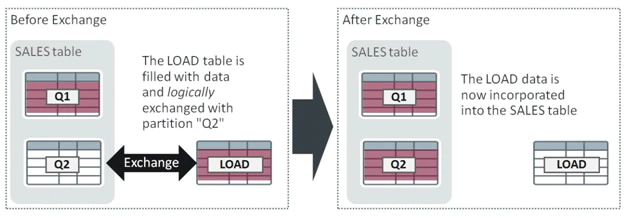
典型的,交換的步驟看起來是這樣的:
alter table SALES exchange partition Q2 with table LOAD
including indexes without validation;
操作上,這個方法比直接插入數據到SALES中更復雜一些,但是他有一些優勢。比如,在該表上創建任何索引前,新的數據可以被插入到LOAD中。如果數據量很大,在加載過程結束后創建索引是非常高效的,從而避免了加載過程中需要面臨的較高的索引維護成本。如果以非常高的并行速率加載數據,則性能收益將尤其明顯。
你需要為分區交換加載所做的具體操作步驟,取決于你所使用的分區類型,而不管表上是本地的還是全局的索引,以及正在使用的是什么約束。在這篇博文中,我將重點介紹如何管理統計信息,但你可以從Database VLDB and Partitioning Guide中找到,如何在帶有索引和約束時進行處理的詳細說明。
當新的數據被加載到表中,優化器統計信息必須被更新,以便將這些新數據考慮在內。在上例中,SALES表的全局統計信息必須要更新,以便反映LOAD與Q2交換時合并到表中的數據。為了使這個步驟盡可能高效,SALES表必須使用增量統計信息維護。我期待你已經從本文的標題中猜到了,我的假設將從現在開始,我還會假設SALES表的統計信息在分區交換加載前是最新的。
Oracle Database 11g
在LOAD與Q2交換后的時刻,是沒有synopsis在Q2中的;它還沒有被創建。增量統計信息需要synopses來高效地更新SALES的全局統計信息,所以,Q2中的synopsis將在收集SALES表的統計信息時被自動創建。例如:
EXEC dbms_stats.gather_table_stats(ownname=>null,tabname=>'SALES')
Q2上的統計信息將被收集,synopsis也將被創建,以便SALES表上的全局統計信息可以被更新。一旦交換已經發生,Q2就需要刷新統計信息、synopsis以及還可能會有的擴展統計信息和直方圖(如果SALES上有的話)。比如,如果SALES上有一個列組"(COL1,COL2)",那么Q2也需要這些統計信息。數據庫會自動的處理它,因為他們會在SALES表的統計信息被收集時為你創建,因此,你不需要在交換前就在LOAD表上創建直方圖和擴展統計信息。
然而有一種場景,你可能會希望在交換前就收集LOAD表上的統計信息。比如,在SALES表被收集統計信息之前,Q2就可能被查詢,那么你可能希望交換一完成,就確保Q2上是有可用的統計信息。由于任何在LOAD表上收集的統計信息都將與交換后的Q2關聯起來,所以,這也是容易做到的。然而,請牢記,這意味著最終新數據的統計信息會被收集兩次:一次在交換前(在LOAD表上),一次在交換后(SALES表上的統計信息被重新收集時對Q2分區的采集)。Oracle Database 12c給了你一個交互選項,我會在下面介紹它。
如果你想進一步了解擴展統計信息和列的使用,請查閱這篇博文。它介紹了你要如何識別,能從使用擴展統計中受益的種子列的使用情況。注意,為了幫助識別是可以從直方圖中受益的列,有些列的使用情況信息是一直被捕獲的。即便你不選擇種子列,也會發生。
Oracle Database 12c
Oracle Database 12c包含一個允許你在交換前,在LOAD表上創建synopsis的增強。這意味著,只要交換發生,是不需要在交換后,在Q2上收集統計信息,其synopsis就已就緒了。其結果就是SALES表上的全局統計信息,在Oracle Database 12c上的刷新比在Oracle Database 11g上更快。以下是在交換前,如何在LOAD表上做準備:
begin
   dbms_stats.set_table_prefs (null,'load','INCREMENTAL','TRUE');
   dbms_stats.set_table_prefs (null,'load','INCREMENTAL_LEVEL','TABLE');
   dbms_stats.gather_table_stats (null,'load');
end;
/
只要交換完成就,Q2就將會有一個全新的統計信息和synopsis。故事還沒有結束,除非你在交換前,已經在LOAD表上創建了適當的直方圖和擴展統計信息,否則Q2上的統計信息會在交換后再次收集(當收集SALES上的統計信息時)。如果你想看一下表上都有什么,GitHub上的list_s.sql腳本可以顯示特定表上的擴展統計信息和直方圖。如果你使用METHOD_OPT,來指定在SALES表上具體創建什么樣的直方圖,那么你可以使用同樣的METHOD_OPT來收集LOAD表上的統計信息。比如:
設置表上的偏好參數
dbms_stats.set_table_prefs(
    ownname=>null,
    tabname=>'SALES',
    method_opt=>'for all columns size 1 for columns sales_area size 254');
然后
   dbms_stats.set_table_prefs (null,'load','INCREMENTAL','TRUE');
   dbms_stats.set_table_prefs (null,'load','INCREMENTAL_LEVEL','TABLE');

   select dbms_stats.create_extended_stats(null,'load','(col1,col2)') from dual;
   dbms_stats.gather_table_stats(
         ownname=>null,
         tabname=>'LOAD',
         method_opt=>'for all columns size 1 for columns sales_area size 254');
或者,如果你使用的缺省值’FOR ALL COLUMNS SIZE AUTO’在SALES表上收集統計信息,那么通常最好保持自動并且交換時不在LOAD表上創建直方圖。這會允許SALES表上的統計信息收集識別出交換后的Q2分區需要什么樣的直方圖。如果SALES表上的列使用信息,顯示出在Q2上沒有直方圖的列,可能會從直方圖中受益,則交換后的Q2上的統計信息會被收集。而且,如上所述,擴展統計信息也將是自動維護的。
步驟摘要
如果你正在使用Oracle Database 12c,并且在帶有適當的直方圖和擴展統計信息的LOAD表上創建了synopsis,那么你就可以最小化SALES(交換后)表的統計信息收集時間。對于Oracle Database 11g,統計信息總是會在Q2上完成交換后被收集。以下是操作步驟(請注意,我貼出的統計信息維護步驟,未包含維護索引和約束等):
1、創建LOAD表并插入新數據 (或者使用 CREATE TABLE load AS SELECT…)
2、為SALES表創建一個新的空分區(Q2)
3、對LOAD表填充數據
4、可選 (Oracle Database 12c) - 如果你想Q2在交換后就立即擁有有效的統計信息,按下面的步驟操作:
  4.1 LOAD表設置INCREMENTAL 為 'TRUE' , INCREMENTAL_LEVEL 為 'TABLE'
  4.2 參照SALES表,在LOAD表上創建擴展統計信息
  4.3 參照SALES表上的METHOD_OPT參數收集LOAD表上的直方圖
5、可選 (Oracle Database 11g) - 如果你想Q2在交換后就立即擁有有效的統計信息,按下面的步驟操作:
  5.1 參照SALES表在LOAD表上創建擴展統計信息
  5.2 參照SALES表上的METHOD_OPT參數收集LOAD表上的直方圖
6、交換LOAD表和Q2分區(這會交換Oracle Database 12c中的synopses,基本的列統計信息和直方圖)
7、為SALES表收集統計信息。如果你實施了上面的步驟4,Oracle Database 12c會完成得更快。
如果過去你曾經使用過分區交換并使用特定的方式收集統計信息,那么你可能需要比較表級直方圖與分區和子分區上的直方圖,是符合你的預期的。我在Github上包含了一個腳本 來幫助你做這個比較。
復合分區表
如果你正在使用一個復合分區表,使用上面描述的同樣方式進行分區交換。如果你想用一個完整的例子來體驗,我創建了一個名為example.sql的腳本.
原文標題:Efficient Statistics Maintenance for Partitioned Tables Using Incremental Statistics – Part 2
原文鏈接:https://blogs.oracle.com/optimizer/post/efficient-statistics-maintenance-for-partitioned-tables-using-incremental-statistics-part-2
原文作者:Nigel Bayliss
原文內容:
Introduction
This post covers how you can manage optimizer statistics efficiently when you use partition exchange load (PEL). This technique is used when large volumes of data must be loaded and maximum performance is paramount. It’s common to see it used in decision support systems and large operational data stores.
Make sure you’ve taken a look at Part 1, or you are at least familiar with the concept of incremental statistics so that you know what a synopsis is in the context of a partitioned table.
Partition Exchange Load
Most of you will be familiar with partition exchange load, but I’ll summarize it briefly to introduce you to the terminology I’ll be using here.
The graphic below represents the process. Firstly, the LOAD table is filled with new data and then exchanged with a partition in the “live” application table (SALES). SALES has partitions for quarter 1 and quarter 2 (Q1 and Q2) and LOAD is exchanged with the empty Q2 partition. The effect of the exchange is to incorporate all of the data in LOAD into SALES by swapping the “identity” of LOAD with Q2. The exchange is a logical operation: a change is made in the Oracle data dictionary and no data is moved. The data in LOAD is published to SALES “at the flick of a switch”.
Typically, the exchange step looks like this:
alter table SALES exchange partition Q2 with table LOAD
including indexes without validation;
alter table SALES exchange partition Q2 with table LOAD
including indexes without validation;
Operationally, this approach is more complex than inserting data directly into SALES but it offers some advantages. For example, new data can be inserted into LOAD before any indexes have been created on this table. If the volume of data is large, creating indexes at the end of the load is very efficient and avoids the need to bear the higher cost of index maintenance during the load. The performance benefit is especially impessive if data is loaded at very high rates in parallel.
The exact steps you need to execute for a partition exchange load will vary depending on the type of partitioning you use, whether there are local or global indexes on the table and what constraints are being used. For the purposes of this blog post I’m going to stick to how you manage statistics, but you can find details on how to deal with indexes and constraints in the Database VLDB and Partitioning Guide.
When new data is loaded into a table, optimizer statistics must be updated to take this new data into account. In the example above, the global-level statistics for SALES must be refreshed to reflect the data incorporated into the table when LOAD is exchanged with Q2. To make this step as efficient as possible SALES must use incremental statistics maintenance. I expect you’ll have guessed from the title of this post that I’m going to assume that from now on! I’m also going to assume that the statistics on SALES are up-to-date prior to the partition exchange load.
Oracle Database 11g
The moment after LOAD has been exchanged with Q2 there will be no synopsis on Q2; it won’t have been created yet. Incremental statistics requires synopses to update the global-level statistics for SALES efficiently so a synopsis for Q2 will be created automatically when statistics on SALES are gathered. For example:
EXEC dbms_stats.gather_table_stats(ownname=>null,tabname=>'SALES')
EXEC dbms_stats.gather_table_stats(ownname=>null,tabname=>‘SALES’)
Statistics will be gathered on Q2 and the synopsis will be created so that the global-level statistics for SALES will be updated. Once the exchange has taken place, Q2 will need fresh statistics and a synopsis and it might also need extended statistics and histograms (if SALES has them). For example, if SALES has a column group, “(COL1, COL2)” then Q2 will need these statistics too. The database takes care of this automatically, so there’s no requirement to create histograms and extended column statistics on LOAD prior to the exchange because they are created for you when statistics are gathered on SALES.
There is nevertheless a scenario where you might want to gather statistics on LOAD prior to the exchange. For example, if it’s likely that Q2 will be queried before statistics have been gathered on SALES then you might want to be sure that statistics are available on Q2 as soon as the exchange completes. This is easy to do because any statistics gathered on LOAD will be associated with Q2 after the exchange. However, bear in mind that this will ultimately mean that statistics for the new data will be gathered twice: once before the exchange (on the LOAD table) and once again after the exchange (for the Q2 partition when SALES statistics are re-gathered). Oracle Database 12c gives you an alternative option, so I’ll cover that below.
If you want to know more about extended statistics and column usage then check out this post. It covers how you can seed column usage to identify where there’s a benefit in using extended statistics. Note that some column usage information is always captured to help identify columns that can benefit from histograms. This happens even if you don’t choose to seed column usage.
Oracle Database 12c
Oracle Database 12c includes an enhancement that allows you to create a synopsis on LOAD prior to the exchange. This means that a synopsis will be ready to be used as soon as the exchange has taken place without requiring statistics to be gathered on Q2 post-exchange. The result of this is that the global-level statistics for SALES can be refreshed faster in Oracle Database 12c than they can be in Oracle Database 11g. This is how to prepare the LOAD table before the exchange:
begin
   dbms_stats.set_table_prefs (null,'load','INCREMENTAL','TRUE');
   dbms_stats.set_table_prefs (null,'load','INCREMENTAL_LEVEL','TABLE');
   dbms_stats.gather_table_stats (null,'load');
end;
/
Q2 will have fresh statistics and a synopsis as soon as the exchange completes. This isn’t quite the end of the story though. Statistics on Q2 will be gathered again after the exchange (when statistics are gathered on SALES) unless you have created appropriate histograms and extended statistics on LOAD before the exchange. The list_s.sql script in GitHub displays extended statistics and histograms for a particular table if you want to take a look at what you have. If you are using METHOD_OPT to specify exactly what histograms to create on SALES then you can use the same METHOD_OPT for gathering statisitcs on LOAD. For example:
Table preference…
dbms_stats.set_table_prefs(
    ownname=>null,
    tabname=>'SALES',
    method_opt=>'for all columns size 1 for columns sales_area size 254');
Then…
   dbms_stats.set_table_prefs (null,'load','INCREMENTAL','TRUE');
   dbms_stats.set_table_prefs (null,'load','INCREMENTAL_LEVEL','TABLE');

   select dbms_stats.create_extended_stats(null,'load','(col1,col2)') from dual;
   dbms_stats.gather_table_stats(
         ownname=>null,
         tabname=>'LOAD',
         method_opt=>'for all columns size 1 for columns sales_area size 254');
Alternatively, if you are using the default ‘FOR ALL COLUMNS SIZE AUTO’ to gather statistics on SALES, then it’s usually best to preserve automation and exchange without creating histograms on LOAD. This allows stats gathering on SALES to figure out what histograms are needed for Q2 post-exchange. Statistics on Q2 will be gathered post-exchange if SALES has column usage information indicating that there are columns in Q2 that don’t have a histogram but might benefit from having one. Also, as mentioned above, extended statistics will be maintained automatically too.
Summary of Steps
If you are using Oracle Database 12c then you can minimize the statistics gathering time for SALES (post-exchange) if you create a synopsis on LOAD along with appropriate histograms and extended statistics. For Oracle Database 11g, statistics will always be gathered on Q2 once the exchange has completed. Here are the steps (bearing in mind I’m sticking to statistics maintenance and not including steps to manage indexes and constraints etc):
1、Create LOAD table and insert new data (or CREATE TABLE load AS SELECT…)
2、Create a new (empty) partition for SALES (Q2)
3、Populate LOAD with data
4、Optionally (Oracle Database 12c) - follow these steps if you want Q2 to have valid statistics immediately after the exchange:
4.1 Set INCREMENTAL to ‘TRUE’ and INCREMENTAL_LEVEL to ‘TABLE’ for LOAD table
4.2 Create extended statistics on LOAD to match SALES
4.3 Gather statistics on LOAD using METHOD_OPT parameter to match histograms with SALES
5、Optionally (Oracle Database 11g) - follow these steps if you want Q2 to have valid statistics immediately after the exchange:
5.1 Create extended statistics on LOAD to match SALES
5.2 Gather statistics on LOAD using METHOD_OPT parameter to match histograms with SALES
6、Exchange LOAD with Q2 (this will exchange synopses in Oracle Database 12c, basic column statistics and histograms)
7、Gather statistics for SALES. Oracle Database 12c will complete this step more quickly if you implemented “4”, above.
If, in the past, you have used partition exchange load and gathered statistics in an ad-hoc manner then you should probably check that the histograms you have match your expectations when comparing table-level histograms with histograms on partitions and sub-partitions. I’ve included a script in GitHub to help you do that.
Composite Partitioned Tables
If you are using a composite partitioned table, partition exchange load works in the same way as described above. If you would like to experiment with a complete example, I’ve created a script called example.sql here.
